
Product Overview
The Hoco ES41 TWS (True Wireless Stereo) Bluetooth Headset provides a wireless audio experience with clear sound. This manual will guide you through the setup, operation, and maintenance of your ES41 headset.
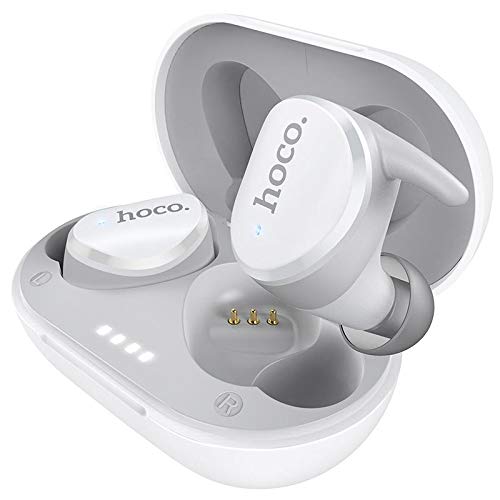
Image: The Hoco ES41 TWS Bluetooth Wireless Headset, showing both earbuds and the charging case in white.
Package Contents
Please check the package for the following items:
- Hoco ES41 TWS Wireless Earbuds (Left and Right)
- Wireless Charging Case
- USB Charging Cable (Micro USB)
- User Manual

Image: Front and back view of the Hoco ES41 retail packaging, displaying the product and key features.
Setup
1. Charging the Headset and Case
Before first use, fully charge the charging case and earbuds.
- Connect the provided USB charging cable to the charging port on the case and to a USB power source.
- The indicator lights on the charging case will illuminate to show charging status.
- Place the earbuds into the charging case. Ensure they are correctly seated; the earbuds will begin charging automatically.
- Charging time for the headset is approximately 1 hour. The charging case takes approximately 2.5 hours to fully charge.

Image: The Hoco ES41 earbuds placed inside the open charging case, showing the LED indicator lights for battery status.
2. Pairing with a Bluetooth Device
The ES41 headset uses Bluetooth 5.0 for a stable connection.
- Initial Pairing:
- Open the charging case. The earbuds will automatically power on and enter pairing mode.
- On your device (smartphone, tablet, etc.), enable Bluetooth.
- Search for Bluetooth devices and select "Hoco ES41" from the list.
- Once connected, you will hear a confirmation tone, and the earbuds' indicator lights will change.
- Reconnection:
- After initial pairing, the earbuds will automatically connect to the last paired device when removed from the charging case and Bluetooth is enabled on the device.
Operating Instructions
Power On/Off
- Power On: Open the charging case, or long-press the touch area on both earbuds for approximately 3 seconds.
- Power Off: Place the earbuds back into the charging case and close the lid, or long-press the touch area on both earbuds for approximately 5 seconds.
Music Playback
- Play/Pause: Tap the touch area on either earbud once.
- Next Track: Double-tap the touch area on the right earbud.
- Previous Track: Double-tap the touch area on the left earbud.
Call Management
- Answer/End Call: Tap the touch area on either earbud once.
- Reject Call: Long-press the touch area on either earbud for 2 seconds.
Voice Assistant
- Activate Voice Assistant: Triple-tap the touch area on either earbud.
Maintenance
- Cleaning: Use a soft, dry cloth to clean the earbuds and charging case. Do not use harsh chemicals or abrasive materials.
- Storage: When not in use, store the earbuds in their charging case to protect them and keep them charged. Store in a cool, dry place away from direct sunlight and extreme temperatures.
- Water Resistance: The earbuds are not waterproof. Avoid exposure to water, sweat, or high humidity.
Troubleshooting
- Earbuds not pairing with each other:
Place both earbuds back into the charging case, close the lid, then open it again. This should reset their connection.
- Earbuds not connecting to device:
Ensure Bluetooth is enabled on your device. Forget "Hoco ES41" from your device's Bluetooth settings and attempt to pair again.
- No sound from one earbud:
Check if both earbuds are charged. Try placing them back in the case and taking them out again. If the issue persists, try resetting the earbuds (refer to the full manual if available for specific reset instructions).
- Charging issues:
Ensure the charging cable is securely connected and the power source is active. Clean the charging contacts on both the earbuds and the case with a dry cotton swab.
Specifications
| Feature | Specification |
|---|---|
| Model Name | ES41 |
| Bluetooth Version | 5.0 |
| Bluetooth Chip | JL6936D |
| Charging Case Battery Capacity | 400mAh |
| Single Headset Battery Capacity | 40mAh |
| Talk/Music Time | 5 hours |
| Standby Time | 200 hours |
| Headset Charging Time | 1 hour |
| Charging Case Charging Time | 2.5 hours |
| Total Weight | 37g |
| Single Headset Weight | 4g |
| Control Method | Touch |
| Connectivity Technology | Wireless |
| Headphones Form Factor | In Ear |
| Material | Plastic |
| Compatible Devices | Cellphones |
Warranty and Support
For warranty information and technical support, please refer to the documentation provided with your purchase or contact HOCO customer service. Keep your proof of purchase for warranty claims.