
1. Product Overview
The MSI Clutch GM41 Lightweight Gaming Mouse is designed for performance and comfort. Weighing only 65 grams, it features a Pixart 3389 optical sensor with up to 16,000 DPI, durable OMRON switches rated for over 60 million clicks, and customizable RGB Mystic Light. Its ambidextrous design accommodates both right and left-handed users.

Figure 1: Top view of the MSI Clutch GM41 Lightweight Gaming Mouse.

Figure 2: The lightweight design of the GM41 mouse, weighing 65 grams.
2. Package Contents
- MSI Clutch GM41 Lightweight Gaming Mouse
- User Manual (this document)
3. Setup Instructions
3.1 Connecting the Mouse
- Locate an available USB port on your computer.
- Plug the USB connector of the MSI Clutch GM41 mouse into the USB port.
- The mouse will be automatically detected by your operating system (Windows 10 or later).
For optimal performance and customization, it is recommended to install the MSI Dragon Center software.

Figure 3: The FrixionFree cable for smooth movement.
4. Operating the Mouse
4.1 Button Functions
The MSI Clutch GM41 features 6 programmable buttons:
- Left Button: Standard left-click function.
- Right Button: Standard right-click function.
- Scroll Wheel: Scrolls up/down, and acts as a middle-click button.
- Side Button 1 (Default: Next Page): Located on the left side.
- Side Button 2 (Default: Previous Page): Located on the left side.
- DPI Switch: Located on the bottom of the mouse, cycles through DPI settings.

Figure 4: GM41 Lightweight features diagram.
4.2 DPI Adjustment
The mouse features a Pixart 3389 optical sensor with a maximum DPI of 16,000. You can adjust the DPI sensitivity using the dedicated DPI switch button located on the underside of the mouse. Each press cycles through preset DPI levels. For fine-tuning and custom DPI profiles, use the MSI Dragon Center software.

Figure 5: DPI adjustment options on the underside of the mouse.
4.3 RGB Mystic Light
The MSI Clutch GM41 features RGB Mystic Light, allowing you to customize the lighting effects. This can be controlled and synchronized with other MSI devices through the MSI Dragon Center software.
4.4 Grip and Ergonomics
The mouse has an ergonomic symmetrical design suitable for various hand shapes and grip styles, including palm grip and claw grip. Soft, durable rubber side grips provide enhanced control.

Figure 6: Recommended grip styles for the GM41 mouse.
4.5 OMRON Switches
Equipped with OMRON switches, the mouse offers a lifespan of over 60 million clicks, ensuring durability and consistent performance.
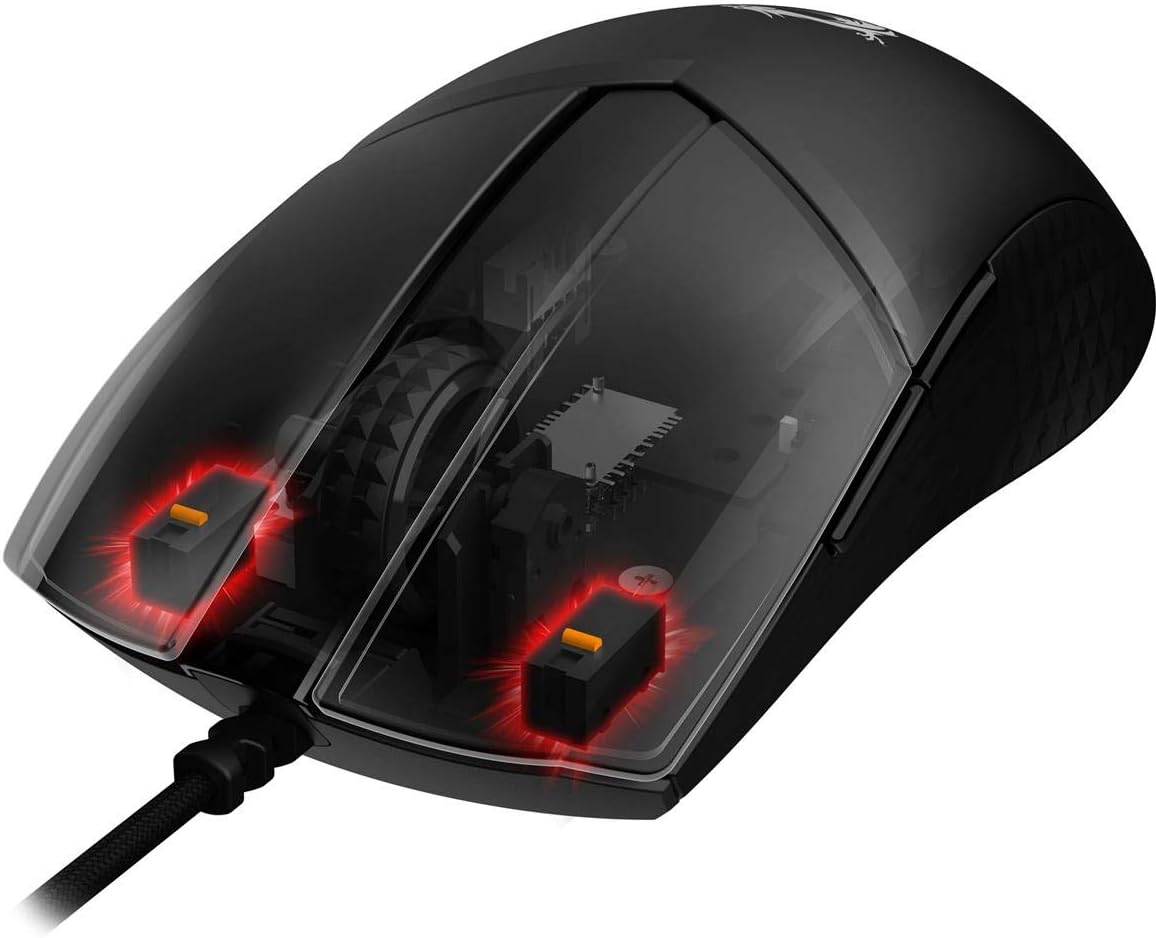
Figure 7: Internal view showing the OMRON switches.
5. Maintenance
5.1 Cleaning
- Disconnect the mouse from your computer before cleaning.
- Use a soft, dry cloth to wipe the surface of the mouse.
- For stubborn dirt, slightly dampen the cloth with water or a mild cleaning solution. Avoid harsh chemicals.
- Use compressed air to clear dust from crevices and around buttons.
5.2 Storage
Store the mouse in a cool, dry place away from direct sunlight and extreme temperatures when not in use for extended periods.
6. Troubleshooting
6.1 Mouse Not Responding
- Ensure the USB cable is securely plugged into a working USB port on your computer.
- Try plugging the mouse into a different USB port.
- Restart your computer.
- Check if the mouse works on another computer to rule out a computer-specific issue.
6.2 Cursor Movement Issues
- Clean the optical sensor on the underside of the mouse with a soft cloth.
- Ensure you are using the mouse on a suitable surface (e.g., a mouse pad). Reflective or uneven surfaces can affect tracking.
- Adjust the DPI settings using the DPI switch or MSI Dragon Center software.
6.3 RGB Lighting Not Working
- Ensure MSI Dragon Center software is installed and updated.
- Check the lighting settings within the MSI Dragon Center software.
7. Specifications
| Feature | Specification |
|---|---|
| Brand | MSI |
| Model Name | GM41 |
| Model Number | ClutchGM41 |
| Connectivity Technology | USB |
| Movement Detection Technology | Optical (Pixart 3389) |
| Mouse Maximum Sensitivity | 16000 Dots per Inch (DPI) |
| Button Quantity | 6 |
| Switch Type | OMRON Switches (60M+ Clicks) |
| Hand Orientation | Ambidextrous |
| Special Feature | Lightweight, RGB Mystic Light |
| Compatible Devices | Personal Computer |
| Operating System | Windows 10 or later |
| Item Weight | 65 Grams (excluding cable) |
| Cable Length | 5.0 meters (FrixionFree Cable) |
| Enclosure Material | Rubber |
8. Official Product Video
Video 1: Official overview of the MSI Clutch GM41 Wired Gaming Mouse by MSI Computer Corp.
9. Warranty and Support
9.1 Warranty Information
This product comes with a 1 Year manufacturer warranty.
9.2 Customer Support
For further assistance, technical support, or warranty claims, please visit the official MSI support website or contact their customer service. You can find more information and resources on the MSI Official Website.


