
Introduction
Thank you for choosing the Marea Smart Watch B57008/4. This device is designed to help you monitor your health, track your activities, and stay connected. This manual provides detailed instructions on how to set up, operate, and maintain your smartwatch. Please read it carefully before use.
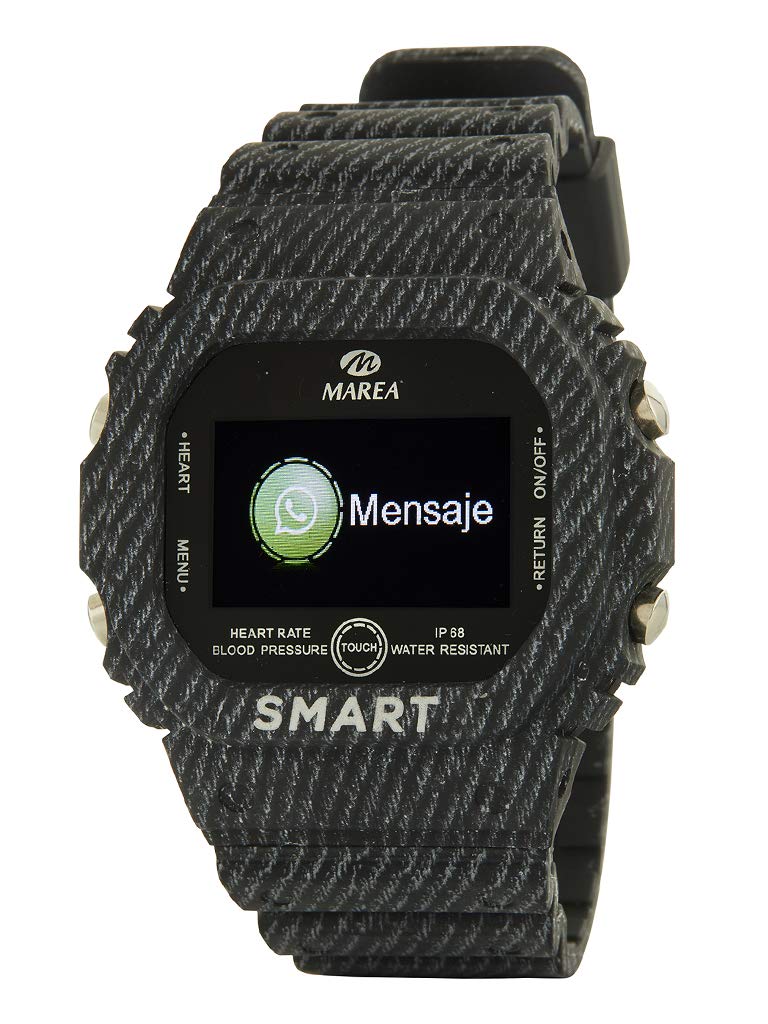
Image: Marea Smart Watch B57008/4. This image displays the smartwatch with a black band, featuring a digital watch face.
1. Setup
1.1 Charging the Smart Watch
Before first use, fully charge your Marea Smart Watch.
- Connect the charging cable to the charging port on the back of the watch.
- Plug the other end of the cable into a standard USB power adapter (not included) or a computer's USB port.
- The watch display will indicate charging status. A full charge typically takes approximately 2 hours.
Note: The watch has a 170 mAh battery, providing approximately 3 days of normal use and up to 7 days in standby mode.
1.2 App Installation and Pairing
To unlock the full potential of your Marea Smart Watch, you need to install the companion application on your smartphone and pair the devices. The watch is compatible with Android and iOS operating systems.
- Download the App: Search for the official Marea Smart Watch application in your smartphone's app store (Google Play Store for Android or Apple App Store for iOS).
- Install and Open: Install the application and open it. Follow the on-screen prompts to create an account or log in.
- Enable Bluetooth: Ensure Bluetooth is enabled on your smartphone.
- Pairing: Within the app, navigate to the device pairing section. Select "Marea B57008/4" from the list of available devices. Confirm the pairing request on both your watch and smartphone if prompted.
Once paired, the watch will synchronize data with your smartphone, and you can customize settings through the app.
2. Operating Instructions
2.1 Basic Navigation
The Marea Smart Watch B57008/4 features a 1.14-inch screen.
- Touch Screen: Swipe left, right, up, or down to navigate through menus and functions. Tap to select an option.
- Side Button: Press the side button to return to the previous screen or to the main watch face. A long press may activate specific functions (refer to app settings for customization).
- Raise to Wake: Lift your wrist to automatically turn on the screen. This feature can be enabled or disabled in the companion app.
2.2 Health Monitoring
Your smartwatch can monitor various health metrics. Ensure the watch is worn snugly on your wrist for accurate readings.
- Heart Rate: Measures your heart rate in beats per minute.
- Blood Pressure: Provides an estimate of your blood pressure.
- Blood Oxygen: Measures the oxygen saturation level in your blood.
- Sleep Monitoring: Tracks your sleep patterns, including deep sleep, light sleep, and awake times.
Important: The health data provided by this device is for reference only and should not be used for medical diagnosis or treatment. Consult a medical professional for any health concerns.
2.3 Activity Tracking
The watch tracks your daily physical activity.
- Steps: Counts the number of steps taken throughout the day.
- Distance: Estimates the distance covered based on your steps.
- Calories: Calculates the approximate calories burned.
- Training Mode: Access specific workout modes (e.g., running, walking) to track performance during exercise.
- Sedentary Reminder: The watch can remind you to move if you have been inactive for too long. This feature can be configured in the app.
2.4 Notifications
Receive notifications from your smartphone directly on your watch.
- The watch can display the last 8 messages or notifications received.
- Enable or disable specific app notifications through the companion app settings.
2.5 Other Functions
- Phone Finder: Use your watch to make your paired smartphone ring, helping you locate it.
- Alarm: Set alarms through the app, and your watch will vibrate to alert you.
- Smart Watch Finder: Use the app to locate your watch if it's within Bluetooth range.
- Remote Control: Control your smartphone's camera remotely from your watch.
- Do Not Disturb Mode: Silence notifications and vibrations during specific times. Configure this in the app.
- Vibration: The watch uses vibration for alerts and notifications.
3. Maintenance
3.1 Water Resistance
The Marea Smart Watch B57008/4 has an IP68 water protection rating. This means it is resistant to dust and can withstand immersion in water up to 1.5 meters for up to 30 minutes.
- It is suitable for daily use, such as hand washing, rain, and showering.
- Do not use it for swimming, diving, or in hot water (e.g., hot showers, saunas) as steam can penetrate the seals.
- Avoid exposing the watch to high-velocity water or sudden temperature changes.
3.2 Cleaning and Care
- Clean the watch regularly with a soft, damp cloth.
- Avoid using harsh chemicals, abrasive cleaners, or solvents.
- Ensure the charging contacts are clean and dry before charging.
3.3 Battery Care
- Avoid fully discharging the battery frequently.
- Do not expose the watch to extreme temperatures (very hot or very cold) as this can affect battery life.
- If storing the watch for an extended period, charge it to about 50% and store it in a cool, dry place.
4. Troubleshooting
- Watch not turning on: Ensure the watch is fully charged. Connect it to the charger and wait a few minutes.
- Cannot pair with smartphone:
- Ensure Bluetooth is enabled on your smartphone.
- Make sure the watch is within Bluetooth range of your phone.
- Restart both the watch and your smartphone.
- Try unpairing and re-pairing the device through the app.
- Inaccurate health data: Ensure the watch is worn snugly on your wrist, not too tight or too loose. Clean the sensors on the back of the watch.
- Notifications not received:
- Check if notifications are enabled for the specific apps in your smartphone's settings and within the Marea companion app.
- Ensure the watch is connected via Bluetooth.
- Verify that "Do Not Disturb" mode is not active on the watch.
5. Specifications
| Feature | Detail |
|---|---|
| Model Number | B57008/4 |
| Brand | Marea |
| Screen Size | 1.14 inches |
| Battery Capacity | 170 mAh |
| Battery Life | Up to 3 days (normal use), 7 days (standby) |
| Water Protection | IP68 |
| Operating System Compatibility | Android, iOS |
| Wireless Communication | Bluetooth |
| GPS | No GPS |
| Special Features | Alarm, Health Monitoring (HR, BP, SpO2, Sleep), Activity Tracking, Notifications |
| Dimensions | 50 x 40 x 15 mm |
| Target Audience | Men |
6. Warranty and Support
For warranty information and customer support, please refer to the documentation provided with your purchase or visit the official Marea website. Keep your proof of purchase for warranty claims.
7. Official Product Videos
No official product videos were provided in the input data for this manual. Please refer to the official Marea website for any available video resources.


