
1. Introduction
Thank you for choosing the HOCO ES43 Bluetooth 5.0 Wireless Stereo Earphones. This manual will guide you through the features, setup, and operation of your new earphones to ensure an optimal audio experience. Please read these instructions carefully before use and retain them for future reference.
2. Product Overview
The HOCO ES43 earphones offer a seamless wireless audio experience with Bluetooth 5.0 connectivity and a built-in microphone for calls. The compact charging case provides extended battery life, making them ideal for on-the-go use.
Key Features:
- Bluetooth Version 5.0 for stable and efficient connection.
- JL AC6976 Chipset for reliable performance.
- Integrated microphone for hands-free calling.
- Supports master-slave switching for flexible use of single or dual earbuds.
- Compact and lightweight design for portability.
Package Contents:
- HOCO ES43 Wireless Stereo Earphones (Left and Right)
- Charging Case
- Charging Cable
- User Manual

Image: The retail packaging for the HOCO ES43 earphones, showing the product and key features on the box.
3. Setup
3.1 Charging the Earphones and Case
Before first use, fully charge the earphones and the charging case.
- Place the earphones into the charging case. Ensure they are correctly seated in their respective slots.
- Connect the charging cable to the charging port on the case and to a USB power source.
- The charging case has a battery capacity of 400 mAh, and each earphone has a 40 mAh battery.
- Charging time for the case is approximately 1.5 hours. Earphones take approximately 2 hours to fully charge inside the case.
- Indicator lights on the case and/or earphones will show charging status and turn off or change color when fully charged.
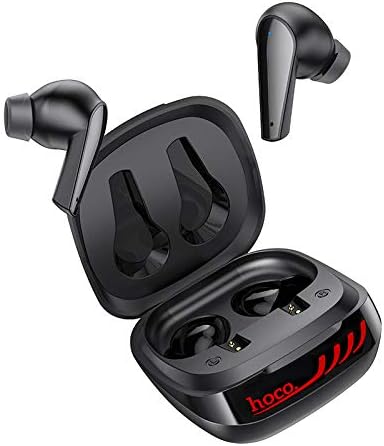
Image: The HOCO ES43 earphones placed inside their open charging case, showing the charging contacts.
3.2 Bluetooth Pairing
To connect your earphones to a device:
- Ensure the earphones are charged.
- Open the charging case. The earphones will automatically power on and enter pairing mode (indicated by flashing LED lights on the earbuds).
- On your device (smartphone, tablet, etc.), enable Bluetooth.
- Search for available Bluetooth devices and select "HOCO ES43" from the list.
- Once connected, the earphone indicator lights will stop flashing or change to a solid color.
- The earphones support master-slave switching, allowing you to use either earbud independently after initial pairing.
4. Operating Instructions
The HOCO ES43 earphones feature touch controls for easy management of music and calls.
4.1 Power On/Off
- Power On: Open the charging case, and the earphones will automatically power on. Alternatively, press and hold the touch area on both earbuds for a few seconds.
- Power Off: Place the earphones back into the charging case and close the lid. Alternatively, disconnect Bluetooth and the earphones will power off automatically after a few minutes, or press and hold the touch area on both earbuds for a few seconds.
4.2 Music Playback
- Play/Pause: Tap the touch area on either earbud once.
- Next Track: Double-tap the touch area on the right earbud.
- Previous Track: Double-tap the touch area on the left earbud.
4.3 Call Management
- Answer/End Call: Tap the touch area on either earbud once.
- Reject Call: Press and hold the touch area on either earbud for 2 seconds.
4.4 Voice Assistant
- Activate Voice Assistant: Triple-tap the touch area on either earbud.

Image: A person wearing the HOCO ES43 earphones, demonstrating typical usage during an activity.
5. Maintenance
Proper maintenance ensures the longevity and optimal performance of your HOCO ES43 earphones.
- Cleaning: Regularly clean the earphones and charging case with a soft, dry, lint-free cloth. Do not use harsh chemicals or abrasive materials.
- Charging Contacts: Ensure the charging contacts on both the earphones and the case are clean and free of debris to maintain proper charging.
- Storage: When not in use, store the earphones in their charging case to protect them from dust and damage. Store in a cool, dry place.
- Avoid Water: These earphones are not waterproof. Avoid exposure to water, moisture, or extreme temperatures.
- Battery Care: To preserve battery life, avoid fully discharging the earphones and charging case frequently. Charge them regularly, even if not in constant use.
6. Troubleshooting
If you encounter issues with your HOCO ES43 earphones, refer to the following common solutions:
- Earphones not pairing with device:
- Ensure Bluetooth is enabled on your device.
- Make sure the earphones are charged and out of the charging case.
- Forget/delete "HOCO ES43" from your device's Bluetooth list and try pairing again.
- Restart your device and the earphones.
- Only one earphone working:
- Place both earphones back into the charging case, close the lid, wait a few seconds, then open it again to allow them to re-sync.
- Ensure both earphones are charged.
- Try resetting the earphones (refer to manufacturer's website for specific reset instructions if needed).
- No sound or low volume:
- Check the volume level on both your device and the earphones.
- Ensure the earphones are properly connected to your device.
- Clean any debris from the earphone speaker grilles.
- Charging issues:
- Ensure the charging cable is securely connected to both the case and the power source.
- Verify that the power source is working.
- Clean the charging contacts on the earphones and inside the case.
- Try a different charging cable or power adapter.
7. Specifications
| Bluetooth Version | 5.0 |
| Bluetooth Chip | JL AC6976 |
| Charging Case Battery Capacity | 400 mAh |
| Earphone Battery Capacity | 40 mAh (each) |
| Charging Time (Case) | Approx. 1.5 hours |
| Charging Time (Earphones) | Approx. 2 hours |
| Music/Talk Time | Approx. 4 hours |
| Standby Time | Approx. 200 hours |
| Total Weight | 48 grams |
| Headphone Form Factor | In Ear |
| Connectivity Technology | Wireless (Bluetooth) |
| Control Type | Call Control, Touch Control |
| Model Number | ES43 |
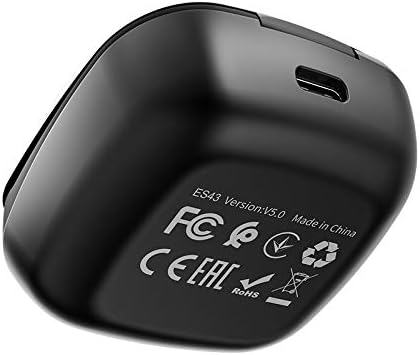
Image: The underside of the HOCO ES43 charging case, displaying model number, Bluetooth version, and compliance markings.
8. Safety Information
Please observe the following safety guidelines:
- Do not disassemble, repair, or modify the product.
- Keep the earphones and charging case away from extreme temperatures, direct sunlight, and open flames.
- Avoid exposing the product to water or other liquids.
- Do not use the product at high volume for extended periods to prevent hearing damage.
- Keep out of reach of children and pets.
- Dispose of the product responsibly according to local regulations.
9. Warranty and Support
For warranty information and customer support, please refer to the documentation provided at the time of purchase or contact your retailer. HOCO is committed to providing quality products and support.


