
Introduction
This manual provides detailed instructions for the safe and effective use, maintenance, and care of your VGR V-052 Beard Trimmer. Please read all instructions carefully before first use and retain this manual for future reference.
Safety Instructions
- This appliance is not intended for use by children under 8 years of age.
- Inexperienced users should operate the trimmer under adult supervision.
- Keep the device away from children and water to prevent accidents.
- Avoid exposing the trimmer to high-temperature environments.
- Ensure the device is fully dry before charging or storing.
- Do not attempt to repair or disassemble the trimmer yourself. Contact authorized service personnel for assistance.
Package Contents
Upon opening the package, verify that all the following items are included:
- 1x VGR V-052 Hair Trimmer
- 1x Adjustable Guide Comb
- 1x USB Charging Cable
- 1x Cleaning Brush
- 1x Lubricating Oil
- 1x User Manual (this document)
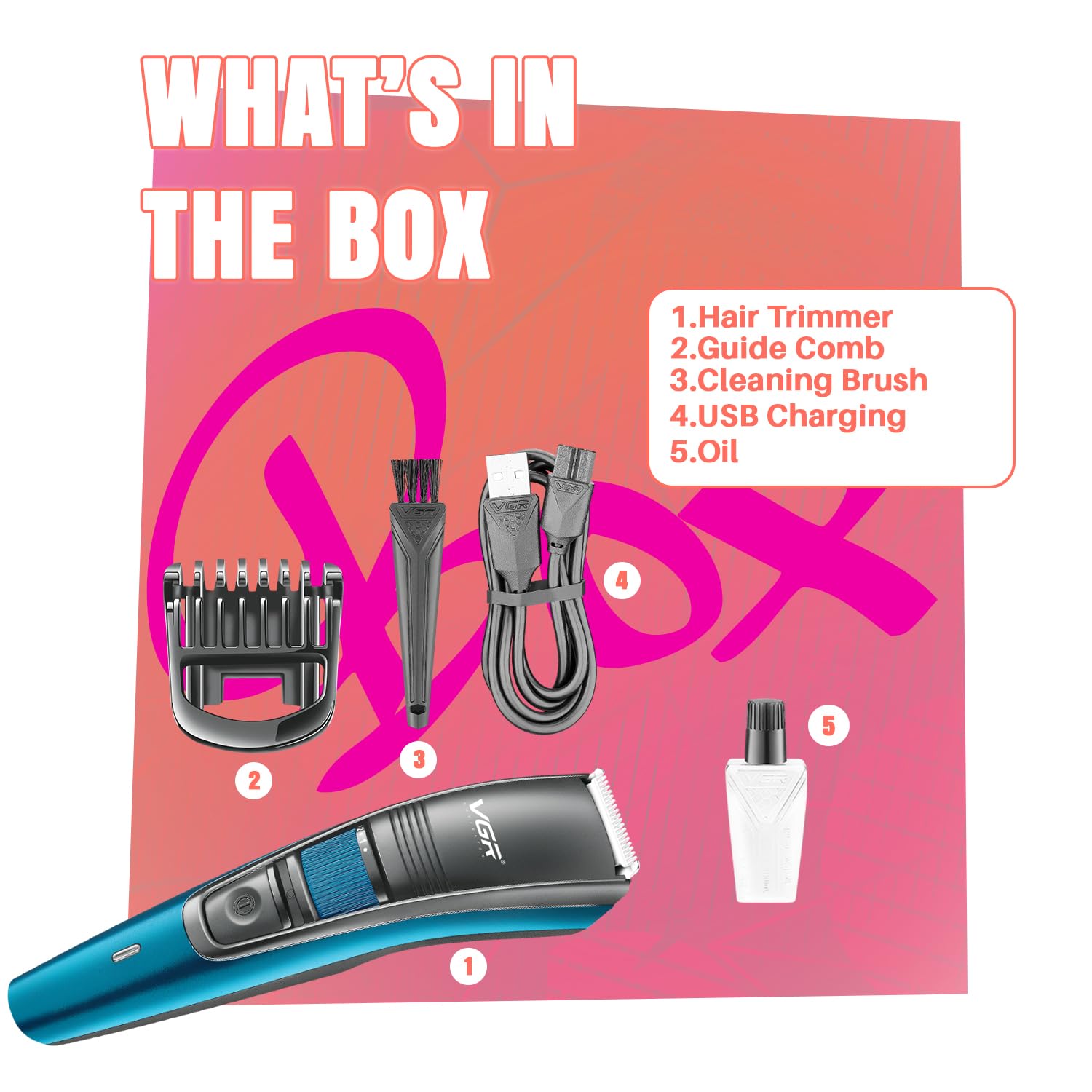
Image: All components included in the VGR V-052 Beard Trimmer package, including the trimmer, guide comb, USB cable, cleaning brush, and oil.
Product Features
- Precision Stainless Steel Blades: Designed for smooth, precise trimming without pulling or snagging.
- 20 Adjustable Length Settings: A zoom wheel allows for precise length adjustments from 0.5mm to 10mm, suitable for various beard and hair styles.
- Corded & Cordless Operation: Use the trimmer with or without the cord for flexibility.
- Long-lasting Battery: Equipped with a 600mAh lithium battery providing up to 120 minutes of runtime on a 2-hour charge.
- USB Charging: Conveniently charge via laptop, power bank, or a 5V-1A adapter.
- Smart LED Indicator: Displays charging status (red for charging, green for fully charged).
- Washable Blade Head: Detachable and washable blade head for easy cleaning and hygiene.
- Ergonomic Design: Lightweight, compact, and comfortable for extended use and travel.

Image: Key features of the VGR V-052 Trimmer, including adjustable length settings, battery life, and washable head.

Image: The zoom wheel on the VGR V-052 Trimmer, illustrating the 20 precision length settings from 0.5mm to 10mm.

Image: Detail of the stainless steel blade, emphasizing its precision for clean cuts.
Setup and Charging
- Initial Charge: Before first use, fully charge the trimmer for approximately 2 hours. Connect the USB charging cable to the trimmer and a compatible USB power source (laptop, power bank, or 5V-1A adapter). The LED indicator will show red during charging and turn green when fully charged.
- Attaching the Guide Comb: Ensure the trimmer is turned off. Align the guide comb with the trimmer head and slide it on until it clicks into place.
- Adjusting Length Settings: Use the zoom wheel located on the trimmer body to select your desired trimming length from 0.5mm to 10mm. The selected length will be indicated on the display.

Image: The VGR V-052 Trimmer being charged via USB, highlighting its battery capacity and runtime.
Operation
- Power On/Off: Press the power button to turn the trimmer on or off.
- Trimming:
- For best results, ensure your hair is clean and dry.
- Hold the trimmer with the blades facing the area you wish to trim.
- Move the trimmer against the direction of hair growth for an even cut.
- Apply light pressure and use smooth, controlled strokes.
- Corded Use: If the battery is low or you prefer continuous power, connect the USB charging cable to the trimmer and a power source. The trimmer can be used while charging.

Image: A user demonstrating beard trimming with the VGR V-052 Trimmer.

Image: The trimmer in use for styling, illustrating its versatility for different beard and hair looks.
Maintenance and Cleaning
- Cleaning the Blade Head:
- Ensure the trimmer is turned off and unplugged.
- Gently push the blade head to detach it from the trimmer body.
- Use the included cleaning brush to remove any loose hairs from the blades and the trimmer body.
- Rinse the detachable blade head under running water. Do NOT rinse the main body of the trimmer.
- Allow the blade head to air dry completely before reattaching.
- Lubrication: After every few uses, apply a small drop of the included lubricating oil to the blades to maintain optimal performance and extend blade life. Turn the trimmer on for a few seconds to distribute the oil.
- Storage: Store the trimmer in a cool, dry place, away from direct sunlight and moisture.

Image: Visual instructions for detaching, cleaning, and washing the trimmer head.
Troubleshooting
| Problem | Possible Cause | Solution |
|---|---|---|
| Trimmer does not turn on. | Battery is depleted. | Charge the trimmer for 2 hours. |
| Trimmer pulls hair or cuts unevenly. | Blades are dull or clogged with hair. | Clean and lubricate the blades. If problem persists, blades may need replacement. |
| Charging indicator not lighting up. | Faulty cable or power source. | Try a different USB cable or power adapter. Ensure connections are secure. |
Specifications
| Feature | Detail |
|---|---|
| Model Number | VGR V-052 |
| Blade Material | Stainless Steel |
| Length Settings | 20 (0.5mm to 10mm) |
| Power Source | Battery Powered (Lithium Ion) |
| Battery Capacity | 600mAh |
| Runtime | Up to 120 minutes |
| Charging Time | 2 hours |
| Charging Type | USB |
| Product Dimensions | 16.2 x 3.8 x 4.2 cm |
| Item Weight | 110 g |
| Special Features | Detachable Head, LED Indicator, Washable Head |
Warranty and Support
The VGR V-052 Beard Trimmer comes with a 2-Year Warranty covering defects in materials or workmanship under normal use. For warranty claims or technical support, please contact VGR customer service.
Manufacturer Contact Information:
Mail id: support@loomantha.in
Call us: +91-9667796740
Product Video
Video: An unboxing and demonstration of the VGR V-052 Beard Trimmer, showcasing its components and basic operation.


