
Introduction
This manual provides instructions for the operation and maintenance of your WIITHINK Portable CD Boombox, model WTB771. This device features multiple audio playback options including CD, FM radio, Bluetooth, USB, and AUX input, designed for versatile use.

Image: Front view of the WIITHINK Portable CD Boombox WTB771, black color, showing the display, control buttons, speakers, and handle.
Package Contents
- 1 x WIITHINK Portable CD Radio Boombox (WTB771)
- 1 x Power Cable
- 1 x AUX Line
- 1 x User Manual
- 1 x Remote Control
Setup
Power Supply
The boombox can be powered by AC power or batteries.
- AC Power: Connect the provided power cable to the AC port on the back of the unit and plug it into a standard wall outlet (AC voltage: 220V / 50Hz, 110V / 60Hz).
- Battery Power: For portable use, insert 4 C-sized batteries (not included) into the battery compartment located on the bottom of the unit. Ensure correct polarity.
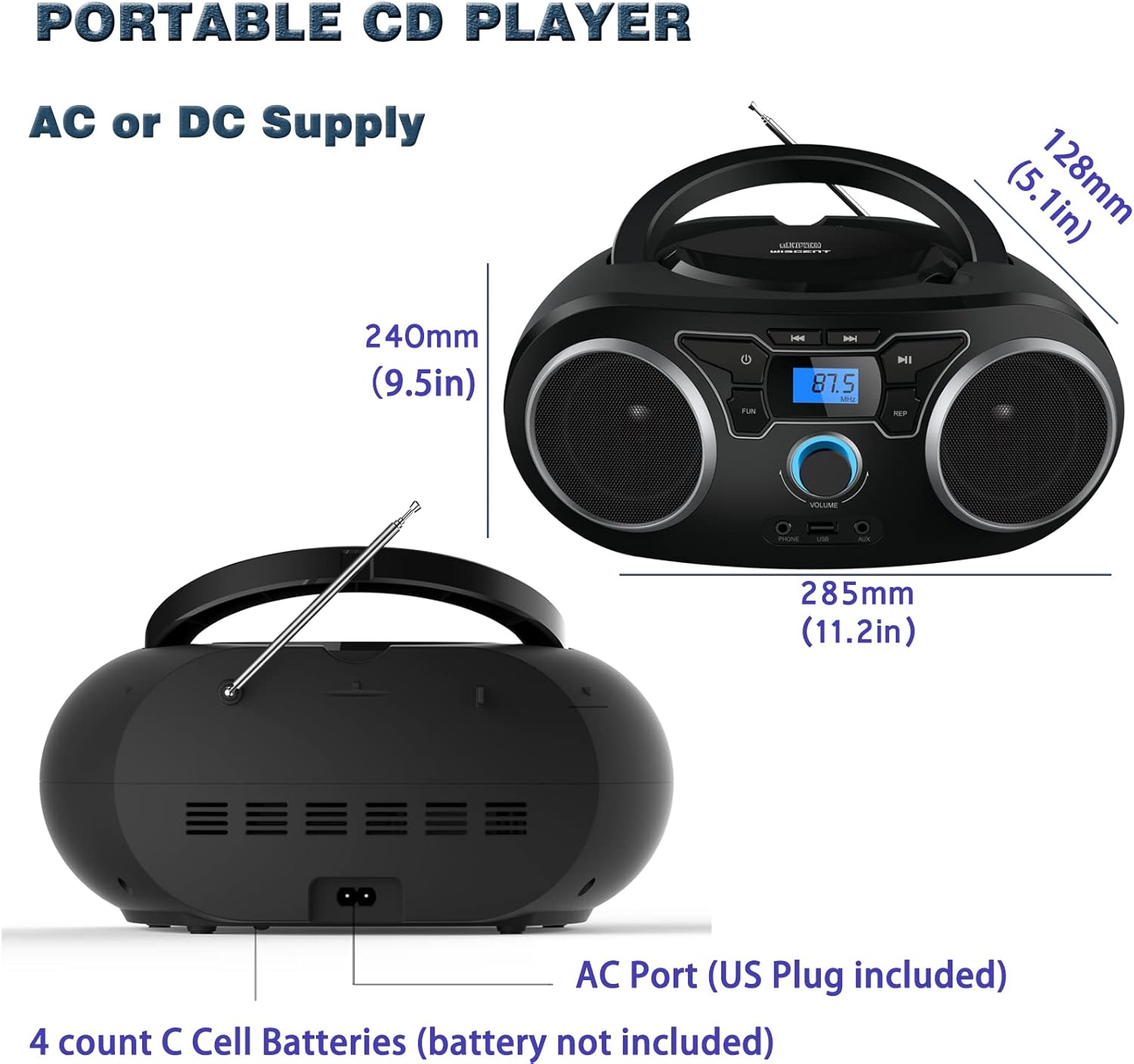
Image: Rear view of the boombox, highlighting the AC power port and the battery compartment for 4 C-sized batteries.
Operating Instructions
General Controls
The unit features a digital LCD screen and various control buttons and knobs. The main volume control is a rotary knob on the front. A remote control is also included for convenient operation.

Image: Top-down view of the boombox, showing the CD compartment, control buttons, and volume knob.
1. CD Playback
- Open the CD compartment lid located on the top of the unit.
- Place a CD (CD, CD-R, CD-RW, MP3-CD) onto the spindle with the label side facing up.
- Close the CD compartment lid.
- Press the MODE button to select CD mode.
- Press the PLAY/PAUSE button to begin playback.
- Use the SKIP/SEARCH buttons to navigate between tracks.
- The REPEAT button allows for repeating a single track or all tracks.
- The PROGRAM function allows you to create a custom playback order for tracks.
The boombox supports MP3 and WMA audio formats on compatible discs.
2. FM Radio Operation
- Extend the telescopic antenna for optimal reception.
- Press the MODE button to select FM Radio mode.
- To auto-scan and save stations, press and hold the SCAN button. The unit will automatically search for and store up to 30 FM stations.
- To manually tune, use the TUNING knob or SKIP/SEARCH buttons to find desired frequencies.
- Use the PRESET buttons to navigate through saved stations.
Video: A user demonstrating the FM radio tuning function on the WIITHINK Portable CD Boombox WTB771, showing the digital display changing frequencies.
3. Bluetooth Connectivity
- Press the MODE button to select Bluetooth mode. The display will indicate "BT" and the unit will enter pairing mode.
- On your Bluetooth-enabled device (e.g., smartphone, tablet), search for available devices and select "WTB771".
- Once paired, you can stream audio wirelessly from your device to the boombox.
Video: A short preview demonstrating Bluetooth connectivity, showing a smartphone wirelessly connected to the boombox.
4. USB Playback
- Insert a USB flash drive containing MP3 files into the USB port on the front of the unit.
- Press the MODE button to select USB mode.
- The unit will automatically detect and begin playing MP3 files from the USB drive.
- Use the playback controls (PLAY/PAUSE, SKIP/SEARCH) to manage your music.
5. AUX Input
- Connect an external audio device (e.g., MP3 player, laptop) to the AUX input jack on the front of the unit using the provided 3.5mm AUX cable.
- Press the MODE button to select AUX mode.
- Audio from the connected device will now play through the boombox speakers. Control playback from your external device.
Controls and Ports Overview
| Feature | Description |
|---|---|
| Power Button | Turns the unit on/off. |
| MODE Button | Switches between CD, FM, Bluetooth, USB, and AUX modes. |
| Volume Knob | Adjusts the audio output level (up to 32 levels). |
| PLAY/PAUSE Button | Starts or pauses playback in CD, USB, and Bluetooth modes. |
| SKIP/SEARCH Buttons | Navigates tracks in CD/USB mode; tunes frequencies in FM mode. |
| REPEAT Button | Repeats current track or all tracks in CD/USB mode. |
| PROGRAM Button | Sets a custom playback order for CD/USB tracks. |
| FM Antenna | Telescopic antenna for FM radio reception. |
| USB Port | Connects USB flash drives for MP3 playback. |
| AUX Input Jack | 3.5mm input for connecting external audio devices. |
| Headphone Jack | 3.5mm output for private listening. |
| Remote Control | Provides wireless control over all functions. |

Image: Close-up of the front panel, showing the USB port, AUX input, and headphone jack.
Maintenance
- Clean the unit with a soft, dry cloth. Do not use abrasive cleaners or solvents.
- Keep the CD compartment clean and free of dust.
- Avoid exposing the unit to extreme temperatures, humidity, or direct sunlight.
- When not in use for extended periods, remove batteries and unplug the AC power cable.
Troubleshooting
| Problem | Solution |
|---|---|
| No Power |
|
| No Sound |
|
| CD Skipping/Not Playing |
|
| Poor FM Reception |
|
| Bluetooth Pairing Issues |
|
Specifications
- Model: WTB771
- Product Dimensions: 7 x 10 x 4.8 inches (17.8 x 25.4 x 12.2 cm)
- Item Weight: 2.64 pounds (1.2 kg)
- Power Output: 2 x 2W RMS
- Connectivity: Auxiliary, Bluetooth, USB
- Speaker Type: Built-In
- Power Supply: AC (220V/50Hz, 110V/60Hz) or 4 x C batteries (not included)
- Supported Disc Types: CD, CD-R, CD-RW, MP3-CD
- Supported Audio Formats: MP3, WMA
- FM Radio Presets: Up to 30 stations
Warranty and Support
WIITHINK offers an 18-month after-sales service for this product. For any inquiries or technical support, please contact WIITHINK customer service through your purchase platform. Lifetime technical support is provided.
For further assistance, you may refer to the "Your Orders" section on Amazon, locate your order, and contact "WIITHINK Direct".
Image: Graphic illustrating WIITHINK's customer support, including 18-month replacement and lifetime technical support.


