
1. Introduction
This manual provides detailed instructions for the safe and effective use of your Fujifilm X-E4 mirrorless digital camera, equipped with the XF27mmF2.8 lens. The Fujifilm X-E4 combines advanced imaging technology with a compact, lightweight design, making it suitable for a wide range of photographic and videographic applications. Please read this manual thoroughly before using your camera and keep it for future reference.
2. Product Overview
2.1 Key Features
- Sensor: 26.1-megapixel APS-C X-Trans CMOS 4 sensor for high-resolution images and excellent low-light performance.
- Processor: Quad-core X-Processor 4 for fast image processing and responsive operation.
- Autofocus: Advanced 0.02-second autofocus system with Face and Eye Detection for precise subject tracking.
- Video Capabilities: Records 4K/30p video and Full HD/240p slow-motion footage.
- Display: 180° forward-tilting LCD touchscreen for versatile shooting angles and self-portraits.
- Design: Compact, lightweight, and rangefinder-style body for portability and classic aesthetics.
- Lens: Fujifilm XF27mmF2.8 R WR prime lens, offering a versatile 41mm equivalent focal length (35mm format) and weather resistance.
2.2 Camera Components
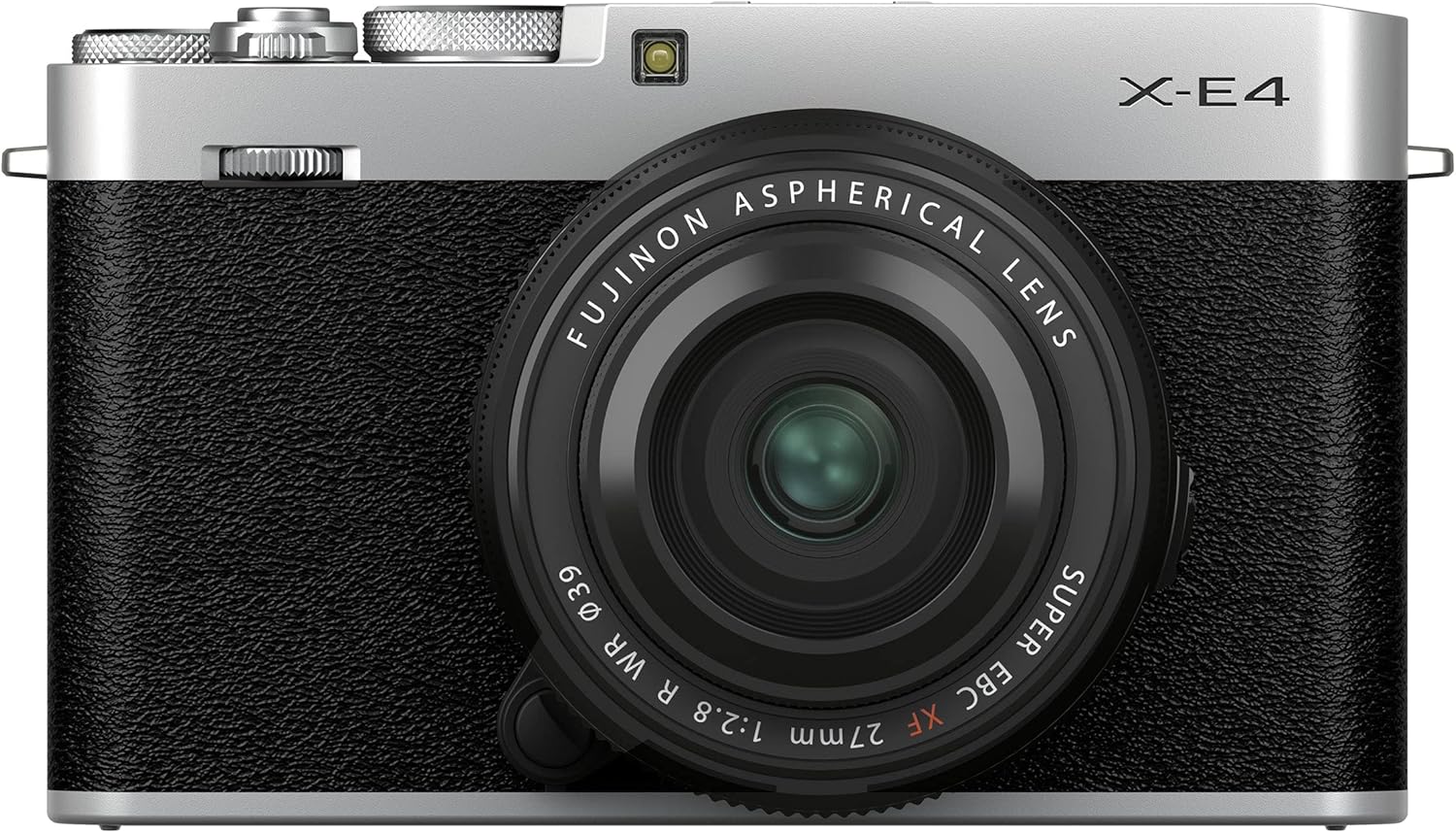
Front View: Shows the X-E4 camera body in silver with the attached XF27mmF2.8 lens. The lens features an aperture ring and a focus ring. The camera body has a textured grip for secure handling.

Top View: Displays the top plate of the X-E4, featuring the shutter speed dial, exposure compensation dial, and the ON/OFF switch integrated with the shutter button. The hot shoe for external flash is also visible.

Back View (Tilted Screen): Illustrates the rear of the camera with the LCD touchscreen tilted upwards, allowing for easier viewing from various angles. Control buttons for menu, playback, and drive mode are located on the top and right side.
3. Setup
3.1 Battery Installation
- Locate the battery compartment cover on the bottom of the camera.
- Slide the latch to open the cover.
- Insert the battery with the contacts facing the correct direction, as indicated inside the compartment.
- Close the cover and slide the latch until it clicks into place.
3.2 Memory Card Insertion
- Open the battery/memory card compartment cover.
- Insert an SD/SDHC/SDXC memory card (UHS-I compatible) into the card slot with the label facing the front of the camera.
- Push the card in until it clicks.
- Close the compartment cover.
3.3 Attaching the Lens
- Remove the body cap from the camera and the rear cap from the lens.
- Align the white mounting mark on the lens with the white mounting mark on the camera body.
- Attach the lens to the camera body and rotate it clockwise until it clicks into place.
3.4 Initial Power On and Basic Settings
- Turn the ON/OFF switch to ON.
- The camera will prompt you to set the date, time, and time zone. Follow the on-screen instructions.
- Adjust basic settings such as language and display brightness as needed through the MENU.
4. Operating the Camera
4.1 Basic Photography Modes
The X-E4 offers various shooting modes accessible via the top dials and menu:
- Program (P): Camera sets both aperture and shutter speed automatically.
- Aperture Priority (A): You set the aperture, camera sets shutter speed.
- Shutter Priority (S): You set the shutter speed, camera sets aperture.
- Manual (M): You set both aperture and shutter speed.
- Bulb Mode (B): Shutter remains open as long as the shutter button is pressed.
4.2 Autofocus System
The camera features a fast and accurate autofocus system. Use the AF mode selector to choose between:
- Single-Servo AF (AF-S): Focuses when the shutter button is pressed halfway.
- Continuous-Servo AF (AF-C): Continuously adjusts focus to track moving subjects.
- Manual Focus (MF): Allows manual adjustment of focus.
Advanced Face and Eye Detection AF helps ensure sharp focus on human subjects.
4.3 Film Simulation Modes
Fujifilm's unique Film Simulation modes allow you to reproduce the look and feel of classic film stocks. Access these modes through the camera's menu to apply different color and tonal characteristics to your images.
4.4 Video Recording
To record video:
- Set the camera to video mode.
- Press the dedicated video recording button to start/stop recording.
- The X-E4 supports 4K/30p and Full HD/240p for high-quality and slow-motion footage.
4.5 Using the Tilting LCD Touchscreen
The 3-inch LCD touchscreen can be tilted 180° forward, making it ideal for vlogging, selfies, or shooting from low angles. It also supports touch operations for focus, shutter release, and menu navigation.
5. Connectivity
5.1 Wi-Fi and Bluetooth Pairing
The X-E4 features built-in Wi-Fi and Bluetooth for wireless connectivity:
- Bluetooth: Use Bluetooth for constant, low-power connection to a smartphone or tablet for automatic image transfer and geotagging.
- Wi-Fi: Connect via Wi-Fi for faster transfer of images and videos, or to remotely control the camera using the Fujifilm Camera Remote app.
5.2 Image Transfer
Images and videos can be transferred to a smartphone, tablet, or computer wirelessly via the Fujifilm Camera Remote app or by connecting the camera directly using a USB-C cable.
5.3 USB-C and Micro-HDMI Ports
The camera is equipped with a USB Type-C port for charging and data transfer, and a Micro-HDMI port for video output to external displays.
6. Maintenance
6.1 Cleaning the Camera Body and Lens
- Use a soft, dry cloth to clean the camera body. For stubborn dirt, use a cloth lightly dampened with water or a mild cleaning solution.
- For the lens, use a lens brush to remove dust, then a lens cleaning cloth with a specialized lens cleaning fluid. Avoid touching the lens surface with your fingers.
- Never use organic solvents or strong chemicals to clean the camera.
6.2 Battery Care
- Charge the battery fully before first use.
- Store batteries in a cool, dry place when not in use.
- Avoid exposing batteries to extreme temperatures.
6.3 Storage
When storing the camera for extended periods, remove the battery and memory card. Store the camera in a dry, well-ventilated area, preferably in a camera bag or case to protect it from dust and impact.
7. Troubleshooting
7.1 Common Issues and Solutions
| Issue | Possible Cause | Solution |
|---|---|---|
| Camera does not power on | Low or depleted battery; incorrectly inserted battery | Charge battery; reinsert battery correctly |
| Images are blurry | Incorrect focus; camera shake; dirty lens | Check focus mode; use faster shutter speed or tripod; clean lens |
| Memory card error | Incorrectly inserted card; corrupted card; incompatible card | Reinsert card; try a different card; format card (data will be lost) |
7.2 Error Messages
If an error message appears on the screen, consult the camera's on-screen help or refer to the full digital manual for specific codes and troubleshooting steps.
8. Specifications
| Feature | Detail |
|---|---|
| Sensor Type | CMOS, APS-C (26.1 MP) |
| Video Resolution | 4320p (4K) |
| Lens Type | Fujifilm XF27mmF2.8 R WR (Prime) |
| Autofocus Points | 425 |
| Screen Size | 3 Inches (Tilting LCD Touchscreen) |
| Connectivity | Bluetooth, Wi-Fi, Micro-HDMI, USB Type C |
| Continuous Shooting | 8 FPS |
| Item Weight | 11.04 ounces |
9. Warranty and Support
9.1 Warranty Information
This Fujifilm X-E4 camera kit is covered by a 1 Year Manufacturer Warranty from the date of purchase. This warranty covers defects in materials and workmanship under normal use. Please retain your proof of purchase for warranty claims.
9.2 Customer Support
For technical assistance, troubleshooting, or warranty service, please contact Fujifilm customer support through their official website or the contact information provided with your product packaging.


