
1. Overview
The XElectron C9 Miracast Airplay WiFi Projector is designed to deliver a high-quality visual experience with Full HD 1080p native resolution and support for 4K content. Featuring Miracast and Airplay capabilities, it allows for seamless screen mirroring from compatible devices. With 12600 lumens (550 ANSI) brightness and a 10000:1 dynamic contrast ratio, it projects clear and vibrant images up to 250 inches. This manual provides essential information for setting up, operating, maintaining, and troubleshooting your projector.
2. What's in the Box
Please check the contents of your package to ensure all items are present:
- XElectron C9 Projector
- Power Cord
- Remote Control
- User Manual
- HDMI Cable

Image: Contents of the XElectron C9 Projector package.
3. Product Diagram & Components
Familiarize yourself with the main parts of your projector:
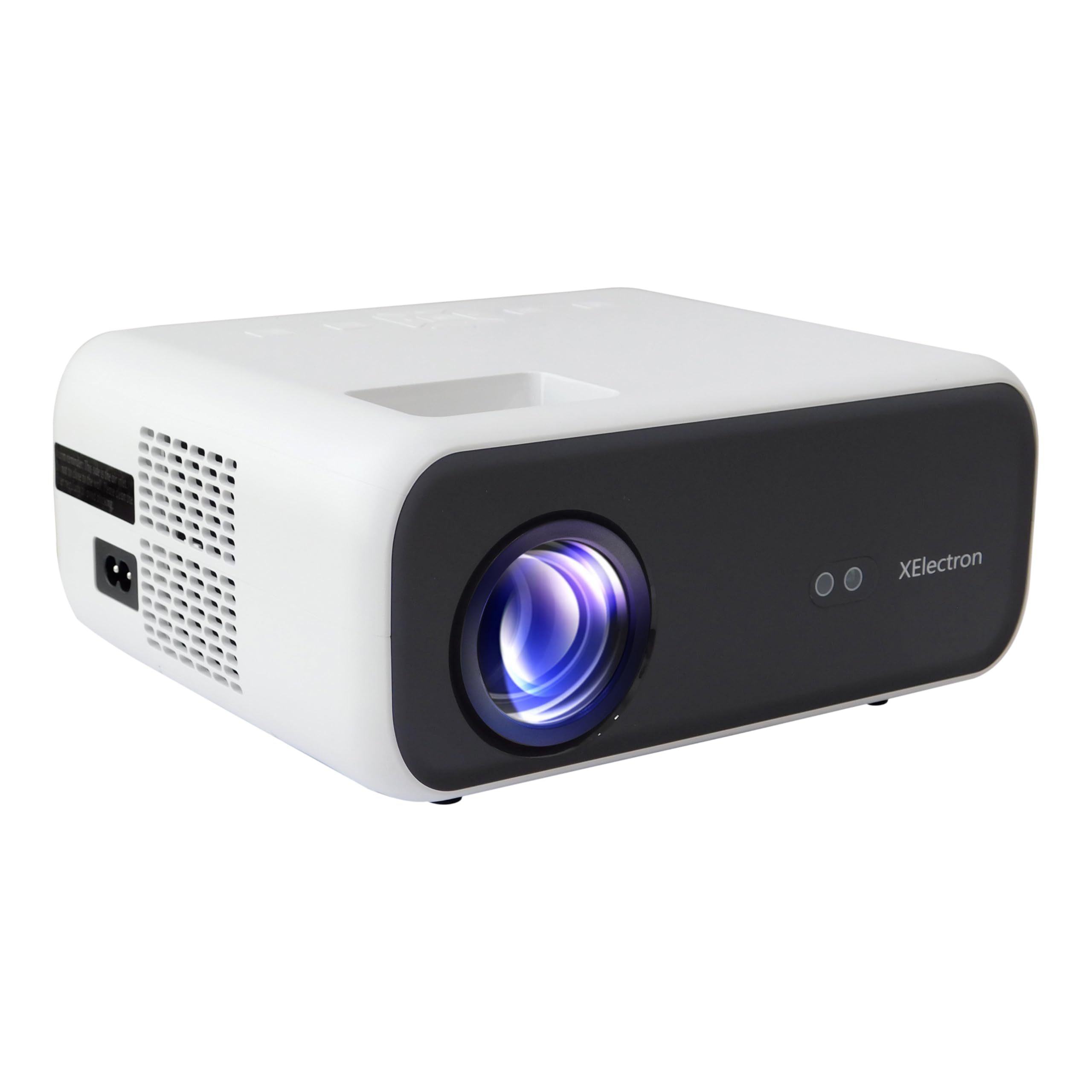
Image: Front view of the XElectron C9 Projector.

Image: Side view of the XElectron C9 Projector highlighting connectivity ports.
- Projection Lens: Emits the image onto the screen.
- Focus Ring: Adjusts image clarity.
- Keystone Correction Dial: Corrects trapezoidal image distortion.
- Control Panel: Buttons for basic navigation and settings.
- HDMI Ports: For connecting external video sources.
- USB Ports: For connecting USB storage devices.
- Audio Out Port: For connecting external speakers or headphones.
- Power Input: For connecting the power cord.
4. Setup
4.1 Placement
Position the projector on a stable, flat surface. Ensure there are no obstructions blocking the lens or ventilation openings. For optimal viewing, place the projector directly in front of the screen or wall.
- Projection Size: The projector can display images from 50 inches up to a maximum of 250 inches.
- Projection Distance: For a 250-inch display, a distance of approximately 17 feet is recommended.

Image: Recommended projection distances for different screen sizes.
4.2 Power Connection
Connect the provided power cord to the projector's power input port and then plug it into a power outlet.
4.3 Initial Power On
Press the power button on the projector or the remote control to turn on the device. The projector will boot up and display the main interface.
4.4 Focus & Keystone Correction
If the projected image appears blurry or distorted (trapezoidal), adjust the focus ring and keystone correction dial until the image is clear and rectangular. The C9 features vertical keystone correction for perfect screen alignment.
5. Operating Instructions
5.1 Display Settings
The XElectron C9 Projector offers a superior visual experience:
- Native Resolution: Full HD 1080p (1920 x 1080 Pixels)
- 4K Support: Compatible with 4K content for enhanced detail.
- Brightness: 12600 Lumens (550 ANSI) for bright and clear images.
- Dynamic Contrast Ratio: 10000:1 for deep blacks and bright whites.
- Aspect Ratio: Supports both 16:9 and 4:3.

Image: Visual comparison of XElectron C9's brightness and resolution.

Image: Demonstrating enhanced visual clarity and detail.
5.2 Connectivity
The projector offers multiple connectivity options:
- HDMI Ports (x2): Connect devices such as TV set-top boxes, Fire TV Sticks, PCs/Laptops, DVD players, and gaming consoles.
- USB Ports (x2): Connect hard drives, USB flash drives, and other USB devices for media playback.
- Audio Out (3.5mm Jack): Connect external speakers or headphones for enhanced audio.
- Wireless Connectivity: Built-in 5G+2.4G WiFi and Bluetooth 5.1 for seamless wireless connections.

Image: Various devices compatible with the projector's connectivity options.
5.3 Sound
Experience clear audio with the projector's integrated sound system:
- Built-in Speaker: Features a 10 Watt stereo speaker.
- Bluetooth 5.1: Connect wireless speakers or headphones for a personalized audio experience.

Image: Demonstrating Bluetooth connectivity for external audio devices.

Image: Illustrating immersive sound experience with the projector.
5.4 Screen Mirroring (Miracast & Airplay)
Wirelessly project content from your smartphone or tablet using Miracast for Android devices or Airplay for iOS devices. The dual-band 5G+2.4G WiFi ensures faster, smoother streaming with lower latency.

Image: Screen mirroring from a smartphone to the projector via 5G+2.4G WiFi.

Image: Seamless screen mirroring functionality.
5.5 Digital Zoom
Adjust the display size without moving the projector using the digital zoom function, accessible via the remote control.
6. Maintenance
Proper maintenance ensures the longevity and optimal performance of your projector:
- Lens Cleaning: Use a soft, lint-free cloth and lens cleaning solution to gently wipe the projection lens. Avoid abrasive materials.
- Ventilation: Ensure the projector's ventilation openings are clear of dust and debris to prevent overheating. Do not block the vents during operation.
- Lamp Life: The projector lamp has an estimated life of 50,000 hours.
- Storage: When not in use, store the projector in a cool, dry place, away from direct sunlight and extreme temperatures.
7. Troubleshooting
If you encounter issues with your projector, refer to the following common problems and solutions:
| Problem | Possible Cause | Solution |
|---|---|---|
| No image displayed | Power not connected, incorrect input source, lens cap on. | Check power connection, select correct input source (HDMI, USB), remove lens cap. |
| Image is blurry | Out of focus, incorrect projection distance. | Adjust the focus ring. Ensure the projector is within the recommended projection distance. |
| Image is trapezoidal | Incorrect keystone setting. | Adjust the keystone correction dial until the image is rectangular. |
| No sound | Volume too low, external audio device not connected properly, incorrect audio output selected. | Increase volume. Check connections of external speakers/headphones. Ensure correct audio output is selected in settings. |
| Screen mirroring issues | WiFi connection unstable, device incompatibility. | Ensure strong WiFi signal. Restart both projector and source device. Check device compatibility with Miracast/Airplay. |
8. Specifications
Detailed technical specifications for the XElectron C9 Projector:
- Brand: XElectron
- Model Number: C9W
- Native Resolution: 1920 x 1080 Pixels (Full HD)
- 4K Support: Yes
- Brightness: 12600 Lumens (550 ANSI)
- Dynamic Contrast Ratio: 10000:1
- Aspect Ratio: 16:9 and 4:3
- Lamp Life: 50,000 Hours
- Connectivity Technology: 3.5mm Jack, Bluetooth 5.1, HDMI (x2), USB (x2), Wi-Fi (5G+2.4G), Airplay, Miracast
- Built-in Speaker: 10 Watt Stereo Speaker
- Form Factor: Portable
- Product Dimensions: 12.9 x 21.6 x 30.7 cm
- Item Weight: 1.35 kg
- Power Source: AC
- Wattage: 90W
- Special Features: Digital Zoom, Vertical Keystone, Built-In Media Player, 100% NTSE & PAL Decoding
9. Warranty and Support
Your XElectron C9 Projector comes with a 1-Year Manufacturer Warranty from the date of purchase.
For any technical assistance, warranty claims, or support, please contact XElectron Customer Care:
- Phone: 0120-4134583, 8527312304
- Manufacturer/Packer/Importer Address: Xelectron Technologies Pvt. Ltd. UG-SR1B, Ansal Plaza, Vaishali, Ghaziabad, India.
