
1. Introduction
Thank you for choosing the ANJANK Wooden Digital Alarm Clock. This versatile device combines an alarm clock, FM radio, and a wireless charging station, designed to simplify your bedside or desk setup. This manual will guide you through the features and functions of your new device, ensuring optimal performance and user experience.
2. Package Contents
- ANJANK Wooden Digital Alarm Clock
- Power Adapter
- FM Antenna Wire
- User Manual
3. Product Overview

Figure 1: Front view of the ANJANK Wooden Digital Alarm Clock with a smartphone charging wirelessly.

Figure 2: Top panel controls including wireless charging pad, time, alarm, radio, and volume buttons.

Figure 3: Rear panel with FM/BT Volume, DC 9V input, USB port, Night Light Dimmer, Alarm Set, Time Set, and Display Dimmer controls.
3.1 Front Display
- LED Time Display: Large, easy-to-read digits for current time.
- AM/PM Indicator: Indicates morning or afternoon hours.
- Alarm Icon: Appears when an alarm is active.
- Charging Indicator: Displays when a device is wirelessly charging.
3.2 Top Panel Controls
- Wireless Charging Pad: For Qi-compatible devices.
- Snooze/Dimmer Button: Snoozes active alarm or adjusts display brightness.
- Time Set Buttons: Adjusts hour and minute during time setting.
- Alarm Set Buttons: Configures alarm time and sound.
- FM Radio/Bluetooth Buttons: Controls radio functions and Bluetooth pairing.
3.3 Rear Panel Ports and Controls
- DC 9V Input: Connects to the power adapter.
- USB Charging Port: For charging additional devices (5V/2A).
- FM Antenna Jack: Connects the included FM antenna.
- Night Light Dimmer: Adjusts the brightness of the ambient night light.
- Display Dimmer: Adjusts the brightness of the LED time display.
- 12/24H Button: Toggles between 12-hour and 24-hour time formats.
4. Setup
4.1 Power Connection
- Connect the provided power adapter to the DC 9V Input port on the rear of the alarm clock.
- Plug the power adapter into a standard wall outlet. The display will light up.
4.2 Battery Backup
The device requires 2 AAA batteries (not included) for battery backup. This feature preserves time and alarm settings during a power outage, but the display will not be active and alarms will not sound.
- Open the battery compartment cover on the bottom of the unit.
- Insert 2 AAA batteries, observing the correct polarity (+/-).
- Replace the battery compartment cover.
4.3 Initial Time Setting
- Press and hold the Time Set button on the top panel until the hour digits begin to flash.
- Use the Hour and Minute adjustment buttons (usually labeled with arrows or +/-) to set the correct hour and minute.
- Press the Time Set button again to confirm and exit time setting mode.
- To switch between 12-hour and 24-hour format, press the 12/24H button on the rear panel.
5. Operating Instructions
5.1 Alarm Setting
The alarm clock supports multiple alarms and offers 9 different wake-up sounds, including a classic buzzer and FM radio.

Figure 4: The alarm clock offers 9 different wake-up sounds, including radio and beep, with a snooze function.
- Press and hold the Alarm Set button (often depicted as a bell icon) until the alarm hour digits flash.
- Use the Hour and Minute adjustment buttons to set your desired alarm time.
- Press Alarm Set again to confirm the time. The alarm sound selection will now flash.
- Use the Hour and Minute adjustment buttons to cycle through the 9 available alarm sounds (e.g., buzzer, bird chirping, ocean waves, FM radio).
- Press Alarm Set one more time to confirm your sound selection. The alarm icon will appear on the display, indicating the alarm is active.
- To activate/deactivate the alarm, short press the Alarm On/Off button.
- To snooze an active alarm, press the large Snooze/Dimmer button on the top. The alarm will pause for 9 minutes and then sound again.
5.2 FM Radio Operation
Connect the included FM antenna wire to the FM Antenna Jack on the rear panel for optimal reception.
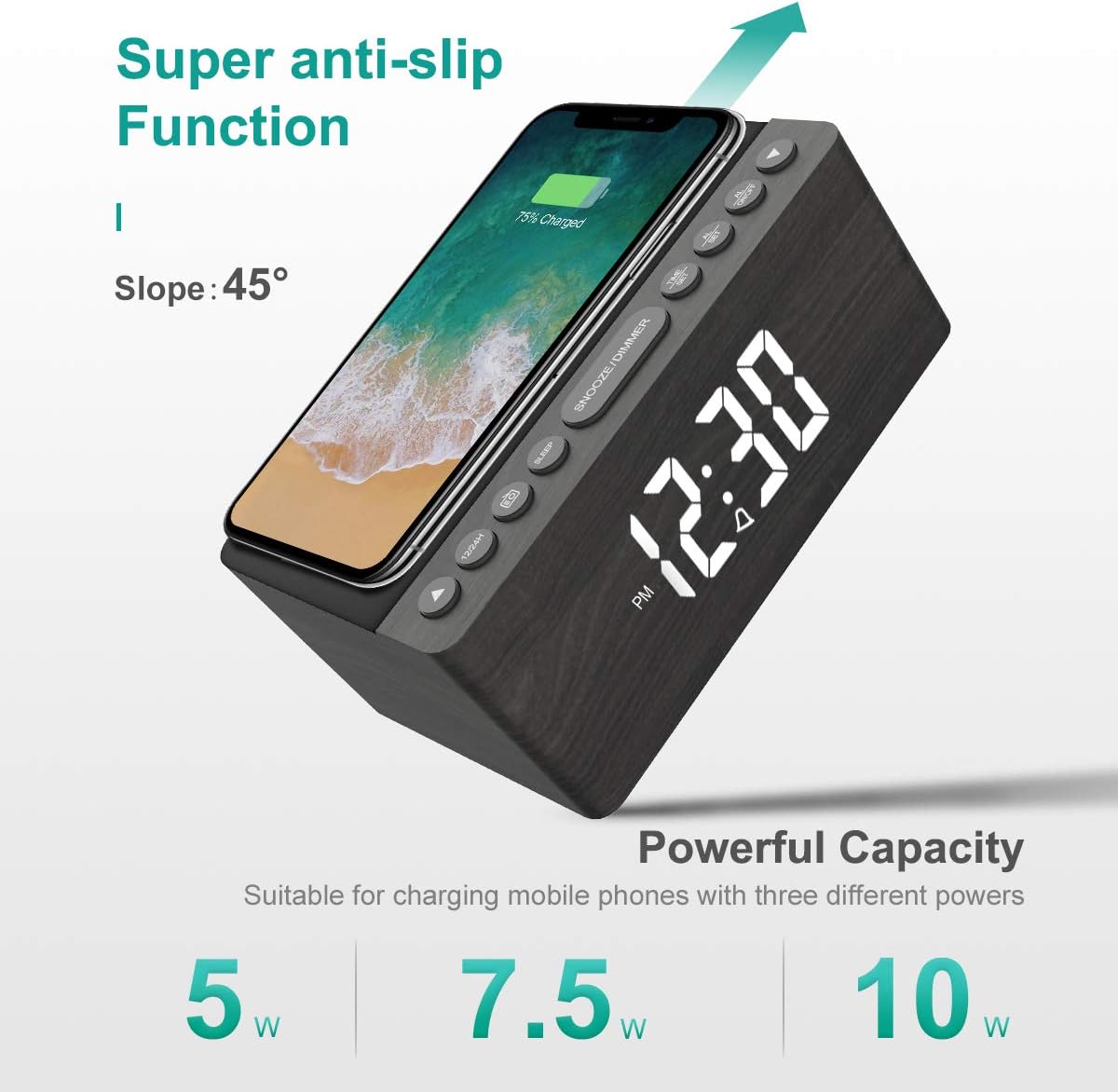
Figure 5: The alarm clock features an anti-slip surface for stable wireless charging and supports various charging powers.
Video 1: Demonstrates the FM Radio and Magnetic Wireless Charging features of a similar product.
- Press the FM Radio button (often labeled with a radio icon) to turn on the FM radio. The current frequency will be displayed.
- Auto-Scan: Press and hold the FM Radio button to automatically scan and save available FM stations.
- Manual Tune: Use the Hour and Minute adjustment buttons to manually tune to a specific frequency.
- Volume Adjustment: Use the FM/BT Volume slider on the rear panel to adjust the radio volume.
- Sleep Timer: Press the Sleep Timer button (often labeled with a crescent moon or 'SLEEP') to set a sleep timer (10-120 minutes). The radio will play for the set duration and then automatically turn off.
5.3 Wireless and USB Charging
The ANJANK alarm clock features Qi-certified wireless charging and an additional USB port for wired charging.

Figure 6: The alarm clock provides both wireless charging for smartphones and a USB port for other electronic devices.
Video 2: Shows the wireless charging function of an alarm clock.
- Wireless Charging: Place your Qi-compatible smartphone on the wireless charging pad on the top of the unit. Ensure the phone is centered for optimal charging. The charging indicator on the display will activate. The device supports 5W, 7.5W, and 10W adaptive charging.
- USB Charging: Connect your device (e.g., second phone, power bank, smartwatch) to the USB Charging Port on the rear panel using a compatible USB cable.
5.4 Display Brightness Adjustment
The LED display offers 5 levels of brightness, allowing you to customize it for comfort.

Figure 7: Visual representation of the five adjustable brightness levels for the LED display.
- Use the Display Dimmer slider on the rear panel to adjust the brightness of the time display from low to high.
- The device also features an auto-dimmable function to adjust brightness based on ambient light.
5.5 Night Light Adjustment
The ambient night light can be adjusted to provide subtle illumination.
- Use the Night Light Dimmer button on the rear panel to cycle through different brightness levels or turn the night light off.
6. Maintenance
- To clean the device, use a soft, dry cloth. Do not use liquid cleaners or abrasive materials.
- Keep the device away from water and high humidity.
- Avoid placing the device in direct sunlight or near heat sources.
7. Troubleshooting
- No Power/Display Off: Ensure the power adapter is securely connected to both the device and a working power outlet. Check if batteries are inserted correctly for backup.
- Wireless Charging Not Working: Ensure your device is Qi-compatible and properly centered on the charging pad. Remove any thick phone cases that might interfere with charging.
- Poor FM Radio Reception: Fully extend the FM antenna wire. Try repositioning the antenna or the alarm clock for better signal.
- Alarm Not Sounding: Verify that the alarm is activated (alarm icon visible) and the volume is set to an audible level. Check if the correct alarm sound is selected.
- Display Too Bright/Dim: Adjust the Display Dimmer slider on the rear panel.
8. Specifications
| Feature | Detail |
|---|---|
| Brand | ANJANK |
| Model | Radio |
| Color | Gray |
| Display Type | Digital LED |
| Power Source | Corded Electric |
| Wireless Charging | 10W Qi Certified (5W, 7.5W, 10W adaptive) |
| USB Charging Port | Yes (5V/2A) |
| FM Radio Frequency | 87.5-108MHz |
| Alarm Sounds | 9 (including radio and buzzer) |
| Display Dimmer | 5 Levels, Auto Dimmable |
| Sleep Timer | 10-120 minutes |
| Battery Backup | 2 AAA batteries required (not included) |
| Product Dimensions | 3.9"W x 2.9"H (approx. 6.4" L x 4" W x 2.9" H from image) |
| Item Weight | 1.48 pounds (0.67 Kilograms) |
9. Warranty & Support
ANJANK offers a worry-free 18-month warranty for this product. Additionally, a 45-day return policy is available. For any questions or support, please contact ANJANK customer service. Responses are typically provided within 24 hours.


