
Amazon Echo Show 10
Amazon Echo Show 10 (3rd Gen) User Manual
Model: Echo Show 10
Introduction
This manual provides instructions for setting up, operating, and maintaining your Amazon Echo Show 10 (3rd Gen) smart display. Please read this guide thoroughly to ensure proper use and to maximize your device's capabilities.
Setup
What's Included
- Echo Show 10 device
- Glacier white power adapter (30W) / cable (5 ft.)
- Motion footprint template
- Quick start guide
Placement Guidelines
The Echo Show 10 features a rotating screen. Ensure adequate space around the device for its motion. The device itself measures 9.9"W x 6.7"D. A recommended footprint of 15"W x 10"D is suggested to allow for full rotation without obstruction.
Initial Connection
- Connect the power adapter to the Echo Show 10 and plug it into a power outlet.
- The device will power on and guide you through the on-screen setup process.
- Follow the prompts to connect to your Wi-Fi network. The device supports 802.11a/b/g/n/ac Wi-Fi networks (Wi-Fi 6 is not supported).
- The Alexa app is compatible with Fire OS, Android, and iOS devices, and is also accessible via a web browser for further configuration.
Amazon Wi-Fi simple setup is available to streamline the connection process for compatible smart devices.
Operation
Voice Control with Alexa
The Echo Show 10 is primarily controlled using voice commands with Alexa. Simply say the wake word "Alexa" followed by your command or question. Alexa speaks English and Spanish.

Image: The Echo Show 10 displaying music content, with icons indicating its capabilities for music, timers, smart home control, information, intercom, and news.
Motion Features
The 10.1" HD screen is designed to move with you, keeping content in view. The device utilizes a brushless motor for +/- 175° rotation. This feature is particularly useful for video calls, recipes, and watching shows.
- Enabling/Disabling Motion: You can disable motion by saying "Alexa, disable Motion" or through the Alexa app settings.
- Motion Range: During initial setup, you can customize the range of motion. This can also be adjusted in the 'Motion' menu within the device settings.
Camera Functions
The Echo Show 10 includes a 13MP camera with an integrated shutter. The camera features auto-framing and motion tracking to keep you centered during video calls or when taking pictures.
- Video Calls: The camera automatically adjusts zoom and framing to keep individuals in view during video calls.
- Home Monitoring: Securely access the built-in camera remotely via the Alexa app or other Echo Show devices to monitor your home.
- Privacy Shutter: A physical shutter is included to cover the camera when not in use, enhancing privacy.

Image: The Echo Show 10 screen showing a grid of four live camera feeds, demonstrating its home monitoring capability.

Image: A close-up view of the Echo Show 10's top edge, highlighting the physical camera shutter mechanism.
Entertainment
The device offers access to various entertainment options, including streaming services and music playback. The 2.1 audio system features two 1.0" tweeters and a 3.0" woofer for premium sound.
- Video Streaming: Watch shows and movies from services like Prime Video, Netflix, and Hulu.
- Music & Podcasts: Play music and podcasts from Amazon Music, Spotify, and other supported services.
- Bluetooth Connectivity: Supports A2DP for audio streaming from mobile devices to the Echo Show 10, or from the Echo Show 10 to a Bluetooth speaker. AVRCP is supported for voice control of connected mobile devices.
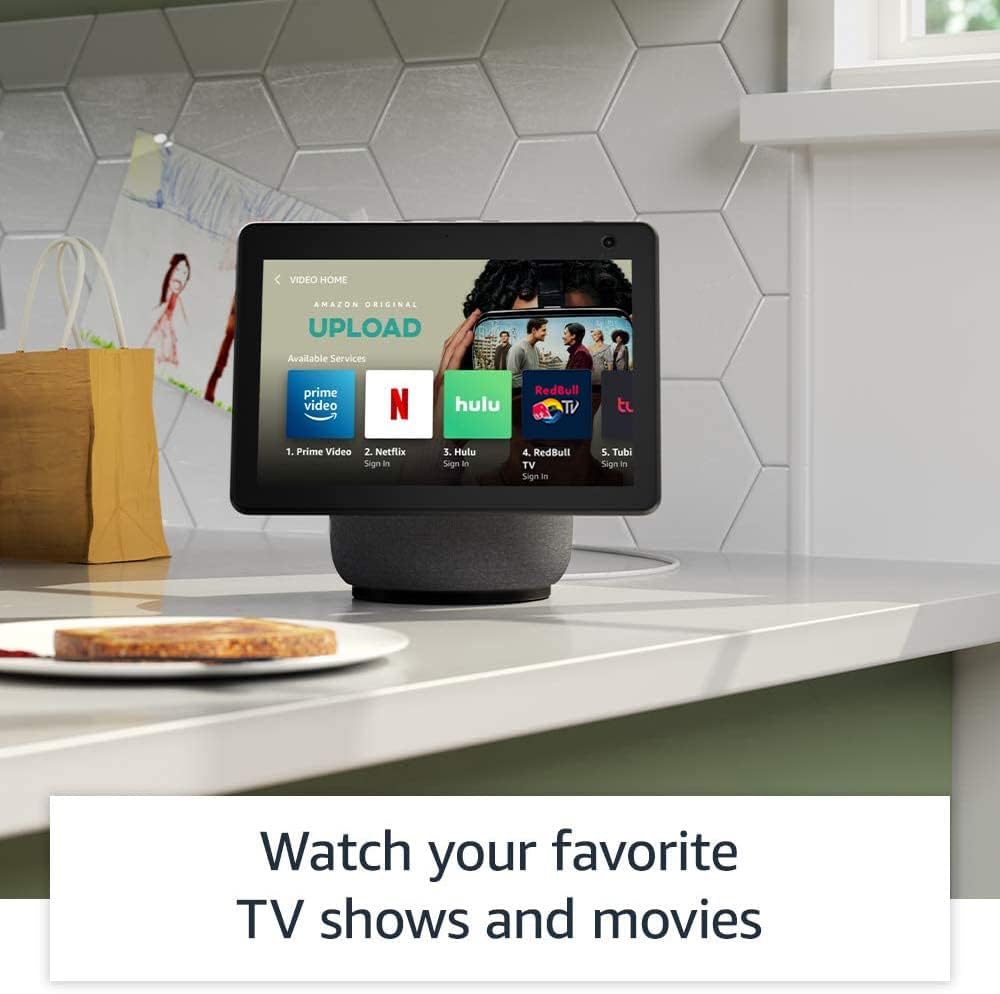
Image: The Echo Show 10 screen showing a "Video Home" interface with icons for Prime Video, Netflix, Hulu, and other streaming services.

Image: The Echo Show 10 displaying music playback with synchronized lyrics on the screen.
Smart Home Integration
The Echo Show 10 includes a built-in smart home hub supporting Zigbee, Sidewalk, and Matter protocols. This allows for direct setup and control of compatible smart home devices without a separate hub.
- Device Control: Use voice commands to control lights, adjust thermostats, and view security cameras.
- Amazon Sidewalk: This feature uses Echo and Ring devices to securely maintain connectivity for other devices and assist in locating lost items. Sidewalk uses a small portion of your internet bandwidth. It is enabled by default but can be turned off in settings.
Kitchen Companion
Utilize the Echo Show 10 in the kitchen for various tasks:
- Access personalized recipes and follow step-by-step instructions hands-free.
- Set multiple timers for cooking.
- Add items directly to your grocery list.

Image: The Echo Show 10 displaying a recipe on its screen, positioned on a kitchen counter.
Digital Photo Frame
Transform your Echo Show 10 into a digital photo frame using Amazon Photos. Share photos with friends and family, and even take new photos directly from the device.
Privacy Features
The Echo Show 10 incorporates multiple privacy controls:
- Microphone/Camera Off Button: A physical button to electronically disconnect the microphone and camera.
- Camera Shutter: A physical slider to cover the camera lens.
- Wake Word Technology: The device only begins recording and sending audio to the cloud after detecting the wake word.
- Streaming Indicators: Visual indicators show when audio or video is being streamed.
- Voice Recording Management: Ability to view and delete your voice recordings.
- Disable Motion: Option to turn off the device's motion tracking.
Accessibility Features
The Echo Show 10 includes various accessibility features. Access these settings via Settings → Accessibility on your device.
- Tap to Alexa: Interact with Alexa via touch using on-screen tiles or a keyboard.
- Adaptive Listening: Provides more time to finish speaking before Alexa responds.
- Preferred Speaking Rate: Control Alexa's speaking speed.
- Alexa Captioning, Call Captioning, Closed Captioning: Provide text captions for supported content.
- Show and Tell: Helps identify products for users who are blind or visually impaired by saying "Alexa, what am I holding."
- VoiceView Screen Reader: Provides audio descriptions for screen elements.
- Screen Magnifier: Zoom in/out and pan around the screen.
- Notify When Nearby: Plays notification sounds when you are detected near the device.
- Kindle Read Aloud: Alexa reads Kindle books aloud.
- Real Time Text: Enables typing live text during a video call.
- Additional settings include Color Inversion, Color Correction, Request Sound, and more.
Maintenance
To maintain your Echo Show 10, gently wipe the screen and exterior surfaces with a soft, lint-free cloth. Avoid using abrasive cleaners or sprays directly on the device.
Troubleshooting
Common Issues and Solutions
- Device Not Responding: Ensure the device is plugged in and powered on. Try restarting the device by unplugging it for a few seconds and plugging it back in.
- Wi-Fi Connectivity Issues: Verify your Wi-Fi network is active and within range. Check your Wi-Fi password. If issues persist, restart your router.
- Motion Tracking Problems: Ensure the motion feature is enabled in settings. Check for obstructions around the device. The device may have difficulty tracking in very low light conditions.
- Audio Problems: Check the volume level. Ensure the microphone is not muted (indicated by a red light).
- Camera Not Working: Ensure the physical camera shutter is open and the camera is not electronically disabled via the mic/camera off button.
For further assistance, refer to the Alexa app or Amazon's online support resources.
Specifications
| Size | 9.9” x 9” x 6.7” (251 x 230 x 172mm) |
| Weight | 90.3 oz (2560 g) |
| Display | 10.1” touchscreen, Rotating screen with manual tilt |
| Camera | 13MP + Shutter |
| Wi-Fi Connectivity | Dual-band, dual-antenna Wi-Fi (MIMO). Supports 802.11a/b/g/n/ac. Does not support Wi-Fi 6 (802.11ax) or ad-hoc networks. Includes 802.15.4 radio for smart home devices. |
| Bluetooth Connectivity | A2DP support for audio streaming. AVRCP for voice control of connected mobile devices. |
| Audio | 2.1 System: 2 x 1.0” tweeters and a 3.0” woofer |
| Processor | MediaTek 8183 main processor plus Amazon AZ1 Neural Edge processor |
| Motion | Brushless Motor +/- 175° rotation |
| Smart Home Hub | Zigbee + Sidewalk + Matter |
| Sensor | ALS RGB |
| Language | Alexa speaks English and Spanish |
Warranty and Support
Warranty Information
The Echo Show 10 includes a 1-year limited warranty and service. Optional 1-year, 2-year, and 3-year extended warranties are available for purchase separately for U.S. customers.
Use of the Echo Show 10 is subject to the terms found on the Amazon website.
Software Security Updates
Information regarding software security updates can be found on the Amazon website. Existing Amazon Echo owners can manage their device-specific information via "Manage Your Content and Devices."
Related documentsEcho Show 10


Ask a question about this manual
Ask about setup, troubleshooting, compatibility, parts, safety, or missing instructions. Manuals+ will review the question and use this page’s manual context to help answer it.