
1. Overview
The Portronics AUTO 12 is an in-car Bluetooth receiver designed to upgrade your car's audio system with wireless capabilities. It enables hands-free calling, music streaming, and voice assistant activation through your car's existing stereo system. This device connects via a 3.5mm AUX input and a USB port for power, transforming non-Bluetooth car stereos into modern, connected audio hubs.

Figure 1: Portronics AUTO 12 In-Car Bluetooth Receiver with USB and AUX connectors.
Video 1: An introductory video showcasing the Portronics AUTO 12 Bluetooth receiver's features and ease of use in a car environment, highlighting its compact design, plug-and-play functionality, noise suppression, Bluetooth 5.1, hands-free calling, active bass sound, and voice assistant capabilities.
2. Key Features
- Wireless Music Streaming: Stream audio from your smartphone to your car stereo via Bluetooth 5.1.
- Hands-Free Calling: Make and receive phone calls with crystal clear sound directly through your car's speakers, featuring a built-in microphone with noise suppression.
- Enhanced Bass: Activate the dedicated bass boost button for a richer, louder audio experience.
- Voice Assistant Support: Easily activate Siri, Google Assistant, or other voice assistants with a single command for convenient control while driving.
- Easy Operation: Simple plug-and-play setup with intuitive controls for music and call management.
- Universal Compatibility: Connects to any car stereo with a 3.5mm AUX input and a USB port for power.
- Compact and Portable: Designed for easy installation and minimal intrusion in your car's interior.

Figure 2: The Portronics AUTO 12 receiver installed in a car, wirelessly streaming music from a smartphone via Bluetooth 5.1.
Video 2: A demonstration of the Portronics AUTO 12 Bluetooth receiver's core functionalities, including wireless music streaming, hands-free calling, and easy Bluetooth connectivity with a smartphone.
3. Setup Instructions
- Connect to Car Stereo:
- Locate the 3.5mm AUX input and a USB port in your car.
- Plug the 3.5mm AUX jack of the AUTO 12 into your car's AUX input.
- Plug the USB connector of the AUTO 12 into a USB power source in your car (e.g., car charger, car's USB port). The device will power on automatically.

Figure 3: Illustrates connecting the Portronics AUTO 12 to a car's AUX input and USB port for power, enabling AUX streaming and hands-free calls.
- Pair with Smartphone:
- On your smartphone, navigate to the Bluetooth settings.
- Ensure Bluetooth is enabled.
- Search for available devices and select "Auto 12" from the list to pair.
- Once paired, the device's indicator light may change or a voice prompt may confirm the connection.
- Mounting the Device:
- The AUTO 12 comes with adhesive Velcro strips. Attach one part to the back of the device and the other to a convenient, flat surface on your car's dashboard.
- Ensure the microphone is positioned clearly for optimal hands-free calling.
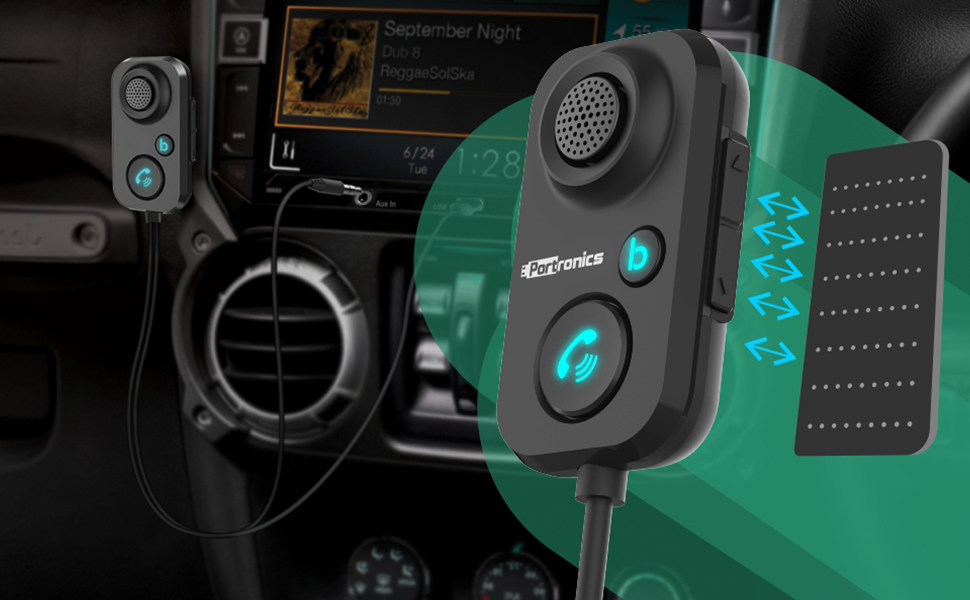
Figure 4: Demonstrates the use of adhesive pads to securely mount the Portronics AUTO 12 on the car dashboard, ensuring the microphone is optimally positioned.
4. Operating Instructions
4.1 Music Playback
- Play/Pause: Press the multi-function button (often the call button) once to play or pause music.
- Volume Control: Use the volume up/down buttons on the side of the device to adjust the audio volume.
- Next/Previous Track: Long press the volume up/down buttons to skip to the next track or go back to the previous track.
- Bass Enhancement: Press the dedicated 'b' button (bass button) once to activate or deactivate the enhanced bass feature.

Figure 5: Close-up of the Portronics AUTO 12 device, highlighting the 'b' button for activating the bass enhancement feature.
4.2 Call Management
- Answer/End Call: Press the call button once to answer an incoming call or end an ongoing call.
- Reject Call: Long press the call button to reject an incoming call.
- Redial Last Number: Double-press the call button to redial the last dialed number.

Figure 6: The Portronics AUTO 12 in use for hands-free calling, showing the microphone and call button, with a phone displaying an incoming call.
4.3 Voice Assistant
- Activate Voice Assistant: Long press the call button (when not on a call) to activate your smartphone's voice assistant (e.g., Siri, Google Assistant).

Figure 7: A user activating a voice assistant (Siri) through the Portronics AUTO 12 device while driving, demonstrating hands-free control.
5. Maintenance
- Keep the device clean by wiping it with a soft, dry cloth.
- Avoid using harsh chemicals or abrasive cleaners.
- Ensure the 3.5mm AUX jack and USB connector are free from dust and debris.
- Store the device in a cool, dry place when not in use for extended periods.
6. Troubleshooting
| Problem | Possible Cause | Solution |
|---|---|---|
| No power/device not turning on. | USB not connected or no power from USB port. | Ensure the USB connector is securely plugged into a working USB power source. Try a different USB port or car charger. |
| Cannot pair with smartphone. | Bluetooth is off on the phone, device is not in pairing mode, or already connected to another device. | Ensure Bluetooth is enabled on your phone. Restart the AUTO 12 by unplugging and re-plugging the USB. Forget "Auto 12" from your phone's Bluetooth list and try pairing again. Ensure no other device is actively connected to the AUTO 12. |
| No audio output. | 3.5mm AUX cable not connected, car stereo not set to AUX input, or volume too low. | Verify the 3.5mm AUX jack is fully inserted into your car's AUX input. Set your car stereo's input source to AUX. Increase the volume on both your car stereo and the AUTO 12. |
| Poor call quality/echo. | Microphone obstruction, high background noise, or microphone too far. | Ensure the microphone is not obstructed and is positioned optimally. Reduce car fan speed or window noise. The AUTO 12 has noise suppression, but extreme noise can still affect quality. |
7. Specifications
| Feature | Detail |
|---|---|
| Brand | Portronics |
| Model Name | Auto |
| Model Number | POR-1195 |
| Hardware Interface | Bluetooth |
| Compatible Devices | Smartphone |
| Special Features | Bluetooth 5.1, Cord Length 1 meter |
| Audio Input Compatible with Item | 3.5mm AUX |
| Audio Output Mode | Stereo |
| Audio Output Type | Bluetooth, Auxiliary |
| Power Source | Corded Electric (USB) |
| Batteries Included | No |
| Batteries Required | No |
| Wireless Type | Bluetooth |
| Connector Type | Bluetooth |
| Compatible Media Type | Bluetooth 5.1 |
| Material | Acrylonitrile Butadiene Styrene (ABS) |
| Item Weight | 35.6 g |
| Product Dimensions | 5.1 x 3.1 x 1.5 cm |
| Country of Origin | China |
8. Warranty and Support
The Portronics AUTO 12 typically comes with a manufacturer's warranty. For specific warranty details, including duration and coverage, please refer to the warranty card included in your product packaging or visit the official Portronics website. You may also find information on the Amazon product page.
For customer support, technical assistance, or service inquiries, please contact Portronics directly using the information provided below:
- Customer Care Address: Portronics Digital Pvt. Ltd. B-76, Wazirpur Industrial Area, New Delhi-110052
- Customer Care Executive Number: +91 9555245245
- Email: help@portronics.com
- Website: www.portronics.com
Please retain your purchase receipt and product packaging for warranty claims.
9. Safety Information
- Ensure the wireless audio adapter is placed away from water and heat sources to prevent damage and safety hazards.
- Do not attempt to disassemble or modify the device. This may void the warranty and pose a safety risk.
- Keep the device out of reach of children.
- Operate the device within its specified temperature and humidity ranges.
- Avoid using the device in environments with strong electromagnetic interference.