
Introduction
The SATLINK ST-2210 is a high-definition digital satellite TV finder designed for precise installation and alignment of satellite dishes. Featuring a 4-inch capacitive touch screen LCD, it provides real-time signal quality parameters, spectrum analysis, and constellation diagrams. This manual provides essential information for setting up, operating, maintaining, and troubleshooting your ST-2210 device.
Product Overview
The ST-2210 integrates advanced signal processing capabilities to ensure accurate and efficient satellite signal acquisition. Its compact design and intuitive interface make it suitable for both professional installers and enthusiasts.

Figure 1: Front view of the SATLINK ST-2210 Satellite TV Finder, showing the touch screen interface.

Figure 2: The SATLINK ST-2210 device along with its accessories, including the silicone case, USB upgrade cable, and AC adapter.
Setup
1. Unpacking
Carefully remove all components from the packaging. Verify that the following items are included:
- SATLINK ST-2210 Satellite Finder
- Silicone case
- USB upgrade cable
- AC adapter (US/EU/UK/AU Plug)
2. Charging the Device
Before initial use, fully charge the device's built-in 7.4V/2000mAh Li-Ion battery. Connect the supplied AC adapter to the DC 12V input port on the device and plug it into a power outlet. The charging indicator on the screen will show the charging status.

Figure 3: The bottom panel of the ST-2210, illustrating the DC power input, USB port, AV output, and HD output.
3. Initial Power On
Press and hold the power button located on the device to turn it on. The device will boot up and display the main menu on the touch screen.
4. Connecting to a Satellite Dish
Connect the coaxial cable from your LNB (Low Noise Block) to the F-type input connector on the top of the ST-2210. Ensure the connection is secure.

Figure 4: The ST-2210 in its protective silicone case, connected to a satellite coaxial cable for signal reception.
Operation
1. Navigating the Touch Screen Interface
The ST-2210 features a 4-inch capacitive touch screen. Navigate through menus and options by tapping on the screen. Use the physical buttons for common functions like 'Back' and 'OK'.

Figure 5: The main menu interface of the ST-2210, showing various functions such as Signal Monitor, Constellation, Spectrum, and System Setup.
2. Satellite Signal Acquisition
From the main menu, select 'Signal Monitor' or a similar option to begin searching for satellite signals. The device supports DVB-S/S2 standards and various demodulation types including QPSK, 8PSK, 16APSK, and 32APSK. It also supports ACM/CCM and DiSEqC 1.0/1.1/1.2, as well as USALS for motorized dishes.
The screen will display real-time signal parameters to assist in dish alignment:
- Level: Indicates the strength of the received signal.
- Quality: Represents the quality of the signal, crucial for stable reception.
- BER (Bit Error Rate): A lower BER indicates better signal quality.
- PWR (Power): Received signal power.
- SNR (Signal-to-Noise Ratio): Higher SNR indicates a cleaner signal.
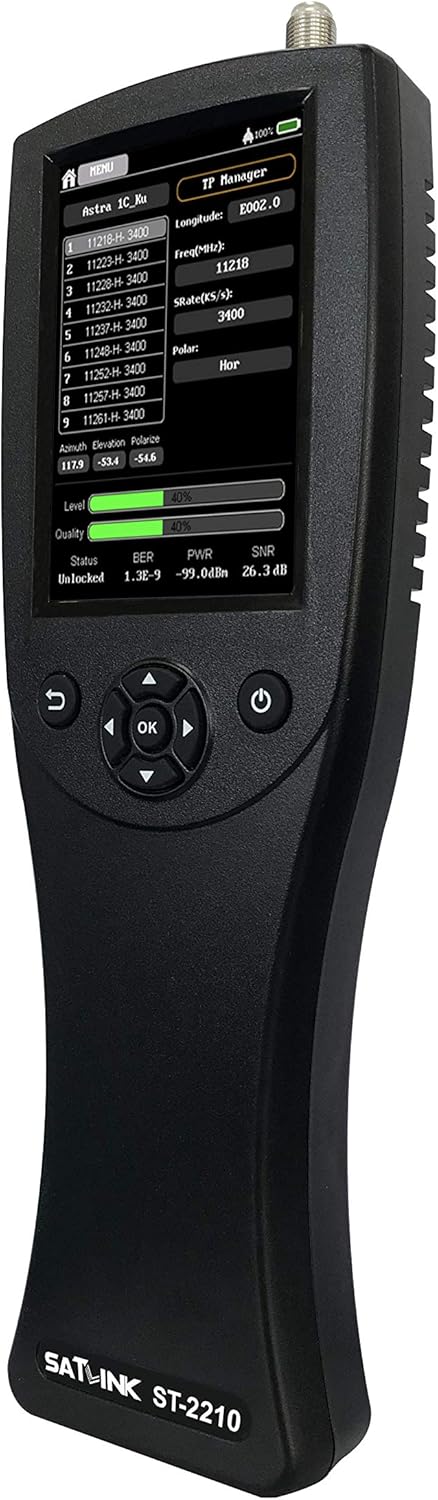
Figure 6: The ST-2210 display showing real-time signal parameters, including Level, Quality, BER, PWR, and SNR, essential for satellite dish alignment.

Figure 7: The ST-2210 displaying a prominent signal level reading in dBm, indicating the strength of the received satellite signal.
3. Spectrum Analyzer Function
The ST-2210 features a high-speed and high-precision real-time spectrum capture function. Access this feature from the main menu to visualize the frequency spectrum of the received signals, aiding in identifying interference or optimizing signal reception.
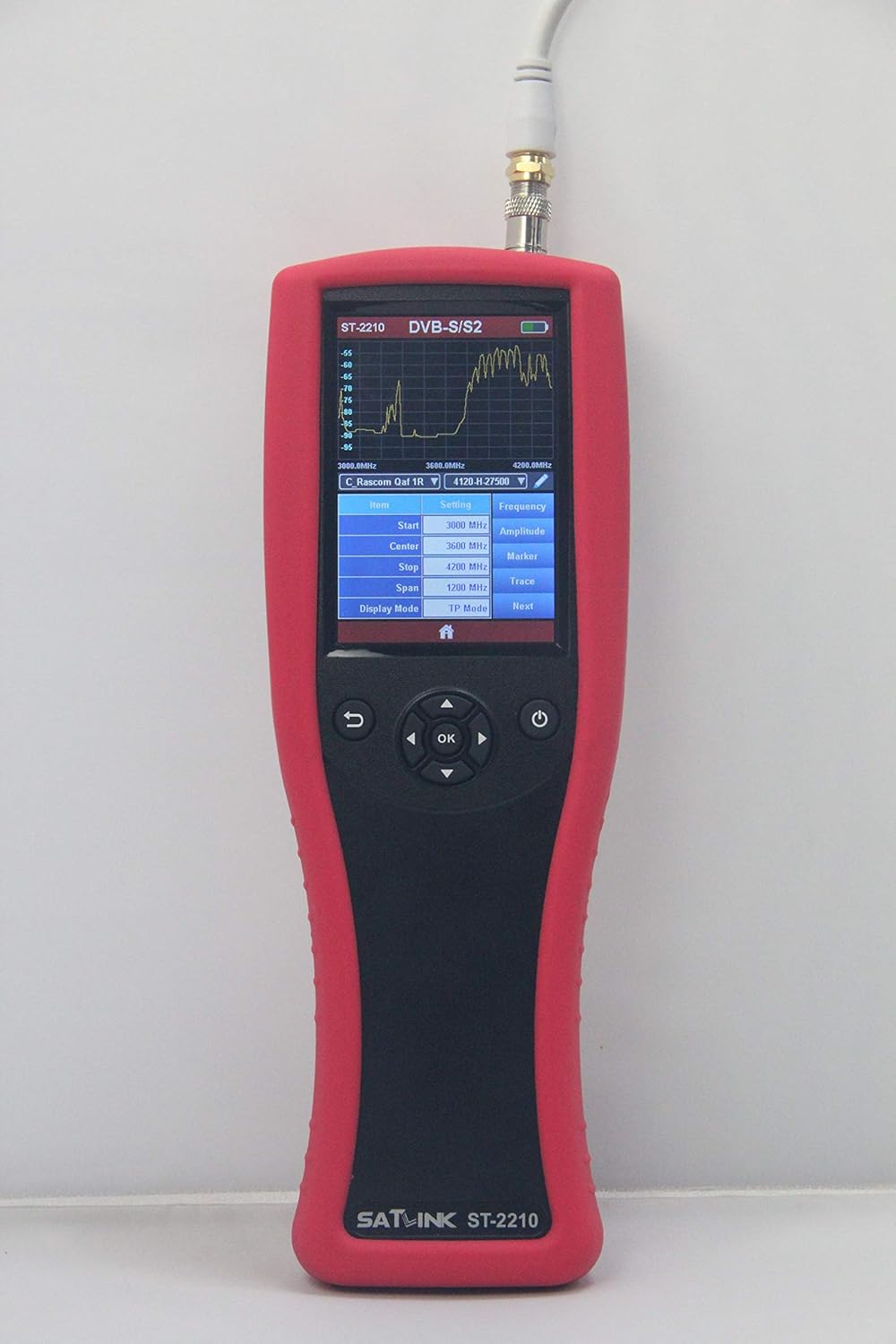
Figure 8: The ST-2210 screen showing the spectrum analyzer, which graphically represents signal strength across different frequencies.
4. Constellation Diagram
Utilize the high-precision constellation diagram feature to visually assess the quality of the demodulated signal. This diagram helps in identifying signal impairments and fine-tuning the dish alignment for optimal performance.
Figure 9: The ST-2210 displaying a constellation diagram, a visual representation of signal modulation quality.
Maintenance
1. Cleaning
To clean the device, use a soft, dry cloth. For stubborn dirt, slightly dampen the cloth with water. Do not use harsh chemicals, solvents, or abrasive cleaners, as these can damage the screen or casing.
2. Software Updates
The ST-2210 supports software upgrades via the included USB cable. Periodically check the manufacturer's website for available firmware updates to ensure optimal performance and access to new features. Follow the instructions provided with the update package carefully.
3. Battery Care
To prolong the life of the Li-Ion battery, avoid fully discharging it frequently. If the device will not be used for an extended period, charge it to approximately 50% and store it in a cool, dry place. Recharge it every few months to prevent deep discharge.
Troubleshooting
No Signal Detected
- Ensure the coaxial cable is securely connected to both the LNB and the ST-2210.
- Check the LNB for proper functionality and power supply from the ST-2210 (12V/18V).
- Verify that the correct satellite and transponder settings are selected in the device menu.
- Confirm that the satellite dish is correctly aimed at the desired satellite.
Low Signal Quality
- Fine-tune the dish alignment (azimuth, elevation, and LNB skew) using the real-time signal quality indicators.
- Check for any obstructions between the dish and the satellite.
- Inspect the coaxial cable and connectors for damage or corrosion.
- Ensure the LNB is functioning correctly and is suitable for the satellite system.
Device Not Powering On
- Ensure the battery is sufficiently charged. Connect the AC adapter and try again.
- Verify that the AC adapter is working and properly connected to a power source.
- If the device still does not power on, contact customer support.
Specifications
| Feature | Specification |
|---|---|
| Transmission Standards | DVB-S/S2-EN300421/EN302307 |
| Connector Type | F Type |
| Input Frequency | 950 to 2150 MHz |
| Signal Input Level | -80 to -10 dBm |
| Band Switch Control | 22KHz |
| LNB Supply | 12V/18V, 0.1V Step, Imax 400mA |
| Demodulation Type | QPSK, 8PSK, 16APSK, 32APSK |
| LCD Type | 4" TFT Capacitive Touch Screen |
| LCD Resolution | 320*480 pixels |
| Data Service Port | USB (USB to RS-232 protocol) |
| Li-Ion Battery | 7.4V/2000mAh |
| Adapter Output | DC12V/1A |
| Power Consumption | Max. 6W (under 18V/300mA) |
| Dimensions (W x D x H) | 210mm x 79mm x 27mm |
| Net Weight | 0.3 kg |
| Connectivity Technology | USB |
| Compatible Devices | Television |
Warranty and Support
For warranty information, please refer to the documentation provided with your purchase or contact your retailer. For technical support, firmware updates, and additional resources, please visit the official Satlink website or contact their customer service department.


