
1. Introduction
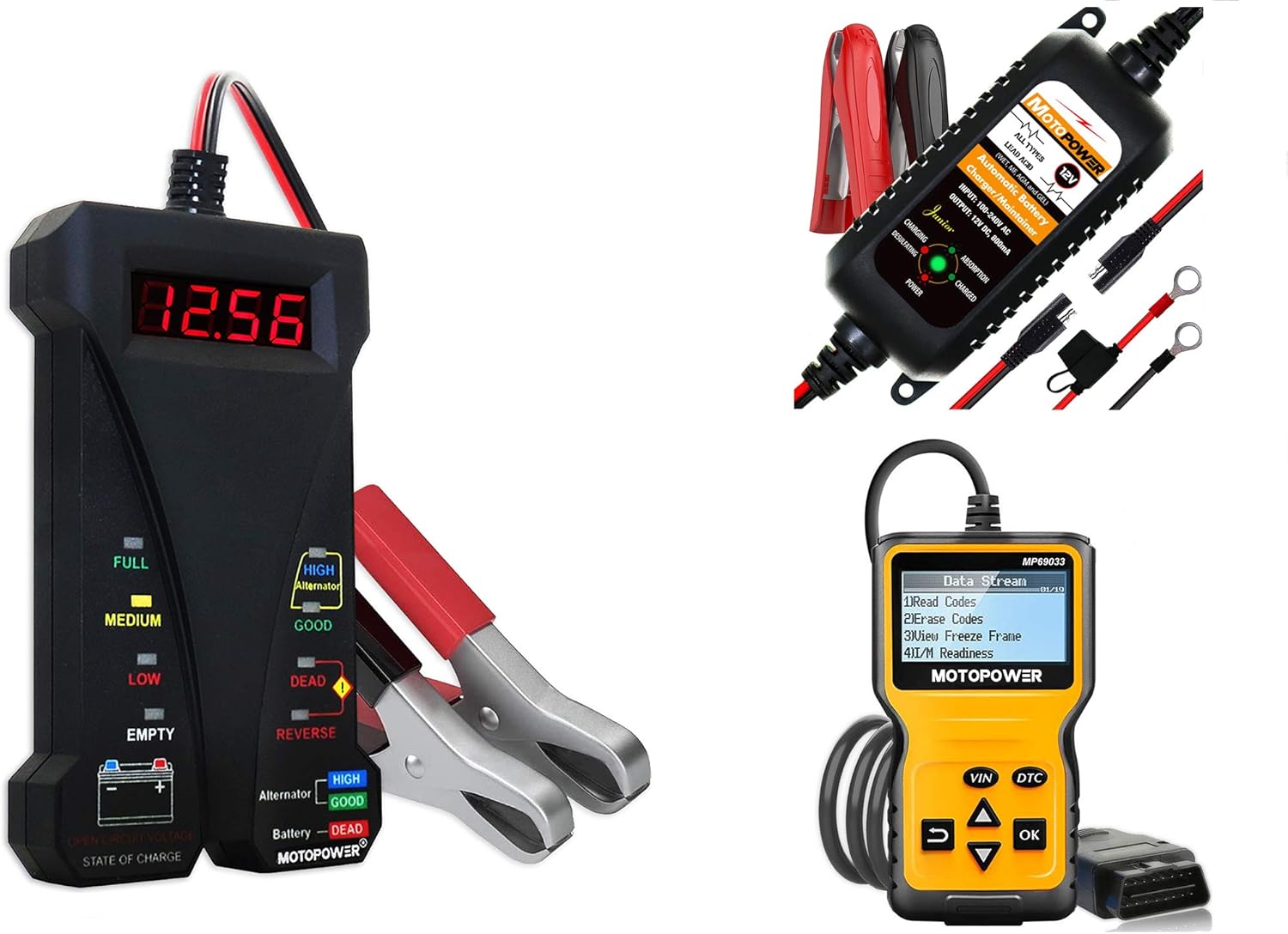
This manual provides comprehensive instructions for the MOTOPOWER MP0514A 12V Battery Tester, MP00205A 12V 800mA Battery Charger/Maintainer, and MP69033 OBD2 Code Reader. These tools are designed to assist in diagnosing and maintaining your vehicle's battery and electrical systems, as well as reading engine diagnostic trouble codes. Please read this manual thoroughly before use to ensure safe and effective operation.
2. Safety Information
Always observe the following safety precautions when working with automotive batteries and electrical systems:
- Wear eye protection and protective clothing.
- Ensure adequate ventilation when working with batteries.
- Avoid sparks, flames, and smoking near batteries.
- Connect positive (+) to positive (+) and negative (-) to negative (-) terminals unless otherwise specified.
- Disconnect the negative terminal first when removing a battery, and connect it last when installing.
- Keep tools and metal objects away from battery terminals to prevent short circuits.
- Refer to your vehicle's owner's manual for specific safety guidelines.
3. Package Contents
Your MOTOPOWER product package includes:
- MOTOPOWER MP0514A 12V Battery Tester
- MOTOPOWER MP00205A 12V 800mA Battery Charger/Maintainer
- MOTOPOWER MP69033 OBD2 Code Reader
- User Manuals for each device (or combined)
4. Product Overview
4.1. MOTOPOWER MP0514A 12V Battery Tester
The MP0514A is a compact digital battery and alternator tester designed for quick and accurate readings. It features a digital LCD screen for voltage display and colored LEDs to indicate battery state of charge and alternator status. It includes reverse-hookup and over-voltage protection for safe operation.
4.2. MOTOPOWER MP00205A 12V 800mA Battery Charger/Maintainer
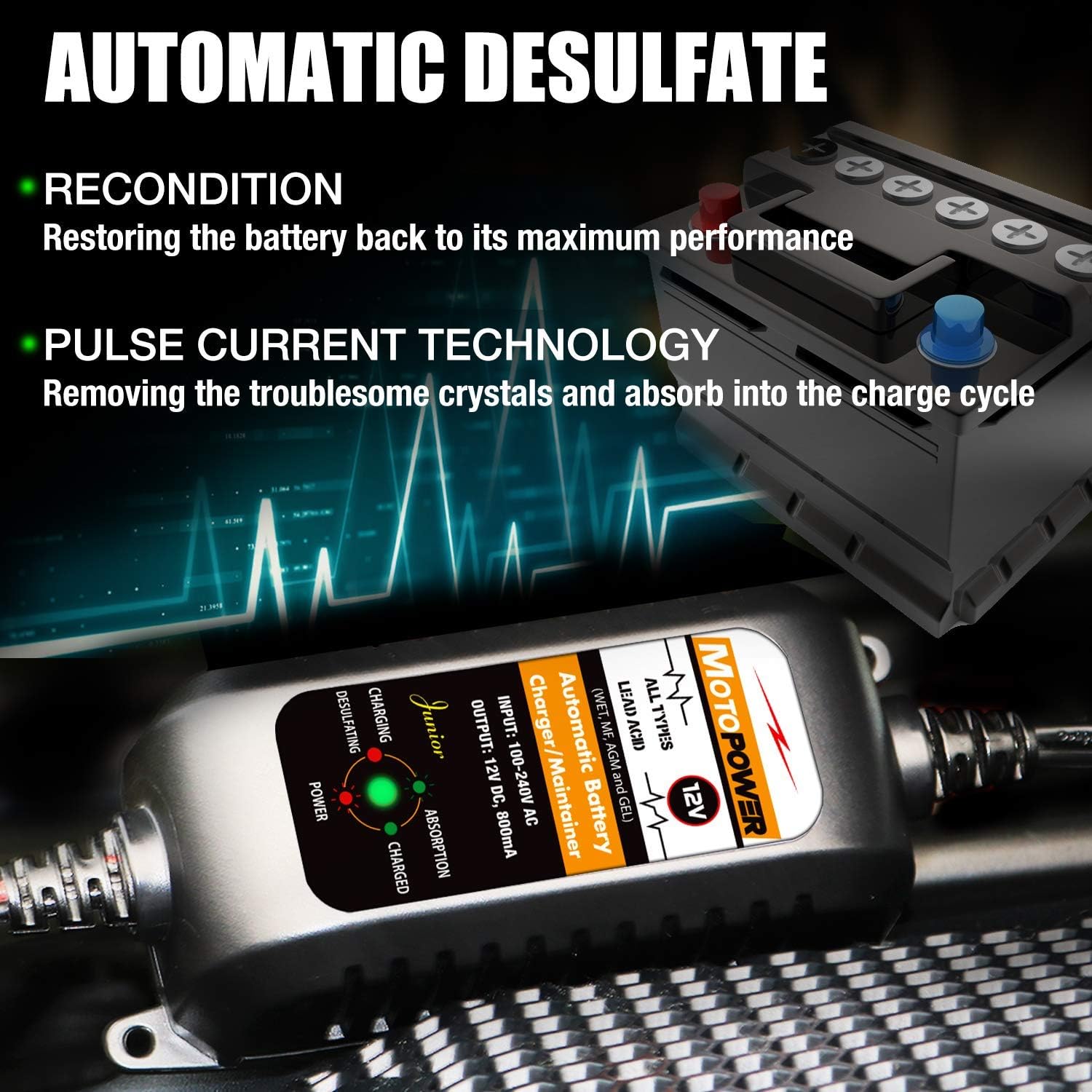
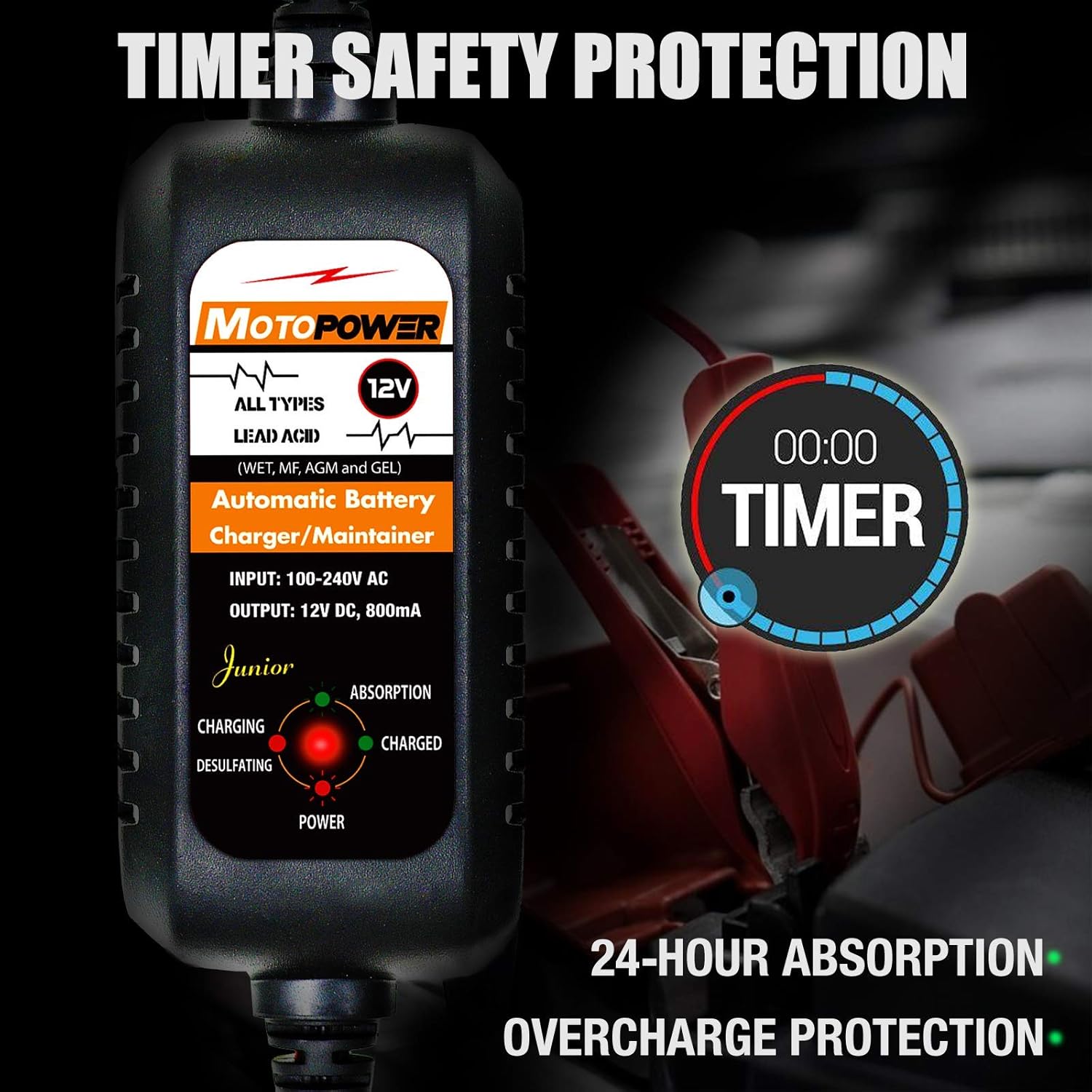
The MP00205A is an automatic battery charger, maintainer, trickle charger, and desulfator. It is suitable for all 12-volt lead-acid, flooded, or sealed maintenance-free batteries (AGM and gel cell). It incorporates multi-level safety protections including overcharge, short circuit, and reverse polarity protection, along with a 24-hour timer for safe maintenance.
4.3. MOTOPOWER MP69033 OBD2 Code Reader
The MP69033 is a multi-function OBD2 code reader that helps diagnose engine light issues. It features a built-in DTC lookup library and can read/erase codes, view freeze frame data, check I/M readiness, and display various vehicle information and real-time data streams.
5. Setup
5.1. MOTOPOWER MP0514A Battery Tester Connection
- Ensure the vehicle engine is off and cool.
- Connect the black clamp to the negative (-) battery terminal.
- Connect the red clamp to the positive (+) battery terminal. The device will power on automatically.
5.2. MOTOPOWER MP00205A Battery Charger/Maintainer Connection
- Ensure the charger is unplugged from the AC outlet.
- Connect the black clamp to the negative (-) battery terminal.
- Connect the red clamp to the positive (+) battery terminal.
- Plug the charger into a standard AC outlet. The charging process will begin automatically.
5.3. MOTOPOWER MP69033 OBD2 Code Reader Connection
- Locate the vehicle's 16-pin Data Link Connector (DLC), usually under the dashboard on the driver's side.
- Ensure the vehicle's ignition is in the 'OFF' position.
- Plug the OBD2 connector of the MP69033 into the vehicle's DLC.
- Turn the vehicle's ignition to the 'ON' position (engine off). The device will power on.
6. Operating Instructions
6.1. MOTOPOWER MP0514A 12V Battery Tester
Once connected, the MP0514A will display the battery voltage on its digital screen. LEDs will indicate the battery's state of charge (Full, Medium, Low, Empty) and alternator status (High, Good, Dead).

Battery State of Charge Test
- Connect the tester to the battery terminals as described in Section 5.1.
- The digital display will show the current voltage (e.g., 12.52V).
- Observe the LEDs on the left side:
- FULL (Green): Battery is fully charged.
- MEDIUM (Yellow): Battery is partially charged.
- LOW (Red): Battery needs charging.
- EMPTY (Red): Battery is deeply discharged or dead.
Alternator Output Test
- With the tester connected, start the vehicle engine.
- Observe the LEDs on the right side (Alternator section):
- HIGH (Yellow): Alternator output is too high.
- GOOD (Green): Alternator is charging correctly.
- DEAD (Red): Alternator is not charging or is faulty.

Reverse Polarity Protection
If the clamps are connected in reverse (red to negative, black to positive), the 'REVERSE' LED will illuminate, indicating an incorrect connection. This feature prevents damage to the tester and battery.
6.2. MOTOPOWER MP00205A 12V 800mA Battery Charger/Maintainer
Once connected and plugged in, the charger will automatically detect the battery type and condition, initiating the appropriate charging mode.

Charging Modes & Indicators
- Desulfating: If the battery is sulfated, the charger may enter a desulfation mode to restore battery performance.
- Charging (Red LED): Indicates the battery is actively being charged.
- Absorption (Yellow LED): The battery is nearing full charge, and the charger is reducing current.
- Charged (Green LED): The battery is fully charged, and the charger has switched to maintenance mode.
Soft Start & Safety Features
- The charger features a soft start function for batteries under 8 volts, applying a 0.5 amp pulse current to activate performance.
- It includes overcharge, short circuit, and reverse polarity protection.
- A 24-hour timer terminates the charge and enters maintaining mode once the voltage is above 14V, ensuring safety and preventing overcharging.
6.3. MOTOPOWER MP69033 OBD2 Code Reader
After connecting the MP69033 to the vehicle's DLC and turning the ignition ON, the device will power up and display the main menu. Use the navigation buttons to select desired functions.

Key Functions
- Read Codes: Displays Diagnostic Trouble Codes (DTCs) and their descriptions.
- Erase Codes: Clears DTCs from the vehicle's computer. This will also turn off the Check Engine Light.
- View Freeze Frame: Shows a snapshot of sensor data when a DTC was set.
- I/M Readiness: Checks if the various emissions-related systems are operating correctly and are ready for inspection.
- Vehicle Information: Retrieves the Vehicle Identification Number (VIN) and other relevant vehicle data.
- Data Flow/Real-time Curve: Displays live sensor data, such as engine RPM, vehicle speed, coolant temperature, and calculated load value.


7. Maintenance
- Keep all devices clean and dry. Wipe with a soft, damp cloth if necessary.
- Store devices in a cool, dry place away from direct sunlight and extreme temperatures.
- Inspect cables and clamps for any signs of damage before each use. Do not use if damaged.
8. Troubleshooting
8.1. MP0514A Battery Tester
- No Display: Ensure clamps are securely connected to the correct battery terminals. Check battery voltage; if below 4V, the device may display 'LO'.
- 'REVERSE' LED On: Disconnect clamps and re-connect with correct polarity (red to positive, black to negative).
- Voltage 'LO' (below 4V) or 'HI' (above 20V): The device is operating outside its measurement range.
8.2. MP00205A Battery Charger/Maintainer
- Not Charging: Ensure proper connection to battery and AC outlet. Check for reverse polarity (charger has protection).
- Battery Not Reaching Full Charge: Battery may be severely sulfated or faulty. The desulfation mode may take time. If unsuccessful, the battery may need replacement.
8.3. MP69033 OBD2 Code Reader
- No Power: Ensure the OBD2 connector is securely plugged into the vehicle's DLC and the ignition is ON. Check vehicle battery voltage.
- Link Error: Verify the ignition is ON. Check for a loose connection. Try the device on another vehicle to rule out a device fault.
9. Specifications
9.1. MOTOPOWER MP0514A 12V Battery Tester
- Voltage Testing Range: 4-20V DC
- Indicators: LED for Battery State of Charge (Full, Medium, Low, Empty), LED for Alternator Status (High, Good, Dead), LED for Reverse Polarity.
- Protection: Reverse-hookup and Over-voltage protection.
9.2. MOTOPOWER MP00205A 12V 800mA Battery Charger/Maintainer
- Input: 100-240V AC
- Output: 12V DC, 800mA
- Battery Types: All 12-volt lead-acid, flooded, sealed maintenance-free batteries (AGM and gel cell).
- Charging Stages: Desulfating, Charging, Absorption, Charged (Maintenance).
- Safety Standards: ETL Listed.
- Protection: Overcharge, short circuit, reverse polarity.
- Special Features: Soft start for low voltage batteries, 24-hour timer for maintenance mode.
9.3. MOTOPOWER MP69033 OBD2 Code Reader
- Display: LCD screen.
- Functions: Read/Erase DTCs, View Freeze Frame, I/M Readiness, Vehicle Info (VIN), Data Stream, Real-time Curve.
- Compatibility: Supports most gasoline vehicles since 1996 (OBD2 compliant).
10. Warranty and Support
MOTOPOWER products typically come with a manufacturer's warranty. Please refer to the product packaging or the official MOTOPOWER website for detailed warranty information and terms. For technical support or service inquiries, please contact MOTOPOWER customer service directly.


