
1. Introduction
This manual provides detailed instructions for the safe installation, operation, and maintenance of your LUTEC Motion Activated Dual-Head Floodlight. Please read this manual thoroughly before installation and retain it for future reference.

Image 1.1: Two LUTEC Motion Activated Dual-Head Floodlight units.
2. Safety Information
- Electrical Safety: Always disconnect power at the circuit breaker before installing, servicing, or replacing any part of this fixture. If you are unsure about electrical wiring, consult a qualified electrician.
- Grounding: Ensure the fixture is properly grounded to prevent electrical shock.
- Bulb Type: Use only PAR38 type bulbs as specified. Exceeding the maximum wattage (150W per head, 300W total) can cause overheating and damage.
- Outdoor Use: This fixture is designed for outdoor use and is waterproof. Ensure all connections are sealed properly to maintain its waterproof rating.
- Heat: Halogen bulbs can become very hot. Allow bulbs to cool completely before handling. Do not touch hot bulbs or fixtures.
3. Package Contents
Verify that all components are present before beginning installation:
- LUTEC Motion Activated Dual-Head Floodlight Unit (2 Packs)
- Mounting Hardware (screws, wire nuts, gasket)
Note: Two 150-Watt medium base PAR38 halogen bulbs are required and are NOT included. This fixture is compatible with PAR38 LED, PAR38 incandescent, PAR38 halogen, and PAR38 dimmable CFL bulbs.
4. Product Features
- Motion-Activated Sensor: Detects motion up to 0-33 feet away with a wide 110-degree sensing angle.
- Adjustable Timer: Set the light duration for 1, 3, or 10 minutes after motion detection ceases.
- Manual Override: Allows the light to remain on constantly for a selected period.
- Adjustable Dual Light Heads: Provides customizable coverage area with 360° adjustability.
- Durable Construction: Made from Polycarbonate material.
- Weather Resistant: Waterproof design suitable for outdoor environments.
- Power: Operates on 120 Volts, with a maximum total wattage of 300 watts (150W per head).
- Brightness: Up to 5200 lumens (with appropriate bulbs).
5. Installation Instructions
This floodlight is designed for wall-mount installation. Follow these steps carefully:
- Prepare for Installation: Turn off power at the circuit breaker before starting. Ensure the mounting surface is secure and can support the fixture.
- Mount the Fixture: Secure the mounting bracket to the wall using the provided hardware. Connect the electrical wires (white to white, black to black, and ground wire) using wire nuts. Carefully tuck the wires into the junction box.
- Attach the Fixture: Align the fixture with the mounting bracket and secure it with the provided screws. Ensure a tight seal to maintain waterproof integrity.
- Install Bulbs: Screw in two PAR38 bulbs (not included) into the light heads. Do not overtighten.
- Adjust Light Heads: Loosen the adjustment knobs on the light heads to position them as desired, then tighten the knobs to secure them.
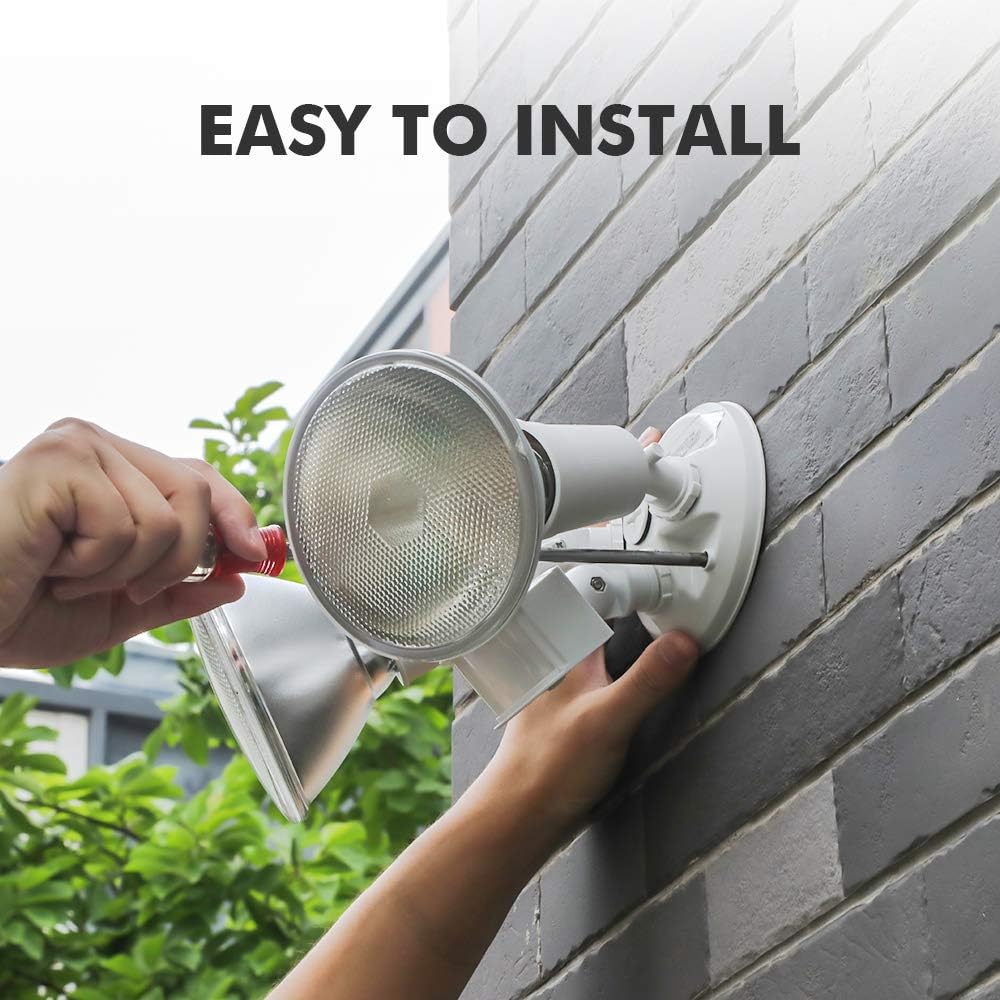
Image 5.1: The floodlight is designed for easy wall-mount installation.

Image 5.2: The dual light heads can be adjusted 360 degrees for optimal coverage.
6. Operating Instructions
After installation, restore power to the fixture. The floodlight features a motion sensor and adjustable settings.
6.1 Motion Sensor Settings
The motion sensor has a 110-degree sensing angle and can detect motion up to 33 feet away. Adjust the sensor's position to cover the desired area.
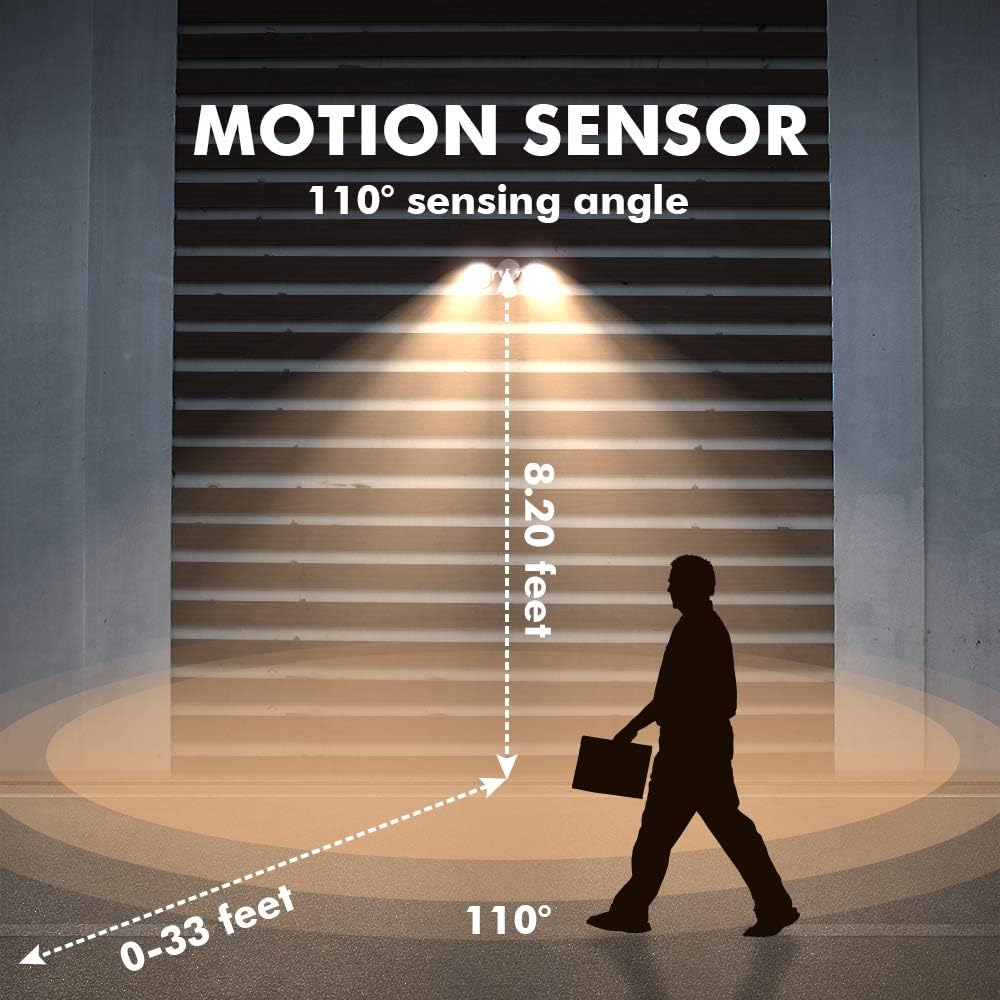
Image 6.1: Motion sensor detection range and angle.
6.2 Adjustable Timer
The adjustable timer controls how long the light remains on after motion is detected. Use the switch on the sensor to select the desired duration:
- 1 MIN: Light stays on for 1 minute.
- 3 MIN: Light stays on for 3 minutes.
- 10 MIN: Light stays on for 10 minutes.
- TEST: For initial setup and testing of the motion sensor's range and coverage.
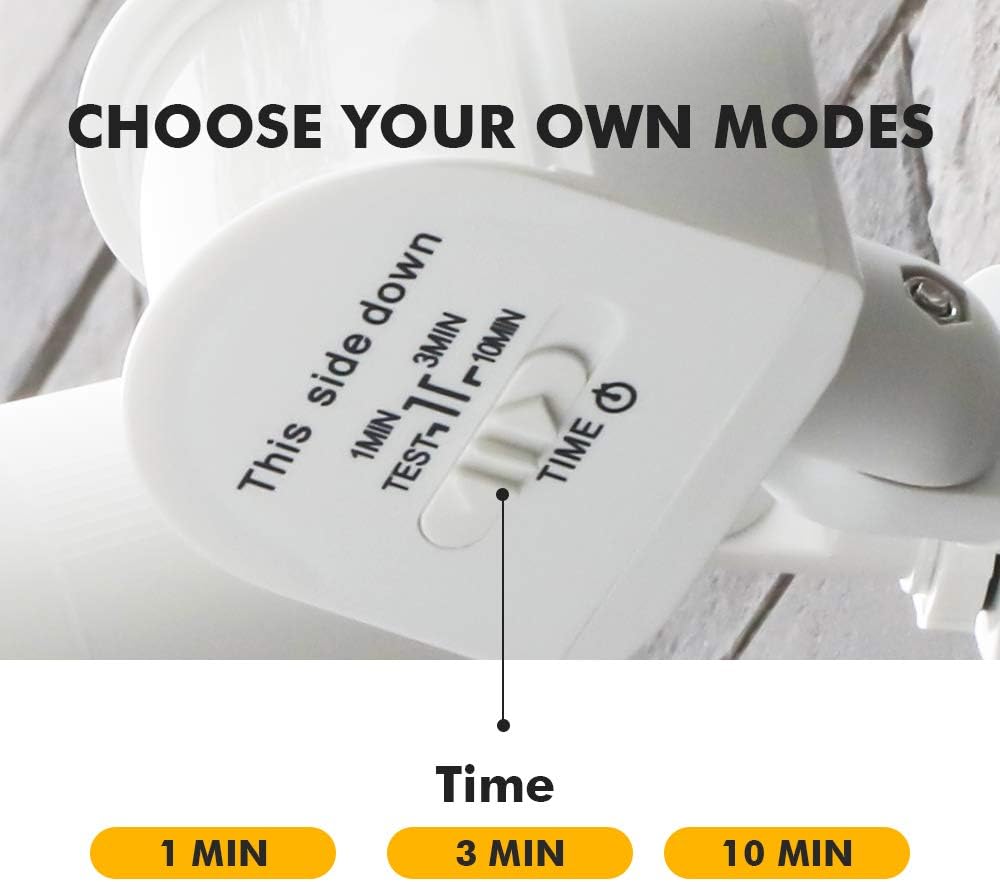
Image 6.2: Timer settings on the motion sensor.
6.3 Manual Override
The manual override option allows the light to be stayed on constantly for a selected period of time, bypassing the motion sensor. Refer to the specific instructions provided with your unit for activating and deactivating this feature, as it typically involves a sequence of turning the power switch on and off.
7. Maintenance
7.1 Bulb Replacement
To replace bulbs:
- Turn off power at the circuit breaker.
- Allow bulbs to cool completely.
- Carefully unscrew the old PAR38 bulbs.
- Screw in new PAR38 bulbs (LED, incandescent, halogen, or dimmable CFL) of up to 150W each.
- Restore power.
7.2 Cleaning
Clean the fixture and sensor lens periodically with a soft, damp cloth. Do not use abrasive cleaners or solvents, as they may damage the finish or sensor functionality.
8. Troubleshooting
- Light does not turn on: Check power supply at the circuit breaker. Ensure bulbs are correctly installed and not burnt out. Verify sensor settings are not in 'TEST' mode or set to a very short duration.
- Light stays on constantly: Check if the manual override feature is activated. Ensure the timer setting is appropriate and not stuck.
- Sensor not detecting motion: Adjust the sensor's angle and range settings. Ensure there are no obstructions blocking the sensor's view. Clean the sensor lens if dirty.
- Light flickers: Check bulb connections. Ensure the correct bulb type and wattage are used.
9. Specifications
| Brand | LUTEC |
| Model Number | amzn.gr.7636002331-AUkocUf58lHI8849fp-LN |
| Color | White |
| Material | Polycarbonate |
| Light Fixture Form | Floodlight |
| Product Dimensions | 7.08"L x 5.31"W x 5.86"H |
| Indoor/Outdoor Usage | Outdoor |
| Power Source | Corded Electric |
| Installation Type | Wall Mount |
| Special Feature | Motion Sensor, Waterproof |
| Light Source Type | Halogen, LED (PAR38 compatible) |
| Number of Light Sources | 2 |
| Voltage | 120 Volts |
| Wattage | 300 watts (total) |
| Bulb Base | E26 (Medium Base) |
| Water Resistance Level | Waterproof |
| Brightness | 5200 lumen (with appropriate bulbs) |
| Item Weight | 1 pounds |
10. Warranty and Support
LUTEC provides quality assurance and offers 7*24h after-sales service. If any issues arise with your product, please contact LUTEC customer support for assistance.


