Introduction
Thank you for choosing TUINYO Bluetooth Headphones. This manual provides essential information for setting up, operating, and maintaining your new headphones. Designed for superior immersive HIFI sound quality and lasting comfort, these headphones offer versatile connectivity and long battery life for an enhanced audio experience.
What's in the Box
- TUINYO Bluetooth Headphones (Model: TP 19)
- 3.5mm Audio Cable
- USB Charging Cable
- Protective Case
- User Manual
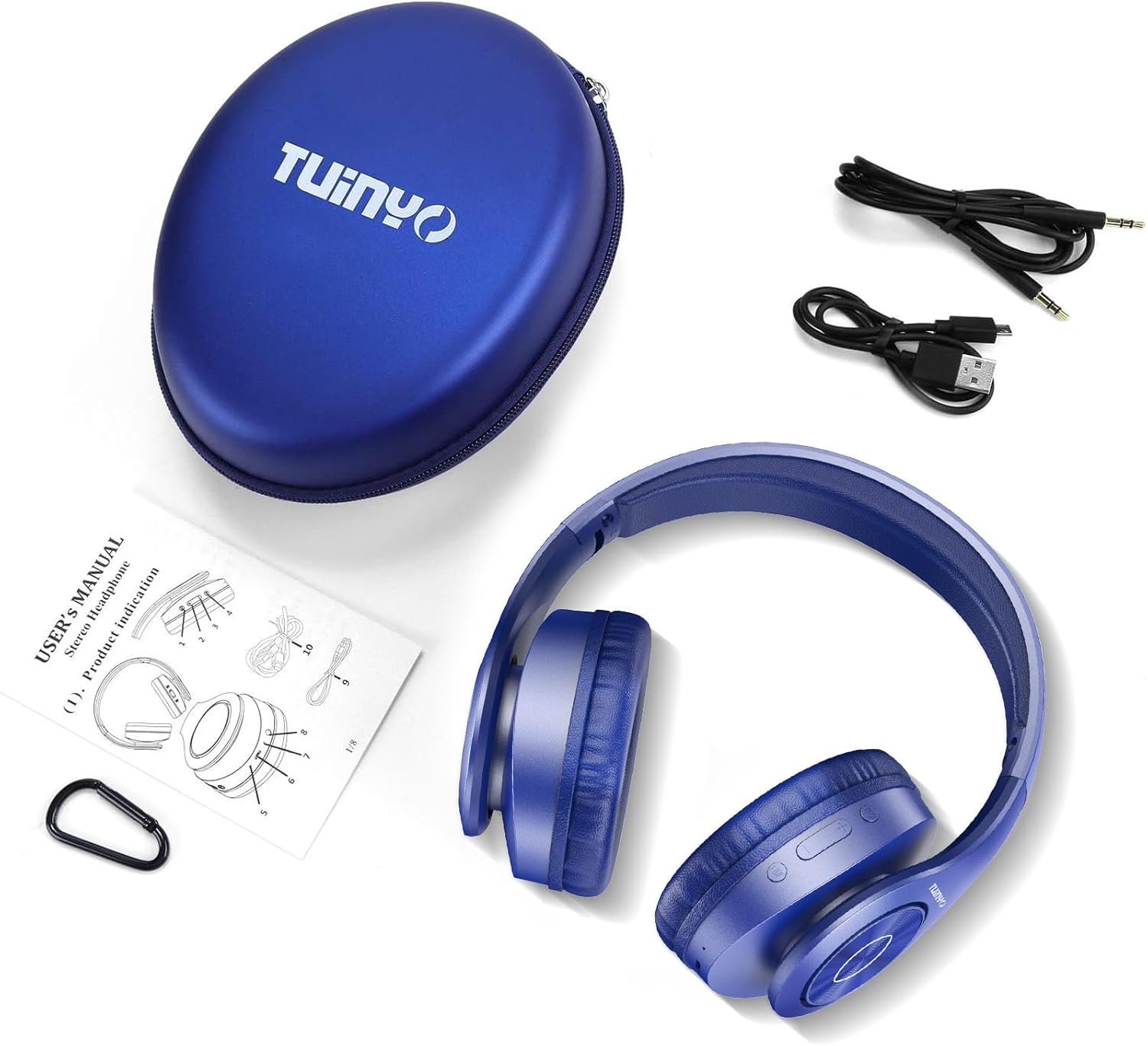
Figure 1: Included accessories with the TUINYO TP 19 headphones.
Product Overview
The TUINYO TP 19 headphones feature a robust yet comfortable design, with intuitive controls for seamless audio management.

Figure 2: Front view of the TUINYO TP 19 headphones, showcasing the over-ear design and metallic accents.

Figure 3: Side view highlighting the control buttons (power, volume, multi-function) and ports on the earcup.

Figure 4: Detail of the soft memory-protein earmuffs, designed for extended comfort.
Video 1: An overview of the TUINYO Bluetooth Wireless Headphones, demonstrating key features and design.
Setup
1. Charging the Headphones
Before first use, fully charge your headphones. Connect the provided USB charging cable to the charging port on the headphone earcup and the other end to a USB power source (e.g., computer, wall adapter). The LED indicator will show charging status and turn off when fully charged. A full charge takes approximately 2-2.5 hours and provides up to 40 hours of music playtime.
2. Powering On/Off
- Power On: Long press the Power button on the earcup until the LED indicator lights up.
- Power Off: Long press the Power button again until the LED indicator turns off.
3. Bluetooth Pairing
- Ensure the headphones are powered off.
- Long press the Power button until the LED indicator flashes blue and red alternately, indicating pairing mode.
- On your device (smartphone, tablet, laptop), enable Bluetooth and search for available devices.
- Select "TP 19" from the list of devices.
- Once connected, the LED indicator will turn solid blue or flash blue slowly.
Note: The headphones are compatible with all Bluetooth-enabled devices. For TVs without built-in Bluetooth, a Bluetooth transmitter is required.
4. Wired Mode Connection
If the battery is depleted or you prefer a wired connection, use the provided 3.5mm audio cable. Plug one end into the headphone's 3.5mm jack and the other end into your audio device's 3.5mm port. The headphones will automatically switch to wired mode.
Operating Instructions
Music Playback
- Play/Pause: Press the Multi-function button once.
- Next Track: Long press the '+' (Volume Up) button.
- Previous Track: Long press the '-' (Volume Down) button.
- Volume Up: Short press the '+' (Volume Up) button.
- Volume Down: Short press the '-' (Volume Down) button.
Call Management
- Answer/End Call: Press the Multi-function button once.
- Reject Call: Long press the Multi-function button.
- Redial Last Number: Double press the Multi-function button.
Voice Assistant
Press the Voice Control button (often labeled 'M' or a microphone icon) to activate your device's voice assistant (e.g., Siri, Google Assistant). This allows for quick access to information and hands-free control depending on your device's operating system.
Maintenance
- Cleaning: Use a soft, dry cloth to clean the headphones. Do not use harsh chemicals or abrasive materials.
- Storage: When not in use, store the headphones in their protective case to prevent damage. Avoid exposing them to extreme temperatures or humidity.
- Battery Care: To prolong battery life, avoid fully discharging the headphones frequently. Charge them regularly, even if not in constant use.
Troubleshooting
| Problem | Solution |
|---|---|
| Headphones won't turn on. | Ensure the headphones are fully charged. |
| Cannot pair with device. |
|
| No sound in Bluetooth mode. |
|
| Sound distortion. |
|
Specifications
| Feature | Detail |
|---|---|
| Model Name | TP 19 |
| Connectivity Technology | Bluetooth, Wired (3.5mm Jack) |
| Wireless Communication Technology | Bluetooth 5.1 |
| Bluetooth Range | Up to 15 Meters |
| Audio Driver Size | 40 Millimeters |
| Frequency Response | 20 Hz - 20,000 Hz |
| Impedance | 32 Ohm |
| Battery Life | Up to 40 Hours (Music Playtime) |
| Charging Time | 2-2.5 Hours |
| Battery Capacity | 800mAh Lithium Polymer |
| Earpiece Shape | Over Ear |
| Material | Stainless Steel, Leather |
| Item Weight | 259 Grams (9.1 ounces) |
| Product Dimensions | 7.09 x 6.3 x 3.54 inches |
| Control Type | Voice Control, Touch |
Warranty & Support
TUINYO headphones come with a one-year warranty from the date of purchase. We also offer a 30-day hassle-free return policy. For any product-related inquiries, technical support, or warranty claims, please contact our customer service team. We provide 24/7 prompt and friendly customer service.
For further assistance, please visit the TUINYO Store on Amazon or refer to the official User Manual (PDF) available for download.


