
1. Introduction
Thank you for choosing the HOCO E52 Euphony Wireless Bluetooth Audio Receiver. This manual provides essential information for the safe and efficient use of your device. Please read it thoroughly before operation and retain it for future reference.
2. Product Overview
The HOCO E52 is a compact wireless Bluetooth audio receiver designed to convert wired audio devices into Bluetooth-enabled ones. It features an integrated microphone for hands-free calls and comes with a pair of in-ear earphones.

Figure 2.1: HOCO E52 Euphony Wireless Bluetooth Audio Receiver with included earphones.
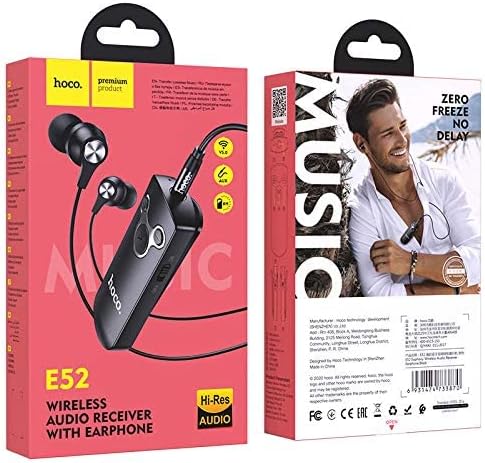
Figure 2.2: Detailed view of the HOCO E52 receiver, highlighting the control buttons and power switch.
3. Package Contents
Ensure all items are present in the package:
- HOCO E52 Wireless Bluetooth Audio Receiver
- In-ear Earphones
- Charging Cable
- Ear Cushions (various sizes)
- Protective Case
- User Manual (this document)
4. Setup
4.1 Charging the Device
Before first use, fully charge the HOCO E52 receiver. Connect the provided charging cable to the micro-USB port on the receiver and the other end to a USB power source (e.g., computer USB port, wall adapter). The indicator light will show charging status and turn off or change color when fully charged.
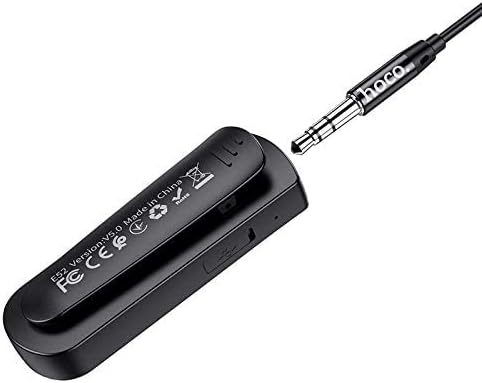
Figure 4.1: Rear view of the HOCO E52 receiver, illustrating the clip and the micro-USB charging port.
4.2 Bluetooth Pairing
- Power On: Slide the power switch to the 'ON' position. The indicator light will flash, indicating it is in pairing mode.
- Activate Bluetooth: On your smartphone or other Bluetooth-enabled device, go to the Bluetooth settings and ensure Bluetooth is turned on.
- Select Device: Look for 'HOCO E52' (or similar) in the list of available devices and select it to connect.
- Confirmation: Once successfully paired, the indicator light on the E52 will stop flashing and remain solid, or flash slowly. A voice prompt may also confirm the connection.
- Connect Earphones: Plug the included earphones (or your own 3.5mm wired headphones) into the 3.5mm audio jack on the HOCO E52 receiver.
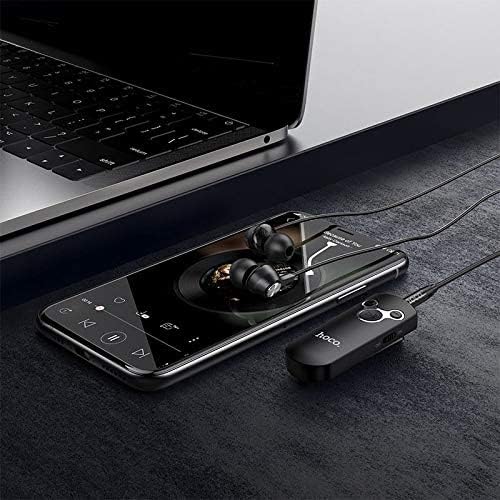
Figure 4.2: The HOCO E52 receiver connected to a smartphone, demonstrating its use with a media device.
5. Operating Instructions
5.1 Power On/Off
- Power On: Slide the 'ON/OFF' switch to the 'ON' position.
- Power Off: Slide the 'ON/OFF' switch to the 'OFF' position.
5.2 Music Playback
- Play/Pause: Press the central Play/Pause button once.
- Next Track: Press and hold the Volume Up (+) button.
- Previous Track: Press and hold the Volume Down (-) button.
5.3 Call Management
With the built-in microphone, you can manage calls directly from the receiver.
- Answer/End Call: Press the central Play/Pause button once during an incoming call to answer, or during an active call to end.
- Reject Call: Press and hold the central Play/Pause button for 2 seconds during an incoming call.
- Redial Last Number: Double-press the central Play/Pause button.
5.4 Volume Control
- Increase Volume: Press the Volume Up (+) button.
- Decrease Volume: Press the Volume Down (-) button.
6. Maintenance
- Keep the device dry. Avoid exposure to moisture or liquids.
- Clean the device with a soft, dry cloth. Do not use harsh chemicals or abrasive cleaners.
- Store the device in a cool, dry place when not in use.
- Avoid extreme temperatures, as this can shorten the lifespan of electronic components.
- Do not attempt to disassemble or modify the device, as this will void the warranty and may cause damage.
7. Troubleshooting
| Problem | Possible Cause | Solution |
|---|---|---|
| Device does not power on | Low battery | Charge the device fully. |
| Cannot pair with device | Bluetooth not enabled on source device; E52 not in pairing mode; too far apart | Ensure Bluetooth is on. Power cycle E52 to enter pairing mode. Keep devices within 10 meters. |
| No sound | Volume too low; earphones not connected properly; incorrect audio output selected on source device | Increase volume on E52 and source device. Re-plug earphones. Check audio output settings on your phone/computer. |
| Short battery life | Device not fully charged; high volume usage | Ensure full charge. Reduce volume if possible. |
8. Specifications
- Model: E52
- Bluetooth Version: 5.0
- Connectivity Technology: Wireless (Bluetooth)
- Music & Talk Time: Approximately 6 hours
- Microphone: Integrated
- Headphones Form Factor: In Ear
- Color: Black
- Package Dimensions: 18.2 x 10.8 x 3.2 cm
- Item Weight: 72 g
- Manufacturer: HOCO
9. Safety Information
- Do not expose the device to extreme temperatures, direct sunlight, or fire.
- Avoid dropping or subjecting the device to strong impacts.
- Keep out of reach of children.
- Dispose of the device and its battery responsibly according to local regulations.
- Do not use the device while driving or in situations where your attention is critical.
10. Warranty and Support
For warranty information and customer support, please refer to the documentation provided at the point of purchase or contact your retailer. HOCO products typically come with a limited warranty against manufacturing defects.