
1. Introduction
This manual provides detailed instructions for the operation and maintenance of your POMIACAM IV8W 5-inch 4-in-1 CCTV Tester. This portable device is designed to assist with the installation, testing, and maintenance of various analog and high-definition coaxial camera systems, including AHD, TVI, CVI, and CVBS, supporting resolutions up to 8MP. It also features UTP cable testing, RS485 PTZ control, VGA/HDMI input, and a DC12V power output for cameras.
2. Product Overview
2.1 Key Features
- 5-inch high-resolution display (800x480) for clear video monitoring.
- Supports 8MP AHD, 8MP TVI, 8MP CVI, and CVBS camera testing.
- Integrated UTP cable test function.
- RS485 PTZ controller for camera pan, tilt, and zoom adjustments.
- VGA and HDMI input for use as an external monitor.
- DC 12V power output (1A) to power cameras directly from the tester.
- Built-in rechargeable Lithium-Ion battery for portable use.
- Durable design with rubber protection on both sides.
2.2 Package Contents
The standard package includes the POMIACAM IV8W tester, a power adapter, various test cables (BNC, power), a UTP cable tester, and a neck strap for convenient carrying during fieldwork.

Image: POMIACAM IV8W CCTV Tester and its accessories, including power adapter, various cables, and a neck strap.
2.3 Device Layout and Ports

Image: Top and bottom views of the POMIACAM IV8W tester, highlighting ports such as RJ45, USB, DC12V output, Audio input/output, VGA input, HDMI input, and RS485 terminals.
- Top Panel: DV12V Output, USB Port, Audio Input, Audio Output, LED Lamp.
- Bottom Panel: RJ45 Port, VGA Input, HDMI Input, USB Charge Port, RS485 Terminals.
3. Setup
3.1 Charging the Device
Before first use, fully charge the built-in Lithium-Ion battery. Connect the provided power adapter to the USB Charge port on the device and plug it into a power outlet. The charging indicator will show the charging status. For optimal battery life, charge the device for at least 8 hours if it has been unused for an extended period.
3.2 Initial Power On
Press and hold the power button (usually located on the side or top panel) until the screen illuminates. The device will boot up and display the main interface.
4. Operating Instructions
4.1 Connecting and Testing Cameras (AHD, TVI, CVI, CVBS)
The IV8W tester supports various coaxial HD camera types. Ensure you select the correct mode for the camera you are testing.
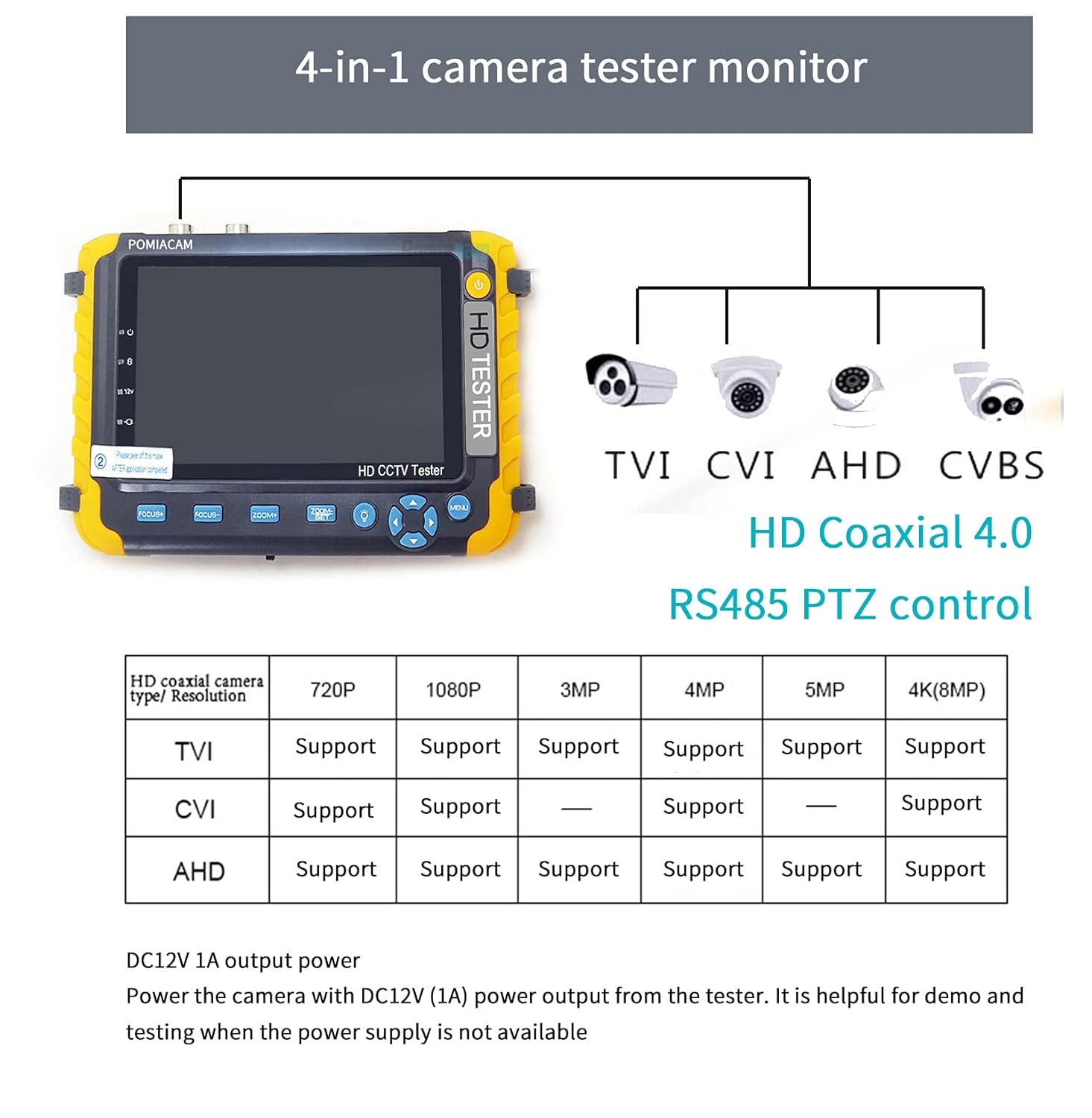
Image: Diagram illustrating the 4-in-1 capability of the tester, supporting TVI, CVI, AHD, and CVBS camera types with various resolutions.
- Connect the coaxial cable from your camera to the BNC input port on the tester.
- If the camera requires power, use the DC 12V output from the tester to power it.
- Press the MENU button on the tester to navigate to the mode selection.
- Select the appropriate camera type (AHD, TVI, CVI, or CVBS) that matches your connected camera.
- The camera's video feed should now be displayed on the tester's screen.
4.2 PTZ Control (RS485)
The tester can control PTZ cameras using the RS485 interface.

Image: Diagram illustrating the PTZ control feature via RS485, showing icons for camera movement and zoom/focus adjustments.
- Connect the RS485 wires from the PTZ camera to the RS485 terminals on the tester.
- Access the PTZ control menu on the tester.
- Use the directional buttons and zoom/focus controls on the tester to manipulate the PTZ camera. The tester supports Pelco-D and Pelco-P protocols.
4.3 UTP Cable Test
The device includes a function to test UTP (Unshielded Twisted Pair) cables for continuity and wiring faults. Refer to the on-screen instructions within the UTP test mode for detailed steps.
4.4 VGA and HDMI Input
The IV8W can function as a display monitor for devices with VGA or HDMI output.
- Connect the VGA or HDMI cable from your source device (e.g., DVR, NVR, PC) to the corresponding input port on the tester.
- Use the VGA/HDMI switch button to select the desired input source.
- The video signal from your source device will be displayed on the tester's screen.
4.5 DC 12V Power Output
The tester provides a DC 12V (1A) power output, useful for powering cameras in locations where an independent power supply is unavailable.
- Connect the camera's power input to the DC 12V output port on the tester using an appropriate power cable.
- Ensure the camera's power requirements do not exceed 1A.
5. Maintenance
5.1 Battery Care
To prolong battery life, avoid fully discharging the battery frequently. If the device will not be used for an extended period, ensure it is charged periodically (e.g., every 3 months) to prevent deep discharge and potential damage.
5.2 Screen Protection
The 5-inch display screen is protected by a film. It is recommended to keep this film on for added protection. The device also features rubber protections on both sides to guard against impacts in various environments.
5.3 Cleaning
Use a soft, dry cloth to clean the device. Do not use liquid cleaners or abrasive materials, as they may damage the screen or casing.
6. Troubleshooting
6.1 Common Issues and Solutions
- Issue: The tester does not display video from an IP camera.
Solution: This tester does not support IP cameras. It is designed for analog (CVBS) and coaxial HD (AHD, TVI, CVI) cameras only. - Issue: No picture or flickering picture when testing an AHD/TVI/CVI camera.
Solution: Ensure the correct camera mode (AHD, TVI, or CVI) is selected on the tester. Press the MENU button to switch between different modes until the correct signal is recognized. - Issue: The tester cannot be turned on after prolonged non-use.
Solution: The built-in battery may have entered a low-power protection state. Connect the charger and charge the device for at least 8 hours. - Issue: HDMI input is not recognized.
Solution: If using HDMI as a display input, ensure it is connected to an NVR or DVR with an HDMI output signal. If using the tester's HDMI as an output, ensure it is connected to a compatible display or TV.
7. Specifications

Image: Product dimensions of the POMIACAM IV8W tester, showing approximate measurements of 10.2 inches (length), 4.3 inches (width), and 1.4 inches (thickness).
| Feature | Detail |
|---|---|
| Model Number | IV8W |
| Display | 5-inch, 800x480 resolution |
| Supported Camera Types | AHD (up to 8MP), TVI (up to 8MP), CVI (up to 8MP), CVBS |
| Video Inputs | BNC (Coaxial), VGA, HDMI |
| Other Functions | RS485 PTZ Control, UTP Cable Test, DC 12V (1A) Output |
| Power Source | Built-in Lithium Ion Battery (included), USB Charge |
| Product Dimensions | 6.69 x 1.18 x 4.33 inches (17 x 3 x 11 cm) |
| Weight | 1.74 Pounds (0.79 kg) |
8. Warranty and Support
8.1 Warranty Information
POMIACAM provides a 45-day free return service and a 1-year warranty for this product. Please retain your proof of purchase for warranty claims.
8.2 Customer Support
For any questions or issues regarding your CCTV tester, please contact POMIACAM customer support. Online assistance is available to help resolve problems. In cases of screen damage, free screen replacements may be provided upon contacting support.

