
NBS C71KW
User Manual
AT&T TV Now DirecTV Receiver Remote Control Voice Remote Control C71KW Black
1. Introduction and Overview
This manual provides comprehensive instructions for the AT&T TV Now DirecTV Receiver Remote Control, Model C71KW. This voice-enabled remote allows you to seamlessly access your entertainment, change channels, and control compatible smart home devices. Its intuitive design and voice recognition capabilities enhance your viewing experience.

Figure 1: Front view of the AT&T TV Now DirecTV Voice Remote Control.
2. Product Features
- Voice Control: Utilize voice commands for channel changes, content search, and smart home integration.
- Universal Compatibility: Designed for AT&T TV Now and DirecTV receivers, with programmable functions for controlling your television.
- Ergonomic Design: Comfortable to hold and easy to navigate with clearly labeled buttons.
- Color: Black finish.
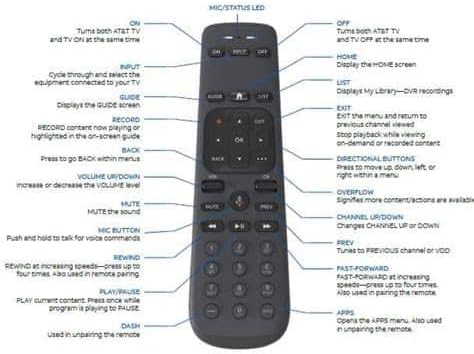
Figure 2: Detailed diagram of the remote control with button functions.
3. Setup
3.1. Battery Installation
- Locate the battery compartment on the back of the remote control.
- Slide the battery cover downwards to open.
- Insert two (2) AA batteries, ensuring correct polarity (+ and -) as indicated inside the compartment.
- Slide the battery cover back into place until it clicks securely.
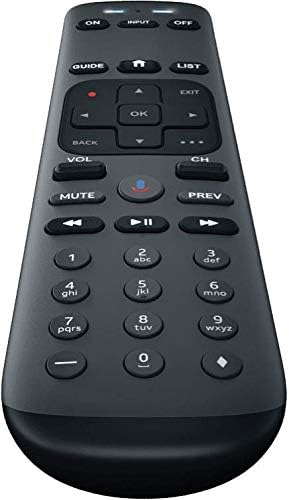
Figure 3: Side view of the remote, showing its ergonomic shape.
3.2. Pairing the Remote Control
To ensure full functionality, your remote control must be paired with your AT&T TV Now or DirecTV receiver and optionally with your television for volume and power control.
- Ensure your receiver and TV are powered on.
- Point the remote at your receiver.
- Press and hold the MUTE and ENTER buttons simultaneously until the LED light at the top of the remote blinks twice.
- Follow the on-screen prompts on your TV to complete the pairing process. This may involve entering a code or confirming the pairing.
- For TV control (volume, power), navigate to the remote control settings within your receiver's menu and follow the instructions to program your TV.
4. Operating Instructions
Familiarize yourself with the remote's buttons for optimal use:
| Button | Function |
|---|---|
| ON / OFF | Turns both AT&T TV and TV ON/OFF at the same time. |
| INPUT | Cycles through and selects the equipment connected to your TV. |
| GUIDE | Displays the GUIDE screen. |
| HOME (House icon) | Displays the Home screen. |
| LIST | Displays My Library—DVR recordings. |
| RECORD (Red dot) | Records content now playing or highlights on-screen guide. |
| Directional Buttons (Up, Down, Left, Right) | Moves up, down, left, or right within a menu. |
| OK | Confirms selections. |
| EXIT | Exits the menu and returns to previous channel viewed. Stops playback while viewing on-demand or recorded content. |
| BACK | Press to go back within menus. |
| VOL (Volume Up/Down) | Increases or decreases the volume level. |
| CH (Channel Up/Down) | Changes channel UP or DOWN. |
| MUTE | Mutes the sound. |
| PREV | Tunes to the previous channel or VOD. |
| MIC Button (Voice Control) | Push and hold to talk for voice commands. |
| REWIND | Rewinds at increasing speeds—press up to four times. Also used in remote pairing. |
| PLAY/PAUSE | Plays current content. Press once while program is playing to PAUSE. |
| FAST-FORWARD | Fast-forwards at increasing speeds—press up to four times. Also used in remote pairing. |
| Number Pad (0-9) | Direct channel entry. |
| DASH (-) | Used in unpairing the remote. |
| APPS | Opens the APPS menu. Also used in unpairing the remote. |
| OVERFLOW (...) | Signifies more content/actions are available. |
5. Maintenance
Proper care will extend the life of your remote control.
- Cleaning: Use a soft, dry cloth to wipe the remote. Do not use liquid cleaners or abrasive materials.
- Battery Replacement: Replace batteries when the remote's response becomes sluggish or the LED indicator does not light up. Always replace both batteries with new AA alkaline batteries.
- Storage: Store the remote in a cool, dry place away from direct sunlight and extreme temperatures.
6. Troubleshooting
| Problem | Solution |
|---|---|
| Remote not responding. | Check battery orientation and charge. Replace batteries if necessary. Ensure there are no obstructions between the remote and the receiver/TV. Re-pair the remote if it has become unpaired. |
| Voice control not working. | Ensure the remote is properly paired. Confirm that the application or interface you are using supports voice commands. Speak clearly and hold the MIC button while speaking. |
| Remote not controlling TV volume/power. | Ensure the remote is programmed for your specific TV model. Refer to your receiver's settings menu for TV programming instructions. |
| Buttons feel sticky or unresponsive. | Clean the remote surface with a soft, dry cloth. Avoid spills or excessive moisture. |
7. Specifications
- Brand: NBS
- Model Number: C71KW
- Product Dimensions: 7 x 2 x 1 inches
- Item Weight: 3.84 ounces
- Batteries: 2 AA batteries required
- Color: Black
- Special Feature: Voice Search
- Max Number of Supported Devices: 1 (Receiver, with TV control programming)
- Compatible Devices: Television, AT&T TV Now / DirecTV Receiver
- Manufacturer: ATT
- Date First Available: December 19, 2020
8. Warranty and Support
For warranty information or technical support, please refer to the documentation provided with your AT&T TV Now or DirecTV receiver, or contact the manufacturer directly. Keep your purchase receipt for warranty claims.
Related documentsC71KW


Ask a question about this manual
Ask about setup, troubleshooting, compatibility, parts, safety, or missing instructions. Manuals+ will review the question and use this page’s manual context to help answer it.