Product Overview
The Ensenior 6 Inch LED Recessed Ceiling Light is a high-brightness, dimmable, canless wafer downlight designed for various indoor applications. Featuring 5 CCT (Correlated Color Temperature) settings, it allows users to select from 2700K (Soft White) to 5000K (Daylight) to suit different room ambiances. This product is IC rated, ETL & Energy Star certified, and includes UL-certified wire terminals, ensuring safety and energy efficiency. Its ultra-thin design and easy installation process make it an ideal lighting solution for modern homes and offices.

Image: A single Ensenior 6-inch LED recessed light with its junction box, alongside a stack of 15 additional lights, illustrating the product and its packaging quantity.
Safety Information
For your safety, please read and understand all instructions before installation and use. This product is designed for indoor use only. Ensure power is disconnected at the circuit breaker before any installation or maintenance. Always consult a qualified electrician if you are unsure about any part of the installation process.
- IC Rated: Suitable for direct contact with insulation.
- ETL & Energy Star Certified: Meets high standards for safety and energy efficiency.
- UL-Certified Wire Terminals: Ensures safe electrical connections.
- The junction box provides thermal protection.
Video: An official Ensenior video demonstrating safety features and guidelines for the recessed ceiling lights.
What's in the Box
Each package of the Ensenior 6 Inch LED Recessed Ceiling Light includes the following components:
- Recessed Lights (Quantity as per pack size, e.g., 16 lights for a 16-pack)
- Junction Box (one per light)
- Cutting Template
- Instruction Manual (this document)
Specifications
| Feature | Detail |
|---|---|
| Brand | Ensenior |
| Model Number | 6I-5CCT-16PACK |
| Size | 6 Inch |
| Color Temperature (CCT) | 2700K, 3000K, 3500K, 4000K, 5000K (5-CCT Selectable) |
| Brightness | 1050 Lumens |
| Wattage | 12 Watts |
| Voltage | 120 Volts |
| Dimmable | Yes (5%-100% smooth dimming) |
| Material | Aluminum |
| Life Span | 50,000 Hours |
| Certifications | IC Rated, ETL, Energy Star, UL-Certified Wire Terminals |
| Product Dimensions | 6.69"L x 6.69"W x 0.94"H |
| Recommended Hole Size | 6.1" ~ 6.6" |
| Room Type | Bathroom, Bedroom, Hallway, Kitchen, Living Room |
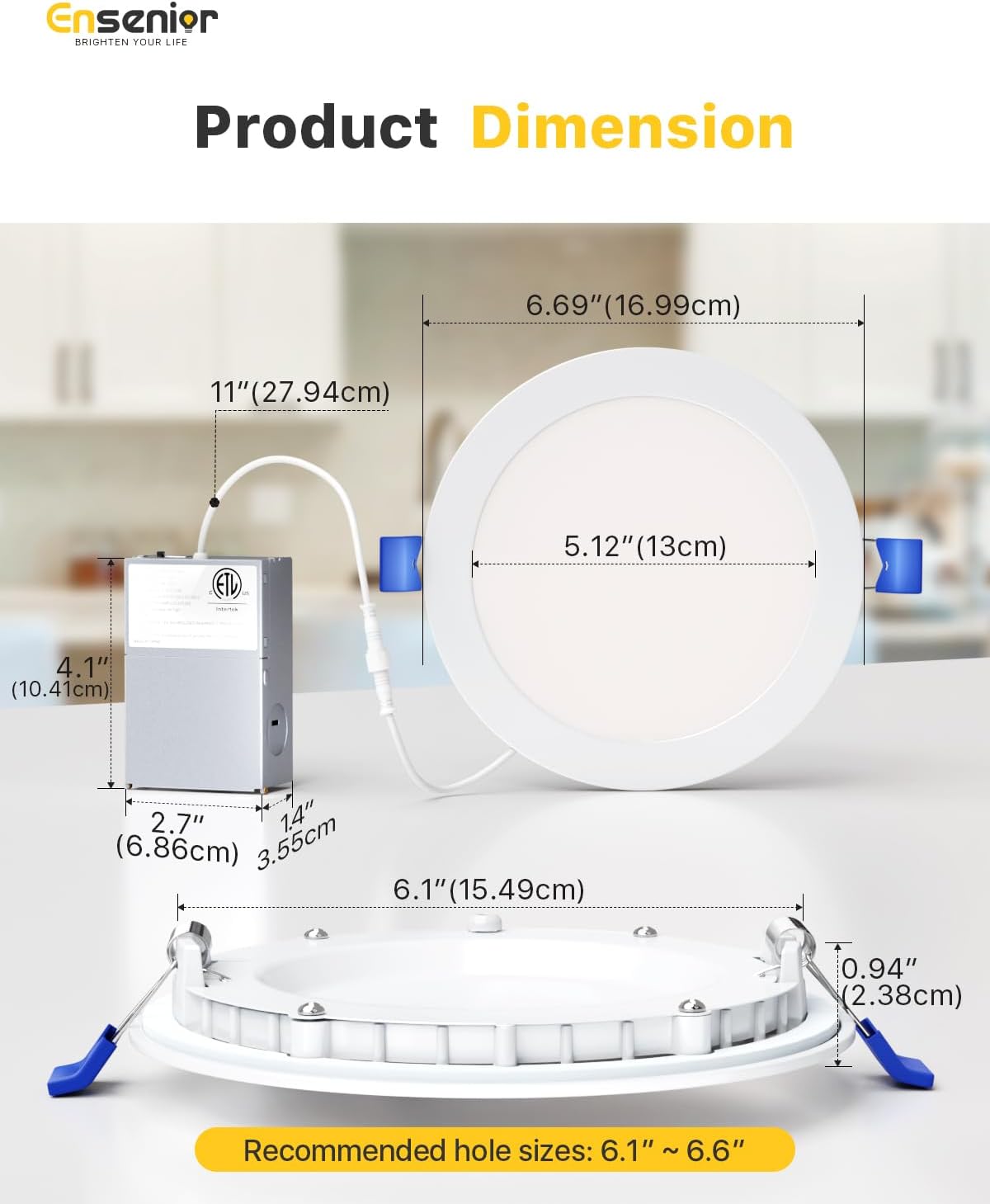
Image: A detailed diagram showing the dimensions of the Ensenior 6-inch recessed light and its junction box, including recommended hole sizes for installation.
Installation Guide
Follow these steps for a hassle-free installation of your Ensenior LED Recessed Ceiling Light. Ensure power is off at the circuit breaker before beginning.
- Prepare the Hole: Use the provided cutting template to mark the desired location on your ceiling. Cut a hole of approximately 6.1 to 6.6 inches in diameter. The junction box requires only a 2-inch ceiling space.
- Connect Wiring: Open the junction box and connect the electrical wires from your ceiling to the UL-certified wire terminals inside the junction box. Ensure all connections are secure and follow local electrical codes.
- Connect Light Panel: Connect the cable from the recessed light panel to the junction box. Ensure the connection is firm.
- Mount Light: Gently push the spring clips on the sides of the light upwards and insert the light into the prepared ceiling hole. The spring clips will secure the light in place.
Note: Use only the included junction box. Using junction boxes from other brands may cause voltage issues or light failure.

Image: A visual step-by-step guide illustrating how to cut a hole, connect wiring, connect the light panel, and mount the light for installation.
Video: An official Ensenior video demonstrating the complete installation process for the recessed ceiling lights.
Operating Instructions
Color Temperature (CCT) Selection
The Ensenior recessed light features 5 CCT settings, allowing you to choose the perfect light color for any environment. The CCT switch is located on the side of the junction box.
- 2700K: Soft White (Ideal for bedrooms, creating a warm and cozy atmosphere)
- 3000K: Warm White (Suitable for bathrooms, providing a comfortable glow)
- 3500K: Neutral White (Great for studies, offering balanced and clear illumination)
- 4000K: Cool White (Perfect for kitchens, providing bright and functional light)
- 5000K: Daylight (Best for living rooms, offering crisp and vibrant illumination)

Image: A visual representation of how different color temperatures (2700K, 3000K, 3500K, 4000K, 5000K) can be used in various rooms like bedrooms, bathrooms, studies, kitchens, and living rooms, with a close-up of the CCT selection switch on the junction box.
Video: An official Ensenior video demonstrating how to change the Correlated Color Temperature (CCT) settings on the recessed lights.
Dimming Functionality
The Ensenior LED recessed lights offer smooth dimming from 5% to 100%, allowing you to adjust the brightness to your preference. These lights are compatible with most Lutron dimmers.
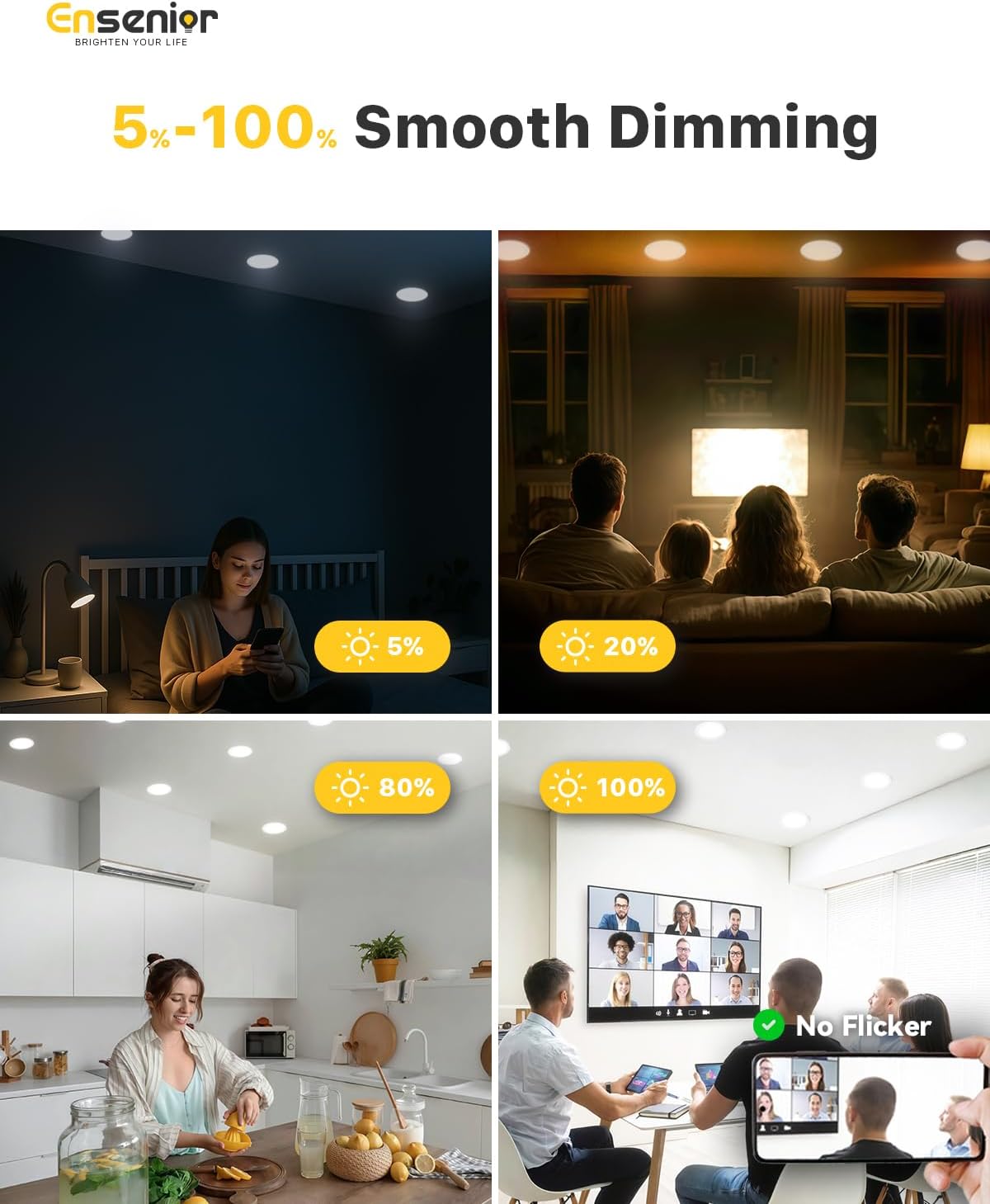
Image: Visual examples showing the smooth dimming capability of the lights from 5% to 100% brightness in various room settings, highlighting the absence of flicker.
Video: An official Ensenior video demonstrating the smooth dimming capabilities of the recessed ceiling lights.
Dimmer Compatibility Guide
For optimal performance, use dimmers listed in the compatibility guide below. While these lights are compatible with most Lutron dimmers, this table provides specific models that have been tested.
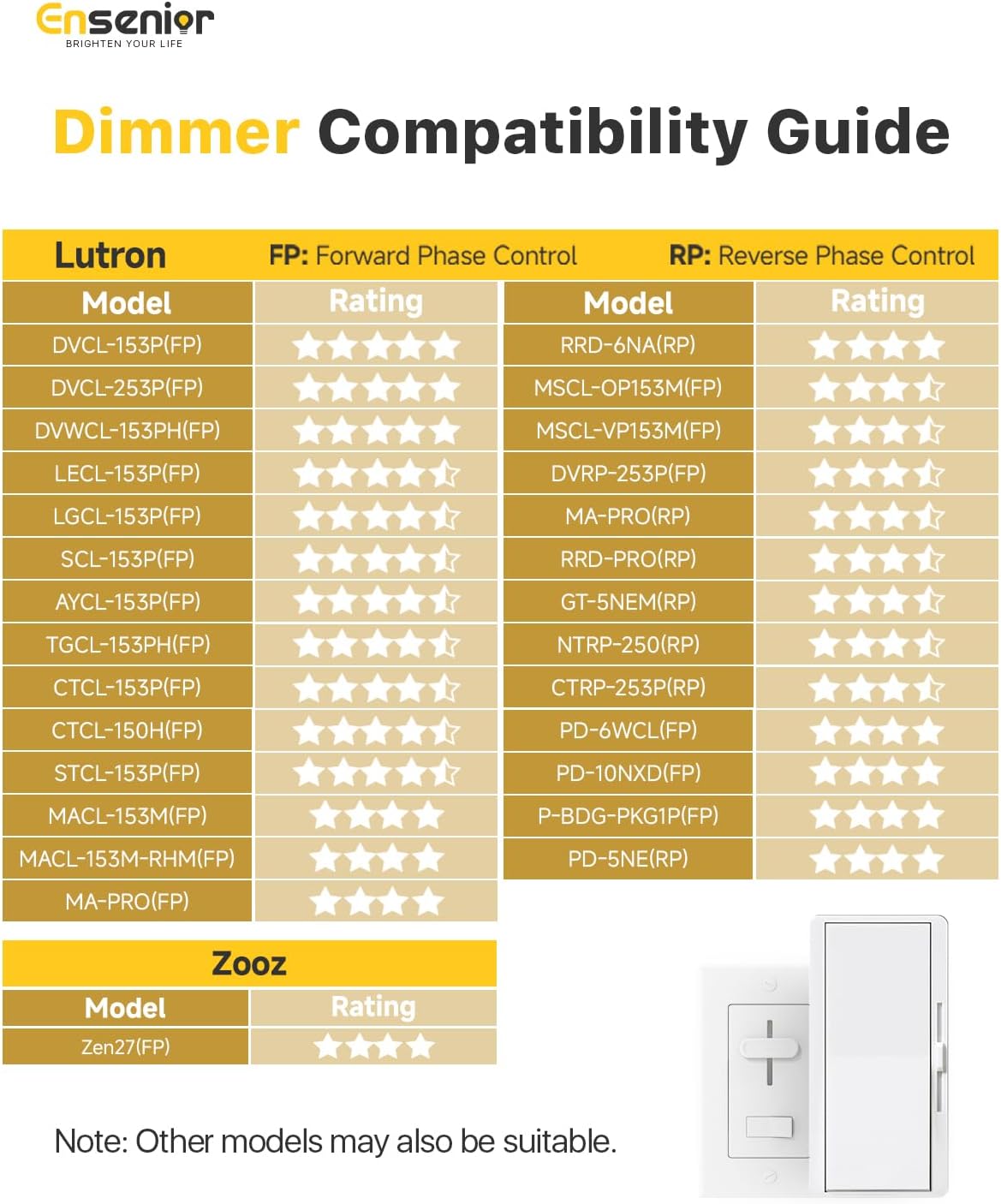
Image: A compatibility chart listing various Lutron and Zooz dimmer models, indicating their rating (Forward Phase Control or Reverse Phase Control) and compatibility with Ensenior lights.
Maintenance
The Ensenior LED Recessed Ceiling Lights are designed for long-term, maintenance-free operation with a lifespan of up to 50,000 hours. Minimal maintenance is required:
- Cleaning: Ensure the light is off and cool before cleaning. Use a soft, dry cloth to wipe the surface. Avoid abrasive cleaners or solvents that could damage the finish or electrical components.
- Inspection: Periodically check for any loose connections or visible damage. If any issues are found, disconnect power immediately and consult a qualified electrician.
Troubleshooting
If you encounter any issues with your Ensenior LED Recessed Ceiling Light, please refer to the following common troubleshooting steps:
| Problem | Possible Cause | Solution |
|---|---|---|
| Light does not turn on | No power supply; Loose wiring connection; Faulty light or junction box. | Check circuit breaker. Ensure all wiring connections are secure. Test with a known working light if possible. Contact customer support if the light is faulty. |
| Light flickers | Incompatible dimmer switch; Loose wiring; Voltage fluctuations. | Verify dimmer compatibility (refer to Dimmer Compatibility Guide). Check wiring connections. Ensure stable power supply. |
| Light is too dim or too bright | Dimmer setting; Incorrect CCT setting. | Adjust the dimmer switch. Check the CCT switch on the junction box and set it to your desired color temperature. |
| Color temperature cannot be changed | CCT switch not properly engaged. | Ensure the CCT switch on the junction box is firmly clicked into one of the five positions. |
If the problem persists after following these steps, please contact Ensenior customer support.
Warranty and Support
Ensenior is committed to providing high-quality products and excellent customer service.
- 5-Year Warranty: Your Ensenior LED Recessed Ceiling Lights are covered by a 5-year warranty from the date of purchase, ensuring peace of mind regarding product quality and performance.
- Customer Service: Ensenior's friendly customer service team is available to address your concerns and provide support. We aim to respond to all inquiries within 12 hours.
- New Replacement: In case of any quality problems covered under warranty, Ensenior offers new replacements without hassle.
For support, please visit the official Ensenior store or contact their customer service directly through the platform where you purchased the product.

Image: An image highlighting Ensenior's exceptional service, including 12-hour quick response, 5-year coverage, and new replacement policy.


