
1. Introduction
Thank you for choosing the AWEI A770BL Bluetooth 5.0 Wireless Headphones. This manual provides detailed instructions for the proper use, setup, and maintenance of your headphones. Designed for comfort and high-quality audio, these headphones feature Bluetooth 5.0 connectivity, a built-in microphone, deep bass, and IPX5 water resistance, making them suitable for various activities. They also include a 3.5mm Aux jack for wired use.

Figure 1: AWEI A770BL Headphone Packaging. The image displays the product packaging, highlighting key features such as Bluetooth 5.0 and the model number A770BL.
2. Product Overview
The AWEI A770BL headphones are designed for both wireless and wired audio experiences. They feature a telescopic head beam for adjustable fit and a sturdy folding design for portability.

Figure 2: Telescopic Head Beam and Folding Design. This image illustrates the adjustable and foldable nature of the headphones, allowing for easy carrying and storage.
Key Features:
- 400mm Large Moving Coil: For enhanced audio quality.
- Bluetooth 5.0 Chip: Ensures stable and efficient wireless connection.
- Voice Calls: Integrated microphone for hands-free communication.
- Closed Earmuffs: Designed for passive noise isolation.
- Built-in Battery: For wireless operation.
- Collapsible Design: For easy storage and transport.

Figure 3: AWEI A770BL Key Features. Icons represent features such as 400mm large moving coil, Bluetooth 5.0, voice calls, closed earmuffs, built-in battery, and collapsible design.
Adjustments and Comfort:
- Retractable Beam: Slide to adjust the headband for a comfortable fit.
- Bendable Earmuffs: Earmuffs can be bent inward for compact storage.
- Breathable Earmuffs: Designed for extended wear comfort.
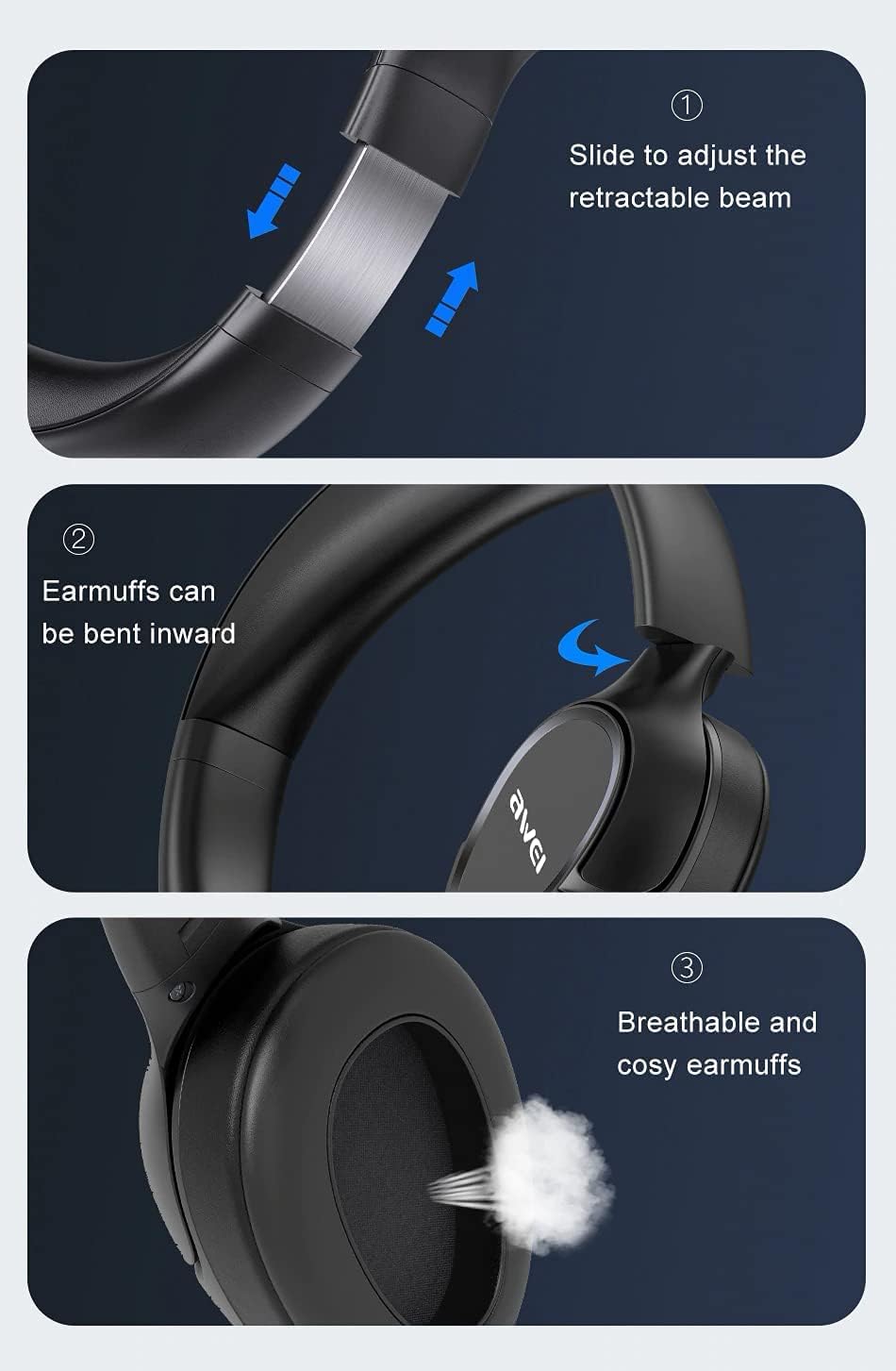
Figure 4: Headphone Adjustments and Earmuff Design. This image demonstrates how to adjust the retractable beam, bend the earmuffs inward, and highlights the breathable material of the earmuffs.
3. Setup
3.1 Charging the Headphones
Before first use, fully charge the headphones. Use a standard 5V USB charger (not included) and the provided charging cable.
- Connect the charging cable to the charging port on the headphones.
- Connect the other end of the cable to a USB power source.
- The indicator light will show charging status (e.g., red for charging, blue for fully charged).
- Charging typically takes approximately 1 hour for a full charge.
A full charge provides approximately 12 hours of play time, 13 hours of talk time, and up to 100 hours of standby time.

Figure 5: High-Capacity Battery Details. This image highlights the 250mAh built-in Li-ion battery, 12 hours of endurance, and 1 hour charging time.
3.2 Powering On/Off
- To Power On: Press and hold the Power button for approximately 3 seconds until the indicator light flashes.
- To Power Off: Press and hold the Power button for approximately 5 seconds until the indicator light turns off.
3.3 Bluetooth Pairing (Wireless Mode)
The headphones use Bluetooth 5.0 for a stable connection up to 10 meters.
- Ensure the headphones are fully charged and powered off.
- Press and hold the Power button for about 5-7 seconds until the indicator light flashes red and blue alternately, indicating pairing mode.
- On your smartphone or Bluetooth-enabled device, enable Bluetooth and search for available devices.
- Select "AWEI A770BL" from the list of devices.
- Once paired, the indicator light will flash blue slowly, and you may hear a confirmation tone.
3.4 Wired Connection (AUX Mode)
You can use the headphones with a 3.5mm audio cable (not included) for a wired connection, which is useful when the battery is low or for devices without Bluetooth.
- Connect one end of the 3.5mm audio cable to the AUX port on the headphones.
- Connect the other end to the 3.5mm audio jack of your device (smartphone, tablet, PC, etc.).
- The headphones will automatically switch to wired mode.
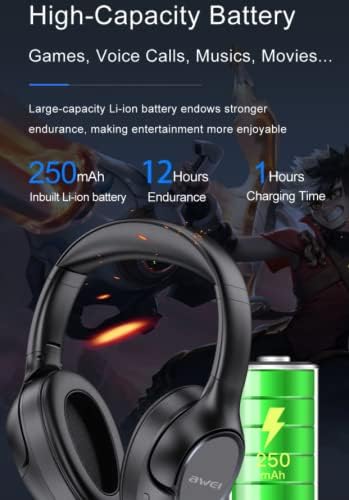
Figure 6: Bluetooth Connection and 3.5mm AUX Plug. This image illustrates the 10-meter Bluetooth connection range and the 3.5mm AUX interface for wired use.
4. Operating Instructions
4.1 Basic Controls (Wireless Mode)
- Power Button: Press and hold to power on/off. Short press for play/pause or answer/end calls.
- Volume Up (+): Short press to increase volume. Long press for next track.
- Volume Down (-): Short press to decrease volume. Long press for previous track.
4.2 Making and Receiving Calls
- Answer Call: Short press the Power button when an incoming call rings.
- End Call: Short press the Power button during a call.
- Reject Call: Press and hold the Power button for 2 seconds when an incoming call rings.
- Redial Last Number: Double-press the Power button.
4.3 Audio Playback
- Play/Pause: Short press the Power button.
- Next Track: Long press the Volume Up (+) button.
- Previous Track: Long press the Volume Down (-) button.
5. Maintenance
Proper maintenance ensures the longevity and performance of your headphones.
- Cleaning: Use a soft, dry cloth to clean the headphones. Do not use abrasive cleaners or solvents.
- Earmuffs: Gently wipe the earmuffs with a damp cloth if necessary, ensuring no liquid enters the speaker grilles.
- Storage: When not in use, store the headphones in a cool, dry place, away from direct sunlight and extreme temperatures. Utilize the folding design for compact storage.
- Water Resistance: The headphones are IPX5 water-resistant, meaning they are protected against low-pressure water jets from any direction. This protects against sweat and light rain, but they are not designed for submersion in water. Do not expose them to heavy rain or immerse them in liquids.
- Charging Port: Keep the charging port clean and free of dust or debris.
6. Troubleshooting
If you encounter issues with your AWEI A770BL headphones, refer to the following common solutions:
- Headphones not powering on: Ensure the headphones are fully charged. Connect them to a power source and try again.
- Cannot pair with device:
- Ensure the headphones are in pairing mode (indicator light flashing red and blue alternately).
- Make sure Bluetooth is enabled on your device.
- Move the headphones closer to your device (within 10 meters).
- Turn off and on Bluetooth on your device, then try pairing again.
- If previously paired, try forgetting the device on your phone and re-pairing.
- No sound or low volume:
- Check the volume levels on both the headphones and your connected device.
- Ensure the headphones are properly connected (Bluetooth or AUX cable).
- If using AUX, ensure the cable is fully inserted into both ports.
- Poor call quality:
- Ensure the microphone is not obstructed.
- Move to an area with less interference.
- Ensure your device has good network reception.
- Intermittent connection:
- Reduce the distance between the headphones and your device.
- Avoid obstacles between the devices.
- Minimize other active Bluetooth devices in the vicinity.
7. Specifications
Below are the technical specifications for the AWEI A770BL Wireless Headphones:

Figure 7: AWEI A770BL Basic Parameters. This image provides a detailed list of specifications including item number, Bluetooth version, battery life, and other technical details.
| Brand | Awei |
| Model Number | A770BL |
| Bluetooth Version | 5.0 |
| Battery Capacity | 250mAh Li-ion |
| Charging Time | 1 Hour |
| Play Time | 12 Hours |
| Talk Time | 13 Hours |
| Standby Time | 100 Hours |
| Transmission Distance | 10 Meters |
| Connectivity | Wireless (Bluetooth), Wired (3.5mm Aux) |
| Microphone | Yes |
| Waterproof Rating | IPX5 |
| Headphone Form Factor | Over-Ear |
| Material | Plastic |
| Driver Size | 400mm Large Moving Coil |
| Frequency Response Range | 2402MHz-2480MHz |
| Working Temperature | -40°C to +85°C |
| Supported Bluetooth Profiles | HSP, HFP, A2DP, AVRCP |
| Net Weight | 199g |
| Color | Black |
8. Warranty and Support
AWEI products are manufactured to high-quality standards. For information regarding warranty coverage, please refer to the warranty card included with your purchase or contact your local retailer.
If you require technical assistance or have questions not covered in this manual, please contact AWEI customer support through the official website or your point of purchase. Please have your product model number (A770BL) and purchase details ready when contacting support.

