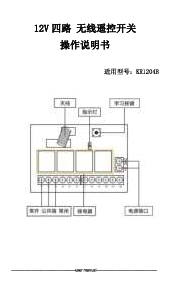
Product Overview
The QIACHIP KR1202+2KT09 is a versatile 12 Volt DC wireless RF remote control relay module designed for controlling electric motors in forward and reverse directions, as well as other applications requiring remote switching. It operates on a 433Mhz frequency, offering stable and reliable performance with high reception sensitivity. The system includes a receiver module and two 3-button transmitters, providing a control range of up to 164 feet (50 meters) in open areas. Its learning code technology enhances security by allowing easy re-programming if a remote is lost.

Image: The QIACHIP KR1202+2KT09 relay module, its protective casing, and two remote control transmitters.
Package Contents
Upon opening the package, verify that all components are present and undamaged:
- 1 x QIACHIP KR1202 2-Channel DC 12V Receiver Module
- 2 x 3-Button RF 433Mhz Transmitters (Remote Controls)
- 1 x Protective Case for the Receiver Module
- 1 x CR2032 Battery (pre-installed in each transmitter)
Image: The complete set of components included in the product package.
Specifications
| Feature | Detail |
|---|---|
| Brand | QIACHIP |
| Model | KR1202+2KT09 |
| Coil Voltage | 12 Volts DC |
| Maximum Switching Voltage | 220 Volts |
| Minimum Switching Voltage | 12 Volts |
| Number of Terminals | 3 |
| Connector Type | Screw |
| Contact Material | Copper |
| Contact Type | Normally Open |
| Mounting Type | Plug In Mount |
| Operation Mode | Manual |
| Item Weight | 3.27 ounces |
| Package Dimensions | 5.63 x 3.31 x 1.06 inches |
| Batteries | 1 CR2032 batteries required (included) |
Setup and Wiring
Proper wiring is crucial for the safe and effective operation of the QIACHIP relay module. Ensure the power supply matches the module's voltage requirements (DC 12V for this model). The module features screw terminals for secure connections.
Basic DC Motor Reversing Wiring
For controlling a DC motor in forward and reverse directions, connect the DC power supply to the module's input terminals (typically marked + and - or VCC and GND). Connect the motor to the output terminals, ensuring correct polarity for desired direction. The module's relays will switch the motor's polarity to achieve forward or reverse motion.

Image: A clear diagram illustrating how to wire a DC motor for forward and reverse control using the relay module.
Simple Wiring for DC 12V Applications
For simple DC 12V applications, connect your DC 12V power source to the module's input. The output terminals can then be connected to your device (e.g., a small light, a lock) to control its power via the remote.

Image: A simplified wiring diagram showing the connection of a DC 12V power source and a device to the relay module.
Additional Wiring Diagrams
The module can be integrated into various systems. Below are examples of common wiring configurations:

Image: Wiring diagram for controlling an AC motor using the relay module.

Image: Wiring diagram for an AC motor with integrated limit switches, controlled by the relay module.

Image: Wiring diagram for a DC motor, showing connections to the relay module.

Image: Wiring diagram for controlling lamps using the relay module.

Image: Wiring diagram for connecting an external power supply to the relay module.
Operating Modes and Programming
The QIACHIP KR1202+2KT09 module supports three distinct operating modes: Momentary, Toggle, and Latched. All three buttons on the transmitter will operate in the same programmed mode. You cannot program individual buttons for different modes.
Programming Steps Overview
To program the module, locate the 'Learning Button' on the receiver board. The programming process involves clearing existing codes and then setting the desired mode by pressing the learning button a specific number of times, followed by pressing a button on the remote.

Image: The receiver module highlighting the 'Learning Button' and LED indicator.
1. Clear Code Function (Important First Step)
Before programming a new mode or remote, it is essential to clear any previously stored codes. This ensures a clean slate for new programming.
- Press the 'Learning Button' on the receiver board 8 times consecutively.
- The LED indicator on the module will flash to confirm that all stored codes have been cleared.
2. Momentary Mode Programming
In Momentary mode, the relay remains active only as long as the remote button is pressed and held. Releasing the button deactivates the relay.
- Perform the 'Clear Code Function' (press learning button 8 times).
- Press the 'Learning Button' on the receiver board 1 time.
- Wait for approximately 3 seconds until the LED indicator turns off.
- Press any button on your remote control (e.g., 'A' button). The LED will flash to confirm successful programming.

Image: Visual instructions for setting the module to Momentary operating mode.
3. Toggle Mode Programming
In Toggle mode, pressing the remote button once activates the relay, and it remains active until the same button is pressed again to deactivate it.
- Perform the 'Clear Code Function' (press learning button 8 times).
- Press the 'Learning Button' on the receiver board 2 times consecutively.
- Wait for approximately 3 seconds until the LED indicator turns off.
- Press any button on your remote control (e.g., 'B' button). The LED will flash to confirm successful programming.

Image: Visual instructions for setting the module to Toggle operating mode.
4. Latched Mode Programming
In Latched mode, pressing one remote button activates the relay, and it remains active until a *different* remote button is pressed to deactivate it. This mode is often used for forward/reverse applications where one button is 'forward' and another is 'reverse', and pressing one cancels the other.
- Perform the 'Clear Code Function' (press learning button 8 times).
- Press the 'Learning Button' on the receiver board 3 times consecutively.
- Wait for approximately 3 seconds until the LED indicator turns off.
- Press the first button on your remote control (e.g., 'A' button).
- Wait for approximately 3 seconds.
- Press the second button on your remote control (e.g., 'B' button). The LED will flash to confirm successful programming.

Image: Visual instructions for setting the module to Latched operating mode.
Maintenance
To ensure the longevity and optimal performance of your QIACHIP relay module and transmitters, follow these maintenance guidelines:
- Cleaning: Use a soft, dry cloth to clean the module and transmitters. Avoid using harsh chemicals, solvents, or abrasive cleaners.
- Battery Replacement: The transmitters use CR2032 batteries. If the remote's range decreases or the LED indicator on the remote does not light up, replace the battery. To replace, open the remote casing carefully, remove the old battery, and insert a new CR2032 battery with the correct polarity.
- Storage: Store the module and transmitters in a cool, dry place away from direct sunlight, extreme temperatures, and high humidity.
- Environmental Protection: While the module has a protective case, avoid exposing it to water, dust, or corrosive substances to prevent damage.
Troubleshooting
If you encounter issues with your QIACHIP relay module, refer to the following common problems and their solutions:
- Module Not Responding to Remote:
- Check if the module is properly powered (12V DC).
- Ensure the remote control's battery is not depleted. Replace if necessary.
- Re-program the remote control to the receiver module following the 'Operating Modes and Programming' instructions.
- Verify that the remote and receiver are within the effective operating range (up to 164ft/50m without obstacles). Walls and other obstructions can reduce range.
- Relay Not Activating/Deactivating Correctly:
- Confirm that the module is programmed to the correct operating mode (Momentary, Toggle, or Latched) for your application.
- Check all wiring connections for looseness or incorrect polarity.
- Ensure the load connected to the relay does not exceed the module's maximum switching voltage (220V) or current capacity.
- Interference Issues:
- If experiencing erratic behavior, check for nearby devices operating on the same 433Mhz frequency that might cause interference.
- Ensure the receiver's antenna is fully extended and not obstructed.
- Remote Control Limit Reached:
- The receiver can store up to 20 remote controllers. If you are trying to add more, you may need to clear all existing codes and re-program only the necessary remotes.
Warranty and Support
QIACHIP products are designed for reliability and performance. This product comes with a standard manufacturer's warranty covering defects in materials and workmanship under normal use. For specific warranty terms and conditions, please refer to the documentation provided with your purchase or contact QIACHIP customer support.
If you encounter any problems or require technical assistance, please contact QIACHIP customer support through the platform where you purchased the product. Provide your order details and a clear description of the issue for prompt assistance.
For additional resources, you may also refer to the official QIACHIP store on Amazon: QIACHIP Store