
Soufyuane TK303F
Soufyuane GPS Tracker User Manual
Model: TK303F
1. Introduction
The Soufyuane Coban TK303F is a professional-grade GPS tracking device designed for real-time vehicle and asset monitoring. It combines Location Based Service (LBS) and GPS for accurate double real-time tracking. This device supports data transmission via SMS, GSM, GPRS, and Internet networks, offering versatile tracking and security features. Its robust design includes waterproof capabilities and multiple alarm functions to enhance vehicle safety and management.
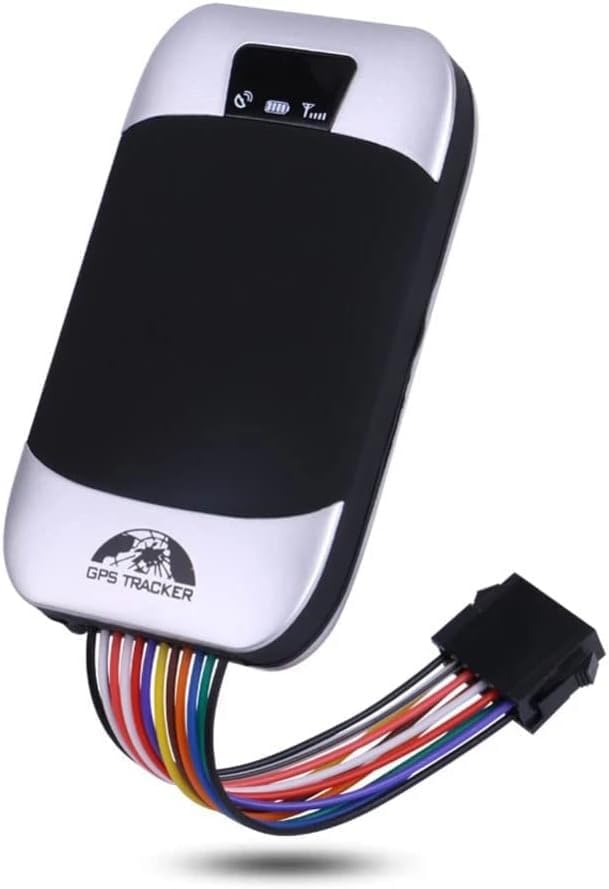
Image: The Soufyuane Coban TK303F GPS Tracker, showcasing its compact design and integrated wiring harness for installation.
2. Package Contents
Please verify that all items listed below are included in your package:
- GPS Main Unit
- 12Pin Harness
- Relay
- Microphone
- Screwdriver
- English User Manual
- SIM Card (Note: SIM card is not included with the device and must be purchased separately.)

Image: A visual representation of the complete package contents for the TK303F GPS Tracker.
3. Setup and Installation
Proper installation is crucial for the optimal performance of your GPS tracker. It is recommended that installation be performed by a qualified professional.
3.1. SIM Card Insertion
Before installation, ensure a valid GSM SIM card (not included) with GPRS data plan is inserted into the device. The SIM card should have sufficient balance for SMS and data services.
3.2. Wiring Connections
The device comes with a 12-pin harness for connection to your vehicle's power supply and other components. Key connections include:
- Power Supply: Connect the red wire to the positive terminal of the vehicle's battery (9-40V DC) and the black wire to the negative terminal.
- ACC Ignition: Connect the orange wire to the vehicle's ACC ignition wire to detect ignition status.
- Oil/Power Cut-off Relay: Connect the relay as per the wiring diagram provided in the full user manual (not included here) to enable remote fuel/power cut-off functionality. This feature allows you to remotely disable the vehicle's engine via SMS commands.
- Microphone: Connect the external microphone for remote voice monitoring inside the vehicle.

Image: Illustration of the remote oil and power cut-off feature, demonstrating its application within a vehicle's system.
4. Operating Instructions
4.1. Tracking Methods
The TK303F offers multiple ways to track your vehicle:
- SMS Tracking: Send a specific SMS command to the tracker's phone number. The device will reply with a text message containing a Google Maps link showing the vehicle's real-time location.
- Web Server Tracking: Access the dedicated web platform for real-time tracking, historical route playback, and device management. The official web server is http://www.gpstrackerxy.com.
- Mobile Phone App: Download the official mobile application for iOS and Android devices for convenient tracking and control on the go. The Android app can be found at https://play.google.com/store/apps/details?id=com.coban.en.
- PC Tracking Software: Utilize the PC-based tracking software for more advanced monitoring and reporting features.

Image: The mobile application and web server interface for accessing the tracker's real-time location and data.
4.2. Remote Control Functions
- Remote Oil/Power Cut-off: To remotely stop the engine, send the SMS command
stop+passwordto the tracker. The device will execute the command and reply with "Stop engine Succeed". The vehicle will remain immobile until a resume command is sent. To execute immediately, sendquickstop+password. - Voice Monitoring: Call the device's phone number. After changing it to monitoring mode, you can listen to the sounds inside the vehicle through the external microphone.

Image: A visual representation of the remote engine cut-off function via SMS command.
4.3. Geo-fence Setup
Set up a geo-fence to restrict the tracker's movements within a defined district. If the unit moves outside this pre-set area, it will send an SMS alert to the authorized numbers.

Image: An aerial view illustrating the geo-fence feature, where a virtual boundary is set for the vehicle.
5. Alarm Functions
The TK303F is equipped with a comprehensive suite of alarm functions to alert you to various events:
- Door Open Alarm: Alerts when a vehicle door is opened.
- ACC Alarm: Triggers when the ignition is turned on without authorization.
- Low Battery Alarm: Notifies when the device's internal battery is low.
- External Power Off Alarm: Alerts if the external power supply to the device is disconnected.
- GPS Blind Spot Alert: Informs when the device enters an area with no GPS signal.
- SOS Alarm: Activated manually in case of emergency.
- Multi-area Management: Allows setting up multiple geo-fences for different areas.
- Movement Alarm: Alerts if the vehicle moves from its parked location.
- Overspeed Alarm: Triggers if the vehicle exceeds a pre-set speed limit.
- Fuel Alarm: Detects and alerts about abnormal fuel consumption or theft.

Image: A visual summary of the various alarm types supported by the TK303F GPS Tracker.

Image: Detailed illustration of alarms triggered when the device is in armed status.
6. Maintenance
To ensure the longevity and optimal performance of your GPS tracker, follow these maintenance guidelines:
- Keep the device dry and away from extreme temperatures.
- Regularly check all wiring connections to ensure they are secure and free from corrosion.
- Ensure the SIM card is properly seated and has an active plan.
- The built-in 3.7V 500mAh Li-ion battery is rechargeable. Ensure it is adequately charged for continuous operation, especially if external power is interrupted.
- Avoid exposing the device to strong impacts or vibrations.
7. Troubleshooting
If you encounter issues with your TK303F GPS tracker, consider the following common problems and solutions:
- Device Not Responding: Check if the device is properly powered. Ensure the SIM card is correctly inserted and has sufficient balance and an active data plan.
- Inaccurate Location: Ensure the device has a clear line of sight to the sky for GPS signal reception. If in an underground garage or dense urban area, GPS signal may be weak, and LBS (Location Based Service) will be used, which is less precise.
- No SMS Reply: Verify the SIM card has SMS capabilities and sufficient credit. Check if the SMS command format is correct.
- Platform/App Offline: Ensure the device has GPRS data connectivity. Check the web platform or app server status.
- Alarms Not Triggering: Confirm that the alarm functions are enabled and correctly configured via SMS commands or the tracking platform. Check sensor connections (e.g., ACC, door sensor).
8. Specifications
| Feature | Detail |
|---|---|
| Model | TK303F |
| Package Dimensions | 5.71 x 3.98 x 2.72 inches |
| Item Weight | 11.7 ounces |
| Batteries | 1 Lithium Ion battery required (included) |
| Connectivity Technologies | Cellular |
| Special Features | Waterproof |
| Other Display Features | Wireless |
| Manufacturer | BCVD |
| Country of Origin | China |
| Date First Available | December 5, 2020 |
| Supported Application | GPS |
| Specific Uses For Product | Vehicle Tracking, Personal Tracking, Asset Tracking |
9. Warranty and Support
For information regarding product warranty, please refer to the documentation provided at the time of purchase or contact your seller directly. For technical support or further assistance, please reach out to the retailer or manufacturer through their official contact channels.
Ask a question about this manual
Ask about setup, troubleshooting, compatibility, parts, safety, or missing instructions. Manuals+ will review the question and use this page’s manual context to help answer it.