
TaoTronics TT-SK15
TaoTronics TT-SK15 Sound Bar User Manual
Model: TT-SK15
Introduction
This user manual provides detailed instructions for the setup, operation, and maintenance of your TaoTronics TT-SK15 Sound Bar. Please read this manual thoroughly before using the product to ensure proper functionality and to maximize your audio experience. The TT-SK15 is a versatile 2.0 channel sound bar designed to enhance your home theater system with powerful sound, offering both wired and wireless connectivity options.

Figure 1: TaoTronics TT-SK15 Sound Bar and its remote control. The sound bar is sleek and black, designed to fit seamlessly into any home entertainment setup.
Setup
1. Unpacking the Sound Bar
Carefully remove all components from the packaging. Ensure all items listed below are present. If any items are missing or damaged, contact customer support.
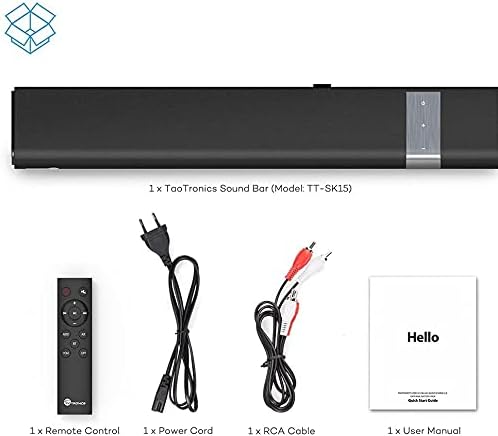
Figure 2: Package contents include the TaoTronics Sound Bar (Model: TT-SK15), a remote control, a power cord, an RCA cable, and a user manual.
- 1 x TaoTronics Sound Bar (Model: TT-SK15)
- 1 x Remote Control
- 1 x Power Cord
- 1 x RCA Cable
- 1 x User Manual (this document)
2. Placement Options
The TT-SK15 Sound Bar offers flexible placement options to suit your home entertainment setup. It can be placed on a tabletop or mounted on a wall.
- Tabletop Placement: Place the sound bar on a stable, flat surface directly in front of your television. Ensure there are no obstructions blocking the sound.
- Wall Mounting: The sound bar is designed to be wall-mountable. Use the integrated mounting holes on the back of the unit. Refer to the wall mounting template (if included in packaging) for precise drilling. Ensure the wall can support the weight of the sound bar.

Figure 3: The TT-SK15 Sound Bar positioned below a television, demonstrating a typical setup for enhanced audio. The sound bar can be placed on a stand or wall-mounted.
3. Connecting to Audio Sources
The TT-SK15 Sound Bar supports multiple wired and wireless connection methods. Choose the connection type that best suits your audio source.

Figure 4: The back panel of the TT-SK15 Sound Bar, highlighting its multiple input interfaces: 3.5mm Audio Input, RCA AUX Input, Optical Input, Coaxial Digital Input, and wall-mounted design features.
- Optical Connection: For high-quality digital audio. Connect an optical cable from your TV or audio device's Optical Out port to the sound bar's OPTICAL IN port.
- Coaxial Connection: For digital audio. Connect a coaxial cable from your TV or audio device's Coaxial Out port to the sound bar's COAXIAL IN port.
- RCA AUX Connection: For analog audio. Connect an RCA cable (red and white plugs) from your TV or audio device's Audio Out (L/R) ports to the sound bar's RCA AUX IN ports.
- 3.5mm Audio Connection: For analog audio from devices with a headphone jack. Connect a 3.5mm audio cable from your device's headphone jack to the sound bar's 3.5mm AUX IN port.
- Bluetooth Connection: For wireless audio streaming. See the "Bluetooth Pairing" section under Operating for instructions.
After connecting your audio source, connect the power cord to the sound bar's power input and then to a power outlet.
Operating the Sound Bar
1. Power On/Off
- Power On: Press the Power button on the sound bar's touch panel or the remote control.
- Power Off: Press the Power button again to turn off the sound bar.
2. Input Selection
You can switch between different audio input modes using the sound bar's touch controls or the remote control.
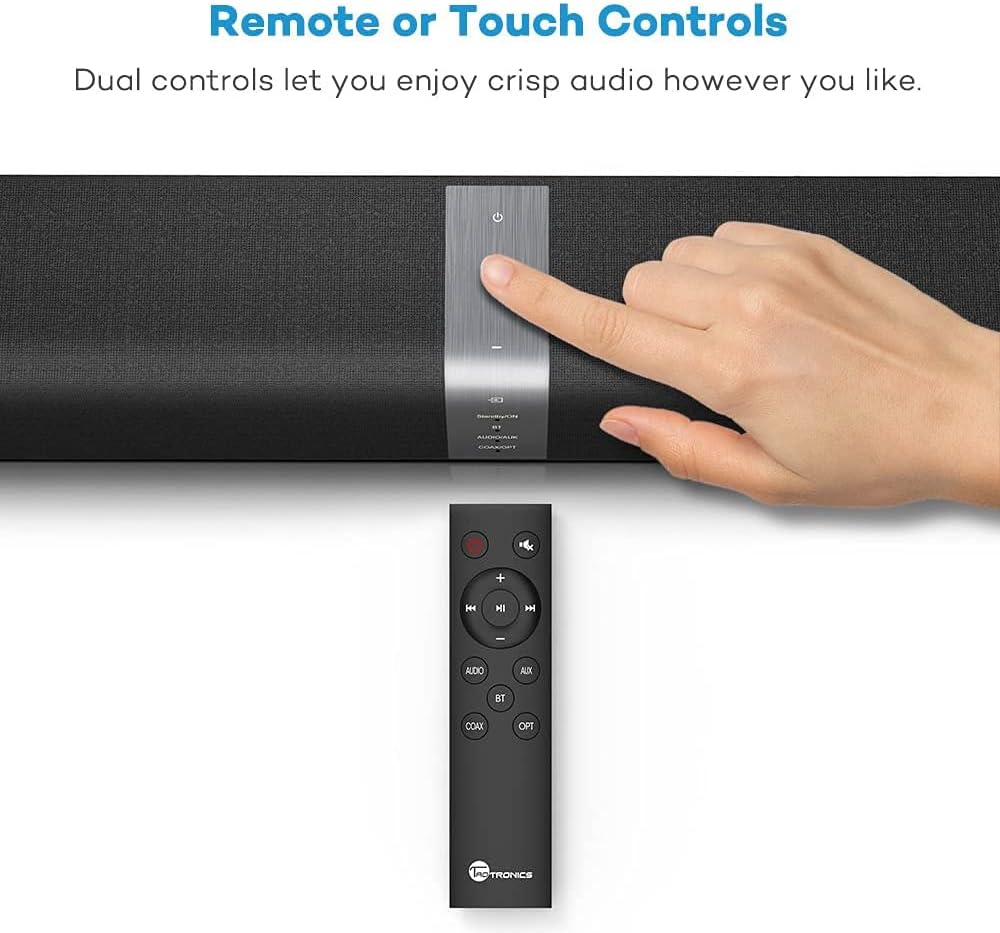
Figure 5: The TT-SK15 Sound Bar features both touch controls on the unit and a full-function remote control for convenient operation, including input selection and volume adjustment.
- Using Touch Controls: Tap the "Input" button on the sound bar's top panel to cycle through modes (BT, AUX, OPT, COAX).
- Using Remote Control: Press the dedicated buttons (BT, AUX, OPT, COAX) on the remote control to directly select the desired input.
3. Volume Control
- Increase Volume: Press the "+" button on the sound bar or remote.
- Decrease Volume: Press the "-" button on the sound bar or remote.
- Mute/Unmute: Press the "Mute" button on the remote control.
4. Bluetooth Pairing
To connect your Bluetooth-enabled device to the sound bar:
- Turn on the sound bar and select Bluetooth mode (BT) using the input button. The Bluetooth indicator light will flash, indicating it's in pairing mode.
- Enable Bluetooth on your device (smartphone, tablet, etc.) and search for available devices.
- Select "TT-SK15" from the list of devices.
- Once paired, the Bluetooth indicator light on the sound bar will turn solid blue. You can now play audio from your device through the sound bar.
- To disconnect, turn off Bluetooth on your device or select a different input mode on the sound bar.
Maintenance
1. Cleaning
To maintain the appearance and performance of your sound bar:
- Always unplug the sound bar from the power outlet before cleaning.
- Use a soft, dry, lint-free cloth to wipe the surfaces.
- Do not use liquid cleaners, aerosol sprays, or abrasive cleaning agents, as they may damage the finish or internal components.
- Avoid getting moisture into any openings.
2. Storage
If you plan to store the sound bar for an extended period:
- Disconnect all cables.
- Store the sound bar in a cool, dry place, away from direct sunlight and extreme temperatures.
- It is recommended to keep the original packaging for storage and transport.
Troubleshooting
If you encounter issues with your TT-SK15 Sound Bar, refer to the following common problems and solutions:
| Problem | Possible Cause | Solution |
|---|---|---|
| No power | Power cord not connected securely; Power outlet not working. | Ensure the power cord is firmly plugged into the sound bar and a working power outlet. Try a different outlet. |
| No sound | Incorrect input selected; Volume too low; Cables not connected properly; Mute function activated. | Select the correct input mode (BT, AUX, OPT, COAX). Increase the volume. Check all audio cables for secure connections. Press the Mute button on the remote to unmute. |
| Bluetooth pairing fails | Sound bar not in pairing mode; Device too far; Interference; Device already paired with another unit. | Ensure the sound bar is in Bluetooth pairing mode (flashing indicator). Move your device closer to the sound bar. Turn off other Bluetooth devices nearby. Disconnect from other Bluetooth devices. |
| Remote control not working | Batteries are dead or inserted incorrectly; Obstruction between remote and sound bar. | Replace the batteries in the remote control, ensuring correct polarity. Remove any obstructions between the remote and the sound bar's sensor. |
Specifications
The following are the technical specifications for the TaoTronics TT-SK15 Sound Bar:
- Model Number: TT-SK15
- Connectivity Technology: Wired/Wireless (Bluetooth)
- Speaker Type: Bluetooth Speakers, 2.0 Channel
- Nominal Output: 30 - 40 Watt (40 Watt total)
- Speakers: 4 full-range high-quality speakers, 2 passive radiators
- Effective Bluetooth Distance: 10 meters / 33 feet
- Input Ports: 3.5mm AUX, Optical, Coaxial, RCA AUX
- Control Methods: Touch controls on unit, Remote control
- Mounting Type: Tabletop, Wall-mountable
- Product Weight: Approximately 3.97 pounds (1.8 kg)
- Package Dimensions: 70.8 x 26.4 x 13.8 cm
- Audio Output Mode: Stereo

Figure 6: An exploded view of the TT-SK15 Sound Bar, illustrating its internal components including four drivers and two passive radiators, which contribute to its powerful stereo audio output.
Warranty and Support
Your TaoTronics TT-SK15 Sound Bar comes with a manufacturer's warranty. Please refer to the warranty card included in your package for specific terms and conditions. For technical support, troubleshooting assistance, or warranty claims, please contact TaoTronics customer service. Contact information can typically be found on the official TaoTronics website or on the warranty card.
For the most up-to-date support information, visit the official TaoTronics website: www.taotronics.com
Related documentsTT-SK15


Ask a question about this manual
Ask about setup, troubleshooting, compatibility, parts, safety, or missing instructions. Manuals+ will review the question and use this page’s manual context to help answer it.