
1. Introduction
This manual provides detailed instructions for the operation and maintenance of your Tayogo WB02 Bone Conduction Swimming Headphones. These headphones are designed for various activities, including swimming, diving, running, and cycling, offering an IPX8 waterproof rating, an integrated 8GB MP3 player, and Bluetooth connectivity.

Image 1.1: Tayogo WB02 Bone Conduction Swimming Headphones. The image displays the black headphones with a flexible neckband, designed to sit comfortably around the head, with the bone conduction transducers resting near the ears. Water splashes are visible in the background, indicating its waterproof nature.
2. Product Features
- IPX8 Waterproof Rating: Designed for underwater use up to 5 meters, suitable for swimming and diving.
- Flexible and Durable Design: Constructed with a titanium alloy frame for 360-degree adjustment and covered with skin-friendly silicone. Includes an adjustable belt and buckle for a secure fit.
- Integrated 8GB MP3 Player: Stores up to 2,000 songs for offline playback, ideal for water activities where Bluetooth connectivity may be limited.
- Bluetooth Connectivity: Supports Bluetooth connection up to 10 meters for streaming audio from compatible devices. Automatically switches to answer incoming calls during music playback.
- FM Radio Mode: Built-in FM tuner allows access to radio channels for news, audiobooks, or music.
- Bone Conduction Technology: Transmits sound through the cheekbones to the inner ear, leaving the ear canal open to ambient sounds for increased awareness and safety.

Image 2.1: Diagram illustrating bone conduction technology. Sound waves are shown bypassing the eardrum and transmitting through cranial bones to the inner ear, allowing the ear to remain open to environmental sounds. A person wearing the headphones while swimming is also depicted.

Image 2.2: Collage showing various usage scenarios for the Tayogo WB02 headphones, including use by hearing-impaired individuals, fitness enthusiasts, cyclists, and drivers, highlighting versatility and safety benefits.
3. Package Contents
Verify that all items are present in your package:
- Tayogo WB02 Bone Conduction Swimming Headphones
- USB Charging/Data Cable
- Adjustable Headband/Buckle
- Swimming Earplugs
- Storage Case
- User Manual (this document)

Image 3.1: Contents of the Tayogo WB02 package, including the headphones, a black protective case, a USB charging cable, and a pair of earplugs, alongside the user manual.
4. Setup
4.1. Charging the Headphones
Before first use, fully charge the headphones. Connect the provided USB charging cable to the USB interface on the headphones and to a standard USB power source (e.g., computer USB port, wall adapter). The charging indicator light will show the charging status. Ensure the charging port is completely dry before connecting the cable to prevent damage.
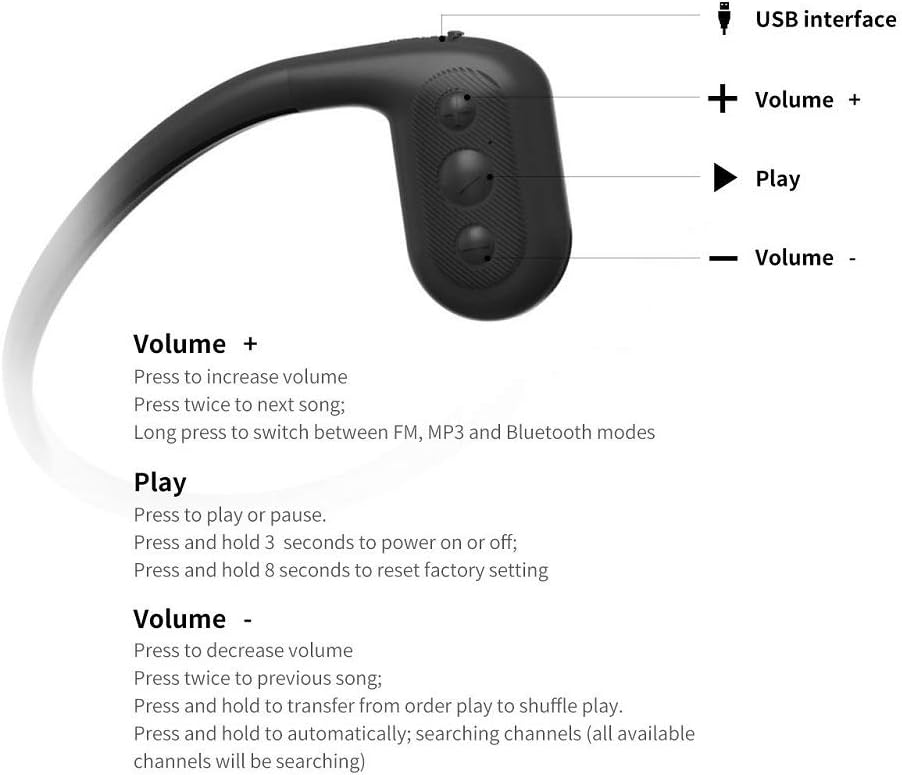
Image 4.1: Close-up view of the Tayogo WB02 headphones showing the USB interface for charging and data transfer, located on one of the ear pieces.
4.2. Loading Music (MP3 Mode)
The headphones have an 8GB internal storage for MP3 playback. To load music:
- Connect the headphones to your computer using the USB charging/data cable.
- The headphones will appear as a removable disk drive on your computer.
- Drag and drop your desired MP3, WMA, WAV, FLAC, or APE audio files into the headphone's storage folder.
- Safely eject the removable disk from your computer before disconnecting the cable.
You can also use the Tayogo APP to manage your song list, as shown in Image 4.2.

Image 4.2: A person connecting the Tayogo WB02 headphones to a laptop via USB to transfer music files, with a smartphone displaying the Tayogo app interface for song management.
4.3. Wearing the Headphones
Place the flexible neckband around the back of your head, with the bone conduction transducers resting comfortably on your cheekbones, just in front of your ears. Adjust the headband for a snug and secure fit. For swimming, ensure the headphones are positioned firmly to prevent movement.
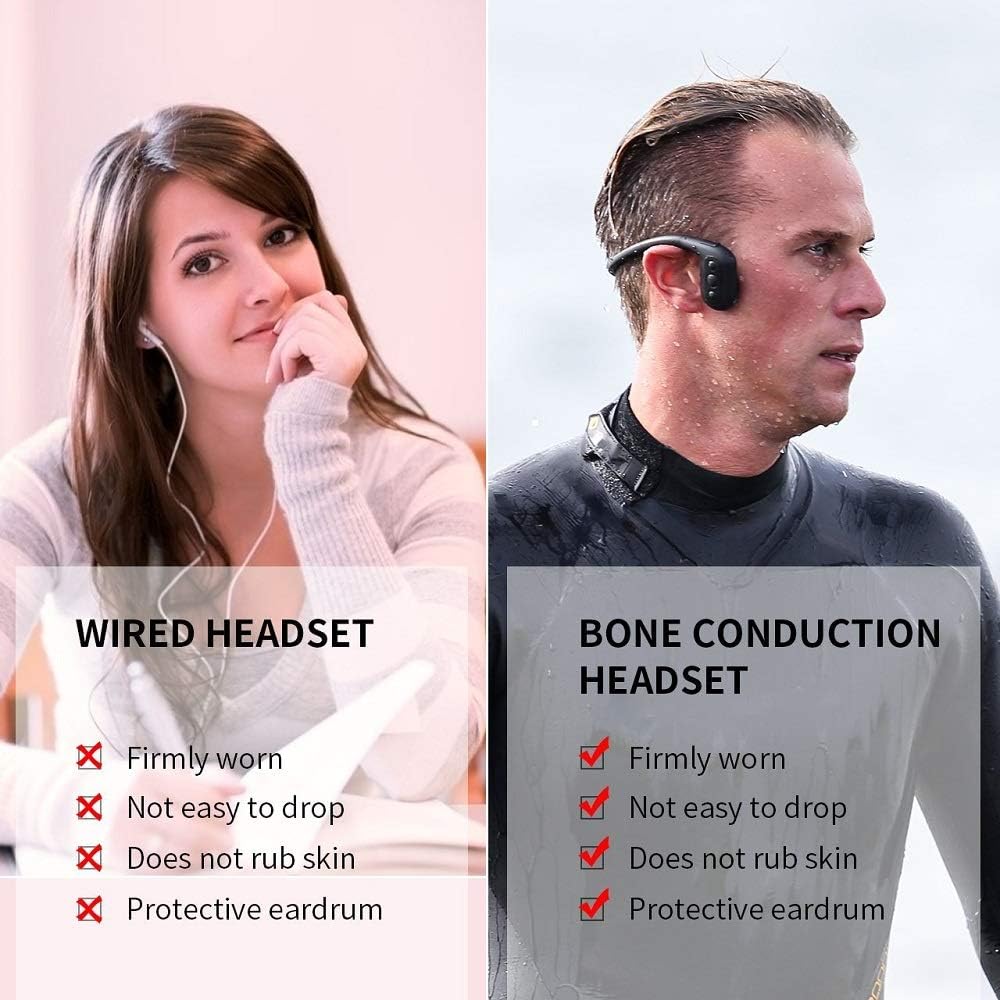
Image 4.3: A side-by-side comparison showing a person wearing traditional wired earbuds versus a person wearing bone conduction headphones. The bone conduction headphones are shown securely fitted around the head, with the transducers positioned correctly.
5. Operating Instructions
5.1. Button Functions
The headphones feature three main control buttons: Volume +, Play, and Volume -.
Image 5.1: Detailed diagram of the control buttons on the Tayogo WB02 headphones, indicating the USB interface, Volume +, Play, and Volume - buttons, along with their primary functions.
- Volume + Button:
- Press: Increase volume.
- Press twice: Next song.
- Long press: Switch between FM, MP3, and Bluetooth modes.
- Play Button:
- Press: Play or pause audio.
- Press and hold for 3 seconds: Power on or off.
- Press and hold for 8 seconds: Reset to factory settings.
- Volume - Button:
- Press: Decrease volume.
- Press twice: Previous song.
- Press and hold: Transfer from order play to shuffle play (MP3 mode).
- Press and hold (in FM mode): Automatically search for and save available FM channels.
5.2. Switching Modes
Long press the Volume + button to cycle through the available modes: Bluetooth, MP3, and FM Radio.
5.3. Bluetooth Pairing
- Ensure the headphones are powered on and in Bluetooth mode (indicated by a specific LED light or voice prompt).
- On your device (smartphone, tablet, etc.), enable Bluetooth and search for available devices.
- Select "Tayogo WB02" (or similar name) from the list to pair.
- Once paired, the headphones will connect automatically to your device when in range and in Bluetooth mode.
Note: Bluetooth connectivity may be interrupted or lost when submerged in water due to radio wave limitations. For underwater use, MP3 mode is recommended.
5.4. Using FM Radio
In FM mode, long press the Volume - button to initiate an automatic scan for FM channels. The headphones will search and save all available stations. Use the Volume + and Volume - buttons (single press) to adjust volume, and double press them to navigate between saved stations.
6. Maintenance
- Cleaning: After use, especially in chlorinated or saltwater, rinse the headphones with fresh water. Wipe them gently with a soft, dry cloth.
- Drying: It is crucial to ensure the charging port and surrounding areas are completely dry before charging or connecting to a computer. Allow the headphones to air dry thoroughly. Avoid storing them in a wet environment.
- Storage: Store the headphones in their protective case in a cool, dry place away from direct sunlight and extreme temperatures.
- Battery Care: To prolong battery life, avoid fully discharging the battery frequently. Charge the headphones regularly, even if not in use for extended periods.
7. Troubleshooting
| Problem | Possible Cause | Solution |
|---|---|---|
| Headphones do not power on. | Low battery. | Charge the headphones fully. |
| Cannot connect via Bluetooth. | Headphones not in Bluetooth mode; device Bluetooth off; out of range. | Ensure headphones are in Bluetooth mode. Turn on Bluetooth on your device. Move device closer to headphones (within 10 meters). |
| No sound or poor sound quality. | Volume too low; incorrect mode; water in transducers (for underwater use). | Adjust volume. Switch to correct mode (MP3/Bluetooth/FM). Ensure transducers are dry and properly positioned on cheekbones. |
| Charging port issues / Device damaged after charging. | Moisture in the charging port. | Always ensure the charging port is completely dry before connecting the USB cable. Allow ample time for air drying after water exposure. If damage occurs, contact customer support. |
| Cannot transfer music files. | Improper connection; file format not supported. | Ensure headphones are properly connected to the computer. Verify audio files are in supported formats (MP3, WMA, WAV, FLAC, APE). Safely eject the device after transfer. |
8. Specifications
- Model: WB02-20201201
- Waterproof Rating: IPX8 (up to 5 meters)
- Internal Storage: 8 GB
- Connectivity: Bluetooth 5.0
- Supported Audio Formats: APE, FLAC, MP3, WAV, WMA
- Special Features: FM Radio, Bone Conduction Technology
- Battery: 1 Lithium Ion battery (included)
- Product Dimensions: 4 x 4 x 1.1 inches
- Item Weight: 9.6 ounces
- Manufacturer: Tayogo
9. Warranty and Support
Tayogo provides a 1-Year Warranty for this product. If you encounter any issues or defects within the warranty period, please contact Tayogo customer support for assistance.
For further support, troubleshooting, or warranty claims, please visit the official Tayogo website or contact their customer service department. Contact details are typically available on the product packaging or the official brand website.
Please retain your proof of purchase for warranty purposes.


