
1. Product Overview
The Baseus LED Desk Lamp DGXC-02 is a versatile, rechargeable, and dimmable lighting solution designed for various indoor environments. It features magnetic mounting for easy installation and removal, adjustable brightness, and three color temperature settings to suit different needs. Its cordless design and long battery life make it ideal for use in study areas, home offices, kitchens, closets, and more.

Figure 1: Baseus LED Desk Lamp DGXC-02
This image displays the Baseus LED Desk Lamp DGXC-02, a sleek, silver-colored magnetic light bar with touch controls visible on its surface. It is shown from an angled perspective, highlighting its minimalist design.
2. Safety Information
- Do not expose the device to extreme temperatures or humidity.
- Avoid dropping or subjecting the device to strong impacts.
- Keep out of reach of children.
- Use only the provided or a compatible USB Type-C cable for charging.
- Do not attempt to disassemble or repair the device yourself. Contact customer support for assistance.
- Ensure the installation surface is clean and dry before applying the adhesive magnetic base.
3. Package Contents
Verify that all items are present in the package:
- Baseus LED Desk Lamp DGXC-02
- Magnetic Mounting Base with Adhesive
- USB Type-C Charging Cable (1 meter)
- User Manual (this document)
4. Features
- Adjustable Brightness: Stepless adjustment and 3-level preset options (10%, 30%, 50%, 70%, 100%).
- Adjustable Color Temperature: Three settings available: 3000K (Warm White), 4000K (Natural White), and 5000K (Cool White).
- Eye-Friendly Lighting: Equipped with 42 energy-saving LEDs, 100 lumens, Color Rendering Index (CRI) > 80 Ra. Passed EU Blue Light RGO Test, ensuring no blue light hazard and no visible strobing for enhanced eye comfort.
- Magnetic & Rotatable Design: Features a built-in magnet for easy attachment to iron surfaces. The lamp body can rotate 80 degrees to direct light as needed, reducing glare.
- Rechargeable Battery: Integrated 1800mAh Lithium Polymer battery provides 4-24 hours of use depending on brightness settings. Fully charges in 4-5 hours via USB Type-C.
- Touch Control: Intuitive touch panel for power, brightness, and color temperature adjustments.
- Memory Function: The light color auto-restore function remembers your last setting.
5. Setup
5.1 Charging the Lamp
Before first use, fully charge the lamp. Connect the provided USB Type-C cable to the lamp's charging port and a 5V/1A power source (e.g., USB adapter, laptop, power bank). The power indicator lights will show charging status.

Figure 2: Charging the Baseus LED Desk Lamp
This image illustrates the Baseus LED Desk Lamp being charged via its USB Type-C port. The power indicator lights are visible, showing the current battery level during the charging process.
5.2 Mounting the Lamp
The lamp offers two installation methods:
- Magnetic Adsorption: If the desired surface is iron (e.g., a metal cabinet), the lamp can be directly adsorbed onto it using its built-in magnet.
- Adhesive Mounting: For non-iron surfaces (e.g., wood, plastic), use the included magnetic mounting base. Clean the surface thoroughly, peel off the protective film from the 3M adhesive on the base, and firmly press the base onto the desired location. Once the base is secured, the lamp can be magnetically attached to it.
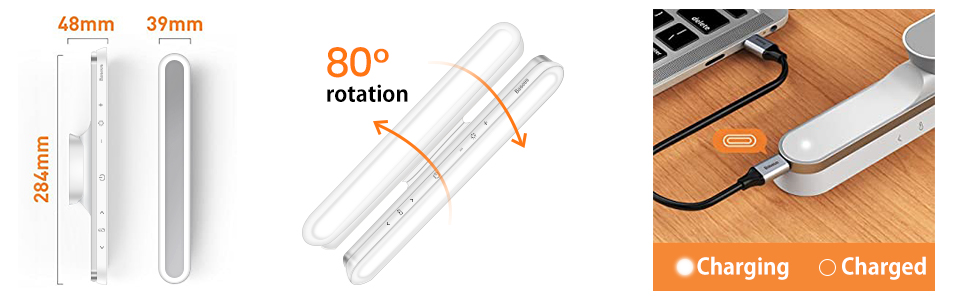
Figure 3: Installation and Features Overview
This diagram provides an overview of the lamp's dimensions, its 80-degree rotation capability, USB-C charging, and the easy adhesive installation method for the magnetic base.

Figure 4: Adhesive Installation Example
A woman is shown installing the Baseus LED Desk Lamp under a wooden shelf. She first attaches the adhesive magnetic base to the shelf, then magnetically attaches the lamp to the base.
5.3 Adjusting the Angle
Once mounted, the lamp can be rotated up to 80 degrees within its magnetic base to direct the light precisely where needed, minimizing glare and optimizing illumination.

Figure 5: 80-Degree Rotation Feature
This image demonstrates the Baseus LED Desk Lamp's ability to rotate 80 degrees on its magnetic base, allowing users to adjust the light direction for optimal illumination and reduced glare.
6. Operating Instructions
The lamp is controlled via a responsive touch panel located on its surface.

Figure 6: Touch Control Panel
This diagram illustrates the touch control panel of the Baseus LED Desk Lamp, detailing the functions for power on/off, adjusting brightness levels, and changing color temperature settings.
- Power On/Off: Press the power button (circle icon) to turn the lamp on or off.
- Brightness Adjustment:
- Short press the brightness buttons (arrow icons) to cycle through 3 preset brightness levels.
- Long press the brightness buttons for stepless dimming or brightening.
- Color Temperature Adjustment:
- Short press the color temperature button (sun icon) to cycle through 3 preset color temperatures (3000K, 4000K, 5000K).
- Long press the color temperature button for stepless adjustment between warm and cool tones.
- 30-Second Turn-Off Delay: Press the timer button (clock icon) for a 30-second turn-off delay.

Figure 7: Detailed Touch Control Functions
This image provides a close-up of the Baseus LED Desk Lamp's touch controls, illustrating how to adjust brightness (Cool light 5000K, Max light 4000K, Warm light 3000K) and color temperature with both 3-step and stepless options.
6.1 Multi-Scene Application
The lamp's versatile design allows it to be used in various settings:
- As a desk lamp for studying or working.
- Under cabinets in the kitchen for task lighting.
- In closets or wardrobes for improved visibility.
- As a vanity light for makeup application.
- In hallways or stairwells as accent or safety lighting.

Figure 8: Multi-Scene Usage Examples
This image showcases the Baseus LED Desk Lamp in four different application scenarios: illuminating a desk, providing light in an aisle, brightening a kitchen counter, and serving as a light source for a makeup mirror.
7. Maintenance
- Clean the lamp surface with a soft, dry cloth. Do not use abrasive cleaners or solvents.
- Ensure the charging port is free of dust and debris to maintain proper charging.
- Store the lamp in a cool, dry place when not in use for extended periods.
8. Troubleshooting
| Problem | Possible Cause | Solution |
|---|---|---|
| Lamp does not turn on. | Battery is depleted. | Charge the lamp fully using the USB Type-C cable. |
| Light is dim or flickers. | Low battery. | Recharge the lamp. |
| Magnetic base does not stick. | Surface is dirty or uneven. | Clean and dry the surface thoroughly before applying the adhesive. Ensure the surface is smooth. |
| Lamp does not rotate smoothly. | Debris in the rotating mechanism. | Gently clean around the magnetic connection point. |
9. Specifications
| Specification | Detail |
|---|---|
| Model Number | DGXC-02 |
| Dimensions | 1.88"D x 11.18"W x 1.53"H |
| Item Weight | 185 Grams (6.5 ounces) |
| Material | Acrylonitrile Butadiene Styrene, Metal, Plastic |
| Light Source Type | LED (42 LEDs) |
| Brightness | 100 Lumens (Max) |
| Color Temperature | 3000K, 4000K, 5000K |
| Wattage | 5 Watt-hours |
| Voltage | 5 Volts |
| Power Source | Battery Powered (1800mAh Lithium Polymer) |
| Battery Life | 4-24 Hours (depending on brightness) |
| Charging Time | 4-5 Hours |
| Control Method | Touch |
| Mounting Type | Magnetic, Adhesive |
| Indoor/Outdoor Usage | Indoor |
10. Official Product Video
Video 1: Baseus LED Table Lamps Overview
This video provides a concise overview of the Baseus LED Desk Lamp, demonstrating its features, installation, and various uses in different settings. It highlights the adjustable brightness, color temperature, and magnetic mounting capabilities.
11. Warranty & Support
Baseus offers a lifetime warranty for this product. For any questions, technical support, or warranty claims, please contact Baseus customer service. They are available 24/7 and will reply promptly.
For more information, visit the official Baseus store: Baseus Store on Amazon


