
Introduction
Thank you for choosing the WAYXIN R9 6-Way Motorcycle Intercom. This device is designed to enhance your riding experience by providing seamless communication, music playback, and navigation audio directly to your helmet. Featuring advanced DSP & CVC noise reduction technology, a long-range intercom system, and a durable, waterproof design, the R9 ensures clear audio and reliable performance in various conditions. Please read this manual carefully to ensure proper installation and optimal use of your intercom system.
What's in the Box
Upon unpacking your WAYXIN R9 intercom system, please verify that all the following components are included:
- 2x R9 Intercom Units (Host-R9)
- 2x Speakers
- 2x Hardcore Microphones
- 2x Button Microphones
- 2x Charging Cables
- 2x Metal Mounting Sheets
- 4x Mounting Screws
- 1x Allen Key
- 1x User Manual
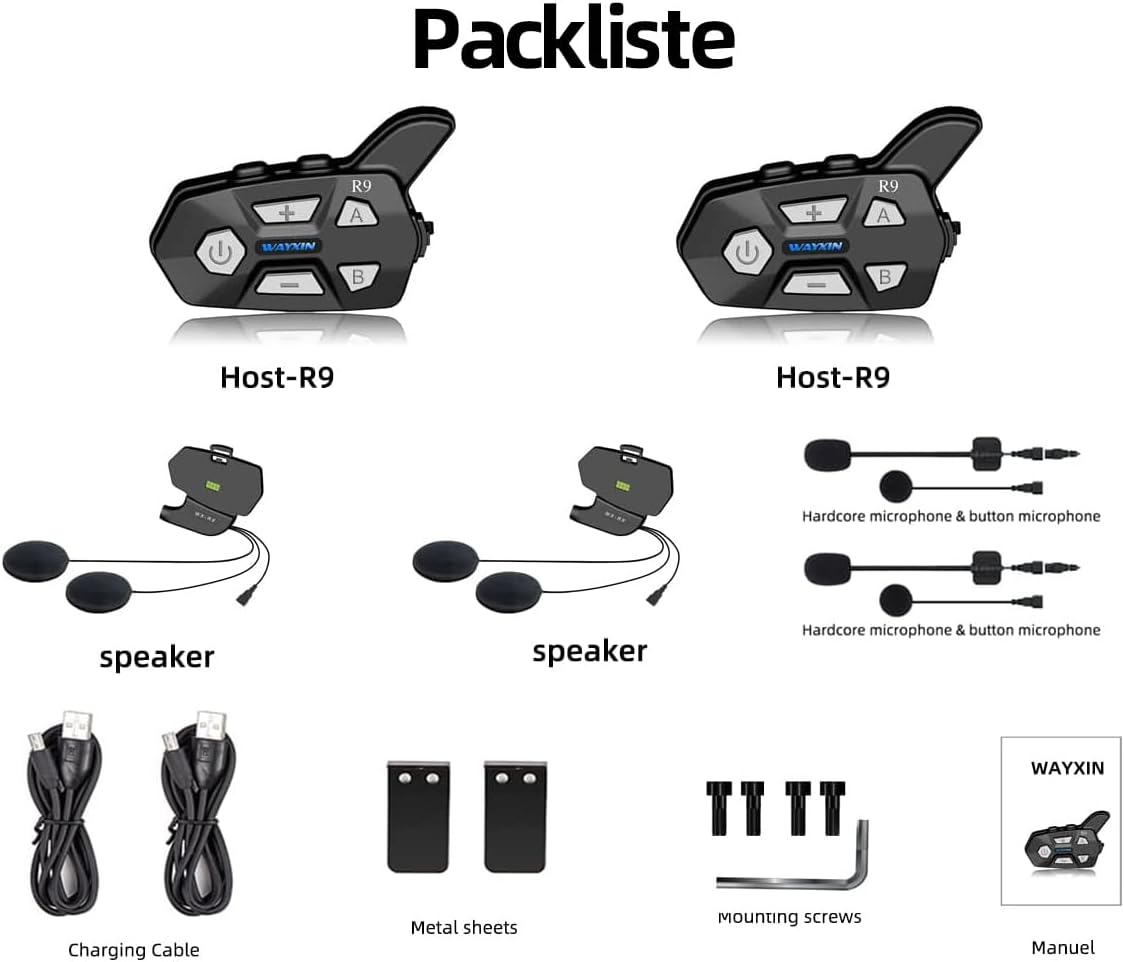
Image: Detailed view of all components included in the WAYXIN R9 package.
Product Overview
The WAYXIN R9 intercom system offers a robust set of features designed for motorcycle riders:
- 6-Way Intercom Communication: Connect with up to 6 riders simultaneously over a range of up to 1500 meters (theoretical value).
- Advanced Noise Reduction: Integrated DSP (Digital Signal Processing) and CVC (Clear Voice Capture) technology effectively reduce wind noise and other background sounds for clear conversations, even at speeds up to 90-100 km/h.
- Bluetooth 5.0: Ensures stable and efficient wireless connectivity with your mobile phone, GPS, and other Bluetooth devices.
- Long Battery Life: Equipped with an 850 mAh battery, providing up to 15 hours of continuous talk time, 380 hours of standby time, and a quick 3-hour charging time.
- Dual Microphone Configuration: Includes both a button microphone and a hardcore microphone for versatile use and improved comfort.
- FM Radio: Built-in full-band FM radio (76 MHz-108 MHz) for entertainment on the go.
- Universal Pairing: Compatible with intercom systems from other manufacturers.
- Voice Assistant Support: Easily activate your smartphone's voice assistant (e.g., Siri, Google Assistant).
- Waterproof Design: Constructed with waterproof materials suitable for various outdoor sports and weather conditions.

Image: Key features of the WAYXIN R9 intercom system.

Image: WAYXIN R9 intercom in use on a motorcycle helmet.

Image: DSP & CVC noise reduction technology for clear audio.
Setup
1. Installation on Helmet
The WAYXIN R9 intercom unit can be easily mounted on most helmet types.
- Choose a suitable location on the side of your helmet for the intercom unit.
- Use the provided mounting screws and metal sheets to securely attach the intercom bracket to the helmet. Ensure it is firm and does not obstruct your vision or helmet functionality.
- Insert the speakers into the helmet's ear pockets. Ensure they are positioned directly over your ears for optimal sound quality.
- Attach the microphone (either hardcore or button type) to a position inside the helmet where it is close to your mouth but not interfering with your breathing or helmet closure.
- Connect the speaker and microphone cables to the corresponding ports on the intercom unit.
2. Initial Charging
Before first use, fully charge the intercom unit.
- Connect the charging cable to the charging port on the R9 unit and to a USB power source.
- A full charge typically takes about 3 hours.

Image: Battery specifications for the WAYXIN R9.
Operating Instructions
1. Power On/Off
- Power On: Press and hold the Power button for approximately 3 seconds until the blue LED lights up.
- Power Off: Press and hold the Power button for approximately 1 second until the red LED lights up.
2. Bluetooth Pairing with Mobile Phone
- With the R9 unit powered off, press and hold the Power button for about 5-7 seconds until the LED indicator flashes red and blue alternately, indicating pairing mode.
- On your mobile phone, enable Bluetooth and search for available devices.
- Select "WAYXIN R9" from the list of devices. Once connected, the LED will flash blue slowly.
3. Intercom Pairing (Multi-Rider)
The R9 supports communication with up to 6 riders. For optimal performance, pair units one by one.
- Ensure both R9 units are powered off.
- On the first unit, press and hold the Power button until it enters pairing mode (red and blue flashing).
- On the second unit, press and hold the "A" button until it enters pairing mode.
- Once paired, the LEDs on both units will flash blue slowly. Repeat this process for additional units, using buttons "B", "C", etc., as per the full manual.
- To initiate intercom communication, briefly press the "A" or "B" button corresponding to the desired rider.

Image: WAYXIN R9 supporting 6-way intercom communication up to 1500m.
4. Music Playback and Sharing
- Once paired with your phone, music will play automatically or can be controlled via your phone.
- To share music with another paired R9 unit (valid for two persons), refer to the specific instructions in the full user manual for the music sharing function.

Image: Music sharing feature between two WAYXIN R9 units.
5. FM Radio
- To activate FM radio, briefly press the FM button (usually indicated by a radio icon).
- Use the Volume Up/Down buttons to change stations.

Image: WAYXIN R9 with FM radio capability.
6. Voice Assistant
- Double-tap the Power button to activate your smartphone's voice assistant (e.g., Siri, Google Assistant).
7. Volume Control
- Use the '+' and '-' buttons on the intercom unit to adjust the volume.

Image: Detailed button layout and functions of the WAYXIN R9 intercom.
Maintenance
To ensure the longevity and optimal performance of your WAYXIN R9 intercom, follow these maintenance guidelines:
- Cleaning: Wipe the unit with a soft, damp cloth. Do not use harsh chemicals or abrasive cleaners.
- Water Resistance: While the R9 is waterproof, avoid submerging it in water for extended periods. Ensure the charging port cover is securely closed when not charging.
- Battery Care: For best battery life, avoid fully discharging the unit frequently. Charge it regularly, especially if storing it for a long time. Store in a cool, dry place.
- Storage: When not in use, store the intercom in a dry environment at room temperature.
Troubleshooting
If you encounter issues with your WAYXIN R9 intercom, refer to the following common solutions:
| Problem | Possible Cause | Solution |
|---|---|---|
| No Power | Battery is discharged. | Charge the unit for at least 3 hours. |
| Cannot Pair with Phone | Intercom not in pairing mode; Bluetooth off on phone; device already paired. | Ensure R9 is in pairing mode (red/blue flashing). Turn phone Bluetooth off/on. Forget previous pairings on phone and R9 (press A+B for 3 seconds to restore pairing record). |
| Intercom Not Connecting | Units not in pairing mode; out of range; interference. | Ensure both units are in intercom pairing mode. Move closer to each other. Avoid areas with strong 2.4G signal interference. |
| Poor Audio Quality / Wind Noise | Microphone placement; high speed; strong wind. | Adjust microphone closer to mouth. Ensure DSP & CVC are active. While noise reduction is effective, extreme wind conditions may still affect clarity. |
| FM Radio Not Working | Poor signal area. | Move to an area with better FM signal reception. |
Specifications
| Feature | Detail |
|---|---|
| Brand | WAYXIN |
| Model Name | WAYXIN R9 6 |
| Model Number | R9 |
| Color | Black |
| Connectivity Technology | Wireless |
| Wireless Communication Technology | Bluetooth |
| Bluetooth Version | 5.0 |
| Noise Control | Active Noise Cancellation (DSP & CVC) |
| Ear Placement | Extra-aural |
| Form Factor | In-Ear (for speakers) |
| Impedance | 32 Ohms |
| Headphone Jack | 3.5 mm Jack |
| Control Method | Tactile, Voice Control |
| Charging Time | 3 hours |
| Average Battery Life (Talk Time) | 15 hours |
| Standby Time | 380 hours |
| Frequency Range | 20 Hz - 20,000 Hz |
| Water Resistance Level | Waterproof |
| Case Material | Plastic |
| Item Weight | 65 Grams |
| Compatible Devices | Smartphones, Tablets, GPS devices, Bluetooth helmets |
| Recommended Uses | Touring motorcycle communication |
Warranty and Support
For warranty information and customer support, please refer to the documentation included with your product or visit the official WAYXIN website. Keep your purchase receipt as proof of purchase.