
1. Introduction
The Antar AT51005 Transport Rollator is a versatile mobility aid designed for individuals requiring assistance with walking and occasional transport. This compact and lightweight device functions as both a rollator for walking support and a transport chair for assisted mobility. Constructed from durable aluminum, it offers stability and ease of maneuverability, supporting users up to 135 kg. Its design incorporates folding footrests, a comfortable seat with a backrest, and a practical shopping bag.
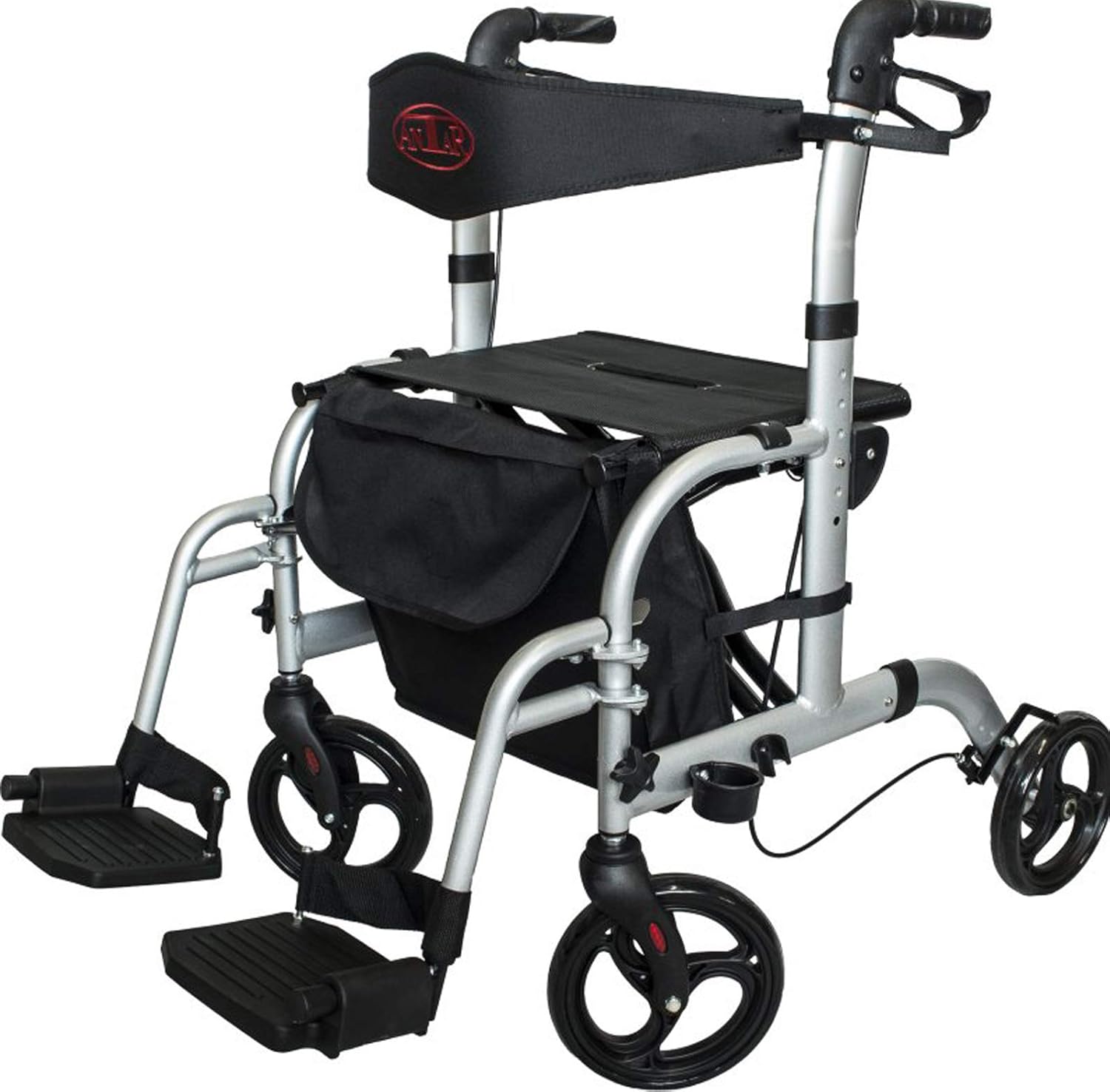
Image 1.1: The Antar AT51005 Transport Rollator, showcasing its primary features including the seat, backrest, and handles.
2. Safety Information
Please read and understand all safety instructions before using the Antar AT51005 Transport Rollator. Failure to follow these instructions may result in injury.
- Weight Limit: Do not exceed the maximum weight capacity of 135 kg (297 lbs).
- Brake Usage: Always engage the parking brakes before sitting on the seat or when standing up from the rollator. Ensure brakes are fully functional before each use.
- Uneven Surfaces: Exercise extreme caution when navigating uneven terrain, cracks, or obstacles. The rollator's hard wheels may cause instability on such surfaces, potentially leading to falls.
- User Capability: This device is intended for users who can sit independently and maintain their balance. It does not include safety belts or harnesses.
- Assisted Use: When used as a transport chair, ensure a capable assistant is pushing the rollator. The user should not attempt to propel themselves while seated in transport mode.
- Regular Inspection: Periodically check all components, including wheels, brakes, and fasteners, for wear, damage, or looseness. Do not use if any part is damaged.
3. Package Contents
Before assembly, please ensure all components are present and undamaged:
- Antar AT51005 Transport Rollator Frame (pre-assembled with seat and backrest)
- Folding Footrests (2 units)
- Removable Shopping Bag
- Walking Stick Holder
- User Manual (this document)
4. Setup and Assembly
Follow these steps to set up your Antar AT51005 Transport Rollator:
- Unfold the Rollator: Place the folded rollator on a flat surface. Gently pull the sides of the frame apart until it fully extends and locks into its open position. Ensure the seat is flat and secure.
- Attach Footrests: If you intend to use the device as a transport chair, locate the two folding footrests. Insert the footrest pins into the designated slots on the front frame of the rollator until they click securely into place.
- Adjust Handle Height: Press the adjustment buttons located on the handle tubes. While holding the buttons, slide the handles up or down to your desired height. Release the buttons to lock the handles. The handles should be at wrist level when standing upright with your arms relaxed at your sides.
- Install Backrest and Seat: The seat and backrest are typically pre-installed. Ensure the backrest is securely positioned for comfort and support.
- Attach Accessories: Secure the removable shopping bag under the seat by attaching its straps to the frame. Attach the walking stick holder to the side frame as desired.

Image 4.1: Key features and adjustable components of the rollator, including handles, height adjustment, and footrests.
5. Operating Instructions
5.1 Using as a Rollator (Walking Aid)
- Hold the ergonomic handles firmly with both hands.
- Push the rollator forward, maintaining a comfortable distance between yourself and the device.
- To slow down or stop, squeeze the hand brake levers.
- To engage the parking brakes, push the brake levers down until they click into the locked position. This prevents the rollator from moving when you sit or stand.
- To release the parking brakes, pull the levers back up.
5.2 Using as a Transport Chair
- Ensure the folding footrests are deployed and securely locked.
- The user should sit comfortably on the seat, facing forward, with their feet placed on the footrests.
- An assistant should stand behind the rollator, holding the handles, and push the device to transport the user.
- Always ensure the user is stable and comfortable before moving.
5.3 Folding for Storage or Transport
The Antar AT51005 is designed to fold compactly for easy storage and transport.
- Remove any items from the shopping bag.
- If attached, remove the footrests.
- Locate the folding mechanism, typically a strap or handle on the seat. Pull this mechanism upwards to collapse the frame.
- Gently push the sides of the rollator together until it is fully folded. The rollator is designed to stand independently when folded.

Image 5.1: The rollator in a compact, folded position, illustrating its space-saving design.
6. Maintenance
Proper maintenance ensures the longevity and safe operation of your rollator.
- Cleaning: Clean the aluminum frame and plastic components with a damp cloth and mild, non-abrasive detergent. Avoid harsh chemicals.
- Brake Check: Regularly test the brakes to ensure they engage effectively. If the brakes feel loose or do not stop the wheels properly, they may need adjustment by a qualified technician.
- Wheel Inspection: Check the wheels for wear, damage, or debris. Ensure they rotate freely.
- Fasteners: Periodically inspect all screws, bolts, and locking mechanisms to ensure they are tight and secure. Do not overtighten.
- Storage: Store the rollator in a dry place, away from extreme temperatures and direct sunlight.
7. Troubleshooting
If you encounter issues with your Antar AT51005 Transport Rollator, refer to the following common problems and solutions:
- Brakes not engaging or too loose: Check the brake cables for any visible damage or kinks. If the tension is incorrect, professional adjustment may be required. Do not attempt to repair brake cables yourself unless you are qualified.
- Difficulty folding the rollator: Ensure the seat strap or folding mechanism is fully pulled upwards. Check for any obstructions (e.g., items in the bag, debris) that might be preventing the frame from collapsing smoothly.
- Rollator feels unstable: Verify that all locking mechanisms are fully engaged after unfolding. Ensure the handle height is adjusted correctly for your posture. Avoid using the rollator on excessively uneven or soft surfaces.
- Wheels not rolling smoothly: Inspect the wheels for trapped debris (hair, lint, dirt). Clean the wheel axles if necessary. If a wheel is damaged, it may need replacement.
8. Specifications
Detailed specifications for the Antar AT51005 Transport Rollator:
| Feature | Specification |
|---|---|
| Product Name | Transport Rollator |
| Model Number | AT51005_1 |
| Brand | Antar |
| Manufacturer | Antar Medizin GmbH |
| Product Dimensions (L x W x H) | 49 x 24 x 59 cm (folded); 95 x 71 x 86-98 cm (unfolded, approx.) |
| Item Weight | 9.8 Kilograms |
| Weight Limit | 135 Kilograms |
| Colour | Black |
| Material | Aluminium |
| Style | Compact |
| Maximum Handle Height | 100 Centimetres |
| Foldable | Yes |

Image 8.1: Dimensional overview of the rollator, including seat height and overall footprint.
9. Warranty and Support
For warranty information, details on returns, or to contact customer support, please refer to the documentation included with your original purchase. You may also visit the official Antar website or contact your retailer for assistance.

