
1. Introduction
This manual provides instructions for the safe and efficient operation of the Radwag MA 50/1.R Moisture Analyzer. This device is designed for precise determination of moisture content in various samples, primarily for laboratory and scientific applications.
2. Safety Information
2.1 General Safety Precautions
- Operate the device only in a stable, level environment.
- Ensure the power supply matches the device's requirements (100-120V AC 50/60Hz or 200-240V AC 50/60Hz).
- Do not block ventilation openings.
- Avoid contact with the heating element during and immediately after operation.
- Use only original accessories and spare parts.
- Disconnect the device from the power supply before cleaning or maintenance.
2.2 Intended Use
The MA 50/1.R Moisture Analyzer is intended for laboratory use to determine moisture content by drying samples. Any other use is considered improper.
3. Product Overview
3.1 Components
The Radwag MA 50/1.R Moisture Analyzer consists of a weighing module and a heating module. It features an infrared drying lamp and a backlit LCD display.

Image: Front view of the Radwag MA 50/1.R Moisture Analyzer, showing the display, control panel, and heating unit.
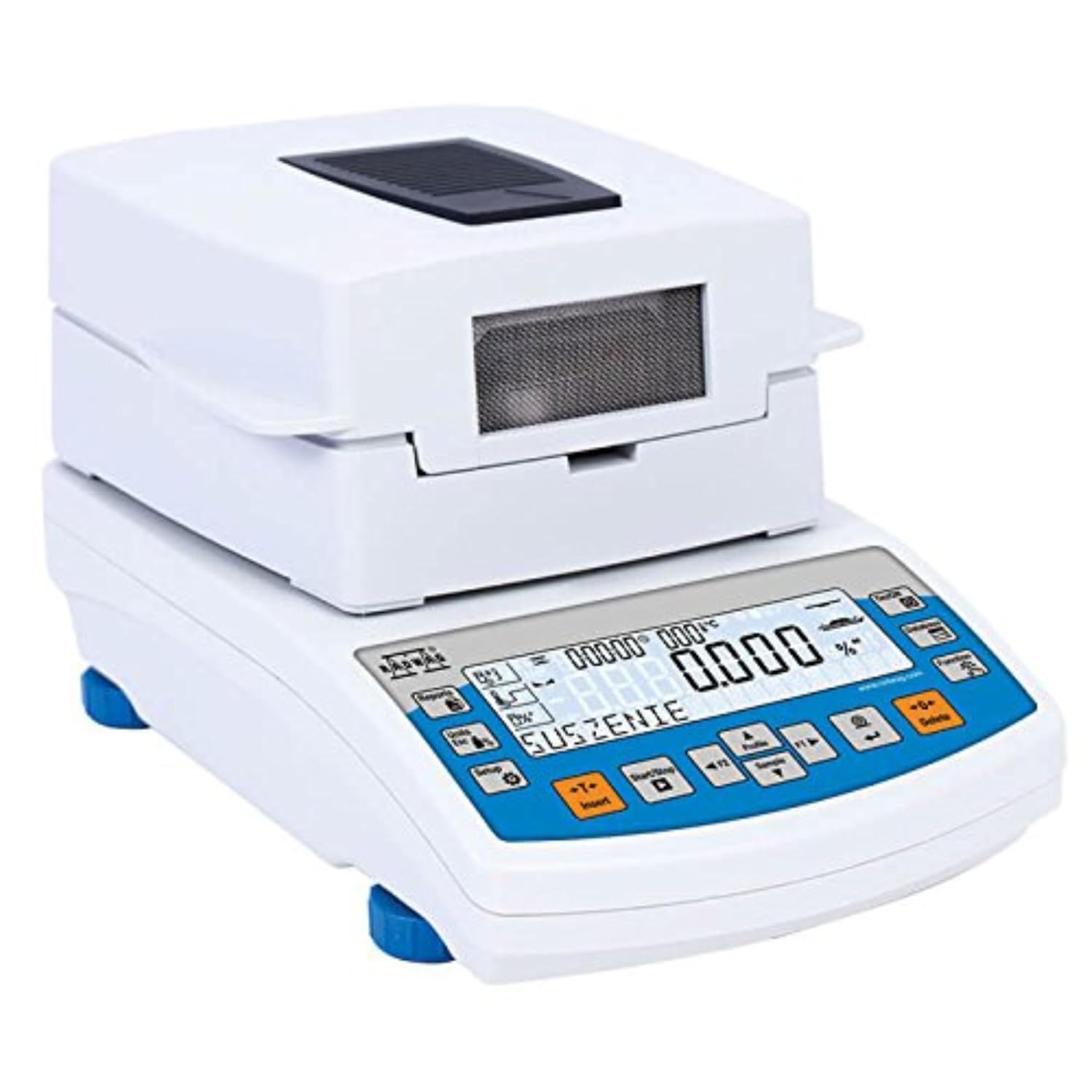
Image: Side view of the Radwag MA 50/1.R Moisture Analyzer, illustrating its compact design.
3.2 Control Panel and Display
The control panel features various buttons for operation, including Units, Setup, Start/Stop, F1, F2, Sample, Profile, Insert, Delete, Function, Database, and On/Off. The backlit LCD display provides real-time information on drying parameters, results, and messages.

Image: The moisture analyzer with its lid open, revealing the sample pan and the infrared heating element. A blue granular sample is visible in the pan.
3.3 Rear Panel Connections
The rear panel provides connectivity options for data transfer and power.

Image: Rear view of the Radwag MA 50/1.R Moisture Analyzer, showing the power input (AC 230V/450W 50Hz), USB1, USB2, and COM (RS232) ports.
4. Setup
4.1 Unpacking and Placement
- Carefully remove the analyzer from its packaging.
- Place the analyzer on a stable, level surface, free from vibrations and drafts.
- Ensure adequate space around the device for ventilation.
4.2 Leveling
The device features adjustable feet and a manual leveling system to ensure accurate measurements. Adjust the feet until the bubble in the spirit level is centered.

Image: A close-up view of the Radwag MA 50/1.R Moisture Analyzer, highlighting the sample pan and the blue adjustable leveling feet at the base.
4.3 Power Connection
Connect the power cable to the analyzer's power input and then to a suitable electrical outlet.
5. Operating Instructions
5.1 Powering On/Off
Press the On/Off button to power the device on or off.
5.2 Basic Operation Sequence
- Power on the analyzer.
- Open the drying chamber lid.
- Place an empty sample pan on the weighing platform.
- Close the lid and press the Tare button (if available, or ensure display shows zero).
- Open the lid, place the sample evenly in the pan.
- Close the lid.
- Select the desired drying program (e.g., standard, fast, step, mild) using the Profile or Function buttons.
- Press Start/Stop to begin the drying process.
- The display will show real-time drying parameters and results.
- Once the process is complete, the final moisture content will be displayed.
5.3 Drying Modes
The MA 50/1.R offers 4 drying profiles: standard, fast, step, and mild. These can be selected based on the sample type and desired drying characteristics.
5.4 Finish Modes
The device supports 4 finish modes: automatic, manual, time-defined, and user-defined, allowing flexibility in determining when the drying process concludes.
5.5 Data Management and Databases
The analyzer features an information system based on 6 databases for managing users, products, weighings, tares, programs, and drying process reports.
- Users: Up to 10 users.
- Products: Up to 1000 products.
- Weighings: Up to 1000 weighings.
- Tares: Up to 100 tares.
- Programs: Up to 100 drying programs.
- Drying process reports: Up to 1000 reports.
Access these databases and functions directly using the keyboard soft keys:
- Database: Access to databases.
- Function: Access to basic functions.
- F1 and F2: Programmable function keys and menu navigation keys.
- Reports: Access to database of drying process reports.
- Profile: Access to parameters settings.
- Sample: Access to products database.

Image: The analyzer's display during a drying process, showing time, temperature, and moisture percentage.

Image: The moisture analyzer with its lid open, showing a sample in the pan and the display indicating direct access to information via soft keys.

Image: A graphical representation of the database structure for Radwag moisture analyzers, showing interconnected cubes representing users, products, weighings, tares, programs, and reports.
6. Maintenance
6.1 Cleaning
Disconnect the device from power before cleaning. Use a soft, damp cloth with a mild detergent to clean the exterior. Do not use abrasive cleaners or solvents. Ensure no liquids enter the device.
6.2 Sample Pan Care
The sample pan should be cleaned regularly to prevent contamination and ensure accurate readings.
7. Troubleshooting
7.1 Common Issues
- Inaccurate Readings:
- Check if the device is level.
- Ensure the sample pan is clean and correctly placed.
- Verify the sample size is within the maximum capacity (50g).
- Check for drafts or vibrations in the environment.
- Device Not Powering On:
- Check the power cable connection.
- Verify the power outlet is functional.
- Drying Process Not Starting:
- Ensure a drying program is selected.
- Check if the lid is properly closed.
7.2 Error Messages
Refer to the on-screen error messages for specific guidance. If an issue persists, contact Radwag support.
8. Specifications
| Parameter | Value |
|---|---|
| Max Capacity | 50g |
| Moisture Content Readability | 0.0001% |
| Drying Lamp | 160 °C Infrared |
| Display Type | Backlit LCD |
| Functions | Dry Mass Determination, 4 Weighing Modes |
| Communication Interfaces | RS232, USB-A, USB-B, Wi-Fi |
| Product Dimensions | 13 x 8 x 7 inches |
| Item Model Number | MA 50/1.R |
| Manufacturer | Radwag |
| Operating Temperature | +10 °C to +40 °C |
| Power Supply | 100-120V AC 50/60Hz or 200-240V AC 50/60Hz |
| Power Consumption | 4 W (standby), 450 W (heating) |
| Protection Class | IP 43 |
| Weighing Pan Dimensions | Ø90, h=8 mm |
| Net Weight | 4.8 kg |
| Gross Weight | 6 kg |
For more detailed specifications, refer to the official Radwag website: radwag.com
9. Warranty and Support
9.1 Warranty Information
Specific warranty details are typically provided with the product documentation at the time of purchase. Please refer to your purchase agreement or contact Radwag customer service for warranty terms.
9.2 Customer Support
For technical assistance, service, or inquiries, please contact Radwag customer support. Radwag operates 8 subsidiaries in Poland and 6 representative offices abroad, including one in the USA.
Visit the official Radwag website for contact information: www.radwag.com


