
1. Important Safety Information
Please read this manual thoroughly before operating your dehumidifier. Keep this manual for future reference. Failure to follow these instructions may result in property damage, injury, or death.
- Always operate the unit on a level surface to prevent water overflow.
- Ensure the power cord is not damaged and is properly grounded.
- Do not block air inlets or outlets. Maintain at least 8 inches of clearance around the unit.
- Unplug the unit before cleaning or performing any maintenance.
- Do not use the unit in areas where flammable gases or liquids are stored.
- This appliance is not intended for use by persons (including children) with reduced physical, sensory or mental capabilities, or lack of experience and knowledge, unless they have been given supervision or instruction concerning use of the appliance by a person responsible for their safety.
2. Product Overview
The JHS Energy Star 25 Pint Dehumidifier is designed to efficiently remove moisture from your indoor environment, improving air quality and comfort. It features a compact design with user-friendly controls.

Figure 2.1: Front view of the JHS 25-Pint Dehumidifier.
Key Features:
- 25-Pint DOE Dehumidification: Removes up to 25 pints of moisture per day.
- Coverage Area: Ideal for spaces up to 1,500 Sq. Ft.
- Energy Star Certified: Ensures energy-efficient operation.
- Portable Design: Equipped with 4 smooth-gliding caster wheels and an easy-carry handle for mobility.
- LED Display & Electronic Controls: Intuitive interface for easy operation.
- Multiple Settings: 3 fan speeds and customizable humidity settings (35%-80%).
- Auto-Restart Function: Automatically resumes operation after a power outage.
- Auto Shut-Off: Unit automatically turns off when the water tank is full.
- Continuous Drain Option: Allows for direct drainage via a hose (not included).
- Washable Air Filter: Reusable and easy to clean for optimal performance.

Figure 2.2: Dehumidifier in a typical room setting.
3. Setup
3.1 Unpacking
Carefully remove the dehumidifier from its packaging. Inspect the unit for any shipping damage. Retain the packaging for future storage or transport.
3.2 Placement
Place the dehumidifier on a smooth, level floor strong enough to support the unit with a full water tank. Ensure there is at least 8 inches (20 cm) of air space on all sides of the unit for proper air circulation.
3.3 Power Connection
Plug the power cord into a properly grounded 115V/60Hz electrical outlet. Do not use an extension cord.
4. Operating Instructions
The control panel allows you to manage all functions of your dehumidifier. Refer to Figure 4.1 for button layout.
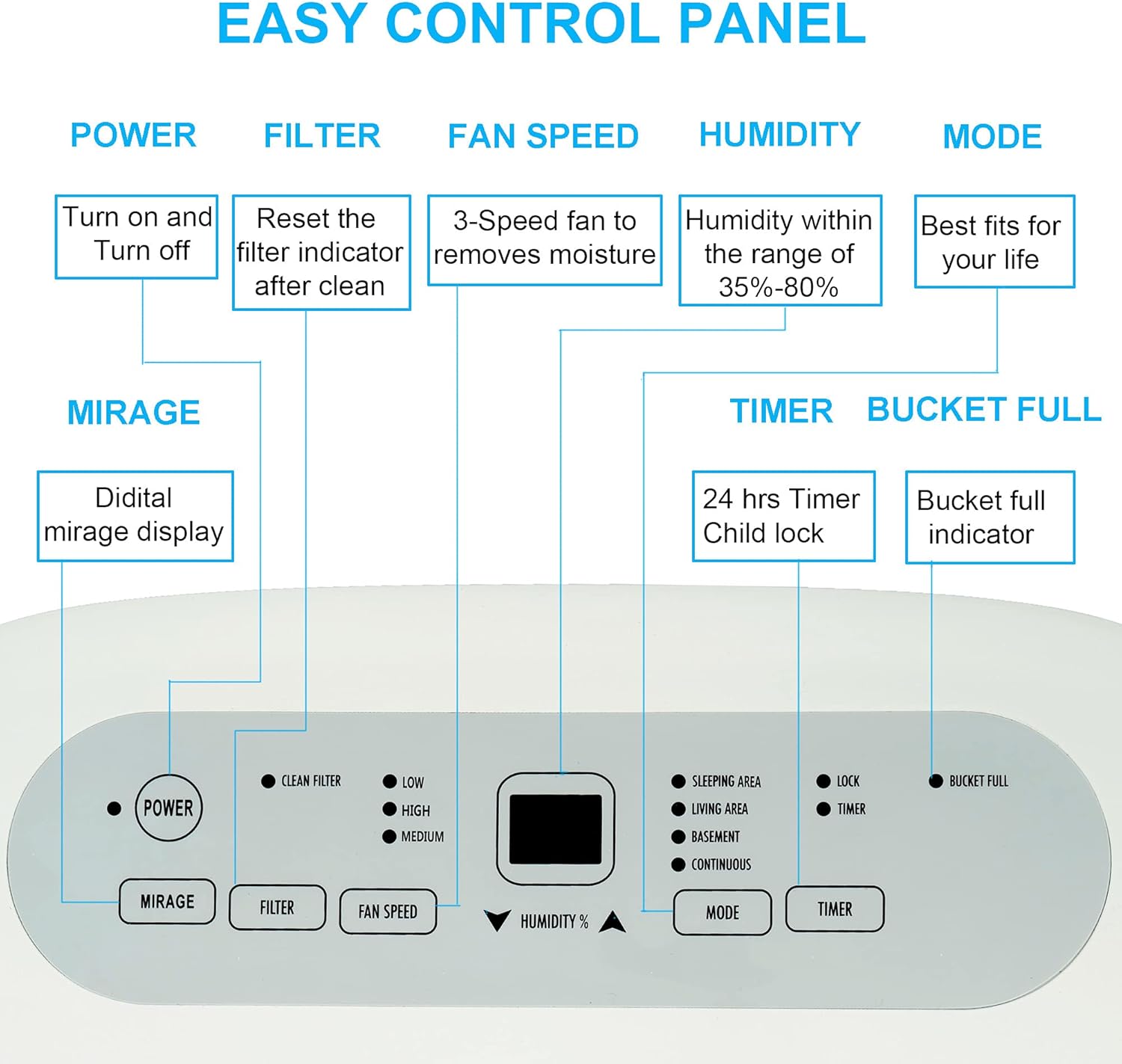
Figure 4.1: Control Panel Layout.
4.1 Control Panel Functions
- POWER Button: Press to turn the dehumidifier ON or OFF.
- FILTER Button: Press to reset the filter indicator after cleaning the air filter.
- FAN SPEED Button: Select between Low, Medium, or High fan speeds.
- HUMIDITY +/- Buttons: Adjust the desired humidity level from 35% to 80% in 5% increments.
- MODE Button: Cycle through different operating modes (e.g., Sleeping Area, Living Area, Basement, Continuous).
- TIMER Button: Set the 24-hour ON/OFF timer.
- BUCKET FULL Indicator: Illuminates when the water tank is full and needs to be emptied. The unit will automatically shut off.
- AUTO-RESTART: In case of a power outage, the unit will automatically restart with the last settings once power is restored.

Figure 4.2: Recommended Humidity Settings.
5. Drainage Options
Your dehumidifier offers two methods for water removal:
5.1 Manual Draining (Water Tank)
When the water tank is full (8.5 pints capacity), the 'BUCKET FULL' indicator will light up, and the unit will automatically shut off. Carefully remove the water tank from the front of the unit and empty it. Reinsert the tank securely to resume operation.
5.2 Continuous Draining
For continuous operation without emptying the water tank, you can connect a standard garden hose (not included) to the continuous drain outlet at the back of the unit. Ensure the hose is sloped downwards to allow gravity drainage to a suitable floor drain or container.

Figure 5.1: Manual and Continuous Drainage Options.
6. Maintenance
6.1 Cleaning the Air Filter
The air filter should be cleaned every two weeks or more frequently depending on usage and air quality. A dirty filter can reduce efficiency and cause the unit to work harder.
- Turn off the unit and unplug it from the power outlet.
- Remove the filter from the back of the unit.
- Wash the filter with warm, soapy water. Rinse thoroughly.
- Allow the filter to air dry completely before reinserting it.
- Once the filter is reinserted, press the 'FILTER' button on the control panel to reset the indicator.
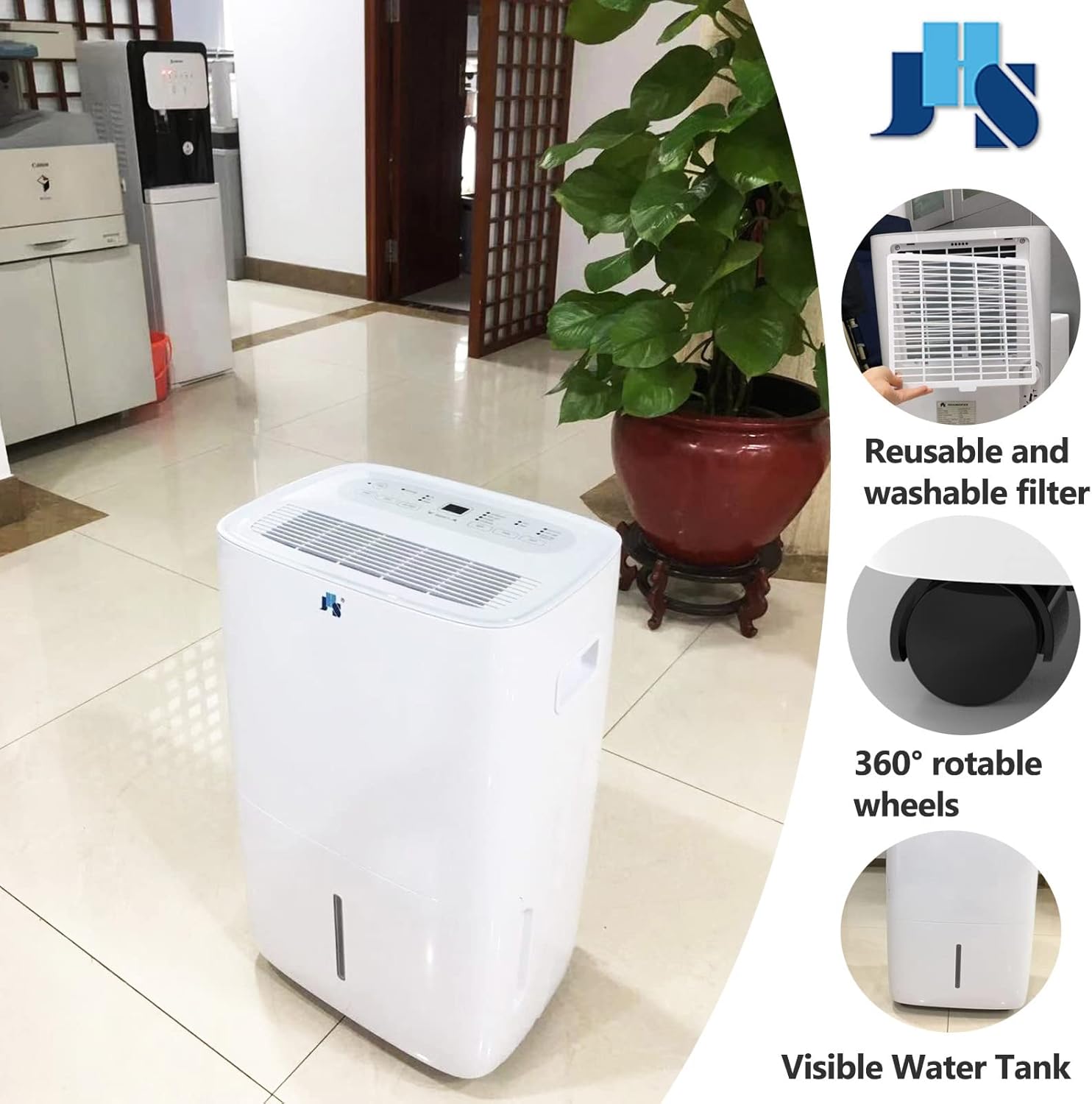
Figure 6.1: Washable Air Filter Location.
6.2 Storage
If you plan to store the dehumidifier for an extended period:
- Empty the water tank and ensure it is completely dry.
- Clean the air filter.
- Wrap the power cord neatly and secure it.
- Store the unit in a cool, dry place, away from direct sunlight and extreme temperatures.
7. Troubleshooting
Before contacting customer support, please refer to the following common issues and solutions:
| Problem | Possible Cause | Solution |
|---|---|---|
| Dehumidifier does not turn on. | No power, power outage, water tank full or not properly inserted. | Check power connection, ensure tank is empty and correctly seated. |
| No water collected. | Humidity setting too high, room temperature too low, air filter dirty, air inlet/outlet blocked. | Lower humidity setting, ensure room temp is above 41°F (5°C), clean filter, clear blockages. |
| Unit runs continuously. | Continuous mode selected, humidity setting too low for current conditions. | Change mode, increase humidity setting. |
| Frost appears on coils. | Low room temperature. | Unit has automatic defrost. If persistent, increase room temperature. |
| Unit is noisy. | Unit not on a level surface, air filter dirty. | Place on a flat, stable surface. Clean air filter. |
8. Specifications
| Feature | Specification |
|---|---|
| Brand | JHS |
| Model Name | JHS Energy Star 25 Pint Dehumidifier |
| Model Number | D025B-25PT |
| Dehumidification Capacity | 25 Pints per Day |
| Coverage Area | Up to 1500 Square Feet |
| Water Tank Capacity | 8.5 Pints |
| Product Dimensions | 10"D x 13"W x 19"H |
| Item Weight | 32 Pounds |
| Voltage | 115V |
| Wattage | 295 watts |
| Number of Speeds | 3 |
| Humidity Control Range | 35%-80% |
| Special Features | Adjustable Humidity Control, Automatic Defrost, Automatic Restart, Automatic Shutoff, Continuous Draining, Portable, Timer |
| Material | Plastic |
| UPC | 850010663005 |

Figure 8.1: Product Dimensions.
9. Warranty and Support
This JHS dehumidifier comes with a 1-year limited warranty from the date of purchase. Please retain your proof of purchase for warranty claims.
For technical support, troubleshooting assistance, or warranty inquiries, please contact JHS customer service. Refer to the contact information provided in your product packaging or visit the official JHS website.


