
Introduction
This manual provides comprehensive instructions for the assembly, operation, maintenance, and troubleshooting of your FLEXISPOT EN2 Whole-Piece Standing Desk. Please read this manual thoroughly before use to ensure safe and efficient operation.

Image: The FLEXISPOT EN2 Whole-Piece Standing Desk, showcasing its spacious white desktop, gray frame, and integrated clamp power strip. The desk is set up with multiple devices, highlighting its functionality.
Safety Warnings
Important Safety Information:
- This desk has a maximum weight recommendation of 154 pounds (70 kg). Exceeding this weight limit could lead to damage or failure of the desk.
- The desk should be securely anchored to the wall if the combined weight of the desktop and objects placed on it exceeds 110 pounds (50 kg) to prevent tipping over.
- Always use caution when assembling the desk, and ensure all parts are securely fastened before use.
- Children should not be allowed to climb or play on the desk, as it poses a risk of injury.
- Regularly inspect the desk for any signs of wear, damage, or instability, and address any issues promptly to maintain safety.
Product Features
- Removable Desktop Power Outlet: Equipped with 3 power outlets and 2 USB charging ports (5V/2A) for convenient device charging. Can be clipped to the back or side of the desk. Includes a cable management device for a tidy workspace.
- Ample Whole-Piece Desktop: Features a 1-inch eco-friendly desktop providing generous space for computer setups, documents, and accessories. Note: Desktop dimensions may vary slightly by 0 to 1 inch due to hand measurements.
- 4 Memory Buttons: A 6-button digital controller allows easy switching between sitting and standing positions with 4 programmable memory presets. The motorized system adjusts smoothly from 28.1 inches to 45.7 inches with a quiet motor operating at less than 50 dB.
- Durable Construction: Rigorously tested frame for performance, durability, and safety. Constructed from premium wood planks and a sturdy industrial-grade steel frame, supporting up to 176 pounds.

Image: Visual comparison illustrating the enhanced stability of a smooth, single-piece desktop compared to a less stable uneven two-piece design.
Setup and Assembly
Your FLEXISPOT EN2 desk will arrive in two separate packages, which may be shipped separately. Assembly is designed to be straightforward, but an electric drill (not included) may be required for certain steps, such as attaching the crossbeam or cable tray.
- Ensure all components from both packages are present before beginning assembly.
- Follow the provided user guide carefully for step-by-step instructions. Pay close attention to the crossbeam adjustment in Step 2; ensure screws are only loose enough to extend the crossbar to the maximum sign, and tighten them only in Step 8 after the base is attached to the table.
- Use a battery-powered drill for self-tapping screws for predrilled holes for table legs and for the center holes on the crossbeam or cable tray.

Image: Illustration showing two separate packages for the desk, one containing the desktop and the other the desk frame, indicating they may arrive at different times.
Operating Instructions
Height Adjustment
The FLEXISPOT EN2 features a motorized height adjustment system controlled by a 6-button digital panel. The desk can be smoothly adjusted from a minimum height of 28.1 inches to a maximum height of 45.7 inches.
- Use the Up (^) and Down (v) arrow buttons on the control panel to manually adjust the desk height. The current height is displayed on the LED screen.
- The motor operates quietly (less than 50 dB) for minimal disruption.
Memory Presets
The control panel includes four programmable memory presets (1, 2, 3, 4) to quickly switch between your preferred sitting and standing heights.
- Adjust the desk to your desired height using the Up/Down arrows.
- Press the "S" button (Set) once. The LED display will flash.
- Immediately press one of the number buttons (1, 2, 3, or 4) to save the current height to that preset.
- To recall a saved height, simply press the corresponding number button. The desk will automatically move to the stored position.
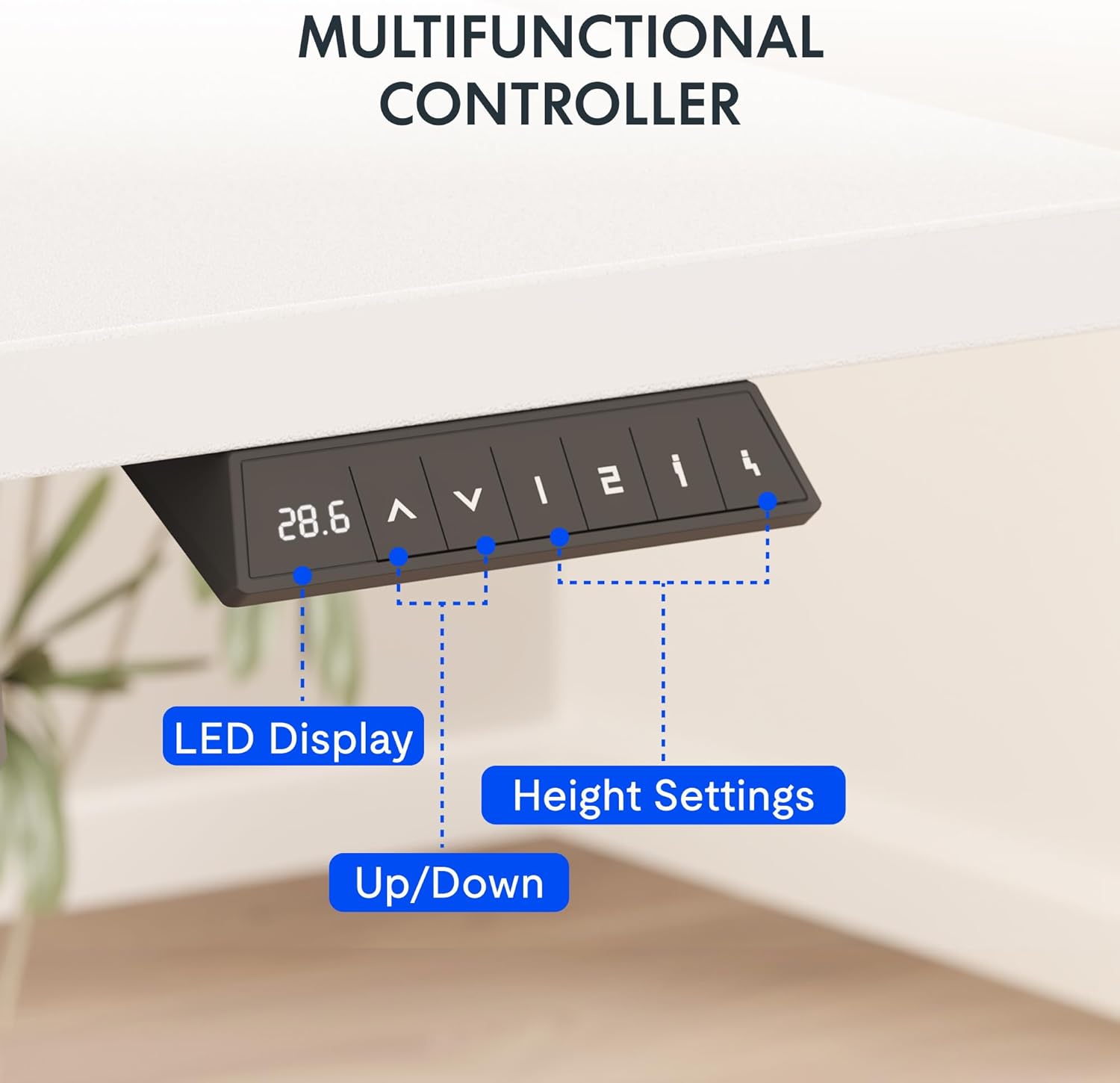
Image: A detailed view of the desk's control panel, showing the LED display, up/down adjustment buttons, and four programmable memory preset buttons.
Integrated Power Outlet
The removable desktop power outlet provides convenient access to power for your electronic devices. It includes 3 AC outlets and 2 USB charging ports (5V/2A).
- The power outlet can be clipped to the back or side of your desk.
- Use the USB ports for charging smaller devices like smartphones and tablets.
- The power outlet is designed for general electronic devices and may not support laptop charging.
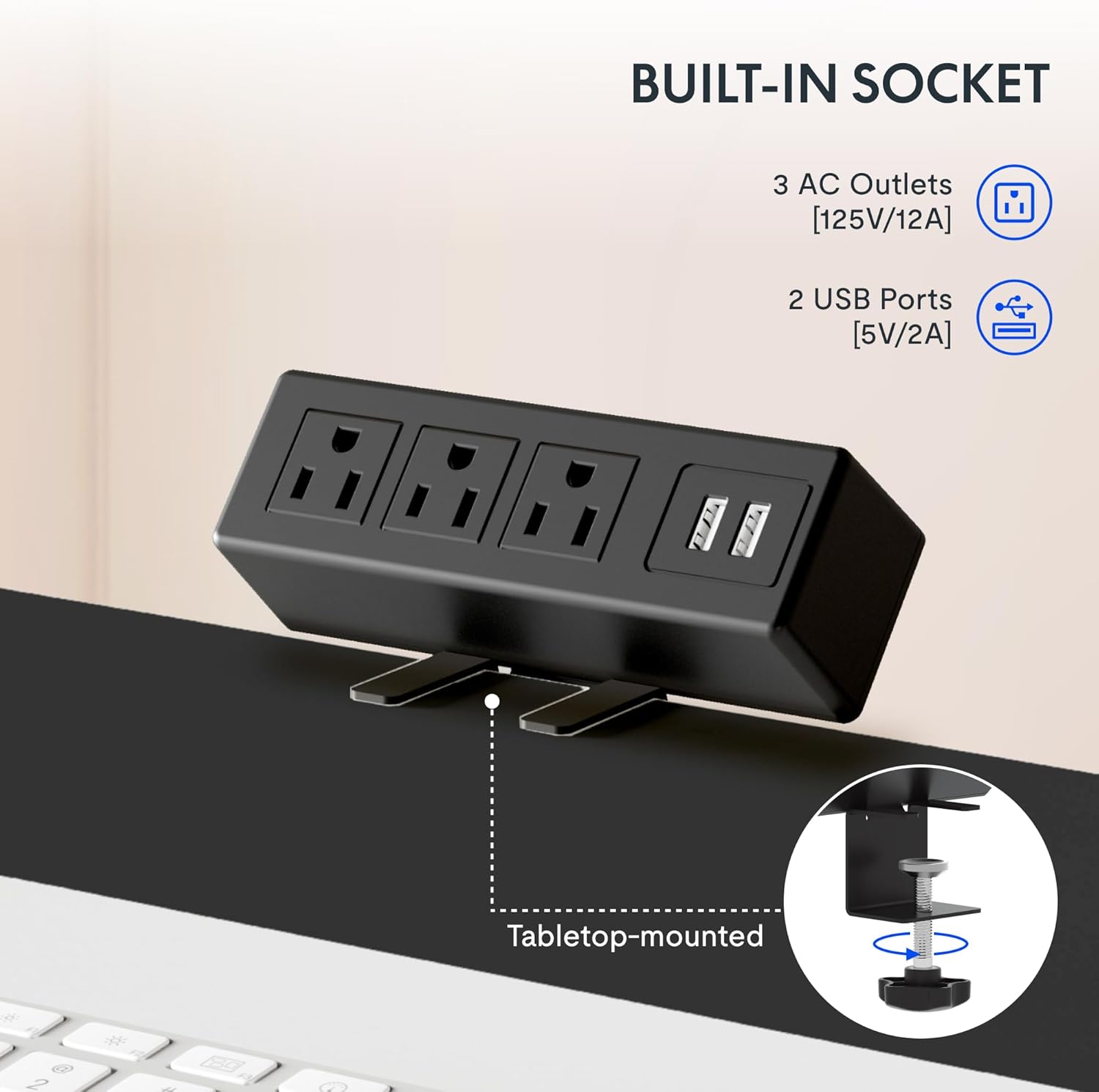
Image: A close-up of the integrated power strip, featuring three AC outlets and two USB ports, designed to clamp onto the desk edge for easy access.
Maintenance
To ensure the longevity and optimal performance of your FLEXISPOT EN2 Standing Desk, follow these maintenance guidelines:
- Cleaning: Wipe the desktop and frame with a soft, damp cloth. Avoid abrasive cleaners or harsh chemicals that could damage the finish.
- Inspection: Periodically check all screws and bolts to ensure they are tight. Re-tighten if necessary.
- Cable Management: Utilize the provided cable management solutions to keep cords organized and prevent them from getting caught during height adjustments.
- Weight Limit: Adhere strictly to the maximum weight recommendation of 176 pounds to prevent motor strain or structural damage.
Troubleshooting
If you encounter any issues with your FLEXISPOT EN2 Standing Desk, refer to the following common troubleshooting tips:
- Desk Not Moving / Error Code "r5t": If the desk is unresponsive or displays an error code like "r5t", a system reset may be required.
- Unplug the desk from the power outlet.
- Wait for at least 10-15 seconds.
- Plug the desk back into the power outlet.
- Press and hold the "Down (v)" button until the desk reaches its lowest position and slightly rises, then releases. This typically initiates a reset.
- If the issue persists, contact customer support.
- Uneven Movement: Ensure the desk is placed on a level surface and that all leg components are securely fastened.
- Noise During Adjustment: A slight motor hum is normal. Excessive or unusual noises may indicate an issue; ensure no cables or objects are obstructing the lifting columns.
Specifications
| Feature | Detail |
|---|---|
| Brand | FLEXISPOT |
| Model Name | EN2 |
| Size (Current Product) | 60x24 inches |
| Color | Gray Frame + White Top |
| Style | Casual |
| Base Material | Alloy Steel |
| Top Material Type | Wood |
| Special Features | Adjustable, Electric, Ergonomic, Integrated Power Strip |
| Minimum Height | 28.1 Inches |
| Maximum Height | 45.7 Inches |
| Maximum Weight Recommendation | 176 Pounds |
| Motor Noise Level | Less than 50 dB |
| Required Assembly | Yes |
Warranty and Support
FLEXISPOT provides comprehensive warranty coverage for your peace of mind:
- 5-Year Warranty: Covers frames, motors, and other mechanical devices.
- 2-Year Warranty: Covers controllers, switches, and electronics.
For customer support or warranty claims, please refer to the contact information provided with your product packaging or visit the official FLEXISPOT website.
Official Product Videos
FLEXISPOT EN2 Whole-Piece Standing Desk Overview
Video: An official overview of the FLEXISPOT EN2 Whole-Piece Standing Desk, demonstrating its features and functionality.
FLEXISPOT Standing Desk Features
Video: A promotional video from FLEXISPOT showcasing various features of their standing desks, including smooth height adjustment and sturdy design.
FlexiSpot Standing Desk - Healthier Lifestyle
Video: An official FlexiSpot video emphasizing the benefits of using a standing desk for a healthier lifestyle and improved work ergonomics.


