
RCA RMW1630
RCA RMW1630 Countertop Microwave Oven Instruction Manual
Model: RMW1630
Product Overview
This manual provides detailed instructions for the safe and efficient operation of your RCA RMW1630 Countertop Microwave Oven. This 1.6 cubic foot microwave oven is designed for convenient cooking, reheating, and defrosting. It features a user-friendly control panel and a durable stainless steel interior.

Figure 1: Front view of the RCA RMW1630 Countertop Microwave Oven.
Key Features
- Convenient Cooking Controls: Equipped with 10 microwave power levels and 10 one-touch cooking menus for quick heating and defrosting.
- Digital Display: Features a soft-touch electronic control panel, digital clock, and kitchen timer for precise operation.
- Child Lock: A safety lock feature prevents unsupervised operation by children, enhancing household safety.
- Interior Light: An internal light allows for monitoring food status without opening the door.
- Spacious Capacity: 1.6 cubic feet capacity accommodates various dish sizes.
What's in the Box
Upon unpacking, ensure all items are present and in good condition:
- RCA RMW1630 Countertop Microwave Oven Unit
- Glass Turntable Plate
- Turntable Ring Assembly
- Instruction Manual (this document)
Setup and Installation
Unpacking
- Remove all packaging materials from inside and outside the microwave oven.
- Check the oven for any damage, such as dents or a misaligned door. Do not operate the oven if it is damaged.
- Place the glass turntable plate and turntable ring assembly inside the oven cavity.
Placement
- Place the microwave oven on a flat, stable surface that can support its weight and the heaviest food item likely to be cooked in it.
- Ensure adequate ventilation. Maintain a minimum of 3 inches (7.5 cm) of space between the oven and any adjacent walls or cabinets.
- Do not block air vents. Blocking vents can damage the oven and lead to poor cooking results.
- Keep the oven away from heat sources and strong magnetic fields.
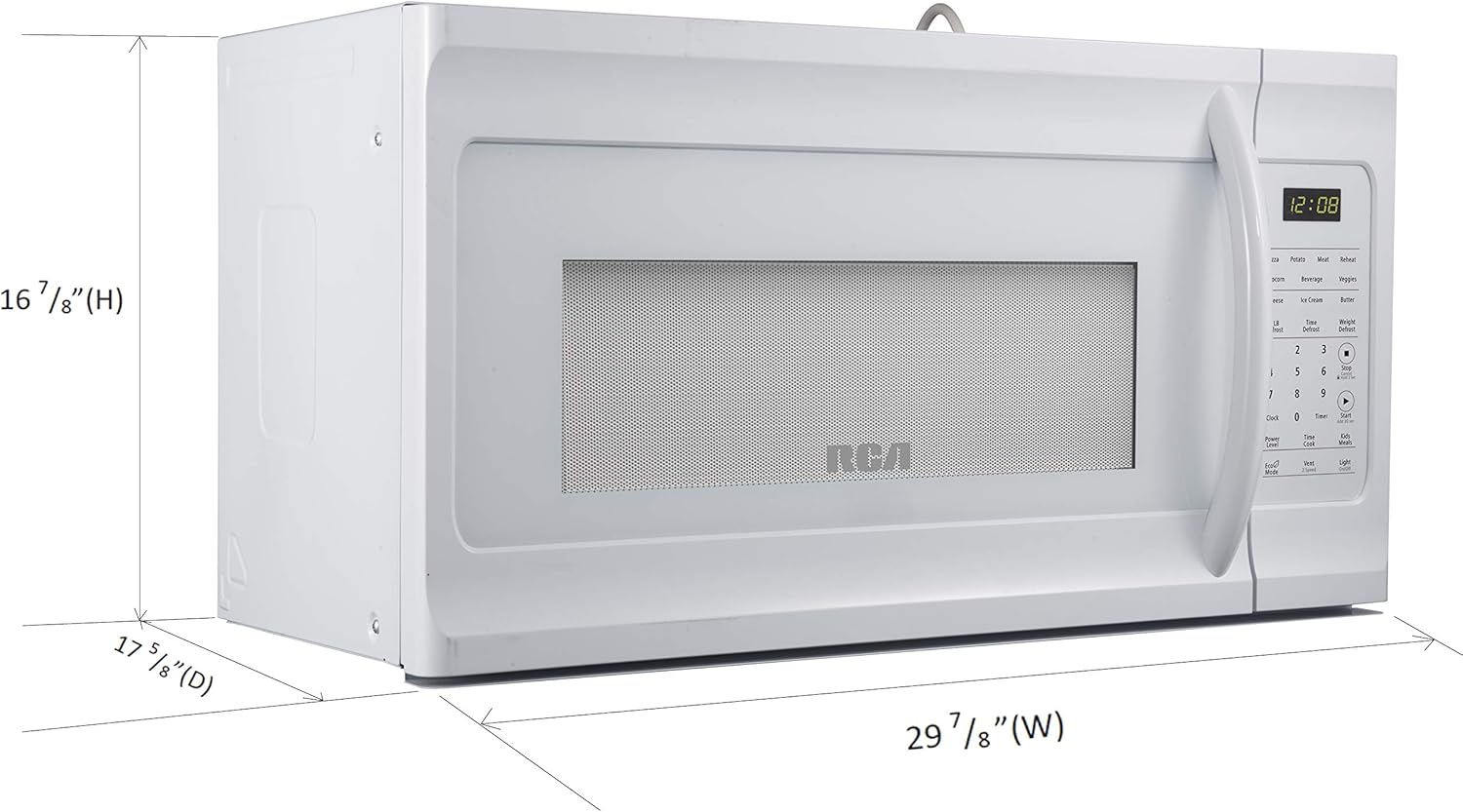
Figure 2: Dimensions of the RCA RMW1630 Countertop Microwave Oven for proper placement.
Electrical Connection
Plug the oven into a properly installed and grounded 3-prong outlet. Do not use an extension cord or adapter.
Operating Instructions
Control Panel Overview
The control panel features a digital display and various function buttons for easy operation.

Figure 3: Close-up of the RCA RMW1630 control panel.
Setting the Clock
- Press the CLOCK button once.
- Enter the current time using the number pads (e.g., for 11:00, press 1, 1, 0, 0).
- Press the CLOCK button again to confirm.
Basic Microwave Cooking
- Place food in a microwave-safe container on the glass turntable.
- Close the microwave door securely.
- Enter the desired cooking time using the number pads (e.g., for 1 minute, press 1, 0, 0).
- Press the START/STOP button to begin cooking.
- To adjust power level, press POWER before pressing START/STOP, then select a number from 1-10 (10 being 100% power).
One-Touch Cooking Menus
The microwave includes pre-programmed settings for common foods:
- Popcorn: Press the POPCORN button.
- Potato: Press the POTATO button.
- Pizza: Press the PIZZA button.
- Beverage: Press the BEVERAGE button.
- Frozen Dinner: Press the FROZEN DINNER button.
- Reheat: Press the REHEAT button.
Defrosting
The microwave offers various defrosting options:
- Defrost by Weight: Press DEFROST BY WEIGHT, enter the weight of the food, then press START/STOP.
- Speed Defrost: Press SPEED DEFROST, enter the desired time, then press START/STOP.
Child Lock Function
To activate the child lock, press and hold the RESET button for 3 seconds. The display will show "LOCK". To deactivate, press and hold the RESET button again for 3 seconds.
Video 1: Demonstration of basic functions and clock setting on an RCA microwave. Note: The video features a black model, but the functions are identical to the white RMW1630 model.
Maintenance and Cleaning
Cleaning the Exterior
Wipe the exterior surface with a damp cloth and mild soap. Avoid abrasive cleaners or harsh chemicals.
Cleaning the Interior
- For light spills, wipe with a damp cloth.
- For stubborn food residue, place a bowl of water with lemon slices inside and microwave for 5-7 minutes. The steam will loosen the residue, making it easier to wipe clean.
- The glass turntable plate and turntable ring can be removed and washed with warm, soapy water or in a dishwasher.
Care of the Door and Door Seals
Regularly clean the door and door seals to ensure proper closure and efficient operation. Do not use harsh or abrasive materials to clean these areas.
Troubleshooting
| Problem | Possible Cause | Solution |
|---|---|---|
| Oven does not start | Power cord not plugged in; Door not closed properly; Fuse blown or circuit breaker tripped. | Ensure power cord is securely plugged in; Close door firmly; Check household fuse or reset circuit breaker. |
| Food not heating | Incorrect cooking time/power level set; Microwave-safe dish not used. | Adjust cooking time and power level; Use only microwave-safe cookware. |
| Turntable not rotating | Turntable not properly seated; Obstruction under turntable. | Ensure turntable and ring are correctly positioned; Remove any obstructions. |
| Display shows "LOCK" | Child lock is activated. | Press and hold the RESET button for 3 seconds to deactivate. |
Specifications
- Brand: RCA
- Model Name: RMW1630
- Capacity: 1.6 Cubic Feet
- Color: White
- Wattage: 1000 watts
- Installation Type: Over-the-Range (Note: Product title and categories indicate Countertop, but specifications list Over-the-Range. Please verify your model type.)
- Material: Steel (Inner Material: Stainless Steel)
- Number of Power Levels: 10
- Controller Type: Touch Pad
- Item Weight: 62.9 Pounds
- Turntable Diameter: 10.16 Inches
- Special Feature: Child Safety Lock
Warranty and Support
This RCA RMW1630 Microwave Oven comes with a 1 Year Manufacturer Warranty. For warranty claims, technical support, or service inquiries, please refer to the contact information provided in your product packaging or visit the official RCA support website.
For additional customer support, please visit the RCA Store on Amazon.
Related documentsRMW1630


Ask a question about this manual
Ask about setup, troubleshooting, compatibility, parts, safety, or missing instructions. Manuals+ will review the question and use this page’s manual context to help answer it.