
1. Introduction
This manual provides detailed instructions for the assembly, operation, and maintenance of your FLEXISPOT 48x24 Inch Electric Height Adjustable Standing Desk. Please read this guide thoroughly before beginning assembly or operation to ensure proper use and longevity of your product. Keep this manual for future reference.
2. Safety Information
- Always follow the assembly instructions carefully to ensure that the desk is stable and can support the recommended weight limit of 132 pounds.
- Use the desk in a residential setting with caution, taking care to avoid any potential hazards.
- Ensure all cables are properly managed and secured to prevent entanglement or damage during height adjustments.
- Keep children and pets away from the desk during operation to prevent injury.
- Do not place hot items directly on the desktop surface without adequate protection.
3. Parts List
Before assembly, verify that all components are present and undamaged. Refer to the included packaging for a complete list of parts. Key components include:
- Desktop (Maple Top)
- Desk Legs (White Frame)
- Desk Feet
- Crossbeam
- Support Plates
- Control Panel (2-button controller)
- Motor and Transmission Rod
- Power Cord and Adapter
- Assembly Hardware (screws, Allen wrenches)
4. Setup and Assembly
Assembly typically requires two people. While the desk includes necessary Allen wrenches, a Phillips screwdriver or drill is recommended for easier installation. Follow the numbered steps provided in the included instruction manual for detailed guidance.
Assembly Overview Video
Video: An overview of the Flexispot Standing Desk assembly process, demonstrating key steps for setting up the desk frame and attaching the desktop.
Key Assembly Steps:
- Install Desk Feet: Attach the desk feet to the bottom of the desk columns using the provided screws and Allen wrench.
- Install Transmission Rod: Connect the transmission rod between the motor and the opposite leg mechanism. Ensure it is securely tightened.
- Install Crossbeam: Secure the crossbeam between the two desk columns.
- Install Support Plates: Attach the support plates to the top of the desk columns.
- Connect Desktop: Carefully place the desktop onto the assembled frame. Secure it using the appropriate screws. Note: The desktop may not have pre-drilled holes for all components, requiring manual screwing.
- Install Adapter Holder, Desktop, and Keypad: Mount the adapter holder, secure the desktop, and install the keypad (control panel) underneath the desktop.
- Install Baffles and Adapter: Attach any baffles or cable management components as per instructions.
- Install and Sort out Power Cord: Connect the power cord to the control box and plug it into a power outlet. Organize cables using the provided cable management solutions.
Image: Illustration of installing the desk feet onto the leg columns.

Image: Illustration of installing the transmission rod between the motor and the desk leg.

Image: Illustration of attaching the crossbeam to the desk frame.

Image: Illustration of installing the support plates onto the desk frame.
5. Operating Instructions
Your FLEXISPOT standing desk features an intuitive 2-button controller for height adjustment and memory presets.
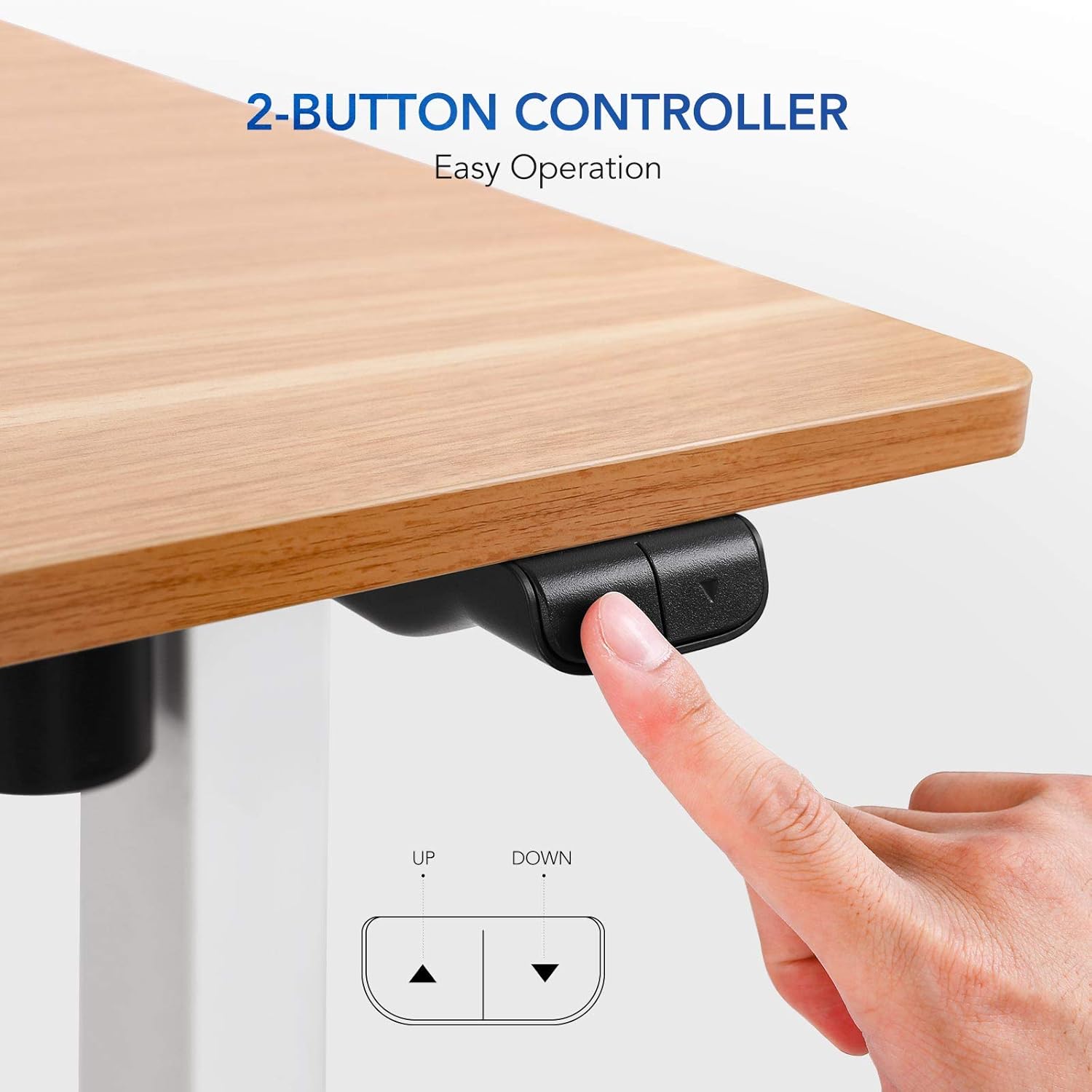
Image: Close-up of the 2-button controller with 'UP' and 'DOWN' arrows, and memory preset buttons (1, 2, 3, M, T).
Height Adjustment:
- To Raise: Press and hold the 'UP' arrow button. The desk will smoothly ascend to your desired height.
- To Lower: Press and hold the 'DOWN' arrow button. The desk will smoothly descend to your desired height.
- The current height is displayed on the digital screen on the control panel.
Memory Presets:
The control panel allows you to save up to three preferred height settings for quick adjustments.
- To Save a Preset: Adjust the desk to your desired height using the UP/DOWN buttons. Press the 'M' button, then press one of the numbered preset buttons (1, 2, or 3) within 3 seconds. The height is now saved to that preset.
- To Use a Preset: Simply press the corresponding numbered preset button (1, 2, or 3). The desk will automatically move to the saved height.
6. Maintenance
- Cleaning: Wipe the desktop surface with a soft, damp cloth. Avoid harsh chemicals or abrasive cleaners that could damage the finish.
- Cable Management: Regularly check and adjust cable routing to ensure they do not snag or become damaged during height changes.
- Fasteners: Periodically check all screws and fasteners to ensure they are tight. Retighten if necessary.
- Weight Limit: Do not exceed the maximum weight recommendation of 132 pounds to prevent damage to the motor and frame.
7. Troubleshooting
If you encounter issues with your standing desk, refer to the following common solutions:
- Desk Not Moving:
- Check if the power cord is securely plugged into both the desk and the wall outlet.
- Unplug the desk for 10-15 seconds, then plug it back in to perform a soft reset.
- Uneven Movement/Wobbling:
- Ensure the desk is on a level surface. Use the adjustable feet on the legs to stabilize if needed.
- Verify all assembly screws, especially those connecting the legs and crossbeam, are securely tightened.
- Motor Noise: A slight motor hum is normal during operation. If the noise is excessive or unusual, ensure the desk is not overloaded and all components are properly assembled.
8. Specifications
| Feature | Detail |
|---|---|
| Brand | FLEXISPOT |
| Model Name | Flexispot Standing Desk |
| Product Dimensions | 24"D x 48"W x 28.6"H |
| Color | White Frame, Maple Top |
| Base Material | Steel, Reclaimed Wood |
| Top Material Type | Engineered Wood |
| Special Feature | Adjustable Height, Electric |
| Maximum Weight Recommendation | 132 Pounds |
| Minimum Height | 28.6 Inches |
| Maximum Height | 48.2 Inches |
| Lifting Mechanism | Standard Two Button Controller |
| Required Assembly | Yes |
9. Quality and Environmental Testing
FLEXISPOT desks undergo rigorous testing to ensure stability, durability, and environmental safety.
Stability, Noise, and Durability Testing
Video: Demonstrates stability, noise levels, and durability testing of the Flexispot standing desk, highlighting its robust design and quiet operation.
Environmental Safety Testing
The desktop materials are tested for formaldehyde content and other hazardous substances. FLEXISPOT desks meet stringent environmental standards, with formaldehyde content significantly below international standards (e.g., 0.04 ppm vs. ASTM standard of ≤ 0.09 ppm).

Image: Graphic highlighting the environmental certifications and protective edge of the desktop.
10. Warranty and Support
Warranty:
This product comes with a 3-year limited warranty. Please refer to the warranty card included with your product for specific terms and conditions.
Customer Support:
For any questions, troubleshooting assistance, or warranty claims, please contact FLEXISPOT customer support. Visit the official FLEXISPOT website for contact information and additional resources.


