
1. Introduction
This manual provides detailed instructions for the safe and effective use of your VGR Professional Hair Clipper Model V-069. Please read this manual thoroughly before operating the device and retain it for future reference. This hair clipper is designed for personal hair cutting and trimming, offering both corded and cordless operation.
2. Safety Information
To reduce the risk of electric shock, injury, or fire, always follow these basic safety precautions:
- Always keep the blades away from your skin while operating to prevent cuts.
- Do not use this appliance on infants or children without proper supervision and care.
- Keep the clipper away from water sources. Do not use it near bathtubs, showers, basins, or other vessels containing water.
- Follow the recommended cleaning and maintenance procedures using the provided cleaning brush and lubricating oil.
- Always unplug the clipper from the power source before cleaning, performing maintenance, or storing.
- Allow the clipper to cool down before handling after extended use.
- Do not operate the appliance with a damaged cord or plug, or if it is not working properly.
- This appliance is intended for household use only.
3. Package Contents
Verify that all items are present in the package:
- VGR Professional Hair Clipper (Model V-069)
- 4 Guide Combs (3mm, 6mm, 9mm, 12mm)
- 1 Protection Cap
- 1 Cleaning Brush
- 1 Lubricating Oil Bottle
- 1 USB Charging Cable
4. Product Components
Familiarize yourself with the parts of your VGR Hair Clipper:

Image 1: VGR Professional Hair Clipper Model V-069 with its retail packaging.
- Professional Blade: High-quality cutting teeth for precise trimming.
- Blade Adjustment Ring (0.8-2.0mm): Allows for fine-tuning of cutting length.
- Turbo Function: Provides increased motor speed for thicker hair.
- ON/OFF Button: Powers the device on or off.
- LED Display: Shows battery percentage, oiling reminder, and charging status.
- Cutting Guides (3/6/9/12mm): Attachments for various hair lengths.
- USB Charging Port: For connecting the charging cable.
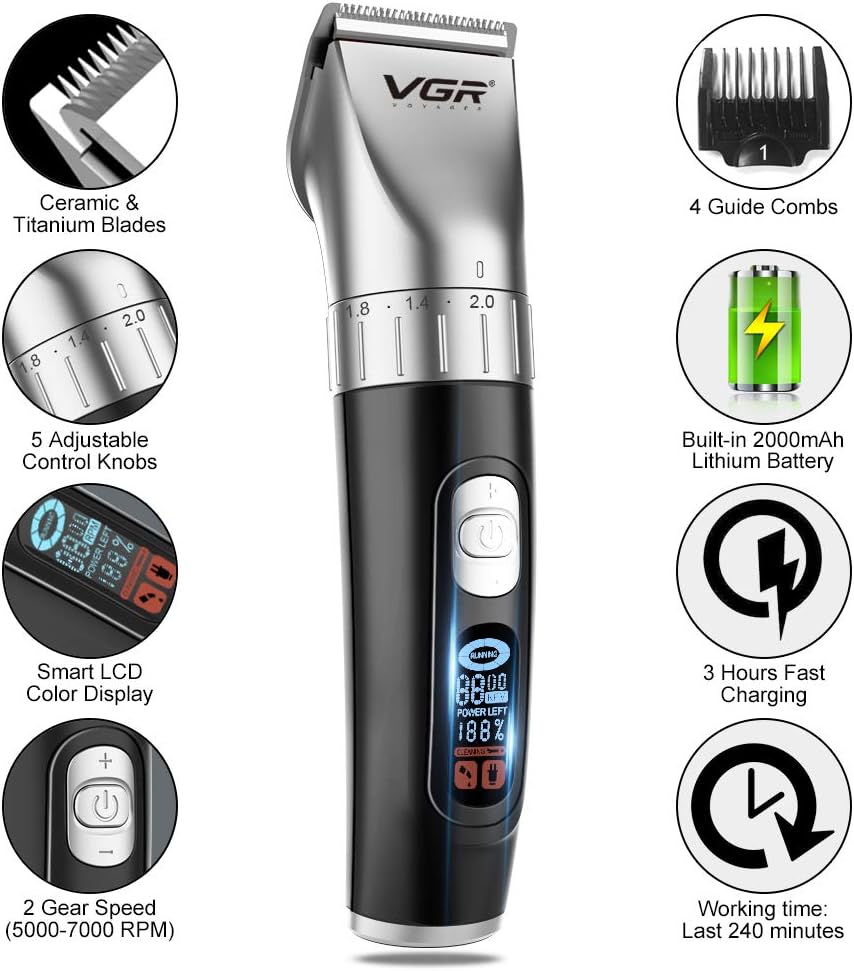
Image 2: Overview of the VGR Hair Clipper's key features and components.

Image 3: Detailed view of the LED Digital Display indicating power, oiling, and charging status.
5. Setup and Charging
5.1 Initial Charging
Before first use, fully charge the hair clipper. Connect the USB charging cable to the clipper's charging port and plug the other end into a compatible USB power adapter (not included) or a USB port. The LED display will indicate the charging status and battery percentage. A full charge takes approximately 3 hours and provides up to 240 minutes of continuous operation.
5.2 Attaching Guide Combs
To attach a guide comb, align the comb with the clipper blade and push it firmly until it clicks into place. To remove, gently pull the comb away from the blade.
6. Operating Instructions
6.1 Turning On/Off
Press the ON/OFF button to power the clipper on. Press it again to turn the clipper off.
6.2 Adjusting Blade Length
The clipper features a blade adjustment ring that allows you to precisely set the cutting length from 0.8mm to 2.0mm without a guide comb. Rotate the blade adjustment ring clockwise or counter-clockwise to select the desired length.

Image 4: Blade adjustment settings from 0.8mm to 2.0mm.
6.3 Using Guide Combs
For longer hair lengths, attach one of the four guide combs (3mm, 6mm, 9mm, 12mm). Ensure the comb is securely attached before use.
6.4 Adjusting Speed
The clipper offers two speed modes (5000-7000 RPM). Press the speed adjustment button to cycle through the available speeds, allowing you to adapt to different hair types and cutting needs.
7. Maintenance
7.1 Cleaning the Blades
After each use, turn off and unplug the clipper. Use the provided cleaning brush to remove any loose hair from the blades and the clipper body. For a more thorough cleaning, you may detach the blade head if your model allows, following specific instructions in the full manual.
7.2 Lubricating the Blades
Regular lubrication ensures optimal performance and extends blade life. After cleaning, apply a small drop of the provided lubricating oil to the teeth of the blades. Turn the clipper on for a few seconds to distribute the oil evenly, then turn it off and wipe off any excess oil.
8. Troubleshooting
If you encounter issues with your VGR Hair Clipper, consider the following:
- Clipper not turning on: Ensure the battery is charged. Connect the clipper to the USB charging cable and allow it to charge for at least 30 minutes before attempting to turn it on again.
- Poor cutting performance: Clean the blades thoroughly to remove any hair buildup. Lubricate the blades with the provided oil. Ensure the blade adjustment ring is set correctly and guide combs are properly attached.
- Clipper making unusual noise: Clean and oil the blades. If the noise persists, discontinue use and contact customer support.
- LED display not working: Ensure the clipper is charged. If the issue persists, contact customer support.
For more complex issues, please refer to the full user manual or contact VGR customer support.
9. Specifications
| Feature | Detail |
|---|---|
| Model Number | V-069 |
| Power Source | Battery Powered (Cord/Cordless) |
| Battery Type | 2000mAh Lithium Battery |
| Charging Time | Approximately 3 hours |
| Running Time | Up to 240 minutes (continuous operation) |
| Power Supply | 5V--1A |
| Housing Material | Plastic |
| Blade Material | Metal (Ceramic & Titanium Blades mentioned in image) |
| Blade Adjustment | 0.8mm - 2.0mm |
| Guide Combs | 3mm, 6mm, 9mm, 12mm |
| Special Features | Cordless, LED Display, Two Gear Speed (5000-7000 RPM) |
| Item Weight | 0.74 Kilograms |
| Manufacturer | Ningbo VGR Electric Appliance Co., Ltd. |
10. Warranty and Support
For warranty information and customer support, please refer to the documentation included with your purchase or visit the official VGR website. Keep your proof of purchase for any warranty claims.


