
1. Introduction and Product Overview
The Beninca BULL10MA is a robust 115 VAC single-phase electric motor opener designed for sliding gates. It is engineered for frequent use and can handle gates up to 30 feet in length or weighing up to 2,000 pounds. This operator features a built-in control panel with an integrated LCD display for easy programming, ensuring smooth and energy-efficient operation.
Key features include:
- Designed for sliding gates up to 30ft or 2,000lb.
- 115 VAC single-phase operation with built-in control panel.
- Suitable for frequent use, offering energy-efficient and smooth operation.
- Integrated LCD display for simplified programming.
- Built-in radio-receiver for remote control functionality.

Figure 1.1: The Beninca BULL10MA slide gate opener unit shown with two remote controls. This image provides an overall view of the product and its accompanying accessories.
2. Safety Instructions
It is crucial to read and understand all safety instructions before installing, operating, or performing maintenance on the Beninca BULL10MA gate opener. Failure to follow these instructions could result in serious injury or property damage.
- Professional Installation Recommended: Installation should be performed by qualified personnel familiar with gate automation systems and electrical wiring.
- Power Disconnection: Always disconnect power to the gate opener before performing any service or maintenance.
- Moving Parts: Keep hands, feet, and clothing clear of the gate and gate opener mechanism when the gate is in motion.
- Children and Pets: Never allow children or pets to play near the gate or operate the gate controls.
- Obstruction Sensors: Ensure all safety devices, such as photo-electric cells and safety edges, are correctly installed and functioning to prevent crushing or entrapment.
- Emergency Release: Familiarize yourself with the manual emergency release mechanism in case of power failure or malfunction.
- Electrical Safety: All electrical connections must comply with local and national electrical codes.
3. Package Contents
Upon unpacking, please verify that all components listed below are present and undamaged. If any items are missing or damaged, contact your supplier immediately.
- 1 x Beninca BULL10MA Slide Gate Opener Unit
- 2 x Beninca Long-Range 2-Button ARC 128 Remote Controls
- 1 x Installation Manual (this document)
- Mounting Hardware (bolts, nuts, washers - specific quantities may vary)
- Emergency Release Key
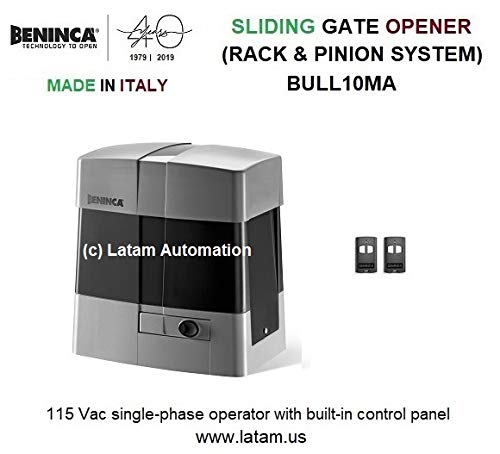
Figure 3.1: A closer view of the Beninca BULL10MA unit and the included remote controls. This image highlights the primary components of the package.
4. Setup and Installation
Installation of the Beninca BULL10MA requires careful planning and adherence to local building and electrical codes. It is strongly recommended that installation be carried out by a certified professional.
4.1 Site Preparation
- Ensure the gate track is level and free of obstructions.
- Verify the gate moves freely by hand before installing the opener.
- Prepare a stable concrete foundation for mounting the opener unit, ensuring it is level and provides adequate drainage.
4.2 Mounting the Opener
- Position the opener unit on the prepared foundation, ensuring proper alignment with the gate's rack.
- Secure the unit using the provided mounting hardware.
- Install the gate rack (not included) onto the gate, ensuring it meshes correctly with the opener's pinion gear.
4.3 Electrical Connections
- Connect the 115 VAC power supply to the designated terminals within the control panel.
- Wire any external safety devices (e.g., photocells, safety edges) and accessories (e.g., keypads, intercoms) according to the wiring diagram in the control panel manual.
- Ensure all wiring is properly insulated and protected from environmental factors.
4.4 Initial Programming
- Power on the unit. The integrated LCD display will guide you through initial setup.
- Perform the auto-learning procedure for gate travel limits.
- Adjust electronic settings such as torque, anti-crushing reverse sensitivity, soft-start, and soft-stop as needed.
- Program the included remote controls to the built-in radio-receiver.
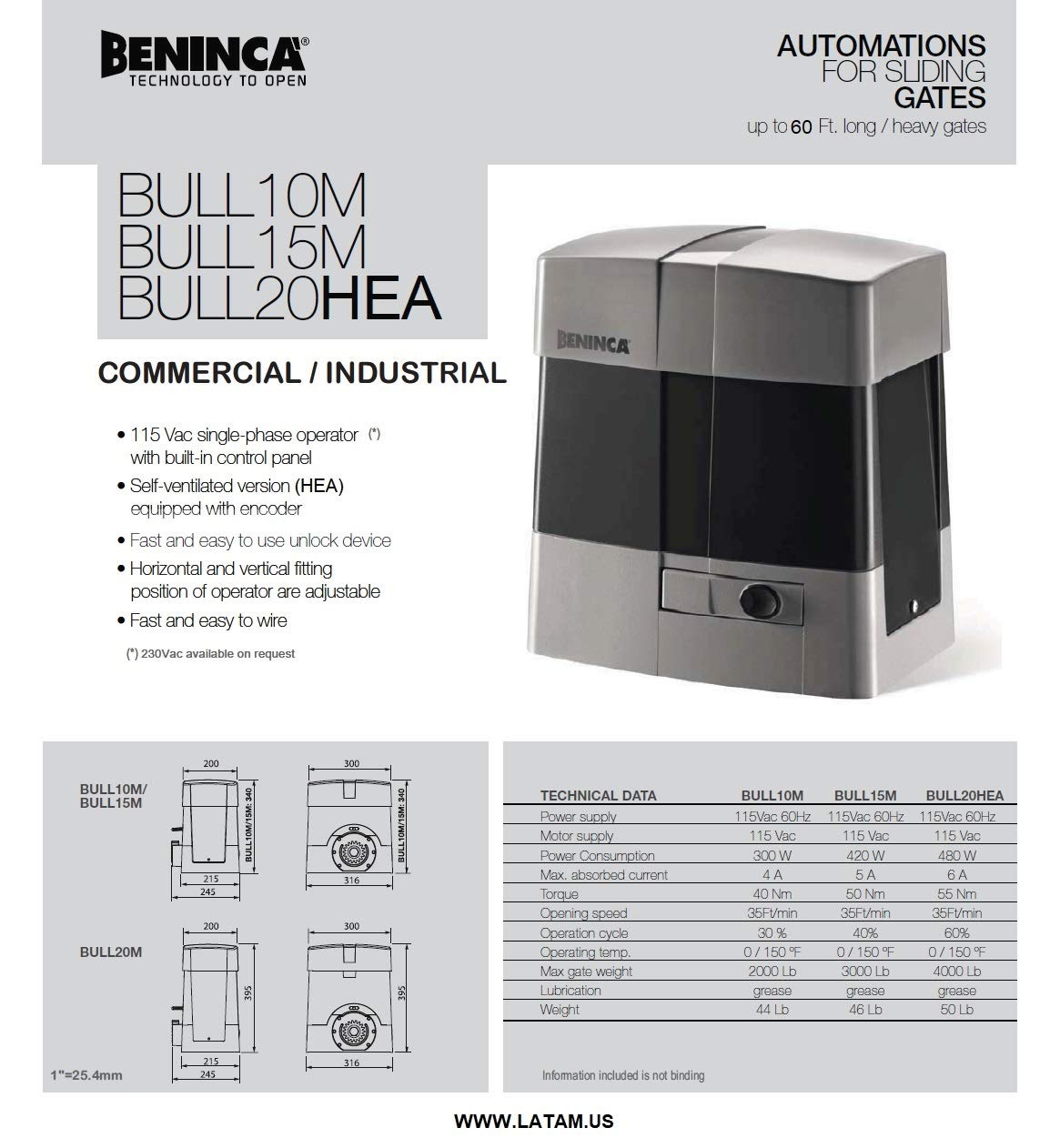
Figure 4.1: Technical drawing showing dimensions and a table of specifications for the Beninca BULL10MA, BULL15M, and BULL20HEA models. This information is critical for proper installation and planning.
5. Operating Instructions
Once installed and programmed, operating your Beninca BULL10MA gate opener is straightforward.
5.1 Using the Remote Control
- Press the programmed button on your Beninca remote control once to activate the gate.
- The gate will begin to open or close. Pressing the button again during operation will stop the gate.
- A third press will reverse the gate's direction (if stopped mid-cycle) or continue its original cycle (if stopped at an end limit).
5.2 Manual Release
In case of power failure or malfunction, the gate can be operated manually using the emergency release key.
- Locate the manual release mechanism on the side or front of the opener unit.
- Insert the emergency release key and turn it as indicated (usually 90 degrees) to disengage the motor.
- The gate can now be moved by hand.
- To re-engage the motor, reverse the key turning process. Ensure the gate is fully closed or open before re-engaging to prevent damage.
6. Maintenance
Regular maintenance ensures the longevity and reliable operation of your Beninca BULL10MA gate opener. Perform these checks periodically:
- Gate Track and Wheels: Keep the gate track clean and free of debris. Inspect gate wheels for wear and ensure they roll smoothly.
- Gate Rack: Check the gate rack for any loose sections or damage. Ensure it is securely fastened to the gate.
- Opener Unit: Keep the exterior of the opener unit clean. Check for any signs of water ingress or pest activity.
- Safety Devices: Regularly test photocells and other safety sensors to ensure they are functioning correctly and detecting obstructions.
- Lubrication: Refer to the detailed technical manual for specific lubrication points and recommended lubricants. Generally, the pinion gear and rack should be kept clean and lightly lubricated.
- Electrical Connections: Periodically inspect all electrical connections for corrosion or loose wiring. (Ensure power is disconnected before inspection).
For complex maintenance or repairs, contact a qualified Beninca service technician.
7. Troubleshooting
This section provides solutions to common issues you might encounter with your Beninca BULL10MA gate opener. For problems not listed here, or if solutions do not resolve the issue, contact technical support.
| Problem | Possible Cause | Solution |
|---|---|---|
| Gate does not respond to remote control. |
|
|
| Gate stops or reverses unexpectedly. |
|
|
| Gate moves slowly or struggles. |
|
|
8. Specifications
Detailed technical specifications for the Beninca BULL10MA model.
| Characteristic | Value (BULL10MA) |
|---|---|
| Power Supply | 115 Vac 60 Hz |
| Max. absorbed current | 4 A |
| Power Consumption | 300 W |
| Torque | 40 Nm |
| Opening Speed | 35 ft/min |
| Operating Cycle | 30 % |
| Operating Temp. | 0 / 150 °F |
| Max gate weight | 2000 Lb |
| Lubrication | grease |
| Weight | 44 Lb |
| Dimensions (approx.) | 215mm (W) x 245mm (D) x 300mm (H) |
Figure 8.1: Detailed technical data and dimensional drawings for the BULL10MA and related models, providing precise measurements and performance metrics.
9. Warranty and Support
Beninca products are manufactured to high standards and are typically covered by a manufacturer's warranty against defects in materials and workmanship. The specific warranty period and terms may vary by region and purchase date.
For warranty claims, technical support, or service inquiries, please contact your authorized Beninca dealer or visit the official Beninca website. When contacting support, please have your product model number (BULL10MA) and purchase information readily available.
Beninca Official Website: www.beninca.com


