
Product Overview
The OLIGHT Baton3 Premium Edition is a compact and powerful LED flashlight designed for everyday carry (EDC). It features a high output of 1200 lumens, multiple lighting modes, and a convenient magnetic charging system. The Premium Edition includes a portable charging case that extends battery life and provides secure storage.
Key Features:
- Lightweight & Durable: Constructed with an aluminum alloy case, offering wear, water, and corrosion resistance. Weighs approximately 53g with battery for easy portability.
- Mini Yet Powerful: Compact design (2.1cm head diameter, 6.3cm length) with a TIR lens and SST40(5A) lamp beads, delivering a max output of 1200 lumens and a beam distance of 166 meters.
- Portable Charger: The included charging case extends the flashlight's battery life and prevents accidental activation of the side button, enhancing security.
- Magnetic Tail Cap & Charging: Features a unique magnetic tail cap for stable handstand capability and attachment to iron surfaces for hands-free lighting. Compatible with MCC 1A/MCC3 magnetic charging cables.
- Six Modes Available: Offers versatile lighting with Mode1 (1200-300 lumens), Mode2 (300 lumens), Mode3 (60 lumens), Mode4 (12 lumens), Mode5 (0.5 lumens), and Strobe (13Hz, 1200 to 650 lumens).
What's in the Box
- OLIGHT Baton3 Flashlight
- Baton3 Wireless Charger
- USB Charging Cable
- User Manual
- Cleaning Cloth

Setup
Initial Charging:
Before first use, fully charge both the flashlight and the charging case. Connect the USB charging cable to the charging case and a power source. The indicator light on the charging case will show charging status.
- Charging Case Status:
- Red: Charging
- Green: Fully Charged
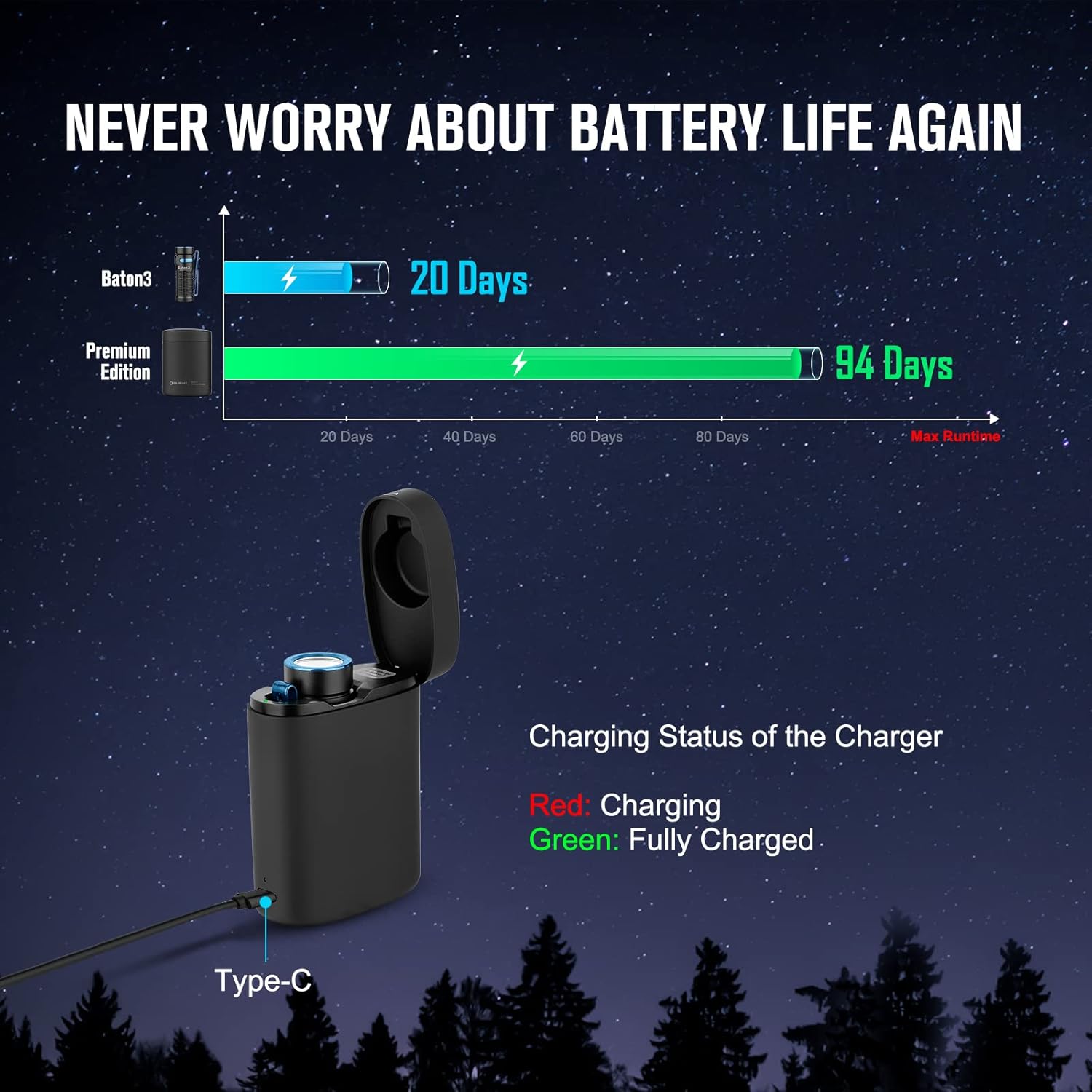
Inserting Flashlight into Case:
Place the Baton3 flashlight into the designated slot within the charging case. The magnetic base will secure it in place. The case will automatically begin charging the flashlight if needed.

Operating Instructions
Power On/Off:
Press the side switch once to turn the flashlight ON/OFF.
Changing Brightness Levels:
When the flashlight is ON, press and hold the side switch to cycle through Low, Medium, and High modes. Release the switch to select the desired brightness.
Moonlight Mode:
When the flashlight is OFF, press and hold the side switch for approximately one second to activate Moonlight mode (0.5 lumens).
Turbo Mode:
Quickly double-press the side switch to activate Turbo mode (1200 lumens). Double-press again to return to the previous brightness level.
Strobe Mode:
Quickly triple-press the side switch to activate Strobe mode. Press and hold to exit Strobe mode.
Button Lockout:
When the flashlight is OFF, press and hold the side switch for about 2 seconds to access the button lockout mode. The flashlight will enter moonlight mode first and then switch off to signal the lockout mode. To unlock it, keep holding the switch for over one second until the moonlight mode is on again.

Battery Level Indicator:
The indicator light on the side switch displays the battery level:
- Green: >60% battery
- Orange: 10-60% battery
- Red: <10% battery

Maintenance
To ensure optimal performance and longevity of your OLIGHT Baton3 Premium Edition, follow these maintenance guidelines:
- Cleaning: Regularly clean the lens and body of the flashlight with a soft, clean cloth. For stubborn dirt, a slightly damp cloth can be used.
- Battery Care: Store the flashlight and charging case in a cool, dry place. If storing for extended periods, ensure the battery is partially charged (around 50%) to prevent deep discharge. Recharge every few months.
- O-rings: Inspect the O-rings periodically for wear and tear. Replace them if damaged to maintain the waterproof seal. Apply silicone grease to the O-rings as needed.
- Magnetic Tail Cap: Keep the magnetic tail cap clean and free of debris to ensure proper charging contact and secure attachment.
Troubleshooting
| Problem | Possible Cause | Solution |
|---|---|---|
| Flashlight not turning on | Low battery; Lockout mode activated | Charge the flashlight; Unlock the flashlight (press and hold side switch for >1 second) |
| Charging not working | Dirty magnetic contacts; Faulty cable/power source | Clean contacts on flashlight and charger; Try a different USB cable or power adapter |
| Light output is dim | Low battery; Incorrect mode selected | Recharge battery; Cycle through brightness modes to select a higher setting |
| Flashlight gets hot | Prolonged use on Turbo/High mode | This is normal. The flashlight will automatically step down brightness to prevent overheating. Reduce brightness if uncomfortable. |
Specifications
| Feature | Detail |
|---|---|
| Brand | OLIGHT |
| Model | Baton3 Premium Edition |
| Max Output | 1200 Lumens |
| Max Throw | 166 Meters |
| Power Source | Rechargeable IMR16340 Battery (included) |
| Charging | Magnetic Charging (MCC 1A/MCC3 compatible) via Charging Case (USB-C) |
| Light Modes | Moonlight, Low, Medium, High, Turbo, Strobe |
| Material | Aluminum Alloy |
| Water Resistance | IPX8 (Waterproof) |
| Dimensions | 2.48 x 0.83 x 0.83 inches (Flashlight) |
| Weight | 1.87 ounces (Flashlight) |

Warranty and Support
OLIGHT is committed to providing high-quality products. The Baton3 Premium Edition comes with a Lifetime Warranty, reflecting OLIGHT's dedication to customer satisfaction and product reliability.
For further assistance, product registration, or to explore other OLIGHT products, please visit the Official OLIGHT Store on Amazon.


