
NKF RM-AMU053
Instruction Manual for NKF RM-AMU053 Remote Control
Compatible with Sony Mini Hi-Fi Component Systems
1. Introduction
This manual provides instructions for the setup, operation, and maintenance of your new NKF RM-AMU053 Replacement Remote Control. This remote is designed to be a direct replacement for original Sony remote controls, offering full functionality without the need for complex programming.
It is compatible with various Sony Mini Hi-Fi Component System models, including:
- MHC-GTR77
- MHC-GTR88
- MHC-GTR33
- MHC-GTR55
- MHC-GTR555
- MHC-GTR888
- MHC-GTR7
- MHC-GTZ3
2. Setup
2.1. Battery Installation
The RM-AMU053 remote control requires two (2) AAA alkaline batteries (not included) for operation. No programming or pairing is required; simply insert the batteries correctly, and the remote will be ready to use.
- Locate the battery compartment on the back of the remote control.
- Slide the battery cover downwards to open it.
- Insert two 1.5V AAA alkaline batteries, ensuring the positive (+) and negative (-) terminals align with the markings inside the compartment.
- Slide the battery cover back into place until it clicks securely.
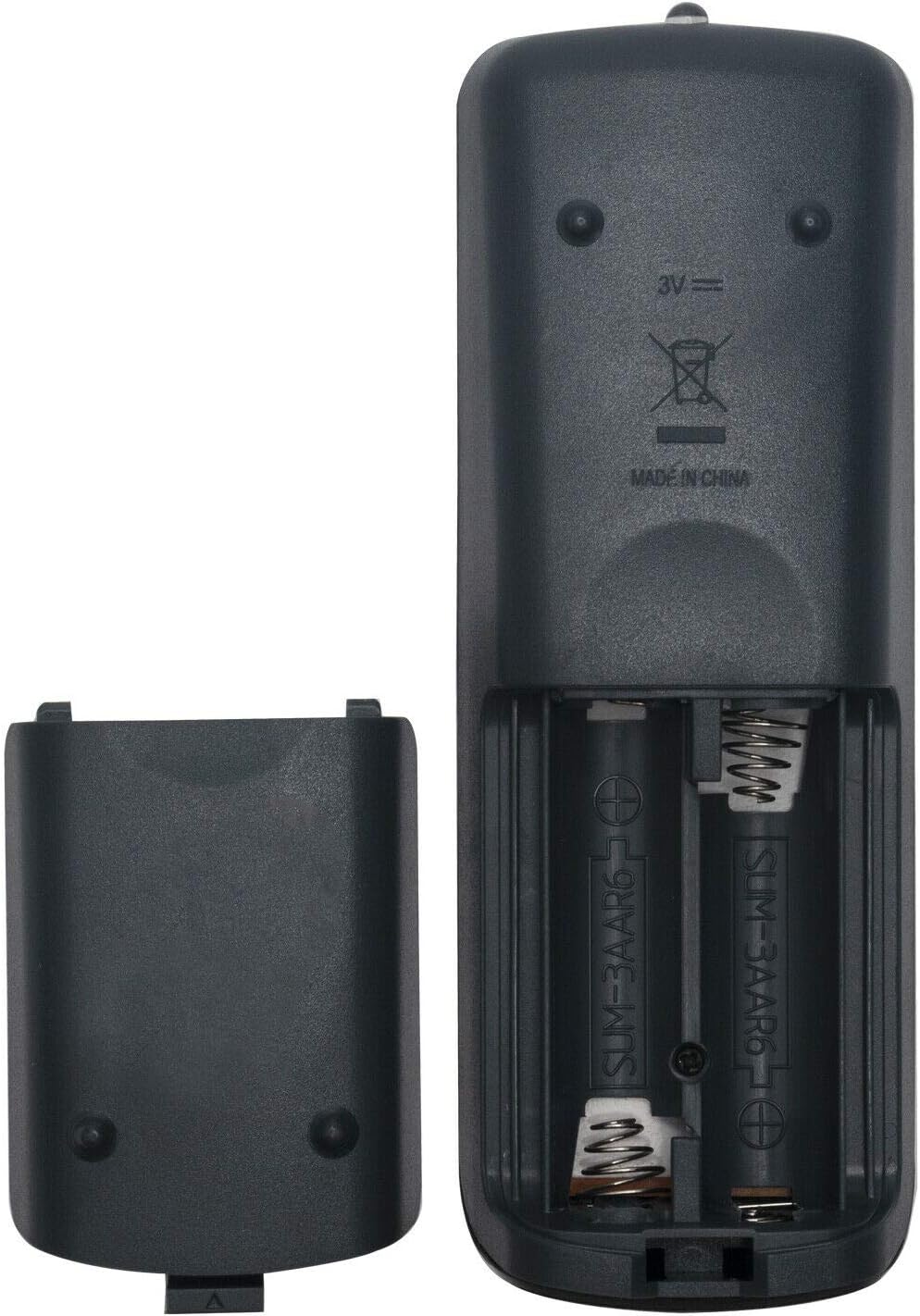
Figure 2.1: Battery compartment of the RM-AMU053 remote control.
3. Operating Instructions
Once batteries are installed, the RM-AMU053 remote control is ready for immediate use with your compatible Sony Mini Hi-Fi Component System. Point the remote control directly at the system's infrared receiver.

Figure 3.1: Front view of the RM-AMU053 remote control.
3.1. Key Functions Overview
The remote control features standard buttons for controlling your audio system. Below is a general overview of common button functions:
| Button Label | Function |
|---|---|
| 1/U (Power) | Turns the audio system on or off. |
| SLEEP | Activates or adjusts the sleep timer. |
| DISPLAY | Changes the display information on the audio system. |
| CLOCK/TIMER SET | Used for setting the clock and various timers. |
| TUNER MEMORY / TUNING MODE | Manages radio station presets and tuning modes. |
| PLAY MODE / REPEAT / FM MODE | Controls playback modes for CD/USB and FM radio settings. |
| USB / CD / TUNER FUNCTION | Selects the input source (USB, CD, Radio). |
| BAND | Switches between FM/AM bands. |
| Navigation Buttons (Up, Down, Left, Right, ENTER) | Used for menu navigation and selection. |
| Play/Pause, Stop, Fast Forward, Rewind, Skip | Standard media playback controls. |
| VOLUME (+/-) | Adjusts the audio volume. |
| EQ | Adjusts equalizer settings. |
| CLEAR | Clears current selections or settings. |
| DISC SKIP / USB SELECT | Skips between discs in a multi-disc changer or selects USB content. |
Note: Specific button functions may vary slightly depending on your Sony audio system model. Refer to your audio system's original manual for detailed functionality.
4. Maintenance
4.1. Cleaning the Remote Control
To maintain the remote control's appearance and functionality, clean it regularly:
- Use a soft, dry cloth to wipe the surface of the remote control.
- For stubborn dirt, slightly dampen the cloth with water or a mild, non-abrasive cleaner.
- Avoid using harsh chemicals, solvents, or abrasive cleaning materials, as these can damage the remote's finish or internal components.
4.2. Battery Replacement
Replace batteries when the remote control's response becomes sluggish or stops working. Always replace both batteries at the same time with new 1.5V AAA alkaline batteries. Do not mix old and new batteries, or different types of batteries.
Remove batteries if the remote control will not be used for an extended period to prevent battery leakage, which can damage the remote.
5. Troubleshooting
If you experience issues with your RM-AMU053 remote control, refer to the following common problems and solutions:
| Problem | Possible Cause / Solution |
|---|---|
| Remote control is not working. |
|
| Some buttons do not respond. |
|
If the problem persists after trying these solutions, please contact customer support.
6. Specifications
| Feature | Detail |
|---|---|
| Model Number | RM-AMU053 |
| Brand | NKF |
| Compatible Devices | Sony Mini Hi-Fi Component Systems (MHC-GTR77, MHC-GTR88, MHC-GTR33, MHC-GTR55, MHC-GTR555, MHC-GTR888, MHC-GTR7, MHC-GTZ3) |
| Connectivity Technology | Infrared (IR) |
| Power Supply | 2 x 1.5V AAA Alkaline Batteries (not included) |
| Product Dimensions | 5.91 x 2.36 x 0.79 inches (15.01 x 5.99 x 2.01 cm) |
| Item Weight | 3.2 ounces (90.72 grams) |
| Special Feature | No Programming Required |
7. Warranty and Support
This replacement remote control is designed for reliable performance. While specific warranty details are not provided, if you encounter any issues with the item, please contact the seller or manufacturer directly. They are committed to assisting you and resolving any problems you may have.
For further assistance, refer to the contact information provided by your retailer or on the product packaging.
Ask a question about this manual
Ask about setup, troubleshooting, compatibility, parts, safety, or missing instructions. Manuals+ will review the question and use this page’s manual context to help answer it.