
1. Introduction
Thank you for choosing the Reboot 50 Amp 230V Plasma Cutter, Model CUT50. This manual provides essential information for the safe and efficient operation, maintenance, and troubleshooting of your new plasma cutting machine. Please read this manual thoroughly before use to ensure proper handling and to prevent injury or damage to the equipment.
The Reboot CUT50 is a compact and portable IGBT inverter plasma metal cutter designed for various cutting tasks. It offers a powerful 10-50A DC output, capable of an ideal clean cut of 1/2 inch (12 mm) and a maximum severance cut of 3/5 inch (16 mm) on 230V input power.
2. Safety Information
WARNING: Plasma cutting can be dangerous. Always follow safety precautions to prevent serious injury or death.
- Eye Protection: Always wear appropriate welding helmets or safety glasses with proper shade filters to protect your eyes from intense light and sparks.
- Protective Clothing: Wear flame-resistant clothing, heavy-duty gloves, and leather aprons to protect your skin from sparks, molten metal, and UV radiation.
- Ventilation: Ensure adequate ventilation in the work area to remove fumes and gases produced during cutting. Avoid working in confined spaces.
- Electrical Safety: Ensure the machine is properly grounded. Do not operate in wet conditions. Inspect power cables and connections for damage before each use. A 30A circuit breaker is recommended for 230V operation.
- Compressed Air Safety: Use clean, dry compressed air at the recommended pressure (60-70 PSI). Ensure air lines are secure and free from leaks.
- Fire Hazards: Keep flammable materials away from the cutting area. Have a fire extinguisher readily available.
- Trained Personnel: This equipment should only be operated by individuals who have received proper training and understand the risks associated with plasma cutting.
3. What's in the Box
Upon opening the package, please verify that all components are present and undamaged. The standard package for your Reboot CUT50 Plasma Cutter includes:
- Reboot CUT50 Plasma Cutter Unit
- PT31 Plasma Cutting Torch (approx. 4 meters)
- Ground Clamp with Cable
- Air Pressure Regulator with Gauge
- Air Hose and Connectors
- Consumables (Electrodes, Nozzles, Ceramic Nozzles, Shunts)
- Teflon Tape
- Instruction Manual

Image 3.1: Reboot CUT50 Plasma Cutter and its included accessories.
4. Setup Instructions
Follow these steps to set up your Reboot CUT50 Plasma Cutter:
- Unpack the Unit: Carefully remove the plasma cutter and all accessories from the packaging.
- Assemble the Plasma Torch: Install the electrode, nozzle, and ceramic nozzle onto the PT31 plasma torch. Ensure they are securely tightened.
- Connect Torch and Ground Clamp: Connect the plasma torch cable to the positive (+) terminal on the front panel of the machine. Connect the ground clamp cable to the negative (-) terminal.
- Assemble Air Pressure Regulator: Attach the pressure gauge and quick connector to the air pressure regulator. Use Teflon tape on threaded connections to ensure an airtight seal. Mount the regulator to the back of the machine using the provided bracket and screws.
- Connect Air Hose: Connect one end of the air hose to the quick connector on the air pressure regulator. Connect the other end of the air hose to your air compressor. Ensure all connections are tight to prevent air leaks.
- Power Connection: Connect the machine's power cord to a suitable 230V power outlet. Ensure the circuit can handle the machine's power requirements (a 30A breaker is recommended).

Image 4.1: Exploded view of the PT31 plasma torch components for assembly.
Video 4.1: This video demonstrates the unboxing and step-by-step installation process for the Reboot CUT50 Plasma Cutter, including torch assembly and air line connections.
5. Operating Instructions
Once the plasma cutter is set up, follow these steps for safe and effective operation:
- Prepare Workpiece: Ensure the material to be cut is clean and free of rust, paint, or other contaminants. Secure the workpiece on a non-flammable surface.
- Attach Ground Clamp: Securely attach the ground clamp to the workpiece or the cutting table, ensuring good electrical contact.
- Turn On Power: Switch on the main power button located on the front panel of the plasma cutter.
- Set Amperage and Air Pressure: Adjust the amperage knob on the front panel according to the thickness and type of material you are cutting. Refer to the recommended settings on the machine's panel or in the specifications section. Set the air pressure regulator to 60-70 PSI.
- Initiate Cut: Position the torch nozzle in contact with the workpiece (for contact cutting). Press the torch trigger to initiate the plasma arc.
- Perform Cut: Move the torch steadily along the desired cutting line. Maintain a consistent speed and distance from the material for a clean cut. Sparks and molten metal will be ejected downwards, so ensure the area below is clear.
- Finish Cut: Release the torch trigger once the cut is complete. Allow the material to cool before handling.
The Reboot CUT50 is suitable for cutting a variety of metals, including stainless steel, alloy steel, mild steel, copper, aluminum, cast iron, and chrome.

Image 5.1: A plasma cutter in operation, demonstrating the cutting process on a metal workpiece.
Video 5.1: This video showcases the Reboot CUT50 Plasma Cutter performing a cutting test on a metal plate, demonstrating its cutting capability and the quality of the cut.
6. Maintenance
Regular maintenance ensures the longevity and optimal performance of your plasma cutter:
- Inspect Consumables: Regularly check the plasma torch's electrode, nozzle, and ceramic shield for wear. Replace them when they show signs of damage or excessive wear to maintain cut quality.
- Clean Air Filter: The air pressure regulator includes a filter to remove moisture and contaminants from the compressed air. Periodically drain any accumulated moisture and clean or replace the filter element as needed.
- Clean Machine: Keep the exterior of the machine clean and free of dust and debris. Ensure cooling vents are unobstructed.
- Cable Inspection: Inspect all cables (power, torch, ground) for cuts, abrasions, or loose connections. Repair or replace damaged cables immediately.
7. Troubleshooting
If you encounter issues with your Reboot CUT50 Plasma Cutter, refer to the following common problems and solutions:
| Problem | Possible Cause | Solution |
|---|---|---|
| No arc or weak arc | Incorrect air pressure, worn consumables, poor ground connection, insufficient power. | Check air pressure (60-70 PSI). Inspect and replace torch consumables. Ensure ground clamp has good contact. Verify power supply (230V, 30A breaker recommended). |
| Machine trips circuit breaker | Overload, insufficient circuit capacity, short circuit. | Reduce amperage setting. Ensure power circuit meets minimum requirements (e.g., 3kW, 30A breaker). Inspect cables and torch for damage. |
| Poor cut quality (rough, dross) | Incorrect cutting speed, wrong amperage/air pressure, worn consumables, dirty workpiece. | Adjust cutting speed. Fine-tune amperage and air pressure. Replace worn torch consumables. Clean workpiece thoroughly. |
| Air leaks | Loose connections, damaged hose. | Tighten all air hose connections. Use Teflon tape on threaded fittings. Replace damaged hoses. |
If the problem persists after attempting these solutions, please contact Reboot customer support for further assistance.
8. Specifications
Key technical specifications for the Reboot CUT50 Plasma Cutter:
- Model Number: CUT50
- Manufacturer: Reboot-EU
- Product Dimensions: 36 x 16 x 31 cm
- Item Weight: 7.68 kg
- Input Voltage: 230 Volts
- Power Type: DC
- Rated Power (KVA): 4.8
- Current Range: 20A-50A
- Ideal Clean Cut Thickness: 1/2 inch (12 mm)
- Maximum Severance Cut Thickness: 3/5 inch (16 mm)
- Recommended Air Pressure: 60-70 PSI
- Duty Cycle: 100% at 40A, 60% at 50A
- Insulation Class: F
- Material: Copper + Plastic
- Color: Black
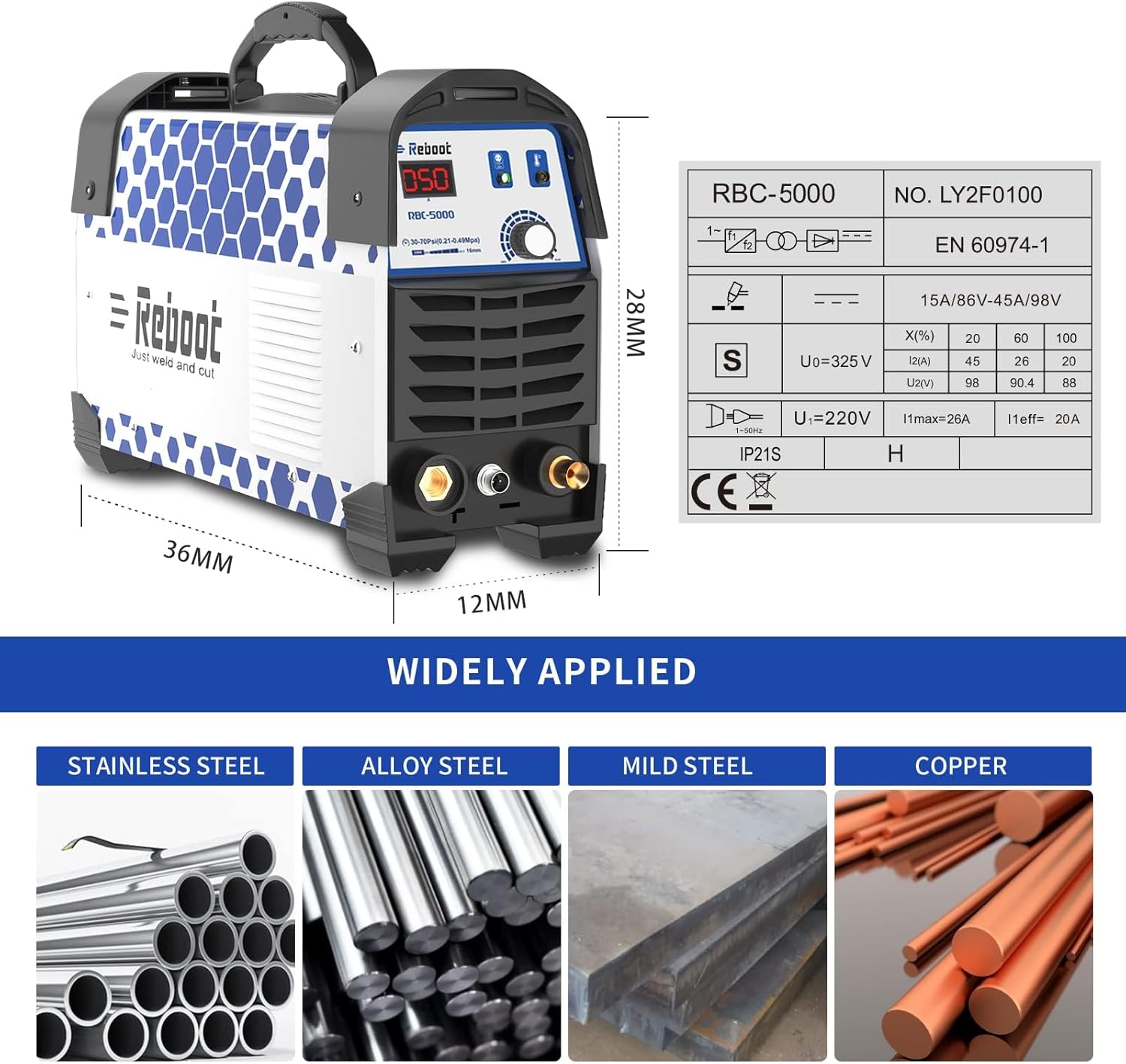
Image 8.1: Dimensions and key technical specifications of the Reboot CUT50 Plasma Cutter.
9. Warranty and Support
The Reboot CUT50 Plasma Cutter comes with a 1-year warranty from the date of purchase, covering manufacturing defects. For warranty claims, technical support, or any questions regarding your product, please contact Reboot customer service through the retailer where the product was purchased or visit the official Reboot website for contact information.
Reboot has over 12 years of professional experience in manufacturing plasma cutting machines, ensuring reliable and high-quality products.


