
DORTALA 2-in-1 Folding Treadmill
DORTALA 2-in-1 Folding Treadmill Instruction Manual
Model: DO-SP37148SL-CA
1. Important Safety Information
Please read this entire manual carefully before operating the DORTALA 2-in-1 Folding Treadmill. Retain this manual for future reference. Failure to follow these instructions may result in injury or damage to the product.
- User Weight Limit: Do not exceed the maximum user weight of 265 lbs (120 kg).
- Children and Pets: Keep children and pets away from the treadmill during operation. This equipment is not a toy.
- Emergency Stop: Always attach the safety key clip to your clothing before starting the treadmill. In an emergency, pulling the safety key will immediately stop the machine.
- Footwear: Always wear appropriate athletic footwear when using the treadmill.
- Placement: Place the treadmill on a flat, stable surface with at least 2 meters (6.5 feet) of clear space behind it and 0.6 meters (2 feet) on each side.
- Power Supply: Ensure the treadmill is connected to a grounded outlet with the correct voltage (110V 60Hz). Do not use extension cords.
- Medical Conditions: Consult a physician before starting any exercise program, especially if you have pre-existing medical conditions.
- Maintenance: Perform regular maintenance as described in this manual to ensure safe operation.
2. Product Overview
The DORTALA 2-in-1 Folding Treadmill is designed for both walking and running exercises, offering a versatile fitness solution for home or office use. Its compact, foldable design allows for easy storage, and it features a powerful yet quiet motor, a multi-layer running belt, and a dual-screen display with Bluetooth connectivity.
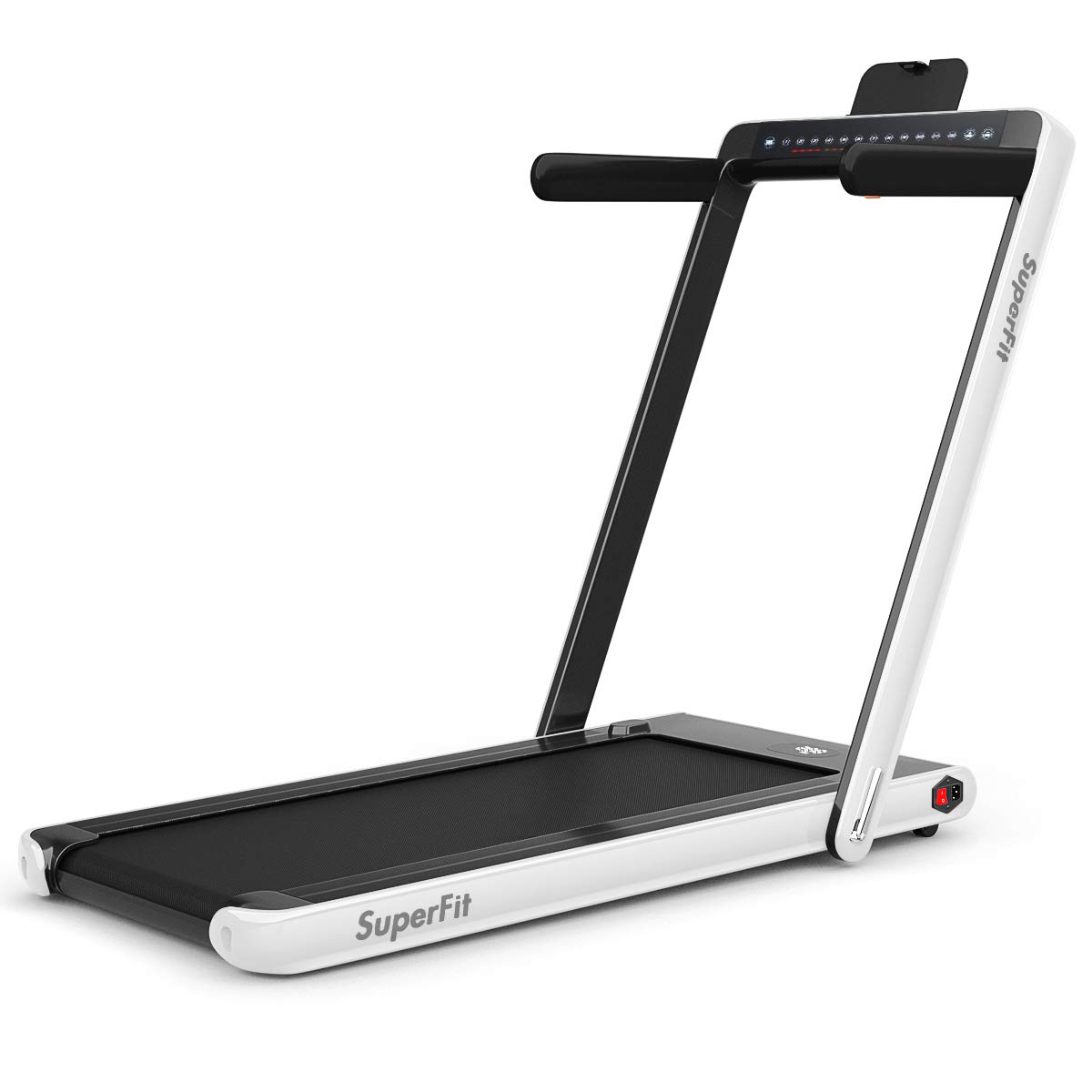
Figure 2.1: The DORTALA 2-in-1 Folding Treadmill in its upright running configuration.
2.1 Key Components
- Running Deck: The main surface for walking or running.
- Handrails/Risers: Provide support during running mode and fold down for walking mode.
- Display Console: Shows time, speed, distance, and calories.
- Safety Key: Magnetic key for emergency stop.
- Remote Control: Adjusts speed and starts/stops the treadmill.
- Mobile Phone Bracket: Holds your device for entertainment during workouts.
- Bluetooth Speaker: Connects to your device for audio playback.
- Transportation Wheels: For easy movement and storage.

Figure 2.2: Illustration of key components including the phone bracket, safety key, remote control, and easy-fold handle.
3. Setup Instructions
3.1 Unpacking and Placement
- Carefully remove all packaging materials and components from the box.
- Place the treadmill on a firm, level surface. Ensure there is adequate clear space around the unit as specified in the safety section.
3.2 Unfolding the Treadmill
The treadmill arrives in a folded configuration. To prepare for use:
- Gently lift the handrails/risers from their folded position until they lock into place.
- Ensure all locking mechanisms are securely engaged before use.

Figure 3.1: The treadmill can be easily unfolded for use or folded for compact storage.
3.3 Connecting Power and Safety Key
- Plug the power cord into a grounded 110V 60Hz electrical outlet.
- Insert the safety key into its designated slot on the console. The treadmill will not operate without the safety key in place.
3.4 Attaching Mobile Phone Bracket
Attach the mobile phone bracket to the console as shown in the diagram (refer to Figure 2.2) to hold your device securely during workouts.
3.5 Setup Video Guide
Video 3.1: This video demonstrates the setup process, including unfolding the treadmill, connecting power, and preparing for use. It also shows the remote control and app functionality.
4. Operating Instructions
4.1 Powering On/Off
- Power On: Ensure the power cord is plugged in and the safety key is in place. Press the power switch located near the power cord connection. The display will illuminate.
- Power Off: Press the power switch to turn off the treadmill. Always remove the safety key when not in use.
4.2 Starting and Adjusting Speed
The treadmill offers two modes: running (with risers up) and walking (with risers down).
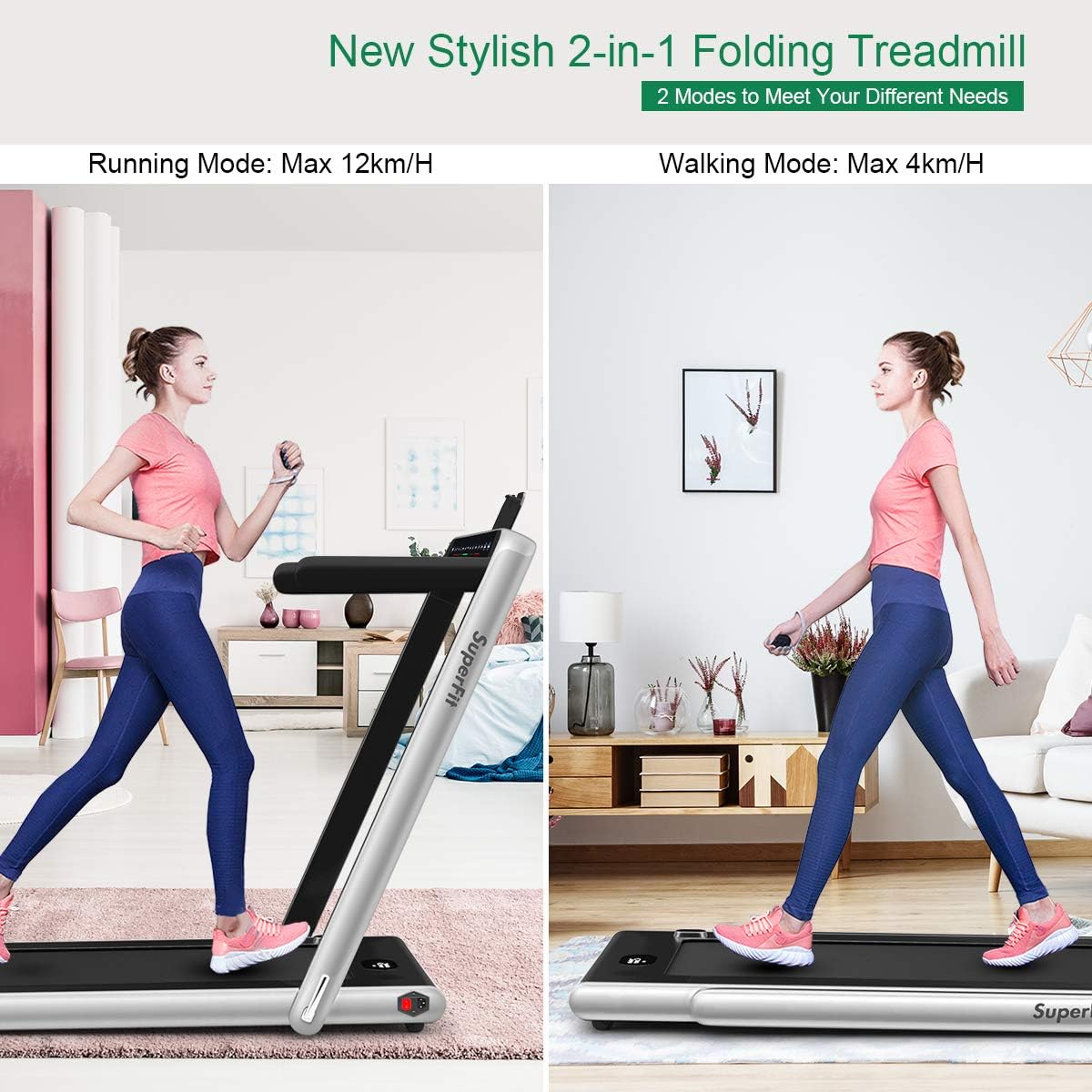
Figure 4.1: The treadmill supports both running and walking modes by adjusting the handrails.
- Start: Press the 'Start/Stop' button on the console or the remote control. The treadmill will begin at a low speed.
- Speed Adjustment:
- Use the 'Speed+' and 'Speed-' buttons on the console or remote control to increase or decrease the speed.
- Running Mode (Risers Up): Speed can be adjusted from 1 km/h to 12 km/h.
- Walking Mode (Risers Down): Speed can be adjusted from 1 km/h to 4 km/h.
- Stop: Press the 'Start/Stop' button again to pause or stop the treadmill. Removing the safety key will also stop the treadmill immediately.
4.3 Dual Screen Display
The treadmill features a dual-screen display that shows real-time workout data.

Figure 4.2: The dual screen display provides essential workout metrics.
- Time: Duration of your workout.
- Speed: Current speed in km/h.
- Distance: Total distance covered.
- Calories: Estimated calories burned.
4.4 Bluetooth Speaker Function
To connect your mobile device to the treadmill's Bluetooth speaker:
- Ensure the treadmill is powered on.
- On your mobile device, go to Bluetooth settings and search for available devices.
- Select the treadmill's Bluetooth name (usually 'Treadmill' or similar) to pair.
- Once connected, you can play music or audio through the treadmill's built-in speaker.
4.5 Smart App Control
The treadmill can be controlled via a dedicated smart application on your mobile device. Refer to the video in Section 3.5 for a demonstration.
- Download the recommended fitness app (e.g., Gymax or SuperFit app) from your device's app store.
- Follow the in-app instructions to pair your device with the treadmill via Bluetooth.
- The app allows for advanced control, tracking, and workout programs.
5. Maintenance
Regular maintenance ensures the longevity and safe operation of your treadmill.
5.1 Cleaning
- Daily: Wipe down the console and handrails with a soft, damp cloth after each use to remove sweat and dust.
- Weekly: Clean the running belt and deck with a mild detergent and damp cloth. Ensure the treadmill is unplugged before cleaning.
- Do not use abrasive cleaners or solvents, as they may damage the finish.
5.2 Running Belt Lubrication
The running belt requires periodic lubrication to reduce friction and extend its lifespan. Refer to the specific lubrication instructions provided with your treadmill's lubricant kit. Typically, this is done every few months depending on usage.
5.3 Running Belt Adjustment
If the running belt feels loose, slips, or drifts to one side, it may need adjustment. Refer to the detailed instructions in the full user manual for belt tensioning and centering procedures. Incorrect adjustment can damage the belt or motor.
6. Troubleshooting
If you encounter issues with your DORTALA 2-in-1 Folding Treadmill, refer to the following common problems and solutions:
| Problem | Possible Cause | Solution |
|---|---|---|
| Treadmill does not power on. | Power cord unplugged, safety key not inserted, power switch off. | Check power cord connection, ensure safety key is fully inserted, turn on power switch. |
| Running belt slips or hesitates. | Belt too loose, lack of lubrication. | Adjust belt tension (refer to full manual), lubricate the running deck. |
| Unusual noise during operation. | Loose components, motor issue, belt friction. | Check for loose screws, lubricate belt. If noise persists, contact customer support. |
| Remote control not working. | Dead battery, interference. | Replace remote control battery. Ensure no obstructions between remote and treadmill. |
For issues not listed here or if solutions do not resolve the problem, please contact DORTALA customer support.
7. Product Specifications
The following table outlines the key specifications for the DORTALA 2-in-1 Folding Treadmill:

Figure 7.1: Visual representation of treadmill dimensions and key specifications.
| Feature | Specification |
|---|---|
| Model Number | DO-SP37148SL-CA |
| Color | Silver |
| Product Dimensions (L x W x H) | 49" x 27" x 42" (124.5 cm x 68.6 cm x 106.7 cm) |
| Folding Size (L x W x H) | 52" x 27" x 5" (132.1 cm x 68.6 cm x 12.7 cm) |
| Net Weight | 74 lbs (33.6 kg) |
| Maximum Weight Capacity | 265 lbs (120 kg) |
| Voltage | 110V 60Hz |
| Speed Range | 1-12 km/h (Running), 1-4 km/h (Walking) |
| Peak Motor Power | 2.25 HP |
| Sound Level | Less than 60 dB |
| Running Area | 40" x 16" (101.6 cm x 40.6 cm) |
| Material | Steel, ABS |
| Display Type | LCD |
| Special Features | Built-In Speaker, Foldable, Remote Control, Mobile Phone Bracket |
8. Warranty and Customer Support
For warranty information, please refer to the warranty card included with your product or visit the official DORTALA website. If you have any questions, require technical assistance, or need to report a problem, please contact DORTALA customer support through the contact information provided on the product packaging or the official website.
Ask a question about this manual
Ask about setup, troubleshooting, compatibility, parts, safety, or missing instructions. Manuals+ will review the question and use this page’s manual context to help answer it.