
1. Introduction
This manual provides essential information for the safe and efficient operation of your MEDION P14057 (MD 30019) Full HD 40-inch Smart TV. Please read this manual thoroughly before using the device and retain it for future reference. Your new Smart TV offers a Full HD display, High Dynamic Range (HDR) support, PVR ready functionality, Wi-Fi, Bluetooth, and an integrated triple tuner for versatile entertainment options.
2. Safety Information
- Power Supply: Ensure the TV is connected to a power outlet with the correct voltage. Do not overload power strips.
- Ventilation: Do not block ventilation openings. Allow adequate space around the TV for proper airflow to prevent overheating.
- Water and Moisture: Do not expose the TV to rain, moisture, or liquids. Avoid placing objects filled with liquids, such as vases, on or near the TV.
- Cleaning: Disconnect the power cord before cleaning. Use a soft, dry cloth. Do not use liquid or aerosol cleaners.
- Placement: Place the TV on a stable, level surface to prevent it from falling. Keep it away from direct sunlight, heat sources, and strong magnetic fields.
- Servicing: Do not attempt to service this product yourself. Refer all servicing to qualified service personnel.
3. Package Contents
Please check that all items are present and in good condition:
- MEDION P14057 (MD 30019) Smart TV
- Feet with screws
- Remote control with batteries (AAA)
- User manual
- Warranty booklet
4. Physical Features and Connections

This image shows the front of the MEDION P14057 Smart TV, emphasizing its key features: Netflix & Amazon streaming, PVR ready functionality, and High Dynamic Range (HDR) support for enhanced picture quality.

This diagram illustrates the physical dimensions of the MEDION P14057 Smart TV, including its 40-inch screen diagonal (100.3 cm), overall width, height, and depth with the stand attached.

The back panel of the MEDION P14057 Smart TV is displayed, detailing the available input and output ports for connecting external devices and antennas.
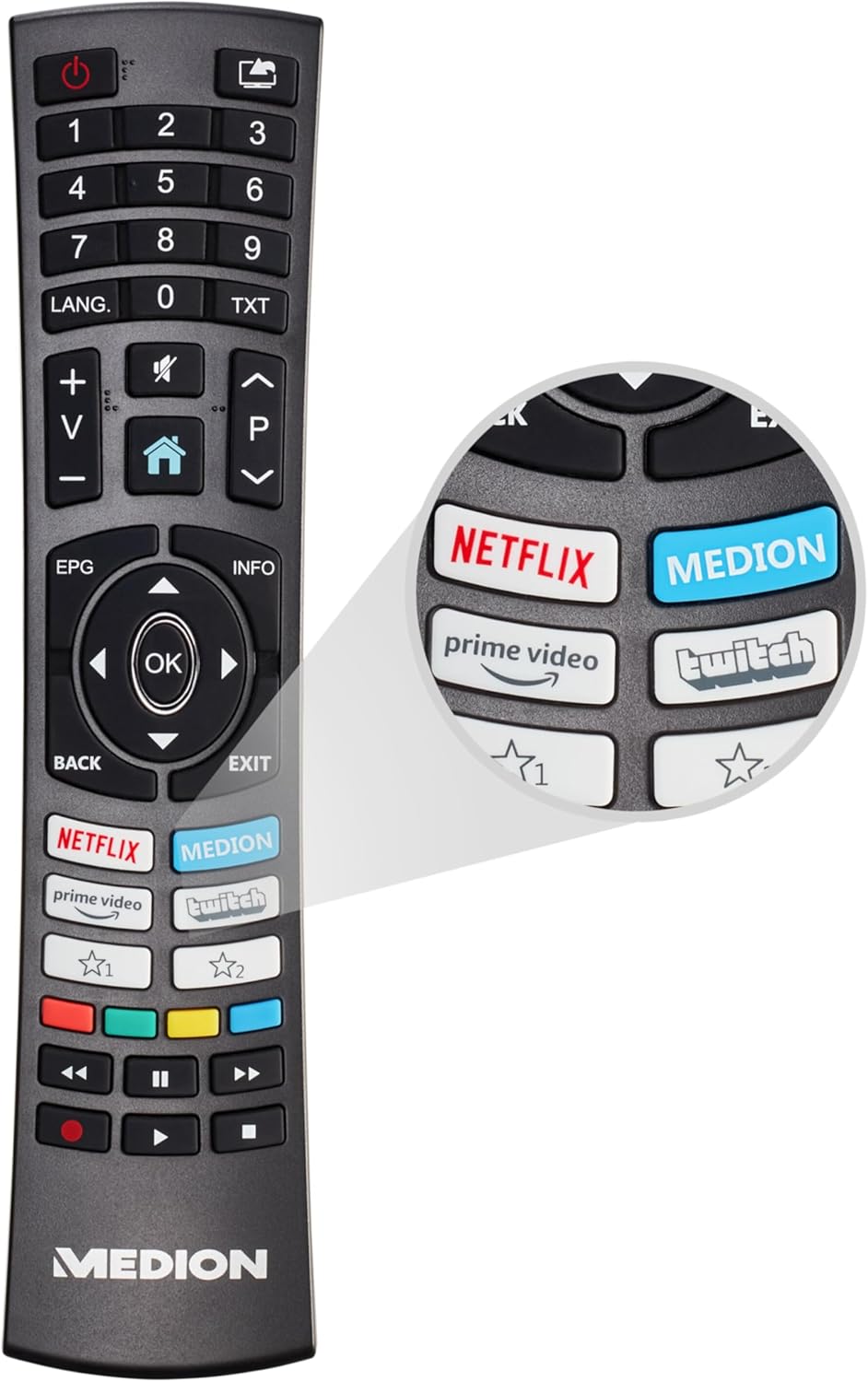
This image features the remote control for the MEDION P14057 Smart TV, highlighting its ergonomic design and quick access buttons for popular streaming services like Netflix and Prime Video.
Available Ports:
- Satellite connection
- Antenna connection
- 1 x LAN (RJ-45)
- 2 x USB
- 3 x HDMI®
- 1 x VGA
- AV In
- Headphone jack
- Digital Audio Out (SPDIF)
5. Setup
5.1 Attaching the Feet
- Carefully place the TV screen-down on a soft, clean surface to prevent scratches.
- Align the feet with the corresponding screw holes on the bottom of the TV.
- Securely fasten the feet using the provided screws. Do not overtighten.
5.2 Connecting Power
Plug the power cord into the TV's power input, then into a wall outlet. Ensure the connection is secure.
5.3 Initial Setup Wizard
Upon first power-on, the TV will guide you through an initial setup process. This includes:
- Language selection
- Network connection (Wi-Fi or Ethernet)
- Channel scanning (for DVB-T2/C/S2)
- Time zone settings
6. Operating the TV
6.1 Basic TV Functions
- Power On/Off: Press the power button on the remote control or TV.
- Channel Selection: Use the number buttons or CH+/- on the remote.
- Volume Control: Use the VOL+/- buttons.
- Input Source: Press the SOURCE button to select between HDMI, AV, USB, or tuner inputs.
6.2 Smart TV Features
Connect your TV to the internet via Wi-Fi or Ethernet to access a world of online content.

A graphic representation of the Wi-Fi symbol, denoting the television's capability for wireless internet connection.

A screenshot of the MEDION Smart TV's user interface, showing the home screen with recommended apps and content sections, including Netflix, Prime Video, and YouTube.
Access popular streaming services directly from your TV:

The official Netflix logo, indicating built-in access to the streaming service.

The official Amazon Prime Video logo, indicating built-in access to the streaming service.
6.3 High Dynamic Range (HDR)
HDR technology provides a wider range of colors and contrasts, resulting in a more vibrant and lifelike picture. Ensure your content source supports HDR for optimal viewing.

This image visually demonstrates the difference between Standard and High Dynamic Range, showing how HDR enhances contrast, color, and detail in a scene.
6.4 PVR Ready (USB Recording)
The TV supports Personal Video Recorder (PVR) functionality, allowing you to record TV programs to an external USB storage device. Connect a compatible USB drive to one of the TV's USB ports.

An on-screen display showing a 'REC' icon, signifying that the PVR (Personal Video Recorder) function is currently active, allowing users to record TV programs.
6.5 Triple Tuner
Your TV is equipped with a triple tuner, supporting DVB-T2 (terrestrial), DVB-C (cable), and DVB-S2 (satellite) signals. This allows you to receive various broadcast types without an external receiver.
7. Maintenance
- Screen Cleaning: Gently wipe the screen with a soft, lint-free cloth. For stubborn marks, slightly dampen the cloth with water or a screen-specific cleaner (never spray directly onto the screen).
- Cabinet Cleaning: Use a soft, dry cloth to wipe the TV cabinet. Avoid abrasive materials or harsh chemicals.
- Dust Removal: Regularly dust the ventilation slots to prevent dust buildup, which can affect performance and lifespan.
8. Troubleshooting
If you encounter issues, try the following basic troubleshooting steps:
- No Power: Check if the power cord is securely plugged into both the TV and the wall outlet. Test the outlet with another device.
- No Picture/Sound: Ensure the correct input source is selected. Check all cable connections (HDMI, antenna, etc.).
- Remote Control Not Working: Replace the batteries. Ensure there are no obstructions between the remote and the TV's IR sensor.
- No Internet Connection: Check your Wi-Fi router or Ethernet cable. Try restarting your router and the TV.
- Poor Picture Quality: Check antenna/cable connections. Adjust picture settings in the TV menu. For streaming, ensure a stable internet connection.
- Software Update: Check for available software updates in the TV settings, as these can resolve various issues.
If problems persist, consult the detailed troubleshooting section in the full user manual or contact customer support.
9. Specifications
| Feature | Specification |
|---|---|
| Brand | MEDION |
| Model Number | P14057 (MD 30019) |
| Screen Size | 39.5 Inches (100.3 cm) |
| Display Technology | LED LCD |
| Resolution | Full HD (1920 x 1080 pixels) |
| Refresh Rate | 60 Hz |
| Special Features | USB Recording, HDR, Smart/Internet TV, Wi-Fi, HbbTV |
| Connectivity Technology | Bluetooth, Ethernet, HDMI, USB, WLAN |
| Aspect Ratio | 1.77:1 |
| Product Dimensions (L x W x H) | 18 x 90.5 x 57.5 cm; 6.1 kg |
| Power Consumption (SDR) | 37.0 W |
| Power Consumption (HDR) | 65.0 W |
| Power Consumption (Standby) | 0.4 W |
| Power Consumption (Networked Standby) | 0.5 W |
| Included Components | Smart TV P14057 (MD 30019) |

The EU energy label for the MEDION MD 30019 TV, indicating its energy efficiency ratings for both Standard Dynamic Range (SDR) and High Dynamic Range (HDR) modes. For more details, visit eprel.ec.europa.eu/qr/1430323.
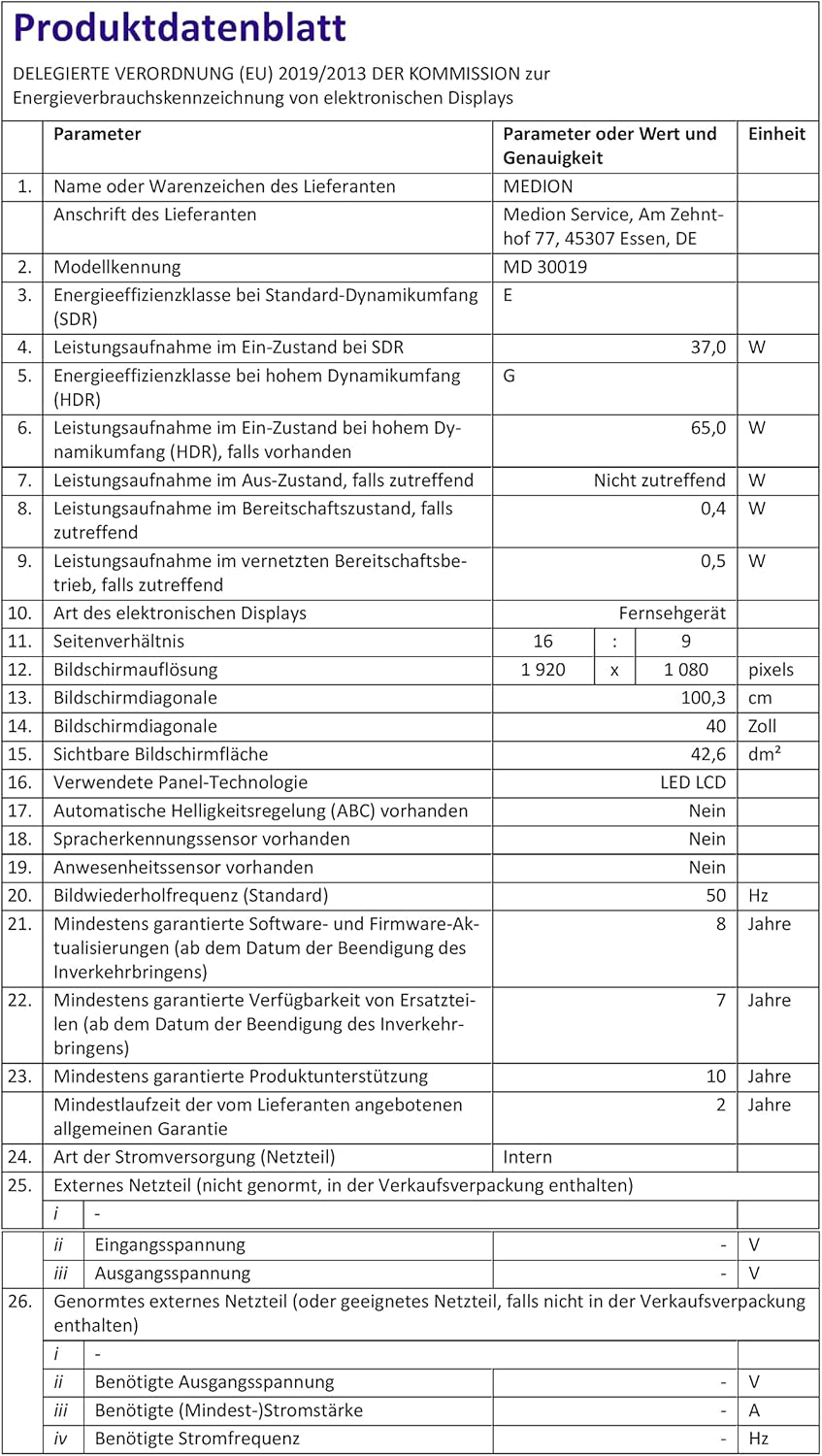
German product data sheet providing detailed technical specifications and energy consumption information for the MEDION MD 30019 TV.

French product data sheet providing detailed technical specifications and energy consumption information for the MEDION MD 30019 TV. For more details, visit eprel.ec.europa.eu/qr/1430323.

Italian product data sheet providing detailed technical specifications and energy consumption information for the MEDION MD 30019 TV.
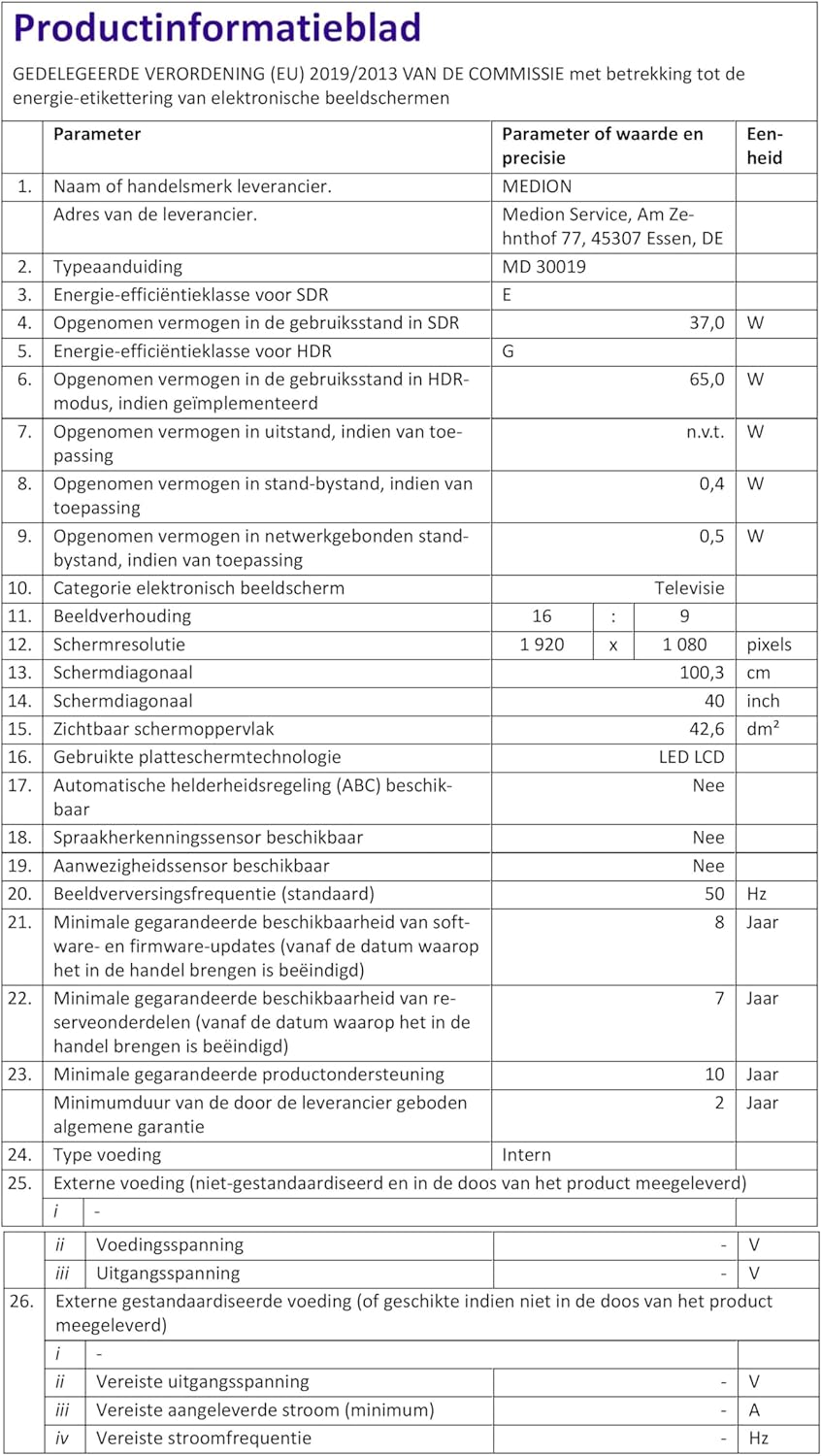
Dutch product data sheet providing detailed technical specifications and energy consumption information for the MEDION MD 30019 TV.
10. Warranty and Support
10.1 Warranty Information
- Minimum Guaranteed Product Support: 10 years
- Minimum Supplier Warranty: 2 years
- Minimum Guaranteed Availability of Spare Parts: 7 years
Please refer to the included warranty booklet for detailed terms and conditions.
10.2 Customer Support
For technical assistance, service, or inquiries, please contact MEDION customer support:
- Email: connect@medion.com
- Website: www.medion.com
- Phone: 020122099577
Customer Service Address:
MEDION Service, Am Zehnthof 77, 45307 Essen, Germany


