
1. Introduction
The PROHEAR 056 Electronic Shooting Ear Protection Muffs are designed to provide superior hearing protection while enhancing situational awareness. Featuring a high Noise Reduction Rating (NRR) of 30dB and advanced sound amplification technology, these earmuffs are ideal for environments such as gun ranges, hunting, and workshops where both noise suppression and the ability to hear critical sounds are essential.

Figure 1: PROHEAR 056 Electronic Shooting Ear Protection Muffs with included accessories.
2. Package Contents
Please inspect the package contents to ensure all items are present and in good condition:
- PROHEAR 056 Electronic Ear Protection Muffs x 1
- Carrying Bag x 1
- 3.5mm Audio Cord x 1
- Instruction Manual x 1

Figure 2: All items included in the PROHEAR 056 package.
3. Key Features
- High Noise Reduction Rating (NRR 30dB): Provides significant protection against loud impulse noises, crucial for shooting and other high-decibel activities.
- Fast Reaction Time (0.01s): The advanced electronic circuitry reacts quickly to suppress harmful noises, protecting your hearing instantly.
- Sound Amplification (up to 4X): Built-in directional microphones amplify ambient sounds to a safe 82 dB, allowing for clear communication and awareness of your surroundings.
- Comfortable Design: Features soft ear cushions, a padded headband, and durable ABS plastic construction for extended wear comfort.
- Audio Input: Includes a 3.5mm connection cord for connecting to MP3 players, scanners, or other audio devices.
- Folding Design: The earmuffs can be folded for compact storage and easy portability.

Figure 3: The NRR 30dB rating provides high noise reduction for activities like shooting and hunting.

Figure 4: Sound amplification feature allows users to hear range commands and ambient sounds up to 4X.

Figure 5: The earmuffs feature an adjustable headband and a convenient folding design for portability.
4. Setup
4.1 Battery Installation
The PROHEAR 056 earmuffs require 2 AAA batteries (not included) for operation. To install the batteries:
- Locate the battery compartment on one of the ear cups.
- Gently open the battery compartment cover.
- Insert 2 AAA batteries, ensuring correct polarity (+/-) as indicated inside the compartment.
- Close the battery compartment cover securely.
4.2 Adjusting Fit
For optimal comfort and noise reduction, adjust the earmuffs to fit snugly over your ears:
- Extend the headband by pulling the ear cups downwards.
- Place the earmuffs over your ears, ensuring the ear cushions fully cover your ears and create a seal.
- Adjust the headband by sliding the ear cups up or down until a comfortable and secure fit is achieved. The padded headband should rest comfortably on top of your head.
5. Operating Instructions
5.1 Power On/Off and Volume Control
The power on/off and volume control are integrated into a single vertical knob located on one of the ear cups.
- To power on, rotate the vertical knob clockwise until you hear a click.
- Continue rotating the knob clockwise to increase the volume of ambient sound amplification.
- Rotate the knob counter-clockwise to decrease the volume.
- To power off, continue rotating the knob counter-clockwise until you hear a click.
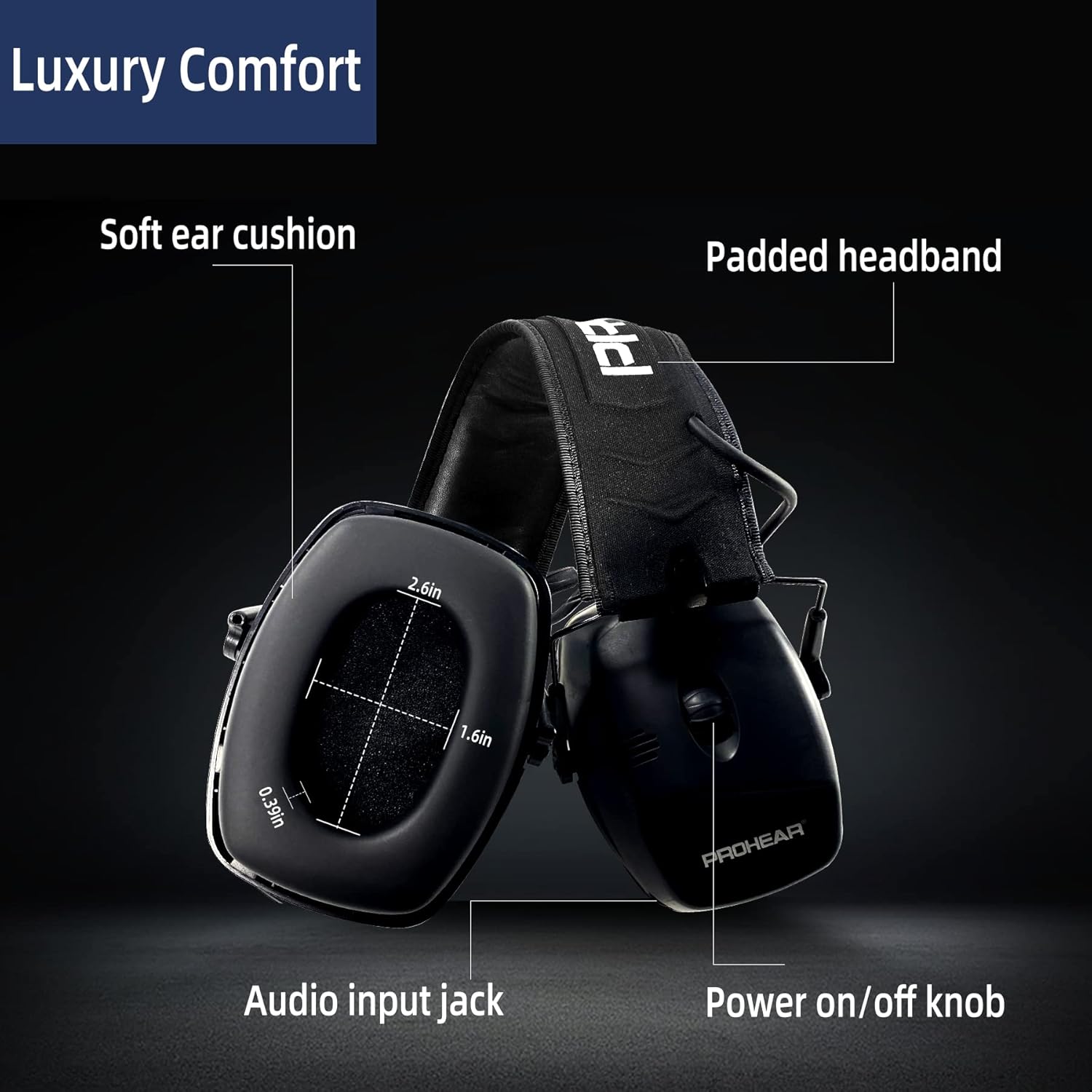
Figure 6: Detailed view of the earmuff's controls and comfort features.
5.2 Using the Audio Input
The earmuffs include a 3.5mm audio input jack for connecting external audio devices.
- Locate the 3.5mm audio input jack on the ear cup (refer to Figure 6).
- Connect one end of the provided 3.5mm audio cord to the earmuffs.
- Connect the other end of the audio cord to your MP3 player, smartphone, or other compatible audio device.
- Adjust the volume using the earmuffs' volume knob and/or your audio device's volume controls.

Figure 7: Connecting the earmuffs to an external audio device.
5.3 Official Product Video
Video 1: Official product overview of the PROHEAR 056 Electronic Shooting Earmuffs, demonstrating key features and benefits.
6. Maintenance
Proper maintenance ensures the longevity and performance of your earmuffs:
- Cleaning: Wipe the ear cups and headband with a soft, damp cloth. Do not use abrasive cleaners or immerse the earmuffs in water.
- Storage: When not in use, store the earmuffs in the provided carrying bag to protect them from dust and damage. Store in a cool, dry place.
- Battery Care: Remove batteries if the earmuffs will not be used for an extended period to prevent battery leakage and damage.
- Ear Cushions: Periodically check the ear cushions for wear and tear. Replace them if they become cracked or lose their seal, as this can affect noise reduction performance.
7. Troubleshooting
If you encounter issues with your PROHEAR 056 earmuffs, refer to the following common problems and solutions:
| Problem | Possible Cause | Solution |
|---|---|---|
| No sound or low volume |
|
|
| Distorted or "tinny" sound |
|
|
| Earmuffs do not fit snugly |
|
|
8. Specifications
- Model: PROHEAR 056
- Noise Reduction Rating (NRR): 30dB
- Reaction Time: 0.01 seconds
- Sound Amplification: Up to 4X (to 82 dB)
- Microphones: 2 Omni-directional microphones
- Power Source: 2 x AAA batteries (not included)
- Material: Durable ABS Plastic, Adjustable Headband, Comfortable Ear Pads
- Audio Input: 3.5mm Jack
- Weight: Approximately 1 pound
- Dimensions (Package): 8.11 x 6.34 x 4.17 inches
- Country of Origin: China
9. Warranty & Support
PROHEAR products are manufactured with quality and performance in mind. For detailed warranty information, please refer to the official user manual PDF available online or contact PROHEAR customer support.
For further assistance, product registration, or to inquire about replacement parts, please visit the official PROHEAR store or contact their customer service department. You can often find additional support resources, FAQs, and contact information on the brand's official website.
User Manual (PDF): Download Here
PROHEAR Store: Visit Store


