Introduction
This manual provides essential information for the installation, operation, and maintenance of your Gecko in.xe Electronic Control System. The in.xe system is designed for spas and hot tubs, integrating a heat.wav heater and supporting various configurations including single pump, dual pump, pump and blower, or dual pump and blower systems. Please read this manual thoroughly before installation and use to ensure proper function and safety.

Image 1: Front view of the Gecko in.xe Electronic Control System, showing the various connectors for pumps, blower, and other accessories, along with the integrated heat.wav heater at the bottom.
Safety Information
Always follow local electrical codes and regulations. Installation should be performed by a qualified electrician or service technician. Disconnect power before servicing. Ensure proper grounding and bonding. This system is suitable for indoor use only when installed under a weatherproof enclosure.
- WARNING: Connect only to a circuit protected by a Ground Fault Circuit Interrupter (GFCI).
- WARNING: Do not connect to an ungrounded receptacle.
- WARNING: Suitable for indoor use only when installed under a weatherproof enclosure.
- WARNING: Refer to installation instructions for specific wiring diagrams.
Setup and Installation
Proper installation is crucial for the safe and efficient operation of your in.xe control system. Refer to the detailed wiring diagrams provided with your unit for specific connections.
Component Overview
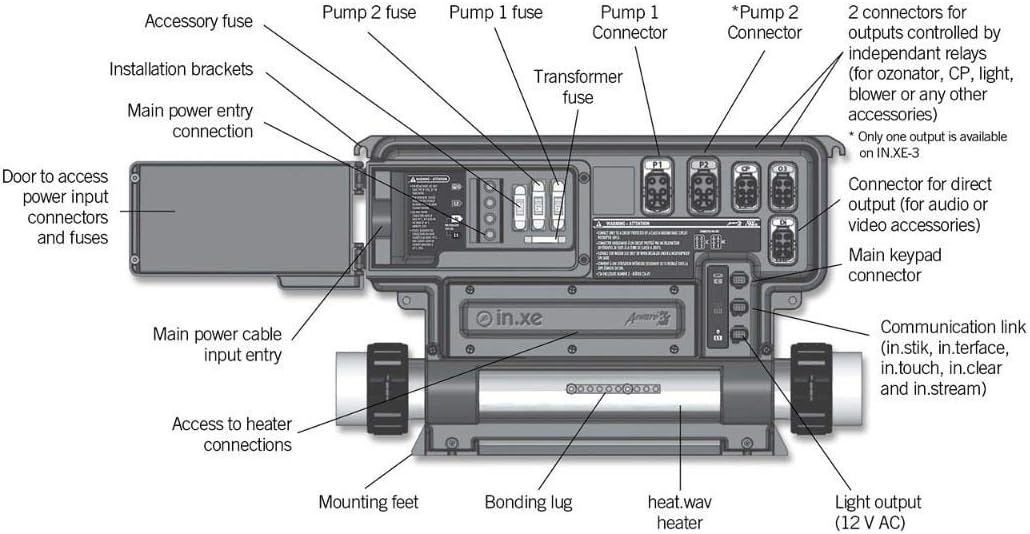
Image 2: Detailed view of the Gecko in.xe control system with labels indicating key components such as main power entry, pump connectors (P1, P2), blower connector, accessory fuses, transformer fuse, main keypad connector, communication link, heat.wav heater, bonding lug, and mounting feet.
- Mounting: Secure the control system using the provided installation brackets and mounting feet. Ensure it is in a location protected from direct weather exposure if installed outdoors, or in a suitable enclosure.
- Power Connection: Connect the main power cable to the main power entry connection. The system supports 120V/240V (Neutral Required). Ensure the circuit is protected by a GFCI.
- Heater Connection: The heat.wav heater is integrated. Ensure proper water flow through the heater before powering on the system.
- Pump Connections: Connect Pump 1 (1-speed or 2-speed) to the P1 connector. If applicable, connect Pump 2 (2-speed) to the P2 connector.
- Blower Connection: Connect the 1-speed blower to its designated connector.
- Other Accessories: Connect circulation pump, ozone generator, or AV receptacles to the appropriate connectors as per your spa configuration.
- Keypad Connection: Connect your compatible Gecko keypad (e.g., in.k600, in.k450, in.k200, K-85) to the main keypad connector.
- Bonding: Ensure the system is properly bonded to the spa structure and other metallic components as required by local codes.
Operating Instructions
The Gecko in.xe system operates in conjunction with a compatible keypad. Refer to your keypad's specific user manual for detailed navigation and function controls. General operations include:
- Power On/Off: Use the main power switch to turn the system on or off.
- Temperature Adjustment: Set your desired water temperature using the keypad controls.
- Pump Activation: Activate Pump 1 and Pump 2 (if installed) for jets or circulation.
- Blower Activation: Turn the blower on or off for air jets.
- Light Control: Operate the spa lights through the keypad.
- Mode Selection: Select different operating modes (e.g., Standard, Economy, Sleep) to manage heating cycles and energy consumption.
Note: The specific functions and their access methods will vary depending on the model of your Gecko keypad.
Maintenance
Regular maintenance ensures the longevity and optimal performance of your control system.
- Power Disconnection: Always disconnect power to the spa before performing any maintenance or inspection.
- Visual Inspection: Periodically inspect the control system for any signs of damage, corrosion, or loose connections.
- Fuse Check: If a component fails to operate, check the corresponding fuse inside the control box. Replace blown fuses with the exact same type and rating. Refer to Image 2 for fuse locations.
- Enclosure Integrity: Ensure the control system enclosure remains sealed and free from moisture ingress.
- Water Quality: Maintain proper spa water chemistry to prevent scale buildup in the heater and other components.
Troubleshooting
This section provides solutions to common issues. For complex problems, contact a qualified service technician.
| Problem | Possible Cause | Solution |
|---|---|---|
| System does not power on. | No power supply, tripped GFCI, blown main fuse. | Check main power breaker and GFCI. Inspect and replace main fuse if blown (ensure correct rating). |
| Pump/Blower not working. | Blown component fuse, loose connection, motor issue. | Check the specific fuse for the pump/blower. Ensure connections are secure. If fuse is good, motor may require service. |
| Heater not heating. | Low water flow, air lock, heater element failure, thermostat issue. | Ensure pumps are running and water flow is adequate. Bleed air from the system. If problem persists, professional service is required. |
| Keypad not responding. | Loose keypad cable, keypad malfunction. | Check keypad cable connection to the control system. If still unresponsive, the keypad may need replacement. |
Specifications
- Model: Gecko in.xe Electronic Control System (0602-221063-299)
- System Voltage: 120V/240V (Neutral Required)
- Heater Wattage: 1.0/4.0kW
- Component Configuration: Pump1 (1spd or 2spd) + Pump2 (2spd) + Blower (1spd) + Circ (1spd) + Ozone + AV Receptacle
- Enclosure Dimensions: 9.5" (W) x 11.75" (H) x 5.1" (D) (Plastic)
- Heater Style: Flow Thru (Fixed)
- Heater Measures: 2" x 15" long
- Compatible Keypads (Not Included): in.k600, in.k450, in.k200, K-85, and more.
- Manufacturer: Gecko
- Package Dimensions: 20 x 12 x 6 inches
Warranty and Support
For warranty information, please refer to the documentation provided with your purchase or contact Gecko customer support directly. Keep your proof of purchase for warranty claims.
For technical support or service inquiries, please contact your authorized Gecko dealer or visit the official Gecko website. Ensure you have your model number (0602-221063-299) and serial number ready when contacting support.


