
1. Introduction
Thank you for choosing the Hyper Tough Stripper/Crimper and 25 Piece Terminal Set. This manual provides essential information for the safe and effective use of your new tool. Please read it thoroughly before operation and retain it for future reference.

Image 1.1: The Hyper Tough Stripper/Crimper tool, featuring red ergonomic handles and clearly marked wire gauges for stripping and crimping functions.
2. Safety Guidelines
Always observe the following safety precautions to prevent injury or damage to the tool:
- Wear appropriate personal protective equipment, such as safety glasses, when using this tool.
- Ensure the power source is disconnected before working on electrical wires.
- Do not use the tool for purposes other than wire stripping, crimping, or cutting.
- Keep hands and fingers clear of the cutting and crimping jaws during operation.
- Store the tool in a dry, secure place, out of reach of children.
- Inspect the tool for any damage before each use. Do not use if damaged.
3. Package Contents
Your Hyper Tough Stripper/Crimper and Terminal Set TD2173TB includes the following items:
- 1 x Hyper Tough Wire Stripper/Crimper Tool
- 25 x Assorted Electrical Terminals (e.g., spade, ring, butt connectors)
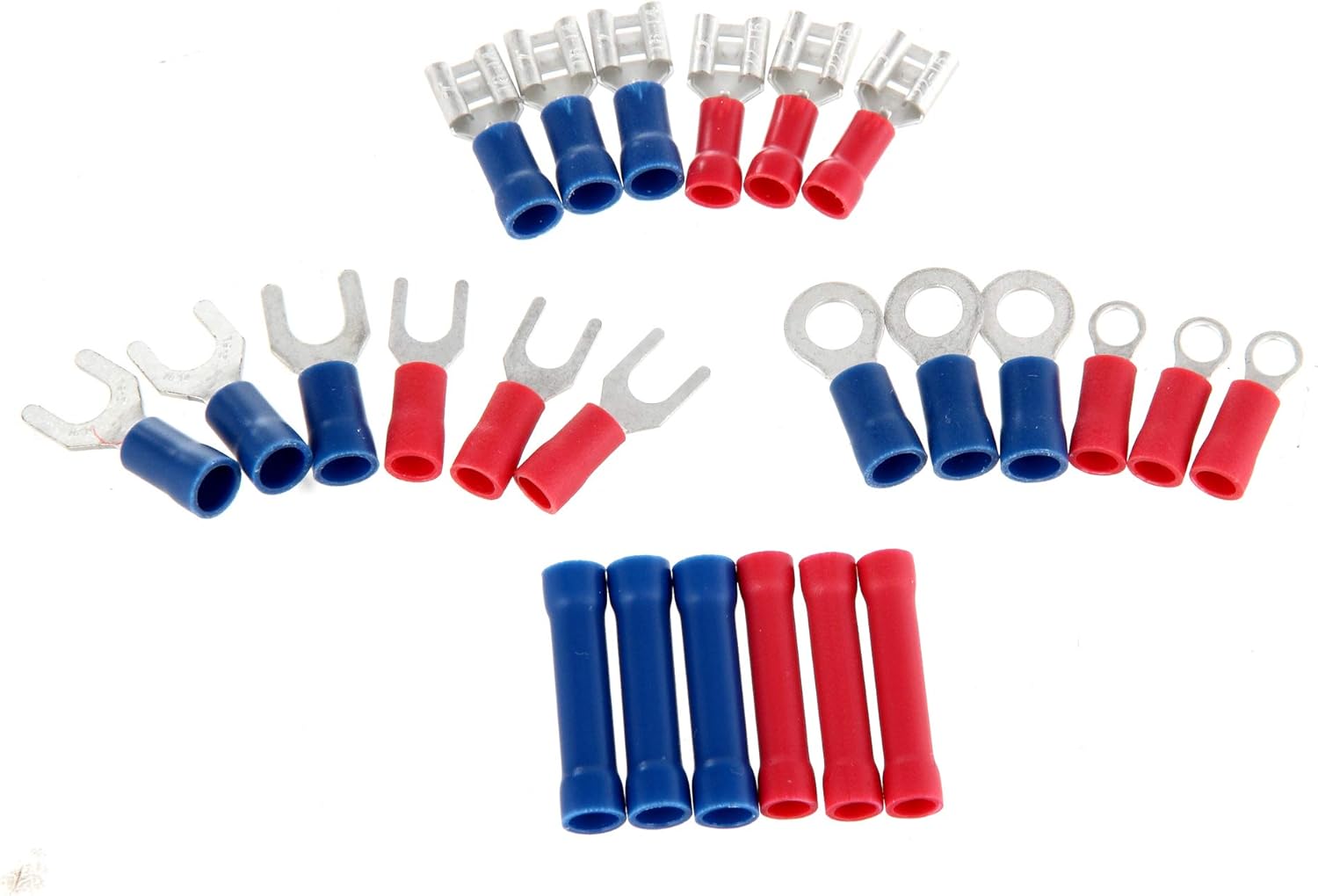
Image 3.1: An assortment of red and blue electrical terminals included in the set, such as spade, ring, and butt connectors.
4. Setup
The Hyper Tough Stripper/Crimper is a hand tool that requires no assembly. Before first use, inspect the tool for any manufacturing defects or shipping damage. Ensure the jaws open and close smoothly.
5. Operating Instructions
5.1. Wire Stripping Function
To strip insulation from wires:
- Identify the wire gauge (AWG) of the wire you intend to strip.
- Locate the corresponding stripping hole on the tool's jaws. The tool features marked holes for various AWG sizes (e.g., 10, 12, 14, 16, 18, 20-22 AWG).
- Insert the wire into the correct stripping hole, ensuring only the insulation is within the jaws and the conductor is positioned to be exposed.
- Close the handles firmly to cut through the insulation, then pull the tool away from the wire to remove the stripped insulation, exposing the conductor.

Image 5.1: A hand demonstrating the wire stripping function, inserting a yellow insulated wire into the appropriate gauge slot on the tool.
5.2. Wire Crimping Function
To crimp terminals onto wires:
- Select the appropriate terminal for your wire gauge and application.
- Strip the wire to the correct length, exposing enough conductor to fit fully into the terminal barrel.
- Insert the stripped wire into the terminal barrel.
- Locate the corresponding crimping section on the tool's jaws. The tool has designated areas for different terminal types and sizes (e.g., 22-18, 16-14, 12-10 AWG for insulated terminals, and specific holes for non-insulated terminals like 8-32, 10-24, 4-40, 6-32, 10-32).
- Place the terminal with the wire into the correct crimping section.
- Squeeze the handles firmly and completely until the crimp is secure. Release the handles and inspect the crimp for tightness.

Image 5.2: A close-up view of the Hyper Tough Stripper/Crimper's jaws, highlighting the various crimping and stripping gauge markings.
5.3. Wire Cutting Function
The tool includes a dedicated wire cutter section. To cut wires, place the wire into the cutting blades located between the stripping and crimping sections, then squeeze the handles firmly.
6. Maintenance
Proper maintenance ensures the longevity and performance of your tool:
- After each use, wipe the tool clean with a dry cloth to remove any debris or residue.
- Periodically apply a light oil to the pivot point to ensure smooth operation.
- Store the tool in a dry environment to prevent rust.
- Do not attempt to sharpen the cutting or stripping blades, as this may damage the tool.
7. Troubleshooting
If you encounter issues with your tool, consider the following:
- Poor Wire Strip: Ensure you are using the correct gauge hole for the wire. The wire should be inserted fully into the hole, and the handles squeezed completely.
- Loose Crimp: Verify that the correct crimping section is used for the terminal and wire gauge. The handles must be squeezed firmly until the crimp is complete.
- Stiff Operation: Apply a small amount of lubricating oil to the pivot joint and work the handles to distribute it.
8. Specifications
| Feature | Detail |
|---|---|
| Model Number | TD2173TB |
| Item Weight | 8.4 ounces |
| Package Dimensions | 10.47 x 4.37 x 0.67 inches |
| Grip Type | Ergonomic |
| UPC | 889526125516 |
9. Warranty and Support
This Hyper Tough product is covered by a 5-Year Limited Warranty. This warranty covers defects in material and workmanship under normal use. For warranty claims or technical support, please refer to the contact information provided on the product packaging or the Hyper Tough official website.