
Paulmann 94453
Paulmann 94453 Capea LED Outdoor Wall Lamp with Motion Detector Instruction Manual
Model: 94453
Introduction
Thank you for choosing the Paulmann 94453 Capea LED Outdoor Wall Lamp. This manual provides essential information for the safe installation, operation, and maintenance of your new outdoor lighting fixture. Please read these instructions carefully before installation and retain them for future reference.

Image: The Paulmann Capea LED Outdoor Wall Lamp, showing the product itself and its retail packaging. The lamp is black, with a conical shade and an integrated motion sensor at the base.
Important Safety Instructions
- Electrical Safety: Installation must be performed by a qualified electrician in accordance with local wiring regulations. Always switch off the main power supply before installation, maintenance, or repair.
- Outdoor Use: This product is designed for outdoor use (IP44 rated). Ensure all connections are properly sealed to prevent water ingress.
- Mounting: Mount the fixture securely on a stable surface. Do not install on flammable surfaces.
- Light Source: The LED light source is integrated and not replaceable by the user. Do not attempt to open or modify the light source compartment.
- Temperature: Do not cover the lamp with insulating material. Ensure adequate air circulation around the fixture.
Package Contents
Verify that all components are present before beginning installation:
- 1x Paulmann Capea LED Outdoor Wall Lamp (Model 94453)
- Assembly Instructions
- Mounting hardware (screws, wall plugs) - (Assumed, as typical for wall lamps)
Technical Specifications
| Model Number | 94453 |
| Brand | Paulmann |
| Power Source | AC (230 Volts) |
| Wattage | 6 Watts |
| Luminous Flux | 600 Lumen |
| Colour Temperature | 3000 Kelvin (Warm White) |
| Colour Rendering Index (CRI) | 80 |
| Average Life | 30000 Hours |
| Protection Class | IP44 (Splash-proof) |
| Material | Aluminium |
| Colour | Black |
| Dimensions (L x W x H) | 9.6 x 15.3 x 16.5 cm |
| Weight | 0.61 kg |
| Special Features | Integrated Motion Sensor |

Image: Technical drawing showing the dimensions of the Paulmann Capea LED Outdoor Wall Lamp: 153mm width, 165mm height, and 96mm depth.
Installation Guide
Before you begin: Ensure the main power supply to the installation area is switched off at the circuit breaker. Use appropriate tools and safety equipment.
- Prepare Mounting Location: Choose a suitable wall location for the lamp, ensuring it is a stable surface and allows for proper wiring. Mark the drilling points for the mounting bracket.
- Drill Holes: Drill holes at the marked points and insert appropriate wall plugs (if necessary).
- Mount Bracket: Secure the mounting bracket to the wall using the provided screws.
- Wiring: Connect the electrical wires from your mains supply to the terminal block inside the lamp fixture. Ensure correct polarity (Live, Neutral, Earth) and secure all connections tightly. Refer to local electrical codes.
- Attach Lamp: Carefully attach the lamp fixture to the mounting bracket, ensuring no wires are pinched. Secure the lamp in place.
- Restore Power: Once installation is complete and all connections are secure, restore power at the main circuit breaker.
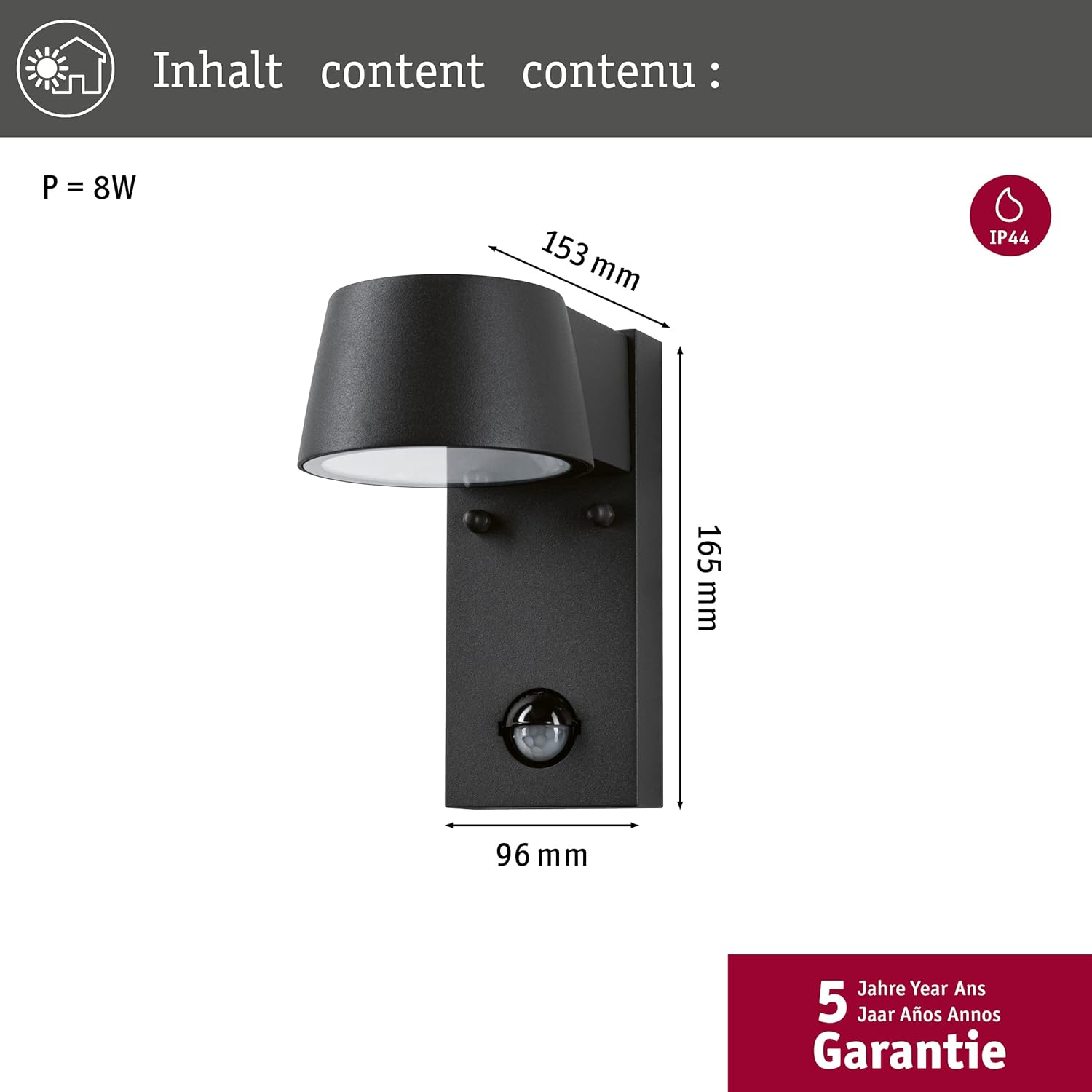
Image: The Paulmann Capea LED Outdoor Wall Lamp shown with its packaging, which illustrates basic installation steps and features like the motion sensor and IP44 rating.
Operating Instructions
The Paulmann Capea LED Outdoor Wall Lamp features an integrated motion sensor for automatic operation.
Motion Sensor Settings
The motion sensor can be adjusted to suit your specific needs. Typically, there are controls for:
- Detection Angle: Approximately 90 degrees.
- Detection Range: 2-8 meters.
- Light Sensitivity (LUX): Determines the ambient light level at which the sensor activates the lamp.
- ON < 20 Lux: The lamp will turn on when motion is detected and the ambient light is below 20 Lux (dark conditions).
- OFF > 20 Lux: The lamp will remain off when the ambient light is above 20 Lux (daylight conditions).
- Time ON: Sets the duration the light remains on after motion is detected. Adjustable from approximately 5 seconds to 5 minutes.
Adjust these settings using the small dials or switches located on the motion sensor unit, usually found at the bottom of the lamp. Use a small screwdriver if necessary.
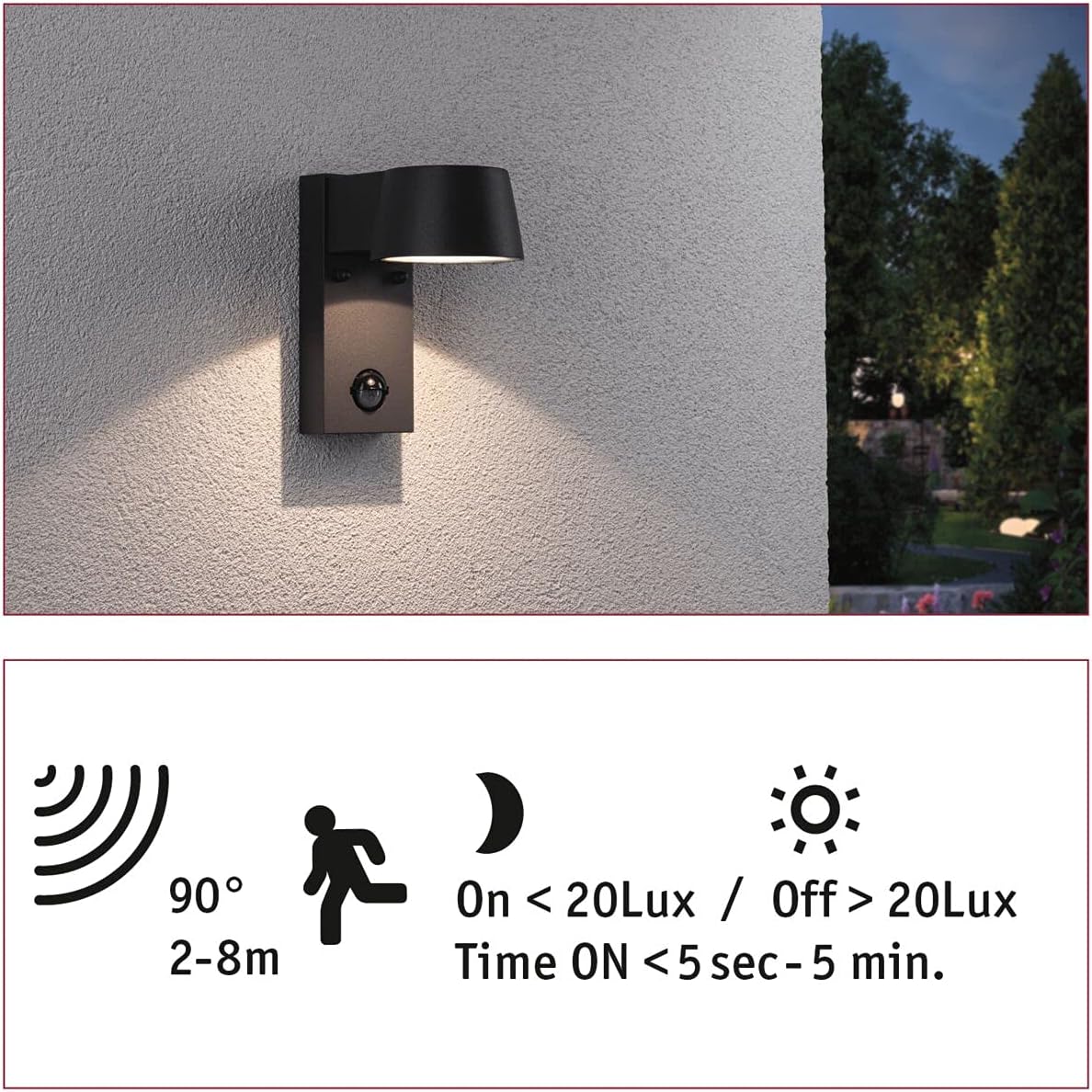
Image: A diagram illustrating the motion sensor's detection angle (90 degrees), range (2-8 meters), and light sensitivity settings (On < 20 Lux / Off > 20 Lux), along with the adjustable time duration (5 seconds - 5 minutes).

Image: A close-up view of the integrated motion sensor located at the base of the Paulmann Capea LED Outdoor Wall Lamp, showing its spherical lens.
Maintenance
- Cleaning: Disconnect power before cleaning. Wipe the lamp with a soft, damp cloth. Do not use abrasive cleaners or solvents, as these can damage the finish or electrical components.
- Light Source: The LED light source is integrated and designed for long-term use (30,000 hours). It is not user-replaceable. If the LED fails, the entire fixture typically needs replacement.
- Inspection: Periodically inspect the lamp for any signs of damage, loose connections, or wear. Address any issues promptly.
Troubleshooting
| Problem | Possible Cause | Solution |
|---|---|---|
| Lamp does not turn on. |
|
|
| Lamp stays on constantly. |
|
|
| Lamp turns on too frequently or at wrong times. |
|
|
Warranty and Customer Support
Paulmann products are manufactured to high quality standards. This product comes with a 5-year guarantee, as indicated on the packaging. For warranty claims, technical assistance, or further inquiries, please contact your retailer or Paulmann customer support directly. Keep your proof of purchase for warranty purposes.
For more information, visit the official Paulmann website: www.paulmann.com
Disposal Information
This product contains electronic components and an integrated LED light source. Do not dispose of it with general household waste. Please take it to a designated collection point for electrical and electronic equipment recycling in accordance with local regulations. Proper disposal helps prevent potential negative consequences for the environment and human health.
Related documents94453


Ask a question about this manual
Ask about setup, troubleshooting, compatibility, parts, safety, or missing instructions. Manuals+ will review the question and use this page’s manual context to help answer it.