
SBS MHTWSSTYLEBTB
SBS Music Hero Wireless Bluetooth Earphones User Manual
Model: MHTWSSTYLEBTB
Introduction
Thank you for choosing the SBS Music Hero Wireless Bluetooth Earphones. This manual provides essential information for the proper setup, operation, and maintenance of your device. Please read it carefully before use.

Image: The SBS Music Hero Wireless Bluetooth Earphones, shown in their light blue charging case. The earbuds are partially visible, indicating their in-ear design.
Package Contents
- SBS Music Hero Wireless Bluetooth Earphones
- Charging Case
- Ear tips/earpads
- USB Charging Cable
- User Manual

Image: A close-up view of the two individual SBS Music Hero wireless earphones, highlighting their design and earbud shape.
Setup Guide
1. Charging the Earphones and Case
Before first use, fully charge the earphones and the charging case.
- Connect the Micro-USB charging cable to the charging port on the bottom of the case.
- Connect the other end of the cable to a USB power source (e.g., computer, wall adapter).
- The LED indicator on the case will illuminate during charging and turn off when fully charged.
- Place the earphones into the charging case. The earphones will begin charging automatically.

Image: The bottom of the earphone charging case, showing the Micro-USB charging port and an LED indicator light.
A full charge for the case and earphones typically takes approximately 1 hour. The earphones provide about 2-3 hours of play time on a single charge, with the case offering additional charges for up to 24 hours of standby time.

Image: The open charging case, illustrating the estimated battery life: 2-3 hours play time, 24 hours standby time, and 1 hour charge time.
2. Pairing with a Bluetooth Device
The earphones use Bluetooth technology for wireless connection.
- Ensure the earphones are charged.
- Open the charging case and remove both earphones. They will automatically enter pairing mode. The LED on one earphone will flash, indicating it's ready to pair.
- On your device (smartphone, tablet, laptop), enable Bluetooth and search for new devices.
- Select "SBS Music Hero" or a similar name from the list of available devices.
- Once connected, the LED indicator on the earphone will stop flashing and remain solid or turn off, depending on the model.
If pairing fails, place the earphones back into the case, close it, and then repeat the steps.
Operating Instructions
The earphones feature a multifunction button for controlling various functions.
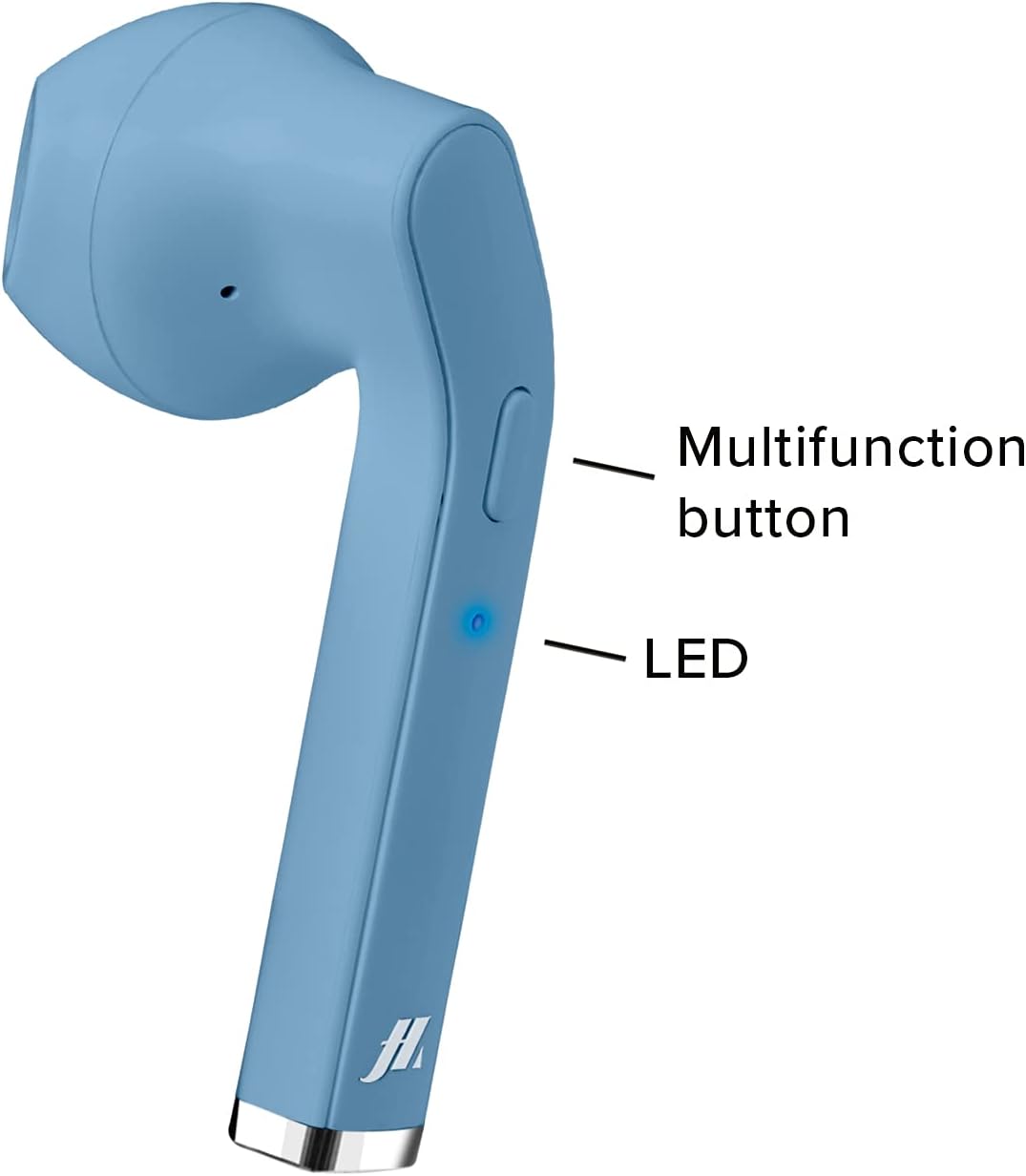
Image: A close-up of one earphone, pointing out the location of the multifunction button and the LED indicator light.
Music Playback
- Play/Pause: Press the multifunction button once.
- Next Track: Double-press the right earphone's multifunction button.
- Previous Track: Double-press the left earphone's multifunction button.
Call Management
- Answer/End Call: Press the multifunction button once during an incoming call or during an active call.
- Reject Incoming Call: Press and hold the multifunction button for approximately 2 seconds during an incoming call.
- Redial Last Number: Triple-press the multifunction button.

Image: An earphone accompanied by icons illustrating its control functions: play/pause, answer/end call, reject incoming call, and redial last number.
Power On/Off
- Power On: The earphones power on automatically when removed from the charging case. Alternatively, press and hold the multifunction button for 3 seconds.
- Power Off: Place the earphones back into the charging case. They will power off automatically. Alternatively, press and hold the multifunction button for 5 seconds.
Maintenance and Care
- Clean the earphones and charging case regularly with a soft, dry cloth.
- Do not use abrasive cleaners or solvents.
- Keep the charging contacts on the earphones and inside the case clean to ensure proper charging.
- Avoid exposing the device to extreme temperatures, humidity, or liquids, as it is not water-resistant.
- Store the earphones in their charging case when not in use to protect them and keep them charged.
Troubleshooting
| Problem | Possible Cause | Solution |
|---|---|---|
| Earphones do not turn on. | Low battery. | Charge the earphones and charging case fully. |
| Cannot pair with device. | Bluetooth is off on device; earphones not in pairing mode; too far from device. | Ensure Bluetooth is enabled. Place earphones back in case, then remove to re-enter pairing mode. Move closer to the device. |
| No sound or poor sound quality. | Volume too low; earphones not properly connected; ear tips not sealed. | Increase volume on your device. Reconnect earphones. Adjust ear tips for a better fit. |
| Only one earphone works. | One earphone not charged; pairing issue. | Ensure both earphones are charged. Place both earphones back in the case, then remove them together to re-establish stereo pairing. |
Product Specifications
| Feature | Detail |
|---|---|
| Model Number | MHTWSSTYLEBTB |
| Connectivity | Bluetooth Wireless Technology |
| Earphone Style | In-Ear |
| Material | Plastic |
| Frequency Range | 20 Hz - 20,000 Hz |
| Sensitivity | 90 dB |
| Battery Type | Lithium Polymer (3 required, included) |
| Average Battery Life (Play Time) | 2 Hours |
| Charging Time | Approx. 1 Hour (Fast Charging) |
| Dimensions | 4 x 18 x 9 cm |
| Weight | 90 g |
| Water Resistance | No (Not water resistant) |
| Compatible Devices | Smartphones, Tablets, Laptops, Desktop Computers |
| Noise Control | Active Noise Cancellation |
Warranty Information
Specific warranty details are not provided in the product data. Please refer to the retailer's return policy or contact the manufacturer directly for warranty information.
Customer Support
For technical support or further assistance, please contact the manufacturer or your point of purchase. Keep your product model number (MHTWSSTYLEBTB) and purchase details ready when contacting support.
Related documentsMHTWSSTYLEBTB


Ask a question about this manual
Ask about setup, troubleshooting, compatibility, parts, safety, or missing instructions. Manuals+ will review the question and use this page’s manual context to help answer it.