
Introduction
This manual provides essential information for setting up, operating, and maintaining your Apple Watch SE (GPS, 40mm). Please read these instructions carefully to ensure proper use and to maximize the features of your device. The Apple Watch SE is designed to integrate seamlessly with your iPhone, offering communication, fitness tracking, and smart notifications directly from your wrist.
What's in the Box
Upon unboxing your Apple Watch SE, verify that all components are present:
- Apple Watch SE (GPS, 40mm)
- Sport Band (Black)
- Charging Cable

Image: The Apple Watch SE, its accompanying sport band, and the magnetic charging cable included in the package.
Setup
1. Charging Your Apple Watch
Before initial use, fully charge your Apple Watch SE. Connect the magnetic charging cable to a USB power adapter (sold separately) and plug it into a power outlet. Place the back of your Apple Watch on the magnetic charger. The watch will display a charging indicator.
2. Pairing with iPhone
To pair your Apple Watch with your iPhone:
- Ensure your iPhone is running the latest iOS version and has Bluetooth enabled.
- Turn on your Apple Watch by pressing and holding the side button until the Apple logo appears.
- Bring your iPhone near your Apple Watch. A pairing screen will appear on your iPhone. Tap 'Continue'.
- Position your iPhone so the Apple Watch appears in the viewfinder in the Apple Watch app.
- Follow the on-screen instructions to complete the pairing process, including setting up a passcode and choosing preferences.
3. Adjusting the Band
The Sport Band is designed for comfort and security. To adjust, slide the pin through one of the holes in the band until it is securely fastened. Ensure the watch fits snugly but comfortably on your wrist for accurate sensor readings.
Operating Your Apple Watch SE
Basic Navigation
Your Apple Watch SE features a Digital Crown, a Side Button, and a Force Touch display for interaction.
- Digital Crown: Rotate to scroll, zoom, or adjust values. Press once to go to the watch face or app list. Double-press to switch between your last two apps. Press and hold for Siri.
- Side Button: Press once to open the Dock (recently used apps). Double-press for Apple Pay. Press and hold for emergency services (SOS).
- Touchscreen: Tap to select, swipe to navigate between screens, and press firmly (Force Touch) for additional options in some apps.
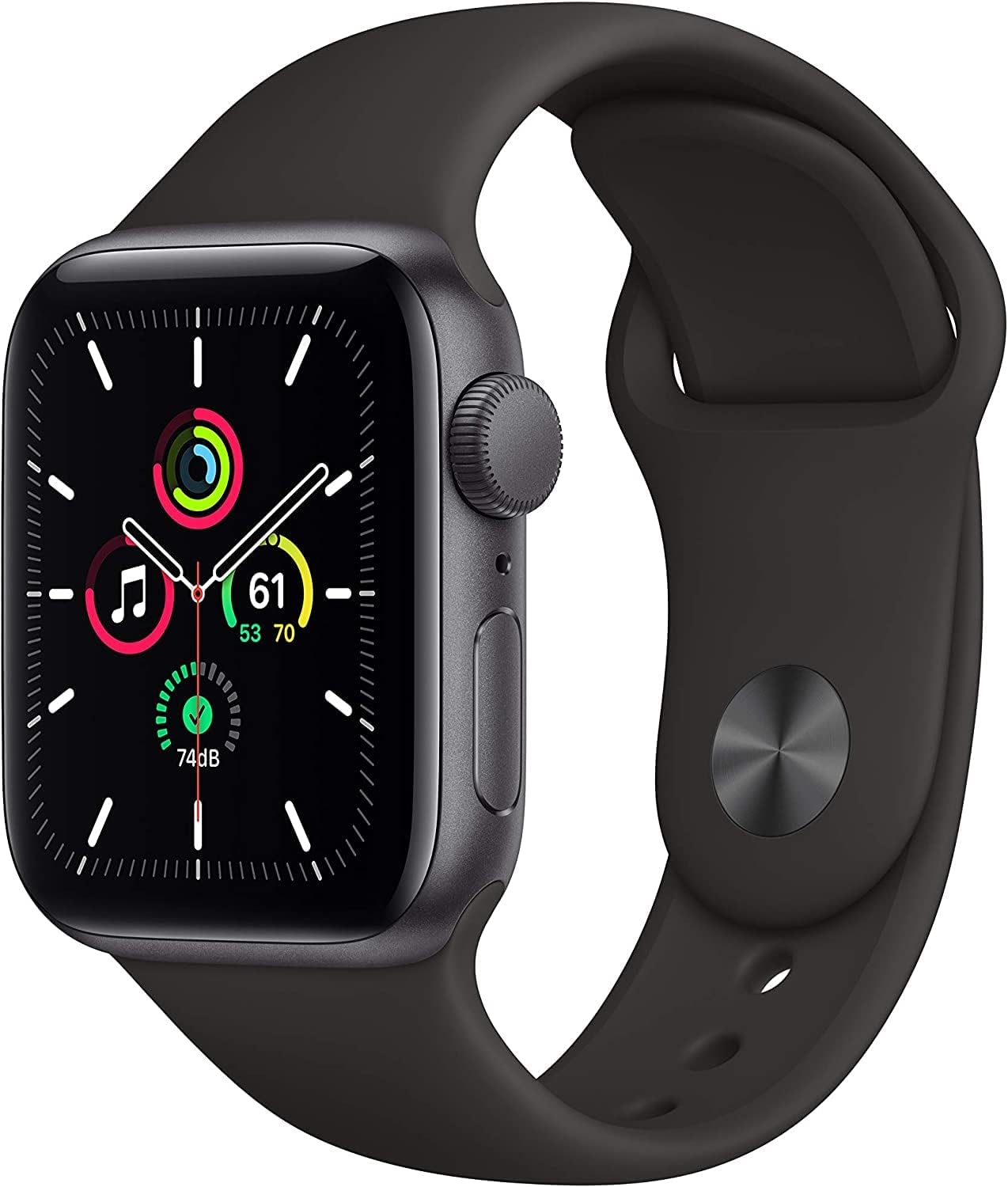
Image: The Apple Watch SE main display showing a watch face with various complications, including activity rings and music controls.

Image: A detailed view of the Apple Watch SE's Digital Crown and side button, highlighting the primary physical controls.
Making Calls and Sending Messages
With your Apple Watch SE paired to your iPhone, you can make and receive calls, and send and receive text messages directly from your wrist. Use the Phone app or Messages app on your watch, or simply ask Siri.
Using Apple Pay
Double-press the side button to quickly access Apple Pay. Hold your watch near a compatible payment terminal to complete transactions securely.
Fitness Tracking
The Apple Watch SE tracks your daily activity, workouts, and heart rate. The Activity app displays three rings: Move, Exercise, and Stand, encouraging you to meet your daily goals. The Workout app allows you to track various exercises, including running, swimming, yoga, and more.

Image: The Apple Watch SE screen showing the Workout app with options for Yoga and Pool Swim, indicating active tracking.

Image: The Apple Watch SE displaying the Heart Rate app, showing a current heart rate of 68 BPM and recent heart rate data.

Image: A collage illustrating various Apple Watch SE features, including sleep goal tracking, diverse workout icons, activity rings, and music playback.
Music and Audio
Store and stream music, podcasts, and audiobooks directly from your Apple Watch SE. Pair Bluetooth headphones for a wire-free listening experience during workouts or on the go.

Image: The Apple Watch SE screen showing the Music app playing a song, with a pair of AirPods depicted alongside, indicating wireless audio playback.
Maintenance
Cleaning Your Apple Watch
To clean your Apple Watch SE, power it off and disconnect the charging cable. Wipe the watch and band with a soft, lint-free cloth. If necessary, lightly dampen the cloth with fresh water. Avoid using harsh chemicals or abrasive materials.
Water Resistance
The Apple Watch SE is water-resistant up to 50 meters. It can be used for shallow-water activities like swimming in a pool or ocean. It should not be used for scuba diving, waterskiing, or other activities involving high-velocity water or submersion below shallow depths. Water resistance is not a permanent condition and may diminish over time.
Battery Life Optimization
To optimize battery life, consider these tips:
- Reduce screen brightness.
- Limit background app refresh.
- Turn off 'Raise to Wake' if not frequently used.
- Disable unnecessary notifications.
- Use Power Reserve mode when battery is low.
Troubleshooting
If you encounter issues with your Apple Watch SE, try the following solutions:
- Watch not turning on: Ensure the watch is charged. Connect it to the charger for at least 30 minutes.
- Pairing issues: Ensure your iPhone's Bluetooth is on and both devices are close. Restart both your iPhone and Apple Watch.
- Poor battery life: Review the battery optimization tips in the Maintenance section. Check for apps consuming excessive power.
- Apps not responding: Force quit the app by pressing and holding the side button until the power off slider appears, then press and hold the Digital Crown.
- Watch is unresponsive: Force restart your watch by pressing and holding both the side button and the Digital Crown for at least 10 seconds until you see the Apple logo.
For more complex issues, refer to Apple's official support resources or contact Apple Support.
Specifications
| Feature | Detail |
|---|---|
| Model Number | A2351 |
| Display | LTPO OLED Retina display, 40mm |
| Operating System | WatchOS |
| Connectivity | GPS, Bluetooth 5.0, Wi-Fi, NFC |
| Water Resistance | 50 meters |
| Storage Capacity | 32 GB |
| Battery Type | Lithium Ion |
| Special Features | Heart Rate Monitor, Fall Detection, SOS, Activity Tracking, Sleep Monitor, Apple Pay, Notifications |
Warranty and Support
Your Apple Watch SE is covered by Apple's standard limited warranty. For detailed information regarding warranty terms, coverage, and service options, please refer to the official Apple website or contact Apple Support directly. Keep your proof of purchase for warranty claims.
For additional support, troubleshooting guides, and software updates, visit the official Apple Support website: support.apple.com/watch


