
1. Introduction
The Prolink PRO903ES is a high-performance 3000VA / 2700W Pure Sine Wave Online Uninterruptible Power Supply (UPS) designed to provide reliable power backup and protection for critical loads. Utilizing true online double conversion technology, it ensures a stable and clean power supply, safeguarding sensitive electronic equipment from various power disturbances. This manual provides essential information for the safe and efficient operation of your PRO903ES UPS.

Figure 1.1: Front view of the Prolink PRO903ES Online UPS, showcasing its compact tower design and front-facing LCD display.
2. Important Safety Instructions
Please read and follow all instructions carefully before installing, operating, or servicing the UPS. Keep this manual for future reference.
- This UPS contains hazardous voltages. Do not attempt to disassemble the unit. Servicing should only be performed by qualified personnel.
- Do not connect appliances that could overload the UPS, such as hair dryers or vacuum cleaners, to the UPS output.
- Ensure the UPS is connected to a grounded AC power outlet.
- Do not block the ventilation openings of the UPS. Ensure adequate airflow around the unit.
- Avoid installing the UPS in areas with excessive dust, humidity, or extreme temperatures.
- In case of fire, use a dry chemical fire extinguisher. Water can cause electrical shock.
- Disconnect the UPS from the AC power source before performing any maintenance or cleaning.
3. Product Features
The Prolink PRO903ES UPS offers advanced features for superior power protection:
- True Double-Conversion: Provides consistent, high-quality AC power regardless of input fluctuations.
- Microprocessor Control: Optimizes reliability and ensures precise operation.
- Wide Input Voltage Range: Operates effectively across a broad range of input voltages (110-300 VAC at 50% load, 160-280 VAC at 100% load).
- Converter Mode: Allows the UPS to function as a frequency converter.
- ECO Mode: Energy-saving mode for improved efficiency under stable power conditions.
- High Input Power Factor Correction: Improves efficiency and reduces overall power losses.
- SNMP Intelligent Slot (Optional): For advanced network monitoring and management.
- USB and RS-232 Communication Ports: For monitoring and control via PC.

Figure 3.1: The PRO903ES provides clean power output, protecting against common power disturbances such as power failure, harmonic distortion, line noise, frequency variation, undervoltage, overvoltage, power sag, and power surge.
4. Package Contents
Upon unpacking, please verify that all items listed below are included and undamaged. If any items are missing or damaged, contact your dealer immediately.
- Prolink PRO903ES UPS Unit
- USB Communication Cable
- RS-232 Communication Cable
- Power Cord
- User Manual (this document)
- Software CD (if applicable)
5. Product Layout and Components
5.1 Front Panel

Figure 5.1: Close-up view of the PRO903ES front panel, featuring the LCD display and control buttons for monitoring and interaction.
The front panel includes an LCD display for real-time status monitoring and control buttons:
- LCD Display: Shows various operational parameters, alarms, and status.
- ON/MUTE Button: Powers on the UPS or mutes the alarm.
- SELECT Button: Navigates through LCD display menus.
- OFF/ENTER Button: Powers off the UPS or confirms selections.
5.2 Rear Panel
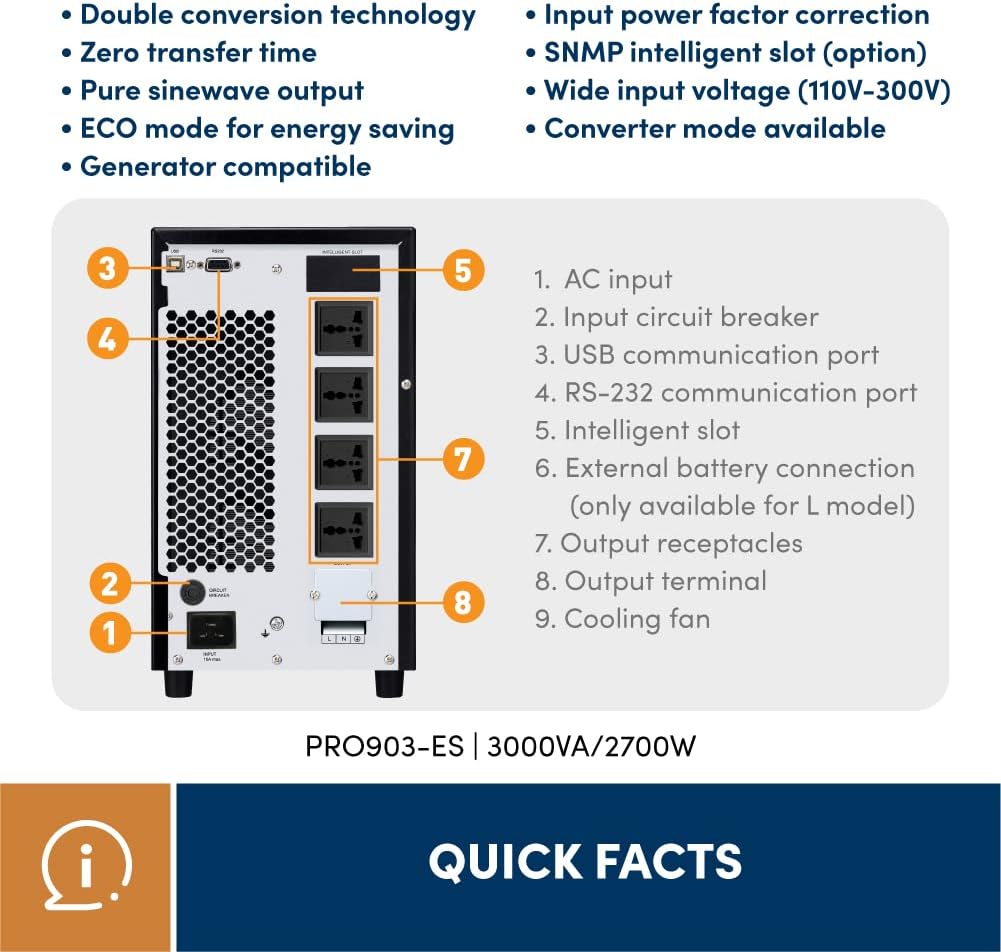
Figure 5.2: Rear panel of the PRO903ES UPS, illustrating the various input, output, and communication ports.
The rear panel provides all necessary connection points for power input, output, and communication:
- AC Input: Main power input connection (IEC 320-C20).
- Input Circuit Breaker: Protects the UPS from input overcurrent.
- USB Communication Port: For connecting to a computer for monitoring.
- RS-232 Communication Port: For serial communication with a computer or network device.
- Intelligent Slot: For optional SNMP card or other communication cards.
- External Battery Connection (L model only): For connecting external battery packs to extend runtime.
- Output Receptacles: Universal sockets for connecting protected equipment (4 x Universal socket for PRO903WS, 2 x Universal socket for PRO903WL).
- Output Circuit Breaker: Protects the output from overcurrent.
- Output Terminal: For hardwired output connections.
6. Installation and Setup
Follow these steps to properly install and set up your PRO903ES UPS:
- Unpacking: Carefully remove the UPS from its packaging. Inspect for any shipping damage.
- Placement: Place the UPS in a clean, dry, and well-ventilated area, away from direct sunlight, heat sources, and excessive dust. Ensure sufficient clearance around the unit for proper airflow.
- Initial Charging: Before initial use, connect the UPS to a standard AC outlet and allow it to charge for at least 4 hours to ensure the batteries are fully charged. The UPS will charge even if the unit is off.
- Connecting Equipment:
- Connect your critical equipment (computers, servers, network devices, etc.) to the output receptacles on the rear panel of the UPS.
- Ensure the total load connected does not exceed the UPS's capacity (2700W).
- Powering On: Press and hold the ON/MUTE button for a few seconds until you hear a beep and the LCD display illuminates. The UPS will perform a self-test and then enter online mode.
- Software Installation (Optional): For advanced monitoring and management, install the provided UPS monitoring software on your computer. Connect the UPS to your computer using the USB or RS-232 communication cable.
7. Operation
7.1 LCD Display and Indicators

Figure 7.1: Detailed view of the PRO903ES LCD display, showing various status icons and numerical readings for input/output voltage, frequency, and battery status.
The LCD display provides comprehensive information about the UPS status. Use the SELECT button to cycle through different display parameters:
- Load Level: Indicates the percentage of connected load.
- Battery Level: Shows the remaining battery capacity.
- AC Mode: UPS is operating on utility power.
- Battery Mode: UPS is operating on battery power (during a power outage).
- Bypass Mode: UPS is supplying utility power directly to the load, bypassing the inverter.
- Fault: Indicates an internal error or malfunction.
- Input/Output Voltage and Frequency: Displays real-time voltage and frequency readings.
7.2 Alarm Indicators
The UPS uses audible alarms to indicate various operational states or warnings:
- Battery Mode: Sounding every 4 seconds. Indicates the UPS is running on battery power.
- Low Battery: Sounding every second. Indicates the battery is low and the UPS will shut down soon.
- Overload: Sounding twice every second. Indicates the connected load exceeds the UPS capacity. Disconnect non-essential equipment immediately.
- Fault: Continuously sounding. Indicates a critical internal fault. Contact technical support.
To mute an alarm, briefly press the ON/MUTE button. Note that critical alarms (like Fault) may not be permanently muted.
8. Maintenance
Proper maintenance ensures the longevity and optimal performance of your UPS.
- Battery Care:
- The internal batteries are sealed, maintenance-free lead-acid batteries. They typically last 3-5 years under normal operating conditions.
- Avoid operating the UPS in extreme temperatures, as this can shorten battery life.
- Perform a battery self-test periodically (if supported by software) to check battery health.
- When replacing batteries, ensure they are of the same type and rating (12V / 9Ah, 6 units for standard model). Battery replacement should be performed by qualified personnel.
- Cleaning:
- Regularly clean the exterior of the UPS with a soft, dry cloth.
- Ensure ventilation openings are free from dust and debris to prevent overheating. Do not use liquid or aerosol cleaners.
- Storage: If storing the UPS for an extended period, ensure the batteries are fully charged. Recharge the batteries every 3 months to prevent deep discharge and maintain battery health.
9. Troubleshooting
This section provides solutions to common issues you might encounter with your UPS. If the problem persists after trying these solutions, contact technical support.
| Problem | Possible Cause | Solution |
|---|---|---|
| UPS does not power on. | No AC input; Low battery; UPS fault. | Check AC power cord connection. Ensure input circuit breaker is not tripped. Allow UPS to charge for 4 hours. If problem persists, contact support. |
| UPS beeps continuously. | Overload; Fault. | Reduce connected load. If fault alarm, contact support. |
| UPS is in Battery Mode frequently. | Unstable AC input; Battery nearing end of life. | Check utility power quality. Consider battery replacement if runtime is significantly reduced. |
| Connected equipment not powered. | Output circuit breaker tripped; UPS off; Overload. | Check output circuit breaker. Ensure UPS is powered on. Reduce load. |
| Communication software not working. | Incorrect cable; Driver issue; Software not installed correctly. | Ensure correct USB/RS-232 cable is used. Reinstall software and drivers. Check port settings. |
10. Technical Specifications
Detailed specifications for the Prolink PRO903ES UPS:
| Parameter | Specification |
|---|---|
| UPS Type | Tower, Online Double Conversion |
| Phase | Single phase with ground |
| Rating (VA/W) | 3000VA / 2700W |
| Input Nominal Voltage | 200/208/220/230/240 VAC |
| Input Voltage Range | 110-300 VAC (Load at 50%), 160-280 VAC (Load at 100%) |
| Input Frequency Range | 45 ~ 70 Hz |
| Input Power Factor | >= 0.99 |
| Output Nominal Voltage | 200/208/220/230/240 VAC |
| Output Voltage Regulation | ±1% |
| Output Frequency Range (Synchronized) | 47 ~ 53 Hz or 57 ~ 63 Hz |
| Output Frequency Range (Battery Mode) | 50 Hz ± 0.25 Hz or 60 Hz ± 0.3 Hz |
| Current Crest Ratio | 3:1 |
| Harmonic Distortion | ≤3% THD (Linear load), ≤6% THD (Non-linear load) |
| Battery Type (Standard Model) | 12V / 9Ah, 6 units |
| Typical Recharge Time | 4 hours to 90% capacity |
| Charging Current (max) | 1A / 2A / 4A / 6A Adjustable (Long-run Model) |
| Dimensions (L x W x H) | 42.1 x 19 x 31.8 cm |
| Weight | 28 kg |
| Connectivity | USB, RS-232, Intelligent Slot |
| Output Receptacles | 4 x Universal socket (PRO903WS), 2 x Universal socket (PRO903WL) |
11. Warranty and Support
Prolink is committed to providing high-quality products and excellent customer service.
- Warranty: This product typically comes with a 2-year warranty. Please refer to your purchase documentation or the official Prolink website for specific warranty terms and conditions applicable to your region.
- Technical Support: For technical assistance, troubleshooting, or service inquiries, please contact Prolink customer support.
- Contact Information:
- Email: support@prolink2u.com
- Phone: (65) 6357 0666 (Singapore)
- Website: Visit the official Prolink website for FAQs, drivers, and additional resources.

Figure 11.1: Prolink Official Store information, highlighting direct warehouse shipping, fast delivery, local warranty, technical support, and 30 years of excellence.


