
Vieta Pro VM-BS26LP
Vieta Pro Round Up 2 Portable Speaker User Manual
Model: VM-BS26LP
Introduction
Welcome to the user manual for your Vieta Pro Round Up 2 portable speaker. This guide provides detailed instructions to help you get the most out of your device, including setup, operation, maintenance, and troubleshooting.
The Vieta Pro Round Up 2 is a versatile portable speaker featuring Bluetooth 5.0, True Wireless Stereo (TWS) functionality, an integrated microphone, FM Radio, and IPX7 water resistance. It offers up to 12 hours of battery life and supports auxiliary input.
Product Overview
Product Components and Controls
Familiarize yourself with the various parts and controls of your speaker.
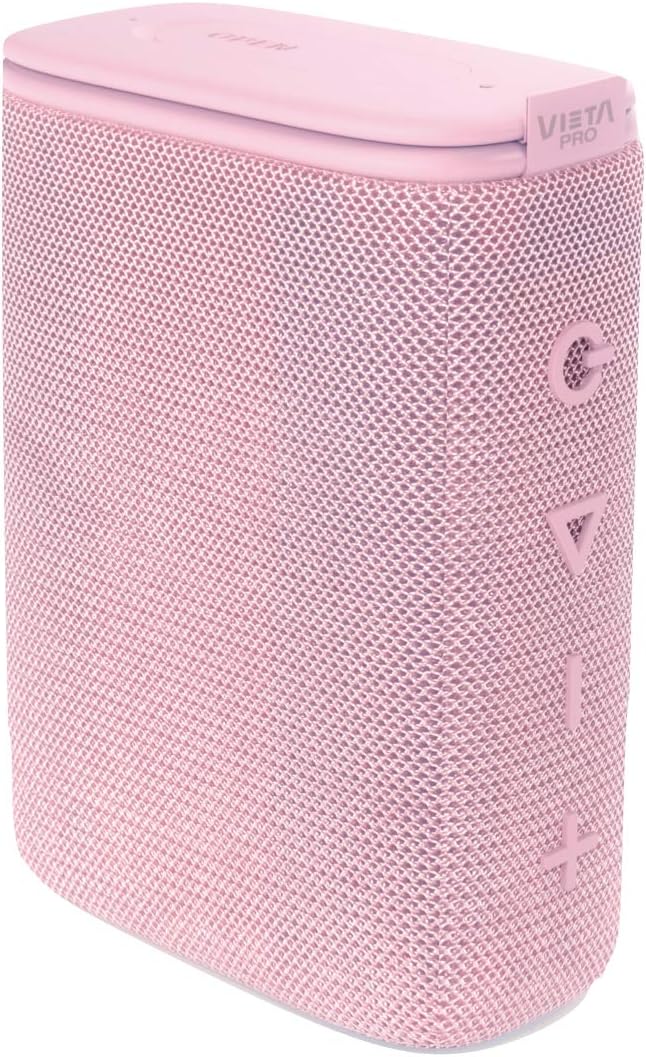
This image shows the overall design of the Vieta Pro Round Up 2 portable speaker, highlighting its compact, cylindrical shape and the mesh fabric finish in a pale pink color. The control buttons are visible on the side.

This image focuses on the side of the speaker where the control buttons are located: Power, Volume Down/Previous Track, Volume Up/Next Track, and Play/Pause/Mode.
Control Buttons:
- Power Button: Press and hold to turn on/off. Short press to change mode (Bluetooth, FM, Aux).
- Volume Down / Previous Track Button: Short press for volume down. Long press for previous track.
- Volume Up / Next Track Button: Short press for volume up. Long press for next track.
- Play/Pause / Mode Button: Short press to play/pause. Long press to switch between Bluetooth, FM Radio, and Auxiliary modes.
Setup
Charging the Speaker
Before first use, fully charge the speaker.

This image shows the top of the speaker with the protective flap open, revealing the charging and auxiliary ports.
- Open the protective flap on the top of the speaker.
- Connect the USB-C charging cable to the speaker's charging port.
- Connect the other end of the cable to a compatible USB power adapter (not included).
- The charging indicator light will illuminate. It will turn off or change color when fully charged.
- A full charge provides approximately 12 hours of playback.
Bluetooth Pairing
To connect your speaker to a Bluetooth-enabled device:
- Ensure the speaker is charged and powered on.
- The speaker will automatically enter Bluetooth pairing mode, indicated by a flashing LED light.
- On your device (smartphone, tablet, etc.), enable Bluetooth and search for available devices.
- Select "Vieta Pro Round Up 2" from the list.
- Once connected, the LED indicator will stop flashing and remain solid.
Operating Instructions
Bluetooth Mode
After successful pairing, audio from your connected device will play through the speaker.
- Play/Pause: Short press the Play/Pause button.
- Next Track: Long press the Volume Up (+) button.
- Previous Track: Long press the Volume Down (-) button.
- Adjust Volume: Short press the Volume Up (+) or Volume Down (-) buttons.
True Wireless Stereo (TWS) Function
The TWS function allows you to pair two Vieta Pro Round Up 2 speakers for a stereo sound experience.
- Ensure both speakers are powered on and not connected to any Bluetooth device.
- On one speaker, double-press the Power button. It will enter TWS pairing mode.
- The two speakers will automatically connect to each other. You will hear an audible confirmation.
- Once paired, connect your device to one of the speakers via Bluetooth as described in the "Bluetooth Pairing" section. Both speakers will now play in stereo.
FM Radio Mode
To use the built-in FM radio:
- Turn on the speaker.
- Short press the Power button repeatedly until you enter FM Radio mode.
- To auto-scan and save stations, long press the Play/Pause button. The speaker will scan and store available FM stations.
- To switch between saved stations, short press the Volume Up (+) or Volume Down (-) buttons.
Auxiliary (AUX) Input
For devices without Bluetooth, use the AUX input:
- Connect one end of a 3.5mm audio cable (not included) to the speaker's AUX port.
- Connect the other end to the audio output of your device.
- The speaker will automatically switch to AUX mode, or you may need to short press the Power button to select it.
Maintenance
Care and Maintenance

This image illustrates the speaker's IPX7 water resistance, showing it partially submerged in water.
- Cleaning: Wipe the speaker with a soft, dry cloth. Do not use abrasive cleaners or solvents.
- Water Resistance: The speaker is IPX7 water resistant, meaning it can be submerged in up to 1 meter of water for 30 minutes. Ensure the protective flap covering the ports is securely closed before exposure to water. Do not expose to saltwater or other chemicals.
- Storage: Store the speaker in a cool, dry place away from direct sunlight and extreme temperatures.
- Battery Care: To prolong battery life, charge the speaker regularly, even if not in frequent use. Avoid fully discharging the battery for extended periods.
Troubleshooting
Common Issues and Solutions
| Problem | Possible Cause | Solution |
|---|---|---|
| Speaker does not turn on. | Low battery. | Charge the speaker fully. |
| Cannot pair via Bluetooth. | Speaker is not in pairing mode; device Bluetooth is off; speaker is already connected to another device. | Ensure speaker is in pairing mode (flashing LED). Turn on Bluetooth on your device. Disconnect from other devices. |
| No sound. | Volume too low; incorrect mode selected; device not playing audio. | Increase speaker and device volume. Ensure correct mode (Bluetooth, FM, AUX) is selected. Check if audio is playing on the source device. |
| Poor FM radio reception. | Weak signal; interference. | Relocate the speaker to an area with better reception. |
| TWS pairing fails. | One or both speakers are connected to a device; incorrect pairing procedure. | Ensure both speakers are disconnected from all Bluetooth devices before initiating TWS pairing. Follow TWS pairing steps carefully. |
Specifications
Technical Specifications
| Feature | Detail |
|---|---|
| Model | VM-BS26LP |
| Brand | Vieta Pro |
| Connectivity | Bluetooth 5.0, Auxiliary (3.5mm), USB-C (charging) |
| Output Power | 10 Watts (rated), 12 Watts (max) |
| Battery Life | Up to 12 hours |
| Water Resistance | IPX7 |
| Dimensions (L x W x H) | 76mm x 41mm x 101mm |
| Weight | 330g |
| Features | True Wireless Stereo (TWS), Microphone, FM Radio |
Warranty and Customer Support
Vieta Pro products are designed for durability and performance. For warranty information and customer support, please refer to the warranty card included with your product or visit the official Vieta Pro website.
Official Website: www.vietapro.com
Contact Support: Refer to the contact details provided on the official website or your purchase documentation.
Related documentsVM-BS26LP


Ask a question about this manual
Ask about setup, troubleshooting, compatibility, parts, safety, or missing instructions. Manuals+ will review the question and use this page’s manual context to help answer it.