
1. Introduction
This manual provides detailed instructions for the setup, operation, and maintenance of your Foxnovo Bluetooth Computer Speakers, Model MX-1. Please read this manual thoroughly before using the product to ensure proper function and longevity.

The Foxnovo MX-1 speaker positioned under a computer monitor, demonstrating its sleek design and compact form factor suitable for desktop environments.
2. Product Features
- High-Fidelity Audio: Equipped with dual full-range speakers for clear sound output.
- Deep Bass: Features a sound guide port designed to enhance bass frequencies.
- Multiple Connectivity Options: Supports Bluetooth, USB, and AUX input for versatile device connection.
- Integrated Digital Clock and Alarm: Includes a front-facing digital display with time and alarm functions.
- Wide Compatibility: Connects with various devices including PCs, laptops, smartphones, tablets, and televisions.
- Advanced Audio Processing: Utilizes Op AMP chips for optimized sound performance.
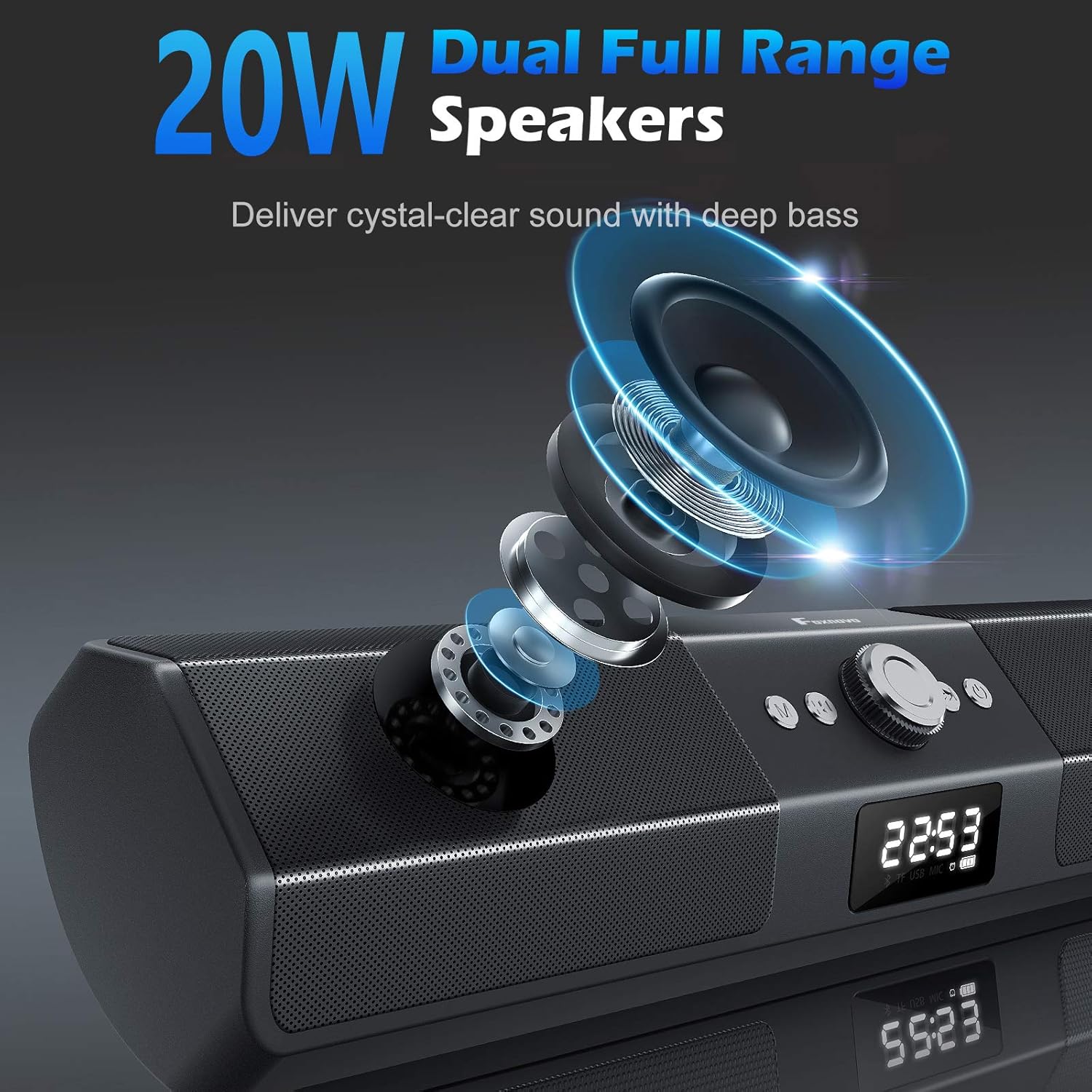
Internal view of the Foxnovo MX-1 speaker, illustrating the dual full-range drivers responsible for audio output.

A close-up view of the Foxnovo MX-1 speaker's sound guide port, designed to centralize sound and produce richer bass.

An internal component view highlighting the Op AMP chips, which contribute to the speaker's audio processing and amplification.
3. Package Contents
Please check the package for the following items:
- Foxnovo MX-1 Bluetooth Computer Speaker
- USB Power Cable
- 3.5mm AUX Audio Cable
- User Manual
4. Product Overview
Familiarize yourself with the speaker's controls and connection ports.

Front view of the Foxnovo MX-1 speaker, displaying the central control knob, function buttons, and digital display.
Controls:
- Power Button: Turns the speaker on or off.
- Mode Button (M): Switches between input modes (Bluetooth, AUX, USB, TF Card).
- Volume Knob: Adjusts the audio volume.
- Play/Pause Button: Controls media playback.
- Previous/Next Track Buttons: Navigates through audio tracks.
- Clock/Alarm Settings Buttons: Used for setting time and alarms.
Connection Ports:

Rear view of the Foxnovo MX-1 speaker, illustrating the various input and power ports.
- DC 5V Port: For power input using the provided USB cable.
- AUX Port: 3.5mm audio input for wired connections.
- TF Card Slot: For playing audio directly from a TF (MicroSD) card.
- USB Port: For playing audio directly from a USB drive.
5. Setup Instructions
5.1 Power Connection
- Connect the provided USB power cable to the DC 5V port on the back of the speaker.
- Plug the other end of the USB cable into a compatible USB power adapter (5V/1A recommended) or a computer's USB port.
- Press the Power button to turn on the speaker.
5.2 Wired Connection (AUX)
- Connect one end of the 3.5mm AUX audio cable to the AUX port on the speaker.
- Connect the other end of the AUX cable to the audio output jack of your device (e.g., computer, smartphone).
- Press the 'M' (Mode) button on the speaker until 'AUX' mode is selected.
5.3 Bluetooth Pairing
- Ensure the speaker is powered on and in Bluetooth mode. If not, press the 'M' (Mode) button until 'BT' (Bluetooth) is displayed. The speaker will enter pairing mode, indicated by a flashing Bluetooth icon.
- On your device (smartphone, tablet, laptop), enable Bluetooth and search for available devices.
- Select 'Foxnovo MX-1' from the list of found devices.
- Once paired, the speaker will indicate a successful connection, and the Bluetooth icon will stop flashing.

Diagram illustrating the Foxnovo MX-1 speaker's compatibility with various devices, including smartphones, tablets, laptops, and PCs, via wired or wireless connections.
6. Operating Instructions
6.1 Power On/Off
Press and hold the Power button for approximately 3 seconds to turn the speaker on or off.
6.2 Mode Selection
Press the 'M' (Mode) button repeatedly to cycle through available input modes: Bluetooth, AUX, USB, and TF Card.
6.3 Volume Control
Rotate the central knob clockwise to increase volume and counter-clockwise to decrease volume. Volume can also be adjusted from the connected device.
6.4 Playback Control (Bluetooth/USB/TF Card Modes)
- Play/Pause: Press the Play/Pause button once to play or pause audio.
- Next Track: Press the 'Next Track' button once to skip to the next song.
- Previous Track: Press the 'Previous Track' button once to go to the beginning of the current song or the previous song.
6.5 Clock and Alarm Settings

The Foxnovo MX-1 speaker displaying its digital clock and alarm functions on the front panel.
The speaker features a digital clock and alarm function. Refer to the specific buttons on the unit for setting the time and configuring alarms. Typically, a dedicated 'Clock' or 'Set' button is used to enter time setting mode, and the 'Previous/Next' buttons adjust values, with the 'Play/Pause' or 'Mode' button confirming selections.
7. Maintenance
- Cleaning: Use a soft, dry cloth to clean the speaker's surface. Do not use liquid cleaners or abrasive materials.
- Storage: When not in use for extended periods, store the speaker in a cool, dry place away from direct sunlight and extreme temperatures.
- Avoid Water: This product is not waterproof. Keep it away from water and high humidity.
8. Troubleshooting
8.1 No Sound
- Ensure the speaker is powered on and the volume is not at minimum.
- Check that the correct input mode (Bluetooth, AUX, USB) is selected.
- Verify that the audio cable (if using AUX) is securely connected to both the speaker and the source device.
- For Bluetooth, ensure the speaker is successfully paired and connected to your device.
- Check the volume level on your source device.
8.2 Bluetooth Pairing Issues
- Ensure the speaker is in Bluetooth pairing mode (flashing 'BT' icon).
- Disable and re-enable Bluetooth on your source device.
- Move the speaker closer to your device to ensure it is within range.
- Clear the Bluetooth device list on your source device and attempt to pair again.
8.3 Static or Distorted Sound
- Reduce the volume on both the speaker and the source device.
- Ensure audio cables are fully inserted and not damaged.
- Move the speaker away from other electronic devices that may cause interference.
- For Bluetooth, ensure there are no obstructions between the speaker and the source device.
9. Specifications
| Brand | Foxnovo |
| Model Number | MX-1 |
| Speaker Type | Computer Speaker |
| Connectivity Technology | Bluetooth, USB, AUX |
| Wireless Communication | Bluetooth |
| Audio Output Mode | Stereo |
| Speaker Maximum Output Power | 20 Watts |
| Signal-to-Noise Ratio | 130 dB |
| Compatible Devices | Desktop, Laptop, Smartphone, Tablet, Television |
| Control Method | Touch, Knob |
| Power Source | Battery Powered (via DC 5V USB) |
| Product Dimensions | 16.1 x 2.95 x 3.35 inches |
| Item Weight | 2.54 pounds |
| Color | Black |
| Waterproof | No |
10. Warranty Information
The Foxnovo MX-1 Bluetooth Computer Speakers come with a limited warranty. Please retain your proof of purchase for any warranty claims. Specific terms and conditions of the warranty may vary by region and retailer. For detailed warranty information, please refer to the documentation included with your purchase or contact Foxnovo customer support.
11. Customer Support
If you encounter any issues or have questions regarding your Foxnovo MX-1 speaker that are not addressed in this manual, please contact Foxnovo customer support. Contact information can typically be found on the product packaging, the official Foxnovo website, or through your retailer.