
1. Introduction
This manual provides detailed instructions for the installation, operation, and maintenance of your LEDLUX CL3803 Mini Tuya Smart Controller. This device is designed to control RGB LED strips, offering smart control capabilities through Wi-Fi connectivity and compatibility with popular voice assistants. Please read this manual carefully before use to ensure proper setup and safe operation.
2. Product Overview
The LEDLUX CL3803 is a compact Wi-Fi enabled smart controller for RGB LED lighting. It allows users to adjust colors, brightness, and lighting modes via the Tuya Smart Life application or integrated smart home systems.

Image 2.1: Controller Top View. This image displays the top surface of the LEDLUX CL3803 controller. It features input terminals for V- and V+, output terminals for V+, R, G, B, and a DC 5-24V power input label. The 'Powered by Tuya' logo and 'AIP-FUTURE SMART SERIES LED SMART CONTROLLER' text are visible, along with CE and RoHS certifications. A QR code for the Smart Life app is also present. For app download, visit smartapp.tuya.com/smartlife.
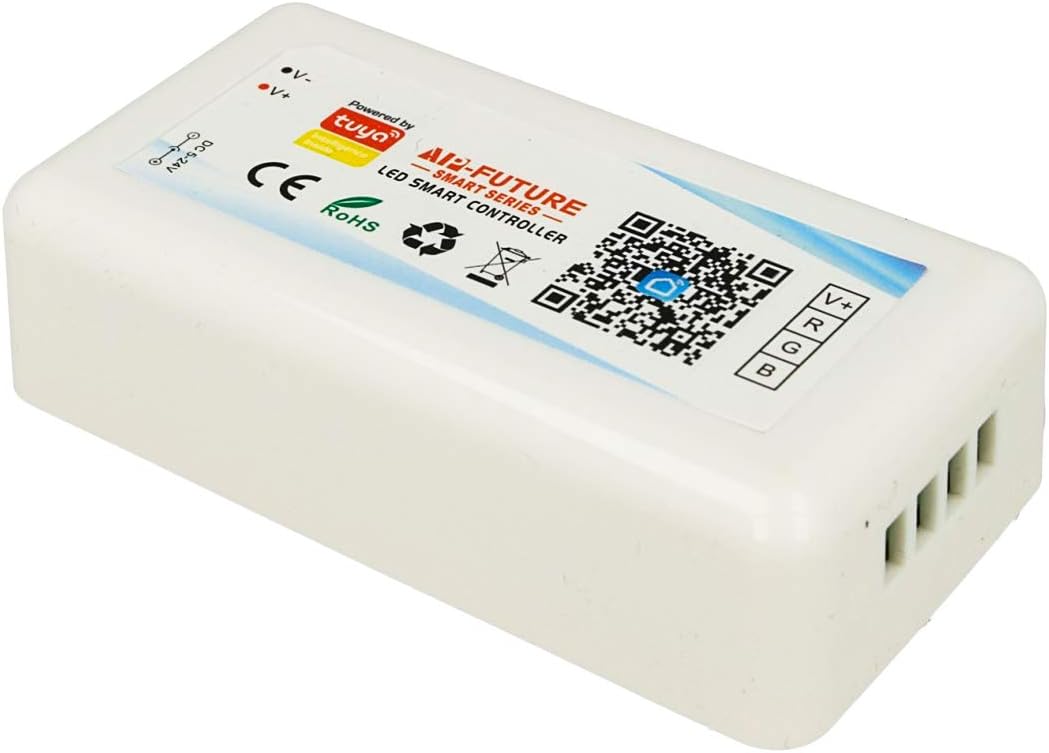
Image 2.2: Controller Angled View. This image shows the LEDLUX CL3803 controller from an angled perspective, highlighting its compact size and the various labels and connection points on its top surface, including the QR code for app download.

Image 2.3: Product Packaging. This image displays the yellow and white packaging box for the LEDLUX CL3803 controller. The box features the 'LED SMART CONTROLLER' text, 'Powered by Tuya' logo, and a QR code for the Smart Life app. For app download, visit smartapp.tuya.com/smartlife.
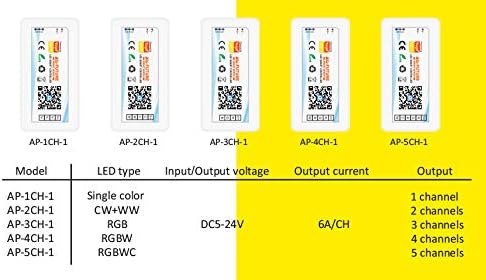
Image 2.4: Model Specifications Table. This table provides specifications for various AIP-FUTURE LED Smart Controller models. For the AP-3CH-1 model, which corresponds to the CL3803, it indicates an RGB LED type, DC5-24V input/output voltage, 6A/CH output current, and 3 channels output.
3. Specifications
- Model: CL3803 (also referred to as AP-3CH-1)
- LED Type Supported: RGB
- Input/Output Voltage: DC 5-24V
- Output Current: 6A per channel (max 18A total)
- Output Channels: 3 Channels (R, G, B)
- Dimensions: 84 x 44 x 22 mm
- Compatibility: Tuya Smart Life App, Amazon Alexa, Google Home, Mi, Aligenie, DuerOS Rokid
4. Setup
4.1. Wiring Diagram
Ensure all power is disconnected before wiring. Incorrect wiring can damage the controller or LED strip.
- Power Input: Connect your DC 5-24V power supply to the V- and V+ terminals on the controller. Ensure correct polarity.
- LED Strip Output: Connect your RGB LED strip to the V+, R, G, B terminals.
- Connect the common positive (+) wire of the LED strip to the V+ terminal.
- Connect the Red (R) wire of the LED strip to the R terminal.
- Connect the Green (G) wire of the LED strip to the G terminal.
- Connect the Blue (B) wire of the LED strip to the B terminal.
4.2. App Installation and Pairing
- Download the App: Scan the QR code on the controller or packaging, or search for "Tuya Smart" or "Smart Life" in your mobile app store (iOS App Store or Google Play Store).
- Register/Log In: Open the app and register for a new account or log in with an existing one.
- Add Device: Tap the "+" icon in the top right corner of the app to add a device.
- Select Device Type: Choose "Lighting" > "Light Source (Wi-Fi)" or "Strip Light (Wi-Fi)".
- Power On Controller: Ensure the controller is powered on. The LED indicator on the controller should be blinking rapidly. If not, power cycle the controller (turn off and on 3 times) until it blinks rapidly to enter pairing mode.
- Connect to Wi-Fi: Follow the in-app instructions to connect the controller to your 2.4GHz Wi-Fi network. Enter your Wi-Fi password when prompted.
- Device Added: Once successfully paired, the app will confirm the device has been added. You can then rename the controller for easier identification.
5. Operating Instructions
5.1. App Control
After successful pairing, you can control your LED strip using the Tuya Smart or Smart Life app:
- Color Selection: Choose from a wide spectrum of colors using the color wheel.
- Brightness Adjustment: Adjust the intensity of the light.
- Scene Modes: Select from pre-set lighting scenes or create custom ones.
- Timer/Schedule: Set schedules for the LED strip to turn on/off or change modes automatically.
5.2. Voice Control Integration
The LEDLUX CL3803 controller is compatible with Amazon Alexa and Google Home. To enable voice control:
- Link Accounts: In the Alexa or Google Home app, navigate to the "Skills" or "Works with Google" section. Search for "Tuya Smart" or "Smart Life" and enable the skill/service.
- Authorize: Log in with your Tuya Smart/Smart Life account credentials to link the accounts.
- Discover Devices: Ask your voice assistant to "Discover devices" or manually initiate device discovery in the app.
- Voice Commands: Once discovered, you can use commands such as:
- "Alexa/Hey Google, turn on [Device Name]"
- "Alexa/Hey Google, set [Device Name] to red"
- "Alexa/Hey Google, dim [Device Name] to 50%"
6. Maintenance
The LEDLUX CL3803 controller requires minimal maintenance. Keep the device clean and free from dust. Use a dry, soft cloth for cleaning. Do not use liquid cleaners or immerse the device in water. Ensure the controller is placed in a well-ventilated area, away from direct sunlight and extreme temperatures.
7. Troubleshooting
- Controller not powering on: Check the power supply connection and ensure it is within the DC 5-24V range. Verify the power outlet is functional.
- LED strip not lighting up: Check the wiring between the controller and the LED strip for correct polarity and secure connections. Ensure the LED strip itself is functional.
- Cannot connect to Wi-Fi:
- Ensure your Wi-Fi network is 2.4GHz. The controller does not support 5GHz Wi-Fi.
- Verify your Wi-Fi password is correct.
- Make sure the controller is in pairing mode (LED indicator blinking rapidly). If not, power cycle it (off/on 3 times).
- Move the controller closer to your Wi-Fi router.
- Voice control not working: Ensure your Tuya Smart/Smart Life account is correctly linked to your Alexa or Google Home app. Try re-discovering devices.
- App not responding: Close and reopen the app. Check your internet connection.
8. Warranty and Support
For warranty information and technical support, please refer to the product packaging or contact your retailer. Keep your purchase receipt as proof of purchase. For common issues, refer to the troubleshooting section of this manual or the support resources available within the Tuya Smart/Smart Life application.


