
1. Introduction
This manual provides detailed instructions for the safe and effective use of your VGR V-055 Professional Hair Trimmer. Please read this manual thoroughly before first use and retain it for future reference. The VGR V-055 is designed for precise hair and beard grooming, offering both corded and cordless operation with adjustable blade settings.

Image 1.1: VGR V-055 Professional Hair Trimmer and its retail packaging.
2. Package Contents
Verify that all items listed below are included in your package:
- 1x VGR V-055 Hair Trimmer
- 4x Guide Combs (various lengths)
- 1x USB Charging Cable
- 1x Cleaning Brush
- 1x Lubricating Oil Bottle
- 1x User Manual
3. Safety Information
For your safety and to prevent damage to the appliance, please adhere to the following guidelines:
- Use only as directed in this manual.
- Do not submerge the trimmer in water or use it with wet hands to avoid the risk of electric shock.
- Keep the appliance away from children.
- Ensure the charging cable is not damaged before use.
- Do not attempt to repair the trimmer yourself. Contact customer support for assistance.
4. Setup
4.1. Charging the Trimmer
Before first use, fully charge the trimmer. A full charge takes approximately 1.5 hours and provides up to 120 minutes of cordless operation.
- Connect the USB charging cable to the trimmer's charging port.
- Plug the other end of the USB cable into a compatible USB power source (e.g., computer, laptop, power bank, or a USB wall adapter).
- The LED indicator light will illuminate during charging. It will change color or turn off once fully charged (refer to the LED indicator section for details).

Image 4.1: The VGR V-055 Trimmer being charged via USB.
4.2. Attaching Guide Combs
The VGR V-055 comes with 4 guide combs to achieve different hair lengths.
- Ensure the trimmer is turned off.
- Select the desired guide comb.
- Align the comb with the trimmer blade and push it firmly until it clicks into place.
- To remove, gently pull the comb away from the blade.
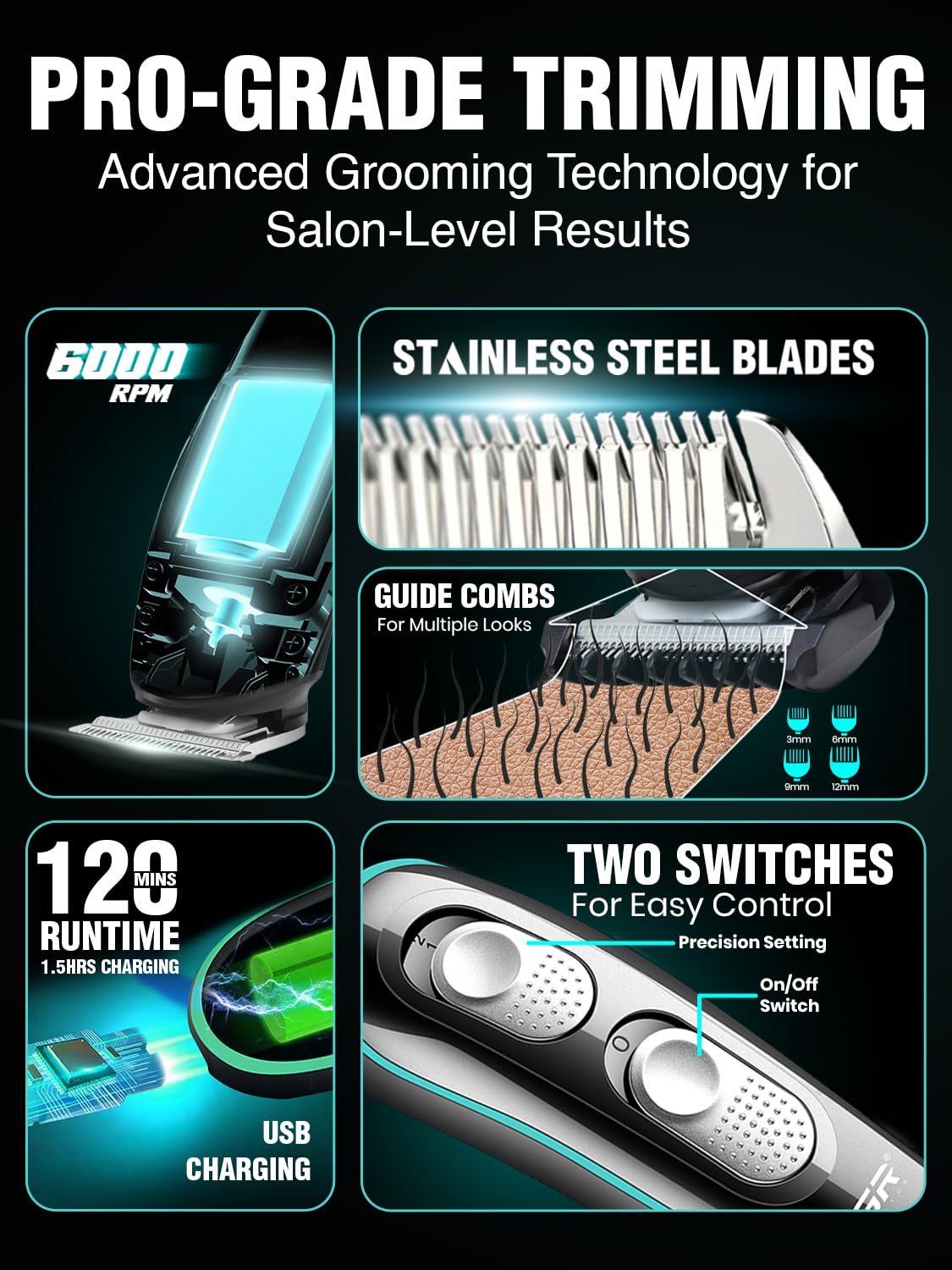
Image 4.2: Illustration of the trimmer's blades and guide combs.
5. Operating Instructions
5.1. Powering On/Off and Blade Adjustment
The trimmer features two switches for control: an On/Off switch and a Precision Setting switch.
- On/Off Switch: Press the main power button to turn the trimmer on or off.
- Precision Setting Switch: Use this switch to adjust the blade's cutting length for fine-tuning your trim. The trimmer offers 3 adjustable blade settings.

Image 5.1: Controls of the VGR V-055 Trimmer.
5.2. Trimming Techniques
For optimal results, follow these general trimming guidelines:
- Ensure hair is clean and dry before trimming.
- Always trim against the direction of hair growth.
- Use light, even strokes.
- Start with a longer guide comb if you are unsure of the desired length, and gradually switch to shorter combs if needed.
- For detailing and edging, remove the guide comb and use the precision T-blade directly.
6. Maintenance
Regular cleaning and lubrication will ensure the longevity and optimal performance of your trimmer.
6.1. Cleaning the Blades
The trimmer features a detachable head for easy cleaning.
- Turn off the trimmer and disconnect it from any power source.
- Gently push the blade assembly forward to detach it from the trimmer body.
- Use the included cleaning brush to remove any loose hairs from the blades and the trimmer body.
- The detachable blade head can be rinsed under running water. Ensure it is completely dry before reattaching.
- Reattach the blade assembly by aligning it and pushing it back until it clicks into place.

Image 6.1: Detaching and cleaning the trimmer head.
6.2. Lubricating the Blades
After every few uses, or if the trimmer's performance decreases, apply a small amount of lubricating oil to the blades.
- Ensure the blades are clean and dry.
- Apply 1-2 drops of the included lubricating oil onto the blades.
- Turn on the trimmer for a few seconds to allow the oil to distribute evenly.
- Wipe off any excess oil with a soft cloth.
7. Troubleshooting
If you encounter issues with your VGR V-055 Trimmer, refer to the following common problems and solutions:
| Problem | Possible Cause | Solution |
|---|---|---|
| Trimmer does not turn on. | Battery is depleted. | Charge the trimmer fully. |
| Trimmer pulls hair or cuts poorly. | Blades are dull, dirty, or not lubricated. | Clean and lubricate the blades. If the issue persists, blades may need replacement. |
| Short battery runtime. | Battery not fully charged or aging battery. | Ensure the trimmer is fully charged. Battery life naturally diminishes over time. |
| Trimmer makes unusual noise. | Blades are not properly aligned or lubricated. | Clean and lubricate the blades. Ensure the blade head is securely attached. |
If the problem persists after attempting these solutions, please contact VGR customer support.
8. Specifications
| Feature | Detail |
|---|---|
| Model Number | V-055 |
| Brand | VGR |
| Blade Material | Stainless Steel |
| Power Source | Battery Powered (Corded & Cordless use) |
| Battery Type | Lithium Ion (1 included) |
| Charging Time | 1.5 hours |
| Runtime | Up to 120 minutes |
| Item Weight | 124 g |
| Dimensions (LxWxH) | 16.5 x 4 x 3.5 cm |
| Special Features | Charge Indicator Light, Fast USB Charging, Precision T-Blade, Rechargeable |
| Country of Origin | China |
9. Warranty and Support
For warranty information, product support, or any inquiries, please contact VGR customer service:
- Email: customercare@vgrofficial.in
- Phone: 18002578939
- Website: www.vgrofficial.in
- Operating Hours: 10:00 AM to 6:00 PM, Monday to Saturday
Please retain your proof of purchase for warranty claims.


